
FormNumber
AI phone system that completes intake forms through voice calls
Gallery
About FormNumber
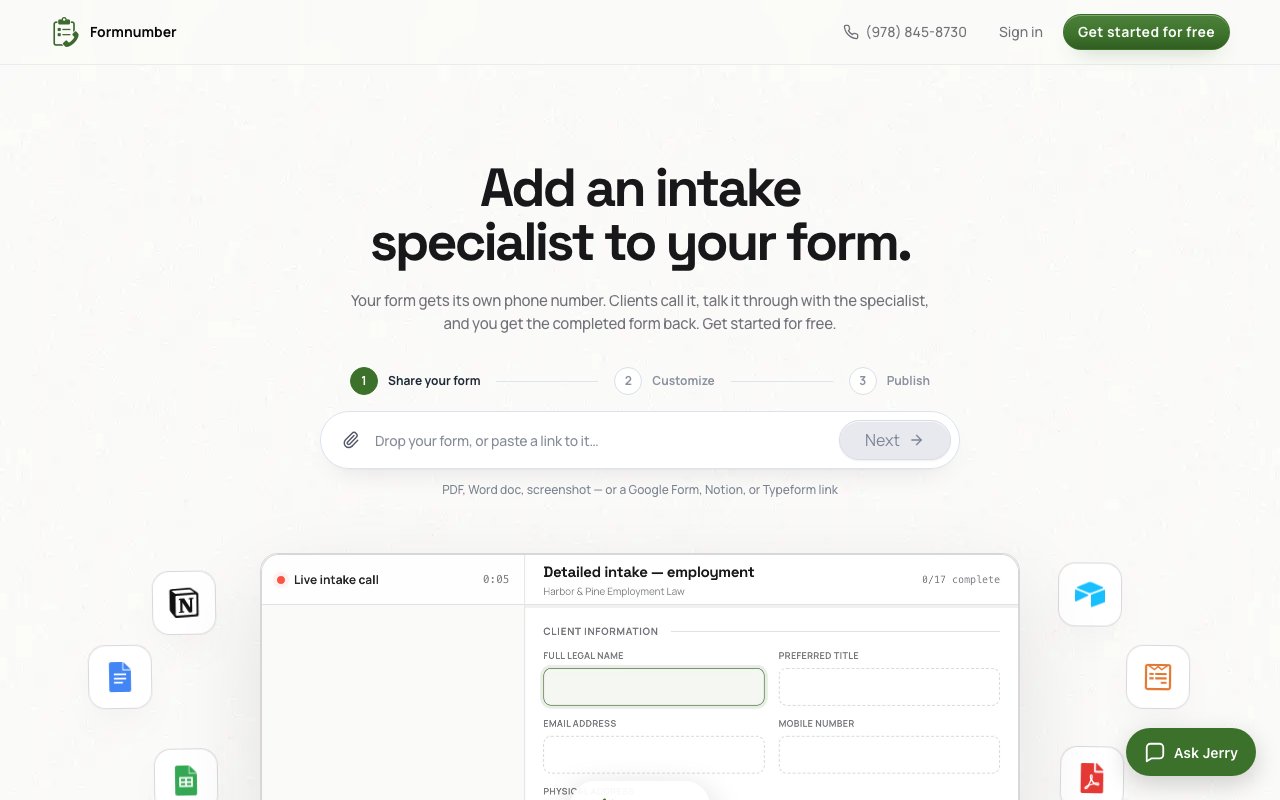
FormNumber transforms static forms into phone conversations handled by an AI intake specialist. Instead of sending clients a link to fill out and hoping they complete it accurately, you share a dedicated phone number. When they call, the AI guides them through the questions conversationally, captures their responses with accuracy checks along the way, and delivers a completed form directly to your email or Google Sheet. This addresses the reality that many people find phone calls easier than typing through form fields, especially for complex intake processes with open ended questions where written responses tend to be incomplete or unclear.
Setting up a form takes three steps with minimal technical requirements. You provide the form itself, which can be a PDF, Word document, screenshot, or link to an existing Google Form, Notion page, or Typeform. The system understands the structure and required information from these formats without needing manual field configuration or form rebuilding. Then you customize the phone greeting, handling instructions, and any specific guidance about how questions should be asked or what level of detail you need in responses. After publishing, the form gets a dedicated phone number that callers reach directly without navigating phone trees or waiting in queues.
The AI handles the messiness of real conversations in ways that static forms fundamentally cannot. When callers ramble or go off topic, it discerns what's actually relevant to include in the final form rather than dumping everything into a text field for someone to sort through later. It repeats important details back during the call to catch errors and misunderstandings before completion, reducing the back and forth that incomplete or incorrect submissions typically require. If answers need clarification or seem inconsistent, it asks follow up questions naturally rather than producing vague data that requires phone tag to resolve after the fact.
When situations exceed what the AI can handle appropriately, it flags the call for human escalation rather than providing inadequate responses or confusing the caller with repeated failed attempts. This might happen when someone calls about something outside the form's scope, when they express frustration that needs human acknowledgment, or when the request involves complexity beyond structured intake. The AI always discloses its nature honestly if callers ask directly, maintaining transparency without leading conversations with disclaimers that might create awkwardness or reduce caller comfort.
Availability provides a major practical advantage over staffing alternatives. The system answers at 9pm, on weekends, during holidays, and handles ten simultaneous callers without queuing or wait times. For businesses where intake happens outside standard hours or where staff bandwidth limits responsiveness to inquiries, this means no missed opportunities while avoiding the cost of around the clock staffing. The AI doesn't take breaks, call in sick, require scheduling coordination, or need training when form questions change, which simplifies operations for small teams especially.
You can forward existing business phone numbers to the dedicated FormNumber line, which means callers reach the intake system through numbers they already have rather than needing new contact information distributed. Completed forms arrive by email or flow directly into Google Sheets for automated processing, integrating with existing workflows rather than requiring new systems to check or additional software to learn. The structured output matches your original form fields, so downstream processing remains consistent with what you'd get from manual completion.
Pricing starts with a free tier limited to one form with no call credits included, useful for testing the concept and hearing how the AI handles your specific questions. The Pro plan at fifteen dollars monthly provides fifteen dollars of call credit at eight dollars per hour, supports up to three forms, and includes 24/7 support for configuration questions. The Business plan at fifty dollars monthly offers fifty dollars of credit at a discounted seven dollar hourly rate with up to ten forms and priority support. Credits from monthly allocations get used first, with overage charged at the same hourly rates, so costs scale predictably with actual usage rather than requiring commitment to higher tiers before you need them.
Organizations handling intake for services, appointments, applications, or consultations will see the clearest benefit. Legal firms managing client intake, healthcare practices handling appointment requests, real estate agents qualifying buyer inquiries, contractors gathering project details, and service businesses where forms require explanation or context represent the core use cases. The pitch is straightforward: good intake costs money either through employee salaries or through lost leads from cumbersome forms that clients abandon partway through. FormNumber offers a middle path at subscription pricing rather than staffing costs, keeping intake quality high without proportional labor expense.
Key Features
- Dedicated phone number per form
- AI specialist handles full intake conversation
- Repeats details back for error prevention
- Escalation flagging for human handoff
- Works with PDFs, Docs, Google Forms, Typeform
- Delivers completed forms to email or Sheets
Pros & Cons
What we like
- Lets clients complete forms by talking instead of typing
- Handles multiple concurrent callers around the clock
- Captures contextual details that forms often miss
- Transparent AI disclosure options built in
Room for improvement
- Per-minute billing can add up for long calls
- Free tier is browser-only without a real number
- Limited to ten forms even on the top plan
- Depends on callers being comfortable with voice
Frequently Asked Questions
What is FormNumber?
How much does FormNumber cost?
Does the AI tell callers it's not human?
What form formats does it accept?
Best For
Featured in
Alternatives to FormNumber
View all
Cartesia
Ultra-low-latency real-time text-to-speech powered by the Sonic model, built for live voice AI agents
ElevenLabs
The voice cloning and text-to-speech service everyone benchmarks against

Listnr
Ultra-realistic AI text-to-speech and voiceover platform with 1,000+ voices across 142+ languages

Orate
On-device text-to-speech for Mac with listening queue and playback controls
Reviews (0)
Badge builder
Add FormNumber to your website
Choose a badge style and size, preview it here, then copy the generated HTML. Badge images are self-contained SVGs and do not require an external script.

<a href="https://toolindex.net/tools/formnumber?ref=badge" target="_blank" rel="noopener">
  <img src="https://toolindex.net/badge/formnumber/medium.svg" alt="FormNumber - Listed on Tool Index" width="180" height="50" />
</a>How to use the badge
- 1. Pick the style, size, and theme that fit your layout.
- 2. Copy the generated HTML from the code block.
- 3. Paste it into your footer, homepage, or press page.
Standard badge available
The standard listing badge is available now. Score and circle badges are limited to tools currently ranked in the top 10 of a category.
Badge clicks return visitors to this profile with a referral tag so the source remains identifiable.
Related Tools

NexSub
Offline real time subtitle translation using local Whisper models for any video source
Listnr
Ultra-realistic AI text-to-speech and voiceover platform with 1,000+ voices across 142+ languages

List55
Voice transcription app that converts audio recordings into formatted text lists

WellSaid Labs
Enterprise text-to-speech with studio-quality AI voice avatars trained on consenting voice actors
Work on FormNumber? Request listing access or correction