
Free AI Image
Browser AI image tools for generating, editing, upscaling and background removal with no signup
Gallery
About Free AI Image
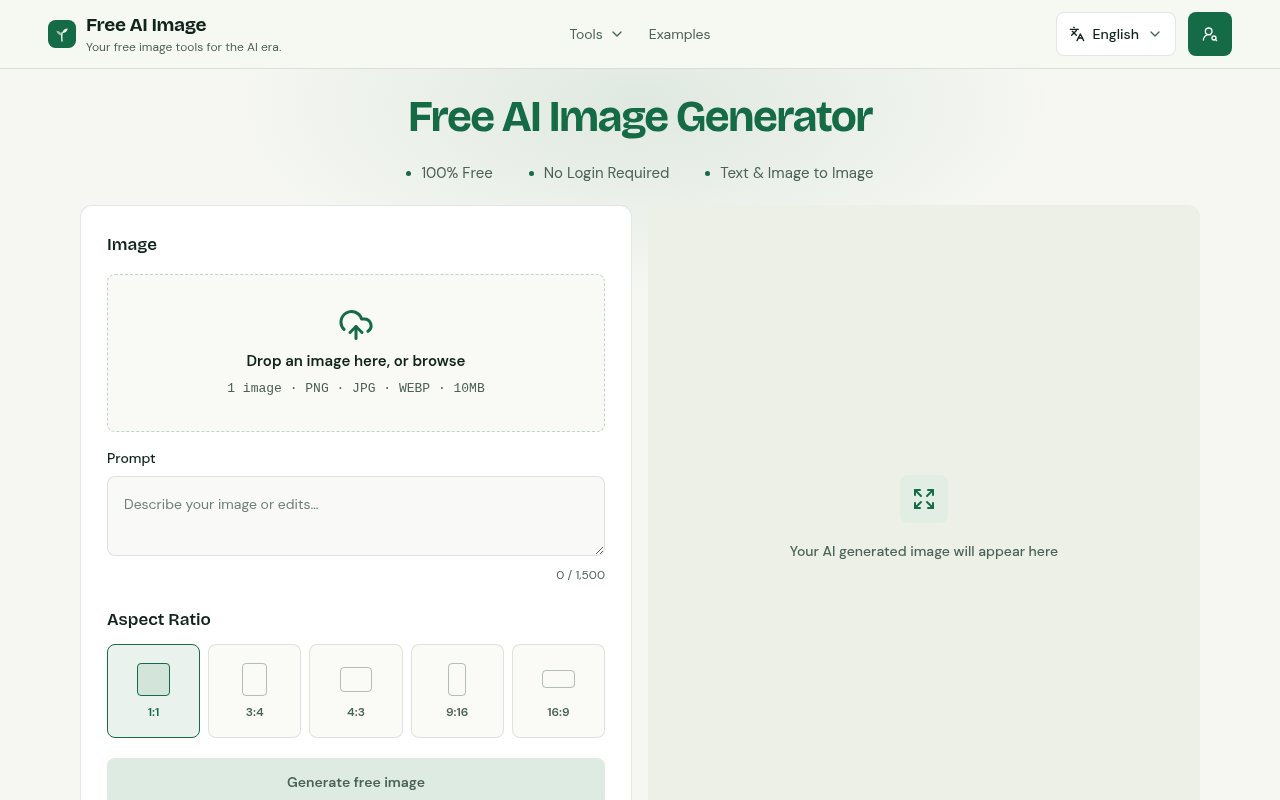
Free AI Image is a set of browser based AI image tools that you can use without creating an account. The main generator turns a text description into an image, and around it sit tools for editing an existing picture from a prompt, removing backgrounds, removing objects, upscaling, extending an image beyond its edges and resizing. The pitch is simple. Describe what you want or upload what you have, pick a shape, and download the result straight from the page.
The problem it addresses is the friction that surrounds most AI image services. Sign up, verify an email, hand over a card for credits you may never use, and then learn a prompt interface before you get a single thumbnail. For someone who needs a mockup, a blog illustration or a clean product shot a few times a month, that setup cost is out of proportion. Free AI Image removes the signup step entirely and puts the tools one click from the homepage.
In practice you type a description, choose square, portrait or landscape, and generate. For editing tools you upload a PNG, JPG or WebP up to 10 MB and either describe the change or let the tool do its single job, such as lifting the subject off its background or cleaning a distraction out of a frame. The homepage generator runs on FLUX.2 Klein 4B and Z-Image-Turbo, two open image models, and the other tools may use different systems under the hood. Free generation is subject to usage limits, which the site doesn't quantify on the pages fetched.
Each tool has a single job. The background remover isolates the subject for a product listing or a profile picture. The object remover takes a distraction out of a frame. The upscaler enlarges a small image for print or a slide without the blur you'd get from a plain resize. The extender adds material beyond the original edges, which is how a square photo becomes a wide banner, and the resizer changes dimensions for a specific placement. The image-to-image editor sits between them, taking an upload and a prompt and returning a restyled or recomposed version.
It's for content creators, marketers, small business owners and hobbyists who want a quick visual without design software or a subscription. The examples page shows the kinds of output to expect, which is worth a look before you rely on it for anything client facing, and the site is honest that you should review a result before using it and that you're responsible for having permission to use anything you upload.
The contact page describes the kind of help the team offers, support with a specific tool, suggestions for improvements and questions about your data, and asks you to include only the information needed to explain the request. There's a language selector in the header, an examples gallery, and a set of links to the directories the site is listed in, which is common for independent tools launched through community channels.
What sets it apart is the breadth of small single purpose tools behind one no-signup front door, rather than a single generator with a paywall behind the second image. Background removal, object removal, upscaling and outpainting are the jobs people usually reach for separate services to do, and here they sit side by side and free to try.
The caveats are worth knowing. The site doesn't name the company behind it, the usage limits on free generation aren't spelled out, and the pricing page describes one-time credits for trial and monthly plans for repeated work plus add-on credit packs, but the plan prices load in the browser and weren't visible when we checked, so budget for a paid plan if you generate at volume. Commercial rights for generated images are governed by the terms of service, so read those before using output in anything you sell.
Compared with the mainstream generators, the trade is obvious. You give up account features like saved history, and you trust an unnamed operator with any image you upload, in exchange for zero setup and a wider set of small editing tools than most free tiers offer. For a one-off task that's a good deal. For a daily production workflow with brand assets, a named vendor with a clear data policy may be the safer choice.
Access is freemium. The tools run without signup and free usage is limited, with credit packs and monthly plans available for heavier use. If you want to test the paid side, the trial credits are the entry point. There's an about page, terms and privacy policy on the site, and the team is reachable at contact@freeaiimage.io.
Key Features
- Text-to-image generation without signup
- Prompt based image-to-image editing
- Background and object removal
- Image upscaling
- Image extension and resizing
- FLUX.2 Klein 4B and Z-Image-Turbo models
Pros & Cons
What we like
- No account needed to start generating
- Several editing tools alongside the generator
- Runs on named open image models
- Published contact email and terms
Room for improvement
- Free usage limits aren't quantified on the site
- Plan prices load in the browser and weren't visible
- Operator behind the site isn't named
- Output quality needs review before client use
Frequently Asked Questions
What is Free AI Image?
Is Free AI Image really free?
Which models does it use?
Can I use the images commercially?
Best For
Featured in
Alternatives to Free AI Image
View all
HairstylesPro
Try hundreds of hairstyles on your own photo before you commit to a cut

Recraft
AI image generator built around vector output and brand styles

Midjourney
Create stunning AI artwork from text prompts

Leonardo.ai
Image generation suite with fine-tuned models for game and product art
Our take
Tool Index Editorial · Sep 2026· 3.0/5
Free AI Image puts generation, prompt based editing, background and object removal, upscaling, extension, resizing, and enhancement behind one browser interface. We found the lack of signup helpful for quick mockups and one off edits, while the examples make the expected visual range easy to inspect. The homepage generator is described as using FLUX.2 Klein 4B and Z-Image-Turbo.
The homepage calls generation free and requires no login, but it doesn't quantify usage limits or expose a clear paid price. Uploaded references pass through processing and safety checks, and the public pages say other tools may use different systems. With no named operator on the pages we captured and no saved account history, this is better for disposable experiments than sensitive brand assets or a production workflow.
Editorial opinion from the Tool Index team, written from the public product pages. Not a user review.
Reviews (0)
Badge builder
Add Free AI Image to your website
Choose a badge style and size, preview it here, then copy the generated HTML. Badge images are self-contained SVGs and do not require an external script.

<a href="https://toolindex.net/tools/free-ai-image?ref=badge" target="_blank" rel="noopener">
  <img src="https://toolindex.net/badge/free-ai-image/medium.svg" alt="Free AI Image - Listed on Tool Index" width="180" height="50" />
</a>How to use the badge
- 1. Pick the style, size, and theme that fit your layout.
- 2. Copy the generated HTML from the code block.
- 3. Paste it into your footer, homepage, or press page.
Standard badge available
The standard listing badge is available now. Score and circle badges are limited to tools currently ranked in the top 10 of a category.
Badge clicks return visitors to this profile with a referral tag so the source remains identifiable.
Related Tools
HairstylesPro
Try hundreds of hairstyles on your own photo before you commit to a cut
Recraft
AI image generator built around vector output and brand styles

AIMakeTattoo
Turn text descriptions into visual tattoo concepts with style and placement options
Flux by Black Forest Labs
Open and hosted image models that power half the AI art stack
Work on Free AI Image? Request listing access or correction