
Leonardo.ai
Image generation suite with fine-tuned models for game and product art
Gallery
About Leonardo.ai
Leonardo.ai is the AI image generator that game artists, marketers, and indie creators kept showing up to use. It's not just a Stable Diffusion wrapper. The team trains custom models, ships fine-grained control tools, and runs a real product, not a demo. It feels less like a research project and more like a working studio.
The Australian startup launched in 2022 and got acquired by Canva in 2024, which gave it the resources to push harder on quality. Leonardo's models now compete with Midjourney on aesthetics and Adobe Firefly on commercial safety, while staying way more controllable than either.
If you've outgrown Midjourney's chat interface or hit DALL-E's edit limits, Leonardo is the next stop. The tooling around the models is what makes it sticky.
What Leonardo.ai actually does
Leonardo runs AI image generation through a web app. You pick a model, write a prompt, tweak settings, and generate images. Past that core, Leonardo ships ControlNet-style guidance, image-to-image, inpainting, upscaling, and a 3D texture generator.
The model library is the differentiator. Beyond the proprietary Phoenix and Lightning models, Leonardo hosts hundreds of fine-tunes for specific styles: pixel art, photorealistic portraits, anime, isometric icons, game UI. You pick a model that already knows your style and prompt within it.
Phoenix and Flux models
Phoenix is Leonardo's flagship in-house model. It's tuned for prompt adherence and photoreal quality. Leonardo also hosts Flux, the open Black Forest Labs model that became a favorite in 2024. You can run both through the same UI.
The model picker matters. Different models excel at different things. Leonardo lets you experiment without setting up your own GPU.
Canvas and elements
The Canvas mode is a Photoshop-lite for AI editing. Inpaint a section, outpaint to extend a scene, layer images. Elements (LoRAs) let you mix specific styles into any model. It's more control than Midjourney offers, by a lot.
Leonardo is the AI image tool that respects you have a real workflow. The control tools turn it from "let's see what we get" into "I need this exact thing."
Who Leonardo.ai is for
Game artists, indie devs, marketers, illustrators, and anyone doing image work past the casual stage. Leonardo's especially popular with game studios because of its style consistency tools and asset-friendly workflows.
It's overkill for "make me a fun picture of a cat in a hat." Use Midjourney or DALL-E for casual. Use Leonardo when you have a brief, a brand, and a quality bar.
Leonardo.ai pricing
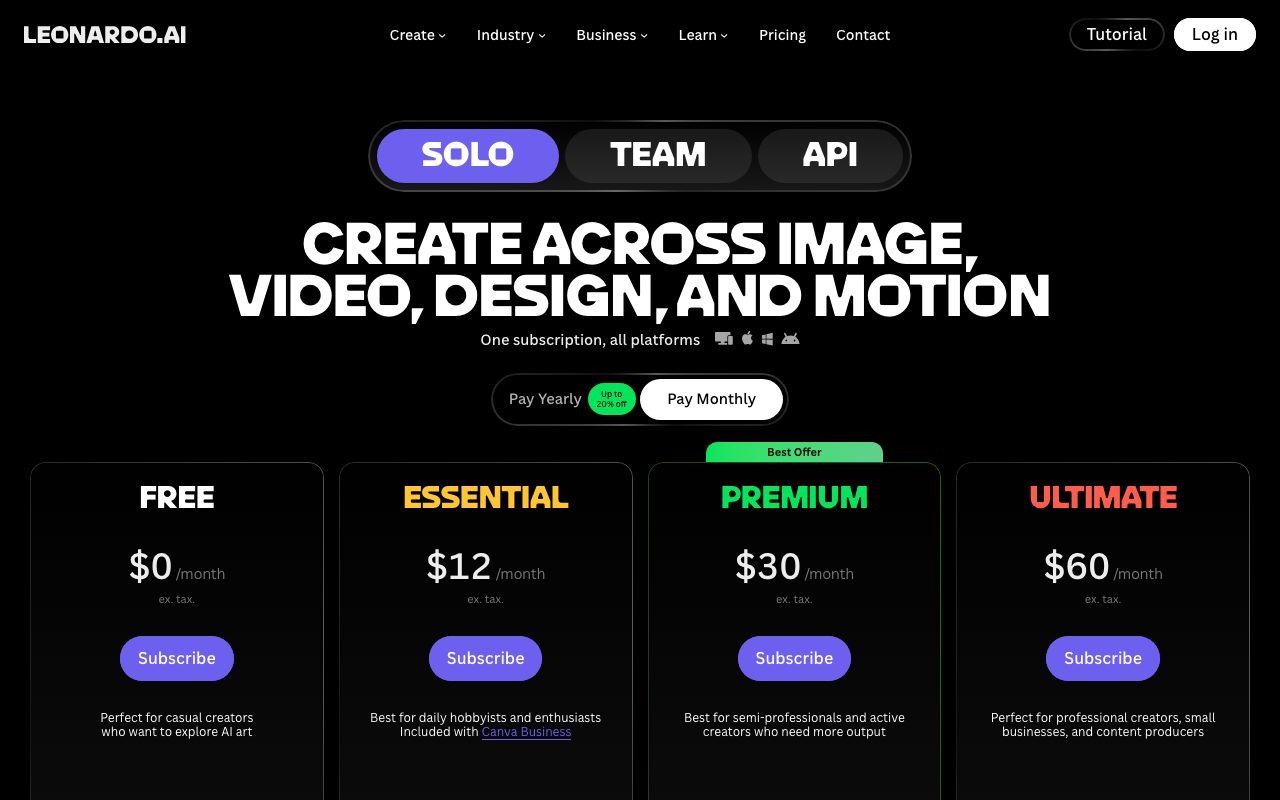
Free tier covers 150 daily tokens, which is enough to play. Apprentice at $12 a month gets 8,500 monthly tokens. Artisan at $30 a month gets 25,000 tokens. Maestro at $60 a month gets 60,000.
The token system is fiddly but reasonable. Different generation types cost different amounts. Most users on Apprentice run out maybe twice a month if they're working seriously.
Features worth knowing
Image guidance
Drop in a reference image and tell Leonardo to use the pose, depth, edges, or style. ControlNet-grade guidance without setting up Stable Diffusion locally. The pose copying alone is worth the subscription for character art.
Prompt magic and prompt enhance
Leonardo's prompt enhancer turns a one-line prompt into a detailed one. It's hit or miss but useful when you're stuck.
3D texture generation
Generate seamless textures or texture maps for 3D models. Niche but real. Game devs use it to skip stock texture sites.
API access
Leonardo offers an API for production integrations. Pricing is usage-based and reasonable. You can build apps on top of Leonardo's models, though most teams use the web app.
The tradeoffs
The token system feels gamey. Some generation types eat tokens fast. Plan your subscription tier carefully.
Leonardo's UI is denser than Midjourney's. There's a learning curve. If you want absolute simplicity, Midjourney's prompt-and-pray model is faster to learn. Leonardo trades simplicity for control.
Leonardo.ai vs alternatives
The usual comparisons are Leonardo.ai vs Midjourney, Leonardo.ai vs Stable Diffusion, and Leonardo.ai vs DALL-E. Midjourney wins on artistic defaults. Stable Diffusion wins if you want to self-host. DALL-E wins on prompt understanding.
Leonardo wins on workflow control. See Leonardo.ai alternatives or browse the best AI image generators.
Bottom line on Leonardo.ai
Leonardo.ai is the working artist's AI image tool. It's not the prettiest defaults. It's the most controllable. For anyone shipping images professionally, that distinction matters.
If you've felt limited by Midjourney's chat interface, Leonardo is where you graduate. The Canva acquisition gave it stability without ruining the product. That's a rare outcome.
Common Leonardo.ai questions
Is Leonardo.ai better than Midjourney? Different tools for different goals. Midjourney has more painterly defaults and easier prompting. Leonardo has more control over composition, pose, and style. For artists who need specific results, Leonardo wins. For "make me a beautiful image," Midjourney is faster.
Can I use Leonardo images commercially? Yes on paid plans. The commercial license is included in Apprentice and up. Free tier images have non-commercial restrictions. Check the latest terms before launching anything you'll sell at scale.
Does Leonardo support NSFW content? No. The platform filters it. If your use case requires it, you'd run Stable Diffusion locally or use unfiltered alternatives. Leonardo's safety-tuned models are the price of running on commercial infrastructure.
How does the token system work?
Each generation costs tokens based on model, resolution, and steps. Standard images cost a few tokens. High-res or upscaled images cost more. Tokens reset monthly. Power users sometimes hit limits, in which case the next tier up usually solves it.
Is Leonardo good for game assets?
Very. Game studios are a big part of the user base. Style consistency tools (Element LoRAs, fixed seeds, image guidance) make it easier to generate matching assets. Texture generation handles the boring 3D work. Many indie games ship Leonardo-generated art.
Workflow tips for Leonardo.ai
Save successful prompts and seeds. Reproducibility matters. Same seed plus same prompt plus same model gives you a similar output. Build a personal prompt library.
Use image guidance for character consistency. Generate one good character, then use that image as a pose reference for variations. It's the cleanest path to a consistent character across many shots.
Layer tools. Generate in Leonardo, upscale in Topaz Gigapixel, finish in Photoshop. The AI generation is rarely the last step. Building a pipeline gets you to publishable quality faster.
Test cheap models first. Run quick generations on Lightning XL to find the prompt direction, then switch to Phoenix for the final renders. Saves tokens and time. Browse tools for designers for related picks.
Real-world Leonardo.ai scenarios
An indie game studio generates concept art and early character designs in Leonardo. The image guidance keeps style consistent across many shots. The texture generator handles the boring 3D texturing work. They ship a real game with mostly Leonardo-generated visuals.
A marketing team generates social media imagery. One brief, dozens of variations, in an hour. The custom brand model keeps everything on-style. The cost is tiny compared to stock photos or freelance artists.
A children's book illustrator uses Leonardo for ideation. Generate dozens of styles, pick the direction, then refine manually. The AI handles the "what could this look like" stage. The artist handles the "make it actually good" stage.
Practical workflow
Pick the right model for the job. Phoenix for photoreal. Lightning for speed. Custom models for specific styles. Don't default to one model for everything.
Save your favorite prompts and seeds. Build a personal library. Reuse what works. Iterating from a known-good starting point beats starting from scratch.
Layer with other tools. Leonardo generates. Photoshop or Procreate finishes. Topaz or Magnific upscales. The pipeline matters as much as the generation.
For working artists, Leonardo is one of the most controllable AI image tools. The control is what separates "play tool" from "production tool." Browse the Leonardo.ai page for community reviews.
Why Leonardo.ai keeps growing
The AI image generation market has matured into clear segments. Midjourney owns "make it pretty." Stable Diffusion owns "I'll run my own GPU." DALL-E owns "explain what I want." Leonardo owns the working artist who needs control over composition, style, and consistency.
The Canva acquisition was the kind of milestone that often kills indie products. Leonardo has so far avoided that fate. The product keeps shipping. The model improvements continue. The community stays vibrant. Acquisition often means stagnation; with Leonardo it's so far meant stability.
For game studios, marketing teams, and indie illustrators, the toolchain integration matters. Leonardo isn't just generating images; it's generating images that fit into a production pipeline. The export options, the consistency tools, the texture generators all serve actual workflows.
For anyone past the casual stage of AI image use, Leonardo is one of the most defensible picks. The control tools matter more than the prompt-and-pray approach. The price is reasonable. The output goes places.
The Leonardo bet on workflow
Leonardo's bet is that workflow tools matter more than raw model quality. Anyone can train a Stable Diffusion variant. Few products wrap one in a real production workflow. Leonardo's investment in image guidance, element LoRAs, and the canvas mode is what keeps it ahead of generic Stable Diffusion frontends.
For 2026 and beyond, expect more competition from Adobe (Firefly), Canva (which now owns Leonardo), and open-source options like ComfyUI. The model layer is commodifying. The differentiation is moving up the stack to workflow integration.
For working artists, Leonardo continues to be the best balance of control and convenience. ComfyUI offers more control but requires significant technical work. Midjourney offers more convenience but less control. Leonardo holds the middle, and the middle is where most professional users actually live.
Tutorial / Demo
Key Features
- Library of fine-tuned style models
- Real-time canvas with live previews
- Inpainting, outpainting, and upscalers
- Train your own model on uploaded images
- 3D texture and motion generation
- API access on paid plans
Pros & Cons
What we like
- Lots of stylistic variety out of the box
- Real-time canvas feels close to drawing
- Daily free token credits
- Good middle ground between Midjourney polish and SD control
Room for improvement
- Token economy can be confusing for new users
- Output quality is below Midjourney v6/v7 on photoreal
- Fine-tuned models drift in quality over time
- Some advertised features hidden behind higher tiers
Frequently Asked Questions
Does Leonardo.ai have a free tier?
Leonardo.ai vs Midjourney, which one is better?
Can I train custom models on Leonardo.ai?
Is Leonardo.ai good for commercial use?
Does Leonardo.ai have an API?
Best For
Featured in
Tags
Alternatives to Leonardo.ai
View allPlayground
AI design studio for image generation, logos, social posts, and merch built on multiple swappable models

Krea AI
Real-time AI creative suite that aggregates 64+ image, video, and 3D models behind one canvas

Freepik AI
AI image generator that aggregates 40+ models inside Freepik's stock and design suite of 250M+ assets

Adobe Firefly
Adobe's commercially safe generative AI for images and video, trained on licensed and public domain content
Our take
Tool Index Editorial · May 2026· 4.4/5
Leonardo.ai positions itself as image generation suite with fine-tuned models for game and product art, and on the whole it earns the framing.
Worth highlighting: Lots of stylistic variety out of the box, Real-time canvas feels close to drawing, and Daily free token credits. The friction points: Token economy can be confusing for new users and Output quality is below Midjourney v6/v7 on photoreal.
Verdict: Leonardo.ai cleanly earns its spot in the category — a smart default when you need game asset generation with consistent style.
Editorial opinion from the Tool Index team, written from the public product pages. Not a user review.
Reviews (5)
Solid daily driver
The pitch for Leonardo.ai sounded too good to be true. Mostly true. The biggest win has been daily free token credits. Would buy again without thinking twice.
Pros
- Daily free token credits
Solid product, even better support
Started using Leonardo.ai casually, now it's pinned in my dock. What stands out is how real-time canvas feels close to drawing.
Cons
- Some advertised features hidden behind higher tiers
Promising but rough around the edges
Tried half a dozen options before landing on Leonardo.ai. The biggest win has been lots of stylistic variety out of the box. Honest gripe: token economy can be confusing for new users. Might revisit when they iterate further.
Pros
- Daily free token credits
Stuck the landing for our team
Leonardo.ai is one of those tools you stop noticing because it just works. The biggest win has been daily free token credits. Real-time canvas with live previews works the way you'd hope. Mostly using it for marketing imagery for product pages.
Pros
- Lots of stylistic variety out of the box
- Real-time canvas feels close to drawing
Recommended without reservation
Tried half a dozen options before landing on Leonardo.ai. Honestly impressed by how daily free token credits. Worth calling out the inpainting, outpainting, and upscalers too.
Badge builder
Add Leonardo.ai to your website
Choose a badge style and size, preview it here, then copy the generated HTML. Badge images are self-contained SVGs and do not require an external script.

<a href="https://toolindex.net/tools/leonardo-ai?ref=badge" target="_blank" rel="noopener">
  <img src="https://toolindex.net/badge/leonardo-ai/medium.svg" alt="Leonardo.ai - Listed on Tool Index" width="180" height="50" />
</a>How to use the badge
- 1. Pick the style, size, and theme that fit your layout.
- 2. Copy the generated HTML from the code block.
- 3. Paste it into your footer, homepage, or press page.
Score badge available
Leonardo.ai qualifies for the score and circle badges based on its current top-10 positionin AI Image Generators.
Badge clicks return visitors to this profile with a referral tag so the source remains identifiable.
Related Tools

Apatero AI
The creator studio for AI image, video, audio, 3D, and avatars, now at apatero.ai.
Kevin Gabeci Toolkits
Seven AI toolkits for writing books, making music, cutting video, and building agents.

Warp
The modern terminal reimagined with AI and collaboration

Bolt.new
Prompt-to-deployed full-stack app inside the browser
Work on Leonardo.ai? Request listing access or correction