
Free Image Merger
Combine multiple images in your browser without uploading to any server
Gallery
About Free Image Merger
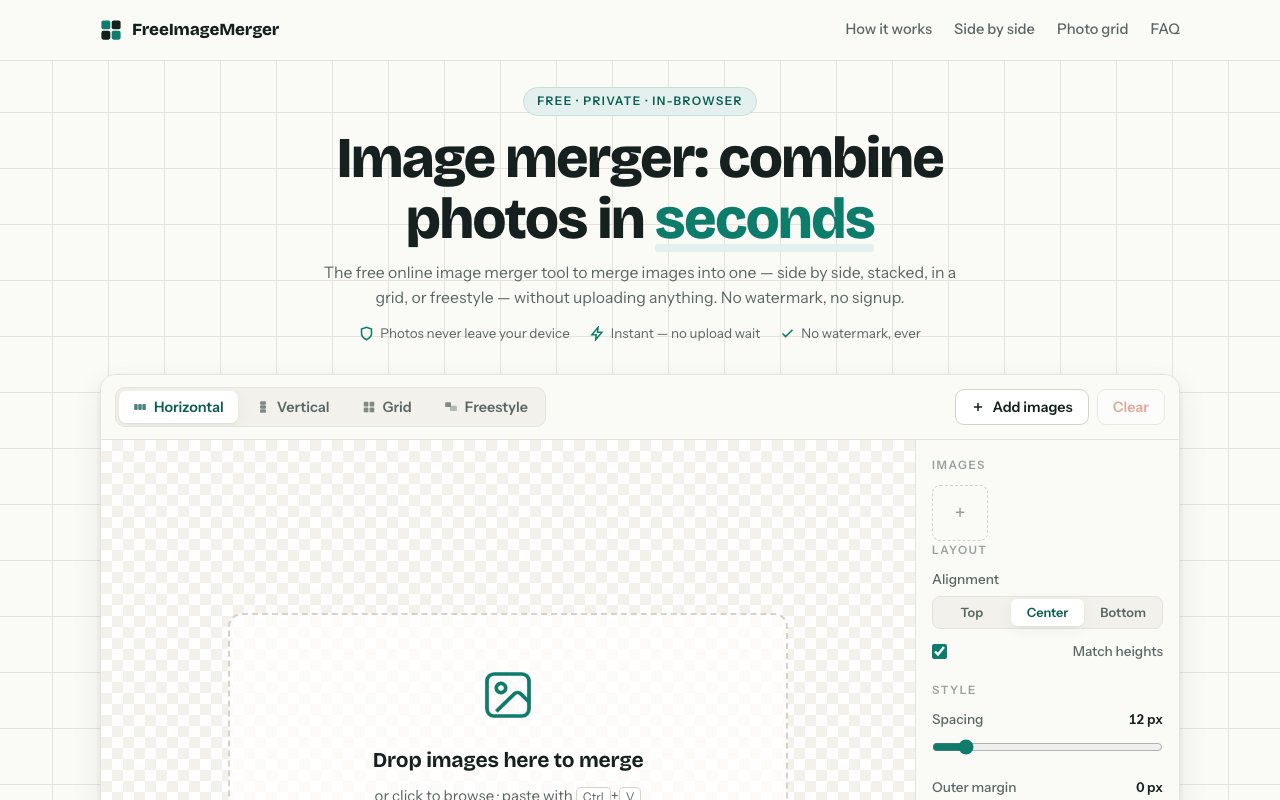
Free Image Merger is a browser based tool that combines multiple images into a single file without uploading anything to a remote server. Everything runs locally in your browser using the HTML5 Canvas API, which means your photos stay on your device from start to finish. It handles the common scenarios: merging images side by side horizontally, stacking them vertically, arranging them in a grid, or placing them freely on a canvas where you can drag and resize each one. The tool is completely free, requires no account, adds no watermarks, and imposes no usage limits. You load your images, configure the layout, and download the result. That is the entire workflow.
The problem it solves is one that comes up constantly but rarely justifies launching a full image editor. You have several images and you need them combined into one. Maybe you are making a before and after comparison for a product listing. Maybe you are stitching together screenshots to document a workflow. Maybe you need a quick collage for social media or a grid of reference images for a design project. Most image editors can do this, but they require installing software, learning an interface with dozens of features you do not need, and often involve more steps than the task deserves. Online tools exist too, but many upload your files to a server, slap watermarks on the result, or gate basic features behind a signup wall. Free Image Merger skips all of that overhead and gets straight to the task at hand.
The tool supports four layout modes, each with its own set of controls. Horizontal merging places images side by side in a row, useful when you want a panoramic style result or a comparison strip. Vertical stacking arranges them top to bottom, which works well for mobile screenshots or step by step tutorials. Grid mode lets you specify how many columns you want and fills them automatically, giving you a structured collage without manually positioning anything. Freestyle canvas is the most flexible option, letting you drag, resize, rotate, and layer images anywhere on the canvas. You can overlap them, create asymmetric layouts, or build more creative compositions that the structured modes do not allow.
Each mode has its own customization options that let you fine tune the output. You can adjust spacing between images, set outer margins, round the corners of individual images, and choose a background color or make the background transparent for export with alpha. In the structured modes you can toggle match heights or match widths to force uniform scaling across images, which prevents awkward size mismatches when your source files are not the same dimensions. In freestyle mode you have full control over each image's position and scale, plus the ability to layer them front to back. These options cover most common use cases without overwhelming you with choices.
On the input side it accepts PNG, JPG, JPEG, WebP, GIF, AVIF, and BMP. You can load up to 20 images per merge, which is enough for most practical scenarios. Once they are loaded, you can reorder them by dragging, which is particularly useful in horizontal and vertical modes where order matters. The preview updates instantly as you adjust settings, so you see exactly what the output will look like before committing to an export. This real time feedback loop makes it easy to experiment with different arrangements without wasting time on trial exports or guessing what the final result will be.
Export options include PNG for lossless quality, JPG with adjustable compression, and WebP for a balance of quality and file size. You can choose the output format that makes sense for your use case, whether you need to preserve transparency, minimize file size for web use, or maintain maximum fidelity for print. There is a hard limit of 8,192 pixels on any edge of the final canvas, which covers most practical use cases but rules out very large poster prints or high resolution mosaics. The tool requires JavaScript and a browser that supports HTML5 Canvas, which is essentially every modern browser at this point.
What makes it stand out is the total absence of friction. No account creation, no watermarks, no usage caps, no advertising that gets in the way. It does one thing, combining images, and does it cleanly. The privacy angle matters too. Because nothing leaves your browser, you can use it for screenshots with sensitive information, personal photos, or proprietary work without worrying about where those files end up or who might access them on a third party server. For anyone who has hesitated to upload personal photos to a random web tool, this approach removes that concern entirely. It is completely free with no hidden tiers or premium upsells waiting to frustrate you at the critical moment.
Key Features
- Browser based processing with no upload
- Horizontal, vertical, grid, and freestyle layouts
- Adjustable spacing, margins, and corner radius
- Transparent background support
- PNG, JPG, and WebP export options
- Drag to reorder and per image scaling
Pros & Cons
What we like
- Completely free with no watermarks or signup
- Files never leave your device
- Instant preview as you adjust settings
- Supports up to 20 images per merge
Room for improvement
- Canvas edge capped at 8,192 pixels
- No batch processing for multiple outputs
- Mobile interface uses pinch gestures only
- No cloud storage or project saving
Frequently Asked Questions
What is Free Image Merger?
Is Free Image Merger actually free?
What file formats does it support?
Is there a limit on image size or quantity?
Best For
Featured in
Alternatives to Free Image Merger
View all
Framer
Visual website builder that lets designers ship production-grade marketing sites with real CMS, SEO controls, and code components.

Apatero Studio
Creator studio for AI image, video, audio, 3D, and avatars. Every model worth using, in one workspace.

Pixel Painters
Unlimited graphic design subscriptions built only for churches and ministries
Our take
Tool Index Editorial · Oct 2026· 4.0/5
Free Image Merger combines up to 20 images horizontally, vertically, in a grid, or on a freestyle canvas, then exports PNG, JPG, or WebP. We found it refreshingly direct. Images stay in the browser, the preview responds as spacing and backgrounds change, and there is no account, upload, watermark, or price. It covers screenshots, comparisons, collages, and simple layout jobs without pretending to be a full editor.
The browser-only approach also sets the ceiling. There is no project storage, collaboration, or batch workflow, and very large source files can strain device memory. Freestyle composition remains basic compared with a desktop editor. For the common job of turning a few images into one private file, though, its limitations are entirely reasonable.
Editorial opinion from the Tool Index team, written from the public product pages. Not a user review.
Reviews (0)
No reviews yet
Be the first to share your experience with Free Image Merger
Sign in to write a reviewBadge builder
Add Free Image Merger to your website
Choose a badge style and size, preview it here, then copy the generated HTML. Badge images are self-contained SVGs and do not require an external script.

<a href="https://toolindex.net/tools/free-image-merger?ref=badge" target="_blank" rel="noopener">
  <img src="https://toolindex.net/badge/free-image-merger/medium.svg" alt="Free Image Merger - Listed on Tool Index" width="180" height="50" />
</a>How to use the badge
- 1. Pick the style, size, and theme that fit your layout.
- 2. Copy the generated HTML from the code block.
- 3. Paste it into your footer, homepage, or press page.
Standard badge available
The standard listing badge is available now. Score and circle badges are limited to tools currently ranked in the top 10 of a category.
Badge clicks return visitors to this profile with a referral tag so the source remains identifiable.
Related Tools
Apatero Studio
Creator studio for AI image, video, audio, 3D, and avatars. Every model worth using, in one workspace.

Tailwind CSS
Rapidly build custom designs without leaving your HTML

Figma
Collaborative interface design tool

Marvel
Lightweight prototyping platform for turning images and screens into clickable mobile and web prototypes.
Work on Free Image Merger? Request listing access or correction