
getdesign
Extract a website's visual system into a grounded design.md file
Gallery
About getdesign
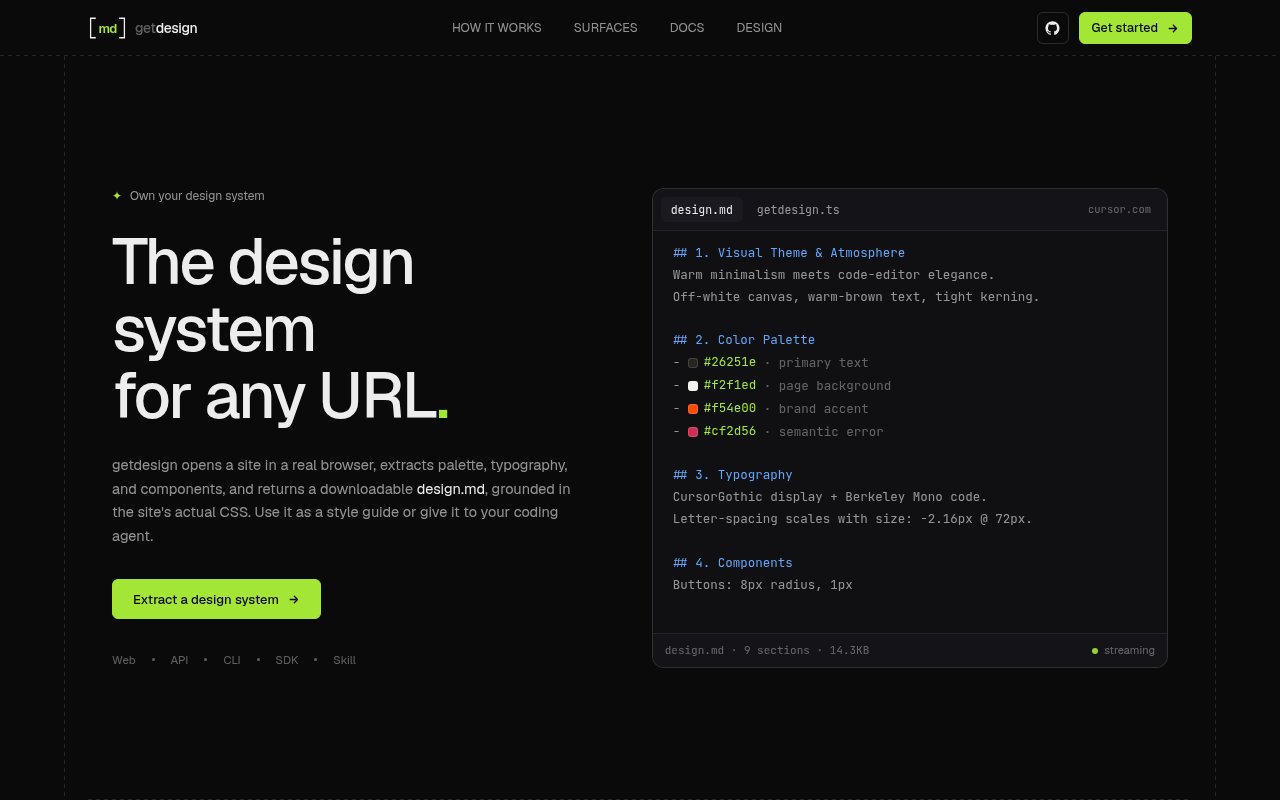
getdesign is an agent that turns a public website into a structured design system document. A user provides a URL, and the product opens the page in a real browser, reads its CSS, captures the rendered result, and produces a downloadable design.md. The document covers the site's palette, typography, spacing, components, and other visual patterns. It can be read as a style guide or handed to an AI coding agent as concrete context, which helps a new interface follow an existing visual language without relying on a screenshot and a series of guesses.
The distinction between extraction and inspiration is important here. getdesign doesn't merely ask a model to describe how a site looks. Its pipeline collects computed styles and CSS tokens, then grounds the generated document in those values and in browser captures of the actual page. Visual runs include screenshots, and the agent is designed to capture a landing page from the top through its rendered document height. The result follows a consistent nine-section format. That gives both a person and a downstream coding tool a stable artifact to inspect, save, share, or place in a project before implementation begins.
The hosted dashboard is the most approachable surface. After signing in, the user saves a Daytona key and an OpenAI key, pastes a public URL, and watches the run produce the design artifact. Runs remain private until the user deliberately publishes one. Publishing creates a link that others can use to view and download the document and screenshots, while switching the run back to private closes future access to that link. Copies already downloaded can't be recalled. The product's current scope is read-only extraction, so it doesn't offer follow-up editing such as warming the palette or comparing two brands inside the same run.
Developers can reach the same agent core through several other surfaces. The HTTP API returns Markdown or JSON and uses WorkOS bearer authentication together with the user's provider keys. A CLI runs on Bun and writes design.md locally, while the TypeScript SDK offers typed results and progress events for applications that need to embed the workflow. There is also a portable skill intended for Claude Code, Codex, and Cursor. In that form the extraction runs with the host agent's own tools. The surfaces change how a run is started and consumed, but they are presented as access points to one extraction system rather than separate products with different output rules.
The programmatic surfaces make the artifact useful beyond one manual download. The API can return Markdown for a script or structured JSON for an application, while the SDK exposes typed results and streaming progress. The CLI can write straight to a local file, which lets a team place the extracted reference beside its interface code and review changes through its normal repository workflow. Because the output describes the source rather than generating an application, a team can decide how much of the reference to adopt. It stays context for implementation instead of becoming opaque generated code that must be accepted as a whole. The shared core also reduces the chance that a dashboard run and a scripted run describe the same site in incompatible formats.
getdesign fits designers evaluating a brand, developers building a new surface for an established product, and teams using coding agents for interface work. It is especially useful when the implementation needs exact colors, type choices, component patterns, and screenshots in a text artifact that can live beside the code. It won't replace a full design audit or an editable Figma library. The current version focuses on public HTTPS pages and a single rendered landing page, with no authenticated page capture, multi-page crawl, hover-state analysis, Figma export, or direct React and Tailwind code generation. That narrow scope helps make the artifact predictable.
The service is in beta and uses a bring-your-own-key model. Version one has no getdesign run billing or subscription. Users pay Daytona for browser capture and OpenAI for model usage through their own accounts, so the tool is free but each run can still create provider costs. The web app stores keys for reuse, while API, SDK, and CLI flows can use request-scoped credentials where supported. This posture is attractive for developers who already have both providers and want control over variable spend, though it creates more setup than a service with bundled credits. The published CLI package and source repository also make the local workflow easier to examine before adopting it.
Key Features
- CSS-grounded design extraction
- Full-page browser captures
- Downloadable design.md output
- Web, API, CLI, and SDK
- Typed progress events
- Portable coding-agent skill
Pros & Cons
What we like
- Grounds palette and typography in actual site CSS
- Produces an artifact coding agents can reuse
- Offers several interfaces around one agent core
- Keeps dashboard runs private until published
Room for improvement
- Requires separate Daytona and OpenAI credentials
- Provider usage still creates external costs
- Limited to public pages and single-page extraction
- No follow-up refinement or design comparison
Frequently Asked Questions
What is getdesign?
Is getdesign free?
Can getdesign be used outside the web dashboard?
What does getdesign produce?
Best For
Featured in
Alternatives to getdesign
View all
Framer
Visual website builder that lets designers ship production-grade marketing sites with real CMS, SEO controls, and code components.

Tailwind CSS
Rapidly build custom designs without leaving your HTML

Apatero Studio
Creator studio for AI image, video, audio, 3D, and avatars. Every model worth using, in one workspace.

Pixel Painters
Unlimited graphic design subscriptions built only for churches and ministries
Our take
Tool Index Editorial · Sep 2026· 3.5/5
getdesign extracts a public site's palette, typography, components, and CSS details into a design.md file for designers and coding agents. We found web, API, CLI, SDK, and portable skill routes around the same agent. The product is in beta and does not show a paid tier, but real runs require the user's own Daytona and OpenAI keys, so provider costs still apply.
The grounding in rendered pages and actual CSS is more useful than a vague visual summary, and the downloadable artifact gives a team something concrete to review. Setup is the catch. The hosted flow needs two external accounts and keys, extraction is limited to public pages, and the site does not show a refinement loop for correcting or comparing the result. It is promising context generation, not a replacement for a maintained design system.
Editorial opinion from the Tool Index team, written from the public product pages. Not a user review.
Reviews (0)
Badge builder
Add getdesign to your website
Choose a badge style and size, preview it here, then copy the generated HTML. Badge images are self-contained SVGs and do not require an external script.

<a href="https://toolindex.net/tools/getdesign?ref=badge" target="_blank" rel="noopener">
  <img src="https://toolindex.net/badge/getdesign/medium.svg" alt="getdesign - Listed on Tool Index" width="180" height="50" />
</a>How to use the badge
- 1. Pick the style, size, and theme that fit your layout.
- 2. Copy the generated HTML from the code block.
- 3. Paste it into your footer, homepage, or press page.
Standard badge available
The standard listing badge is available now. Score and circle badges are limited to tools currently ranked in the top 10 of a category.
Badge clicks return visitors to this profile with a referral tag so the source remains identifiable.
Related Tools
Apatero Studio
Creator studio for AI image, video, audio, 3D, and avatars. Every model worth using, in one workspace.
Tailwind CSS
Rapidly build custom designs without leaving your HTML

Figma
Collaborative interface design tool

Marvel
Lightweight prototyping platform for turning images and screens into clickable mobile and web prototypes.
Work on getdesign? Request listing access or correction