Google Imagen
Google DeepMind's text-to-image model with class-leading text rendering, served in Gemini and ImageFX
Gallery
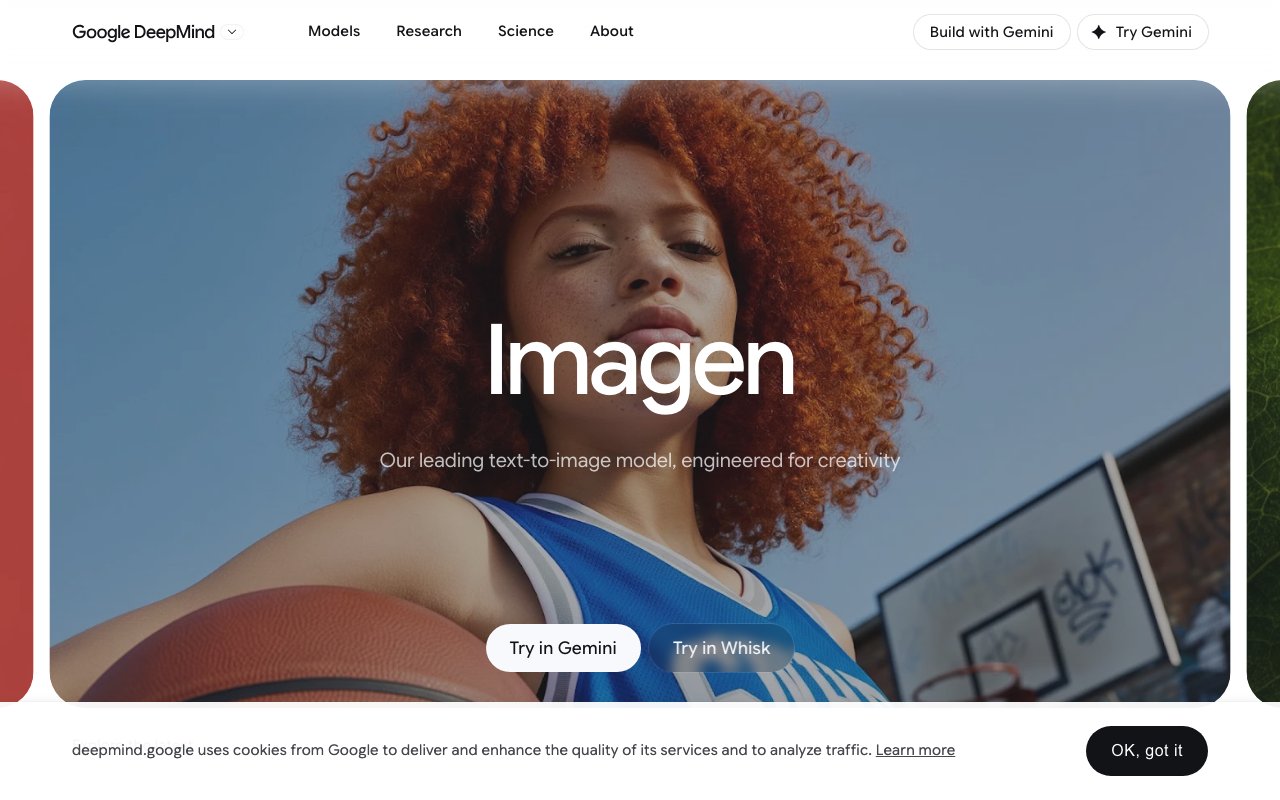
About Google Imagen
Google Imagen is DeepMind's flagship text to image generation model, converting written descriptions into high quality visual content across photorealistic, stylized, and artistic domains. The current version, Imagen 4, generates images up to 2K resolution with particular strength in capturing rich colors, intricate details, subtle textures, and smooth gradients that approach photographic quality. The model handles everything from photorealistic landscapes with detailed foliage and accurate lighting to stylized graphics, vintage photography aesthetics, comic book art, product packaging mockups, sticker designs, and logo concepts. If you need to turn a text prompt into an image that looks genuinely polished rather than carrying obvious AI generation artifacts, Imagen ranks among the leading options available from major AI research labs.
Generation speed improved dramatically in recent iterations. Imagen now offers an ultra fast mode that runs approximately ten times faster than previous versions, approaching real time speeds that make rapid iteration on concepts practical rather than tedious. This acceleration matters for design workflows where you want to explore multiple creative directions quickly, adjusting prompts and regenerating variations until something clicks. Rather than waiting minutes between generations and losing creative momentum, designers can maintain flow while the AI keeps pace with their thinking. The model also substantially improved text rendering accuracy, a historically weak area for image generation systems. Imagen 4 handles longer text strings, complex typography layouts, and readable text embedded within images more reliably than earlier versions or many competitors struggle to achieve.
The artistic range Imagen covers spans from strict photorealism through impressionism, abstract expressionism, technical illustration, and experimental compositions. Imagen 4 specifically enhanced color accuracy, style fidelity, and fine detail precision compared to its predecessors. In comparative evaluations using human preference metrics, it consistently scores highly, meaning people generally find its outputs more visually appealing and closer to their prompts than alternatives from other providers. Images can capture extreme close up details with accurate textures and color gradations that hold up under inspection. Google integrates SynthID digital watermarking into all generated images, embedding invisible identification that marks content as AI generated for authenticity verification, provenance tracking, and transparency in an era of increasing synthetic media.
Access to Imagen comes through multiple Google platforms and services, each serving different use cases and user types. Gemini integrates Imagen directly into conversational AI interactions, letting you request and refine images through natural language chat. Whisk provides a specialized image based prompting interface for visual ideation workflows where you start from reference images rather than pure text. Google AI Studio offers direct image generation for developers and researchers experimenting with prompts and parameters. The Gemini API enables full programmatic access for developers building image generation capabilities into their own applications, websites, and services. For enterprise scale deployments requiring higher volumes, dedicated infrastructure, and service level guarantees, the Gemini Enterprise Agent Platform handles those requirements.
Real world production use cases already exist across creative industries. Companies like Cartwheel integrate Imagen into 3D character animation workflows, using generated images as reference material and texture sources. Viggle incorporates Imagen into AI video production tools. Marketing teams use it for rapid campaign concept visualization. Product designers generate packaging mockups before committing to physical prototypes. The model serves professional creative workflows rather than just casual experimentation.
Google acknowledges known limitations transparently rather than overselling capabilities. The model occasionally struggles with factual accuracy in complex compositions, particularly rendering small faces accurately or maintaining thin structural details like wires, antennae, or delicate architectural elements. Centering images precisely on specific subjects can be unpredictable, with the model sometimes choosing different compositional framing than intended. Nonsensical, contradictory, or incomprehensible prompts produce unreliable and often surreal outputs. On the safety and responsibility side, extensive filtering and data labeling work to minimize harmful content generation, with specific evaluation processes addressing child safety concerns and demographic representation accuracy.
The typical Imagen user spans creative professionals using it for rapid prototyping and concept exploration, software developers integrating image generation into applications, content creators across media and marketing industries, and enterprises building scalable visual content pipelines. Academic and research institutions access Imagen through Google's platforms for studying generative AI capabilities. Pricing varies by access method, with Gemini subscriptions offering bundled image generation, AI Studio providing experimentation access, and API usage priced per image or token for production deployments. For organizations already embedded in Google Cloud and the broader Google AI ecosystem, Imagen provides natural integration without separate vendor relationships.
Key Features
- Imagen 4 family: Standard, Fast, and Ultra variants
- Strong in-image text and typography rendering
- Photorealistic detail across landscapes, people, and objects
- Output up to 2K resolution
- Fast mode roughly 10x quicker than the prior model
- SynthID invisible watermark on every output
Pros & Cons
What we like
- Best-in-class spelling and legible text inside images
- Free to try via the Gemini app and ImageFX with no card
- Flat per-image API pricing makes budgeting simple
- Backed by Google's Gemini API and Vertex AI infrastructure
Room for improvement
- Free tiers carry daily generation limits
- Every image is watermarked with SynthID, no opt-out
- API access of Ultra costs more per image than Fast
- Content filters can block edgier or sensitive prompts
Frequently Asked Questions
What is Google Imagen?
How much does Google Imagen cost?
What is Google Imagen best for?
How good is Google Imagen at rendering text?
Best For
Featured in
Alternatives to Google Imagen
View all
Midjourney
Create stunning AI artwork from text prompts

DALL-E
OpenAI's image generator, now folded into ChatGPT and the gpt-image-1 Images API for text-to-image and edits
Reve
AI image generator from the team formerly behind Halfmoon, built for prompt adherence and text

Stable Diffusion
Stability AI's open-weight text-to-image model family you can self-host or call via API
Reviews (12)
Solid daily driver
Picked Google Imagen for the price, stayed for the quality. Real selling point for me was flat per-image api pricing makes budgeting simple. It has been a fit for prototyping concept art and product mockups. Easy yes for anyone weighing the same trade offs.
The kind of tool you forget you are paying for
Have been running Google Imagen for a while, here is where I land. The defaults are sensible, so I was not fighting settings on day one. Mostly using it for designing posters, packaging, and comic panels. Easy yes for anyone weighing the same trade offs.
Two months in, no regrets
Google Imagen has quietly become part of my daily flow. Real selling point for me was free to try via the gemini app and imagefx with no card. Support actually answered when I had a question, which surprised me. No regrets so far.
Powerful once it clicks
Tried Google Imagen on a side project first, then rolled it out everywhere. The best-in-class spelling and legible text inside images is more useful than I expected. It does what it says, which is rarer than it should be. It fits well for designing posters, packaging, and comic panels. One thing that bugs me is every image is watermarked with synthid, no opt-out. No regrets so far.
Two months in, no regrets
Onboarded the whole team to Google Imagen in an afternoon. What stands out is how it handles flat per-image api pricing makes budgeting simple. Hard to imagine going back to my old setup.
Quietly excellent
Found Google Imagen on a Reddit thread and I am glad I clicked. Real selling point for me was best-in-class spelling and legible text inside images. It does what it says, which is rarer than it should be. It has been a fit for generating marketing visuals and ad creative with readable text. Would sign up again without thinking twice.
Good, with a few caveats
Almost a year on Google Imagen now, no plans to leave. It handles the boring parts so I can focus on the work that matters. It fits well for generating marketing visuals and ad creative with readable text. The catch is every image is watermarked with synthid, no opt-out.
Pulled its weight from week one
Tried Google Imagen on a side project first, then rolled it out everywhere. Where it really wins is best-in-class spelling and legible text inside images. The output quality holds up better than I expected. It has been a fit for prototyping concept art and product mockups.
It just works
Picked Google Imagen for the price, stayed for the quality. Where it really wins is photorealistic detail across landscapes, people, and objects. Would sign up again without thinking twice.
Three months in, mixed but positive
Tried Google Imagen on a side project first, then rolled it out everywhere. Got real value out of strong in-image text and typography rendering. The thing I keep coming back to is how reliable it is. My only gripe is api access of ultra costs more per image than fast. Worth the price for what I get out of it.
Pulled its weight from week one
Tried Google Imagen on a side project first, then rolled it out everywhere. The synthid invisible watermark on every output is more useful than I expected. I expected to churn off it in a week and I am still here. Hard to imagine going back to my old setup.
Three months in, mixed but positive
Google Imagen has quietly become part of my daily flow. Real selling point for me was output up to 2k resolution. Setup was painless and I was productive the same day. My only gripe is free tiers carry daily generation limits. Would sign up again without thinking twice.
Badge builder
Add Google Imagen to your website
Choose a badge style and size, preview it here, then copy the generated HTML. Badge images are self-contained SVGs and do not require an external script.

<a href="https://toolindex.net/tools/google-imagen?ref=badge" target="_blank" rel="noopener">
  <img src="https://toolindex.net/badge/google-imagen/medium.svg" alt="Google Imagen - Listed on Tool Index" width="180" height="50" />
</a>How to use the badge
- 1. Pick the style, size, and theme that fit your layout.
- 2. Copy the generated HTML from the code block.
- 3. Paste it into your footer, homepage, or press page.
Standard badge available
The standard listing badge is available now. Score and circle badges are limited to tools currently ranked in the top 10 of a category.
Badge clicks return visitors to this profile with a referral tag so the source remains identifiable.
Related Tools

HairstylesPro
Try hundreds of hairstyles on your own photo before you commit to a cut

Recraft
AI image generator built around vector output and brand styles

AIMakeTattoo
Turn text descriptions into visual tattoo concepts with style and placement options
Flux by Black Forest Labs
Open and hosted image models that power half the AI art stack
Work on Google Imagen? Request listing access or correction