
Gotcha
On-device AI copilot for Android that turns natural language into real device actions
Gallery
About Gotcha
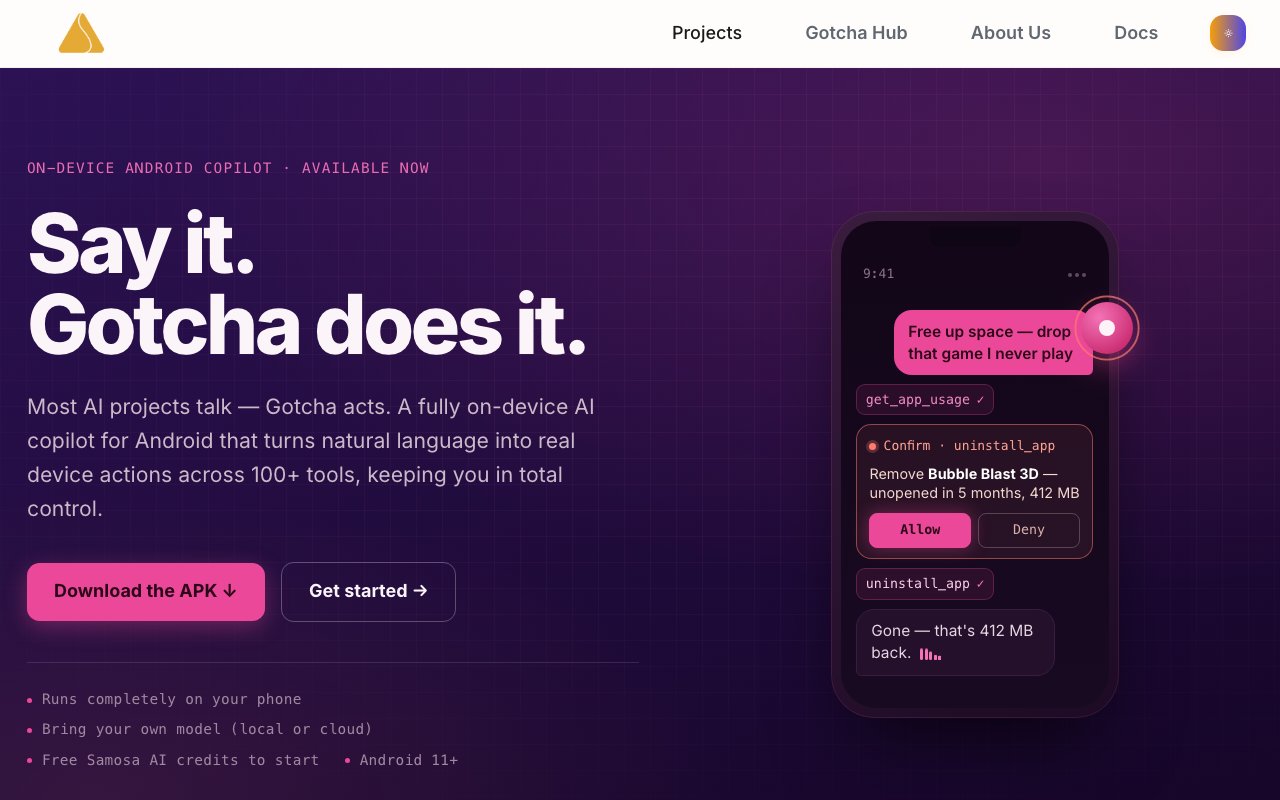
Gotcha is an Android copilot that runs entirely on your phone and converts natural language commands into actual device operations. You tell it what you want done, whether that's texting someone, changing a setting, checking your storage, or launching an app, and it works out which Android APIs to invoke. The AI processing happens locally by default, which means your commands don't leave the device unless you explicitly route them through a cloud model you've chosen to connect. Built with Kotlin and Jetpack Compose, it's designed from the ground up for Android rather than being a cross-platform port, so it can reach deeper into system functionality than wrapper-style assistants typically manage.
The problem Gotcha addresses is the friction between what you want your phone to do and how Android actually exposes that functionality. Opening settings, navigating menus, tapping through dialogues, confirming permissions, all of that disappears when you can just say what you need. It's not a glorified voice assistant limited to a narrow set of canned actions. Gotcha provides access to 106 purpose-built Android tools in Operator mode, covering calls, SMS, contacts, files, media, system settings, and more. A command like "Text mom I'm running late" triggers contact lookup, SMS composition, and sending in one shot. Asking "How much space have I got left?" retrieves storage information without you opening a settings menu. The range of supported actions is genuinely broad, reaching into corners of the system that typical voice assistants ignore.
It works through two distinct modes. Monitor mode offers read-only access through 40 or so tools, letting Gotcha observe what's on screen and inspect device state without making changes. That's useful when you want it to gather context before taking any action, or when you simply want answers about your device without risking unintended side effects. Operator mode is where it actually triggers device operations on your behalf, with the full 106 tools unlocked. A floating orb interface called the Assistive Ball sits on top of whatever app you're using, available via long press or by saying "Hey Gotcha" to activate push-to-talk voice input. The interface can see your screen and act on what it observes, which means you can give contextual commands rather than spelling out every detail. Visual feedback shows processing status with colored rings, a blue ring indicating foreground reading and an orange ring for background work.
Permissions are tiered into four levels, and each tier requires explicit user consent before Gotcha can use those capabilities. The lowest tier handles everyday functions like battery status, alarms, and storage queries. Higher tiers unlock more powerful operations including accessibility actions that can tap and swipe on your behalf. The top tier, available only on rooted devices, grants shell command access for users who want truly unrestricted automation. Gotcha fails closed on privileged actions if your phone isn't rooted, so it won't pretend to accomplish something it can't actually do. Confirmation gates add another layer for sensitive operations, meaning you won't accidentally trigger a mass delete or outbound message without explicit approval.
A key architectural choice is local execution paired with model flexibility. You can bring your own language model, whether that's something running on the device itself or pointing at an OpenAI-compatible cloud endpoint you control. Samosa AI provides starter credits for their hosted inference so you can try it without setup, but the product is designed so you never have to depend on their servers if you don't want to. That makes it genuinely privacy-first rather than just marketing-friendly. For users who want integrations beyond the core Android functions, Gotcha supports optional connections to Gmail, Outlook, Notion, and Home Assistant, so you can extend its reach into your broader workflow without leaving the device interface. An append-only audit log records what actions have been taken, and credentials are encrypted and stored locally rather than synced to any cloud service.
The distribution model is direct APK download from GitHub Releases, with in-app updates, which means it's not on the Play Store. That fits the audience: technical Android users comfortable sideloading apps and configuring permissions rather than casual users who expect a one-tap install. Android 11 or higher is required, specifically API level 30 and up. The current release is version 1.0.2. Pricing is freemium, with free starter credits when you sign up for a Samosa AI account, and the option to use your own model backend at no cost to Samosa. The documentation is upfront about the fact that it's powered by large language models operating autonomously across Android APIs, and that users assume responsibility for potential data loss or system issues. That transparency suits the power-user audience it's built for.
Key Features
- On-device natural language processing
- Two modes: Monitor and Operator
- Four-tier permission system
- Floating assistive ball interface
- Bring your own LLM support
- Encrypted audit log and credentials
Pros & Cons
What we like
- Runs locally so commands stay on your device
- Works with your own language model, not locked to one provider
- Granular permission tiers give you control over what it can touch
- Supports over 100 Android tools and system actions
Room for improvement
- Not on the Play Store, requires sideloading
- Root required for the most privileged operations
- Needs Android 11 or higher
- Younger project with a smaller community
Frequently Asked Questions
What is Gotcha?
Does Gotcha require an internet connection?
Is Gotcha free?
Who is Gotcha for?
Best For
Featured in
Alternatives to Gotcha
PropGPT
iOS app that uses AI to analyze player props, spreads, and bets across major sports leagues

Apatero AI
The creator studio for AI image, video, audio, 3D, and avatars, now at apatero.ai.

Expo
The React Native framework and cloud build service that ships native iOS and Android apps without touching Xcode.

SoloDevStack
A solo developer blog built on head-to-head tool comparisons, 580+ posts deep.
Our take
Tool Index Editorial · Oct 2026· 3.0/5
Gotcha is an Android copilot that maps natural-language requests to more than 100 device tools for messages, apps, media, settings, and screen automation. We found the separation between a read-only Monitor mode and an active Operator mode sensible, as are four permission tiers, visible status rings, and confirmation before sensitive actions. It can use a local model or a cloud endpoint chosen by the user.
This is powerful software with a large blast radius. Installation requires sideloading an APK on Android 11 or later, deeper automation relies on Accessibility access, and root is needed for shell-level actions. The public pages offer starter credits but no clear ongoing price table, and the documentation is lighter than the permission surface deserves. It is for technical Android users who will review logs and grant access gradually, not a casual voice-assistant replacement.
Editorial opinion from the Tool Index team, written from the public product pages. Not a user review.
Reviews (0)
Badge builder
Add Gotcha to your website
Choose a badge style and size, preview it here, then copy the generated HTML. Badge images are self-contained SVGs and do not require an external script.

<a href="https://toolindex.net/tools/gotcha?ref=badge" target="_blank" rel="noopener">
  <img src="https://toolindex.net/badge/gotcha/medium.svg" alt="Gotcha - Listed on Tool Index" width="180" height="50" />
</a>How to use the badge
- 1. Pick the style, size, and theme that fit your layout.
- 2. Copy the generated HTML from the code block.
- 3. Paste it into your footer, homepage, or press page.
Standard badge available
The standard listing badge is available now. Score and circle badges are limited to tools currently ranked in the top 10 of a category.
Badge clicks return visitors to this profile with a referral tag so the source remains identifiable.
Related Tools
Apatero AI
The creator studio for AI image, video, audio, 3D, and avatars, now at apatero.ai.
Kevin Gabeci Toolkits
Seven AI toolkits for writing books, making music, cutting video, and building agents.

Warp
The modern terminal reimagined with AI and collaboration

Bolt.new
Prompt-to-deployed full-stack app inside the browser
Work on Gotcha? Request listing access or correction