
Guuey
Deploy a hosted AI agent on your site with two script tags, generative UI and MCP tools
Gallery
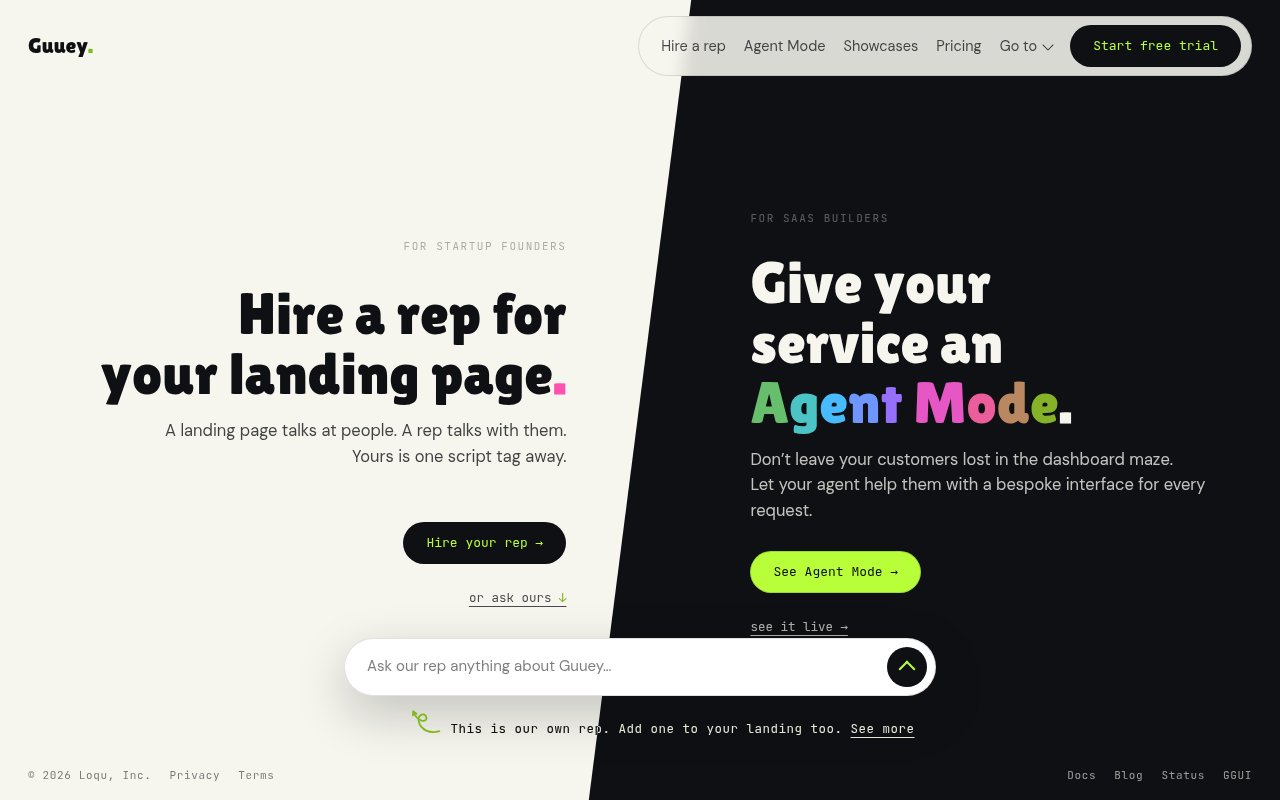
About Guuey
Guuey is a platform for building and hosting AI agents that talk to your users on your own site or through a hosted chat page. You bring a system prompt, pick a model and attach MCP servers for tools and knowledge, and Guuey runs the agent on isolated, always-on infrastructure. Two script tags put the chat widget on your website, and share links give anyone a hosted chat page with nothing to install. The problem it goes after is that a capable agent is only half the job. Hosting it, streaming replies, keeping it awake and giving it an interface people actually want to use is the other half, and that's the part Guuey takes over.
Agents are put together in the builder console by combining a system prompt, a model choice and the MCP servers that give the agent its tools and access to external APIs. Each deployed app runs on its own always-on runtime with no cold starts, and conversations stream in real time. Beyond text, an agent can render interactive screens through Guuey's ggui protocol, so a reply can be a card, a form or a set of buttons instead of a paragraph. That's the generative UI piece. The docs describe it as agents that keep the default MCP server reply but answer with interactive screens, not just text, which in practice means a support agent can hand you a form to fill in rather than a list of instructions.
There are three ways to put an agent in front of people. Drop the two script tags on your site for an embedded chat widget. Send a share link for a hosted chat page. Or publish to the Portal, which Guuey describes as the agent App Store and universal chat client where users find and talk to your agent. For teams that want their own interface, the @guuey/agent-client SDK handles streaming, status and conversation continuity so you can build a custom chat UI on top of the same backend. Getting started follows that shape. Sign up, create an app, write the system prompt, choose the model and connect MCP servers, then paste the script tags into your site. The same agent can be reached through the widget, a share link and the Portal without separate deployments.
It's aimed at two groups. Startup founders who want a live agent on the landing page rather than a contact form, so a visitor can ask what the product does and get an answer with a signup form attached. For a founder, the practical difference is that a visitor who asks about pricing can be answered and moved into a signup in the same exchange. And SaaS builders who want Agent Mode, a generative UI helper that guides customers around a dashboard instead of leaving them to hunt through menus. Anyone running a support or onboarding flow where the right answer is often an action or a form, not a block of text, will get the most out of the interactive screens.
What sets it apart is the combination. MCP as the integration layer, interactive screens as the output format, and per app hosting that's always on. Plenty of products give you a chat bubble. Fewer let the agent reply with a working form, and fewer still take on the hosting so there's nothing to keep warm and no server of your own to run. Because the agent's capabilities come from MCP servers, adding a new tool is a configuration change rather than a code change.
The per app model shapes how you'd use it. Each agent is its own deployment with its own runtime, quota and credit, which keeps a landing page agent and a dashboard helper from competing for the same budget and makes it obvious which one is busy. Each plan includes a managed LLM credit and a range of agent sizes, from XS to SM on Starter up to XL on Scale, so the model usage and capacity you pay for grow with the plan rather than needing a re-architecture.
It's a younger platform, and the documentation doesn't yet list which models are available or a full integration catalog beyond MCP. Pricing is per deployed app rather than per account, which is simple for one agent and adds up if you run several. There's no free tier once the trial ends, and generation quotas with overage pricing mean a busy site will want to keep an eye on volume.
Every app starts with a 7-day free trial of the full product. When the trial ends the app pauses until you choose a plan, and nothing is deleted. Starter is $49 a month per app with 1,200 generations and a $20 managed LLM credit, agent sizes from XS to SM, and email support. Pro is $129 with 3,500 generations, a $50 credit, sizes up to MD, unlimited team members, custom domains and priority support. Scale is $299 with 9,000 generations, a $100 credit, sizes up to XL and dedicated support. Overage runs at $0.10, $0.09 or $0.085 per generation depending on the tier. Support is at hello@guuey.com, and there's documentation and a blog alongside the console.
Key Features
- Two script tag chat widget install
- Generative UI via the ggui protocol
- MCP servers for tools and knowledge
- Always-on hosted runtime, no cold starts
- Portal agent store and share links
- @guuey/agent-client SDK for custom UIs
Pros & Cons
What we like
- Agents can reply with forms and cards, not just text
- Hosting and streaming handled for you
- MCP makes adding tools a config change
- 7-day trial of the full product before paying
Room for improvement
- No free tier after the trial
- Billed per deployed app, which adds up
- Model list not documented yet
- Younger platform with a short track record
Frequently Asked Questions
What is Guuey?
How much does Guuey cost?
What is generative UI in Guuey?
Can I build my own chat interface?
Best For
Featured in
Alternatives to Guuey
View all
Almanac
A hosted, source-cited wiki that turns your files into context your AI agents can use

Demi AI
Demi helps busy professionals eliminate repetitive admin work across their favorite tools.

Lindy
No-code AI agents that handle email, meetings, and recurring workflows
Vapi
Build voice AI agents that take and place phone calls
Our take
Tool Index Editorial · Sep 2026· 3.5/5
Guuey hosts an AI agent for a landing page or SaaS product, with an embeddable chat surface, MCP tools, and interactive replies such as forms and cards. We found the generative interface angle more useful than another plain chat bubble, and the per-app runtime makes deployment boundaries easy to understand. Every app gets a seven-day trial, then Starter begins at $49 per month for 1,200 generations and $20 of managed model credit.
This is aimed at founders and SaaS teams that want a production surface without running agent infrastructure themselves. It is still in public beta, the public pages do not fully document model choice, and billing per deployed app gets expensive as use cases multiply. Generation quotas, model credit, runtime capacity, and overage are separate concepts, so teams should model a busy month rather than choosing solely by the headline plan price.
Editorial opinion from the Tool Index team, written from the public product pages. Not a user review.
Reviews (0)
Badge builder
Add Guuey to your website
Choose a badge style and size, preview it here, then copy the generated HTML. Badge images are self-contained SVGs and do not require an external script.

<a href="https://toolindex.net/tools/guuey?ref=badge" target="_blank" rel="noopener">
  <img src="https://toolindex.net/badge/guuey/medium.svg" alt="Guuey - Listed on Tool Index" width="180" height="50" />
</a>How to use the badge
- 1. Pick the style, size, and theme that fit your layout.
- 2. Copy the generated HTML from the code block.
- 3. Paste it into your footer, homepage, or press page.
Standard badge available
The standard listing badge is available now. Score and circle badges are limited to tools currently ranked in the top 10 of a category.
Badge clicks return visitors to this profile with a referral tag so the source remains identifiable.
Related Tools

OpenBenchmarks
Public, externally validated benchmarks that help agents pick SaaS APIs
Almanac
A hosted, source-cited wiki that turns your files into context your AI agents can use

Wizard
Self-extending Rust terminal AI agent that works with any model

Chariot
Elastic cloud infrastructure for deploying and scaling AI agent fleets with persistent storage
Work on Guuey? Request listing access or correction