
HNTerminal
High-density Hacker News reader with grid layout, velocity signals, and switchable themes
Gallery
About HNTerminal
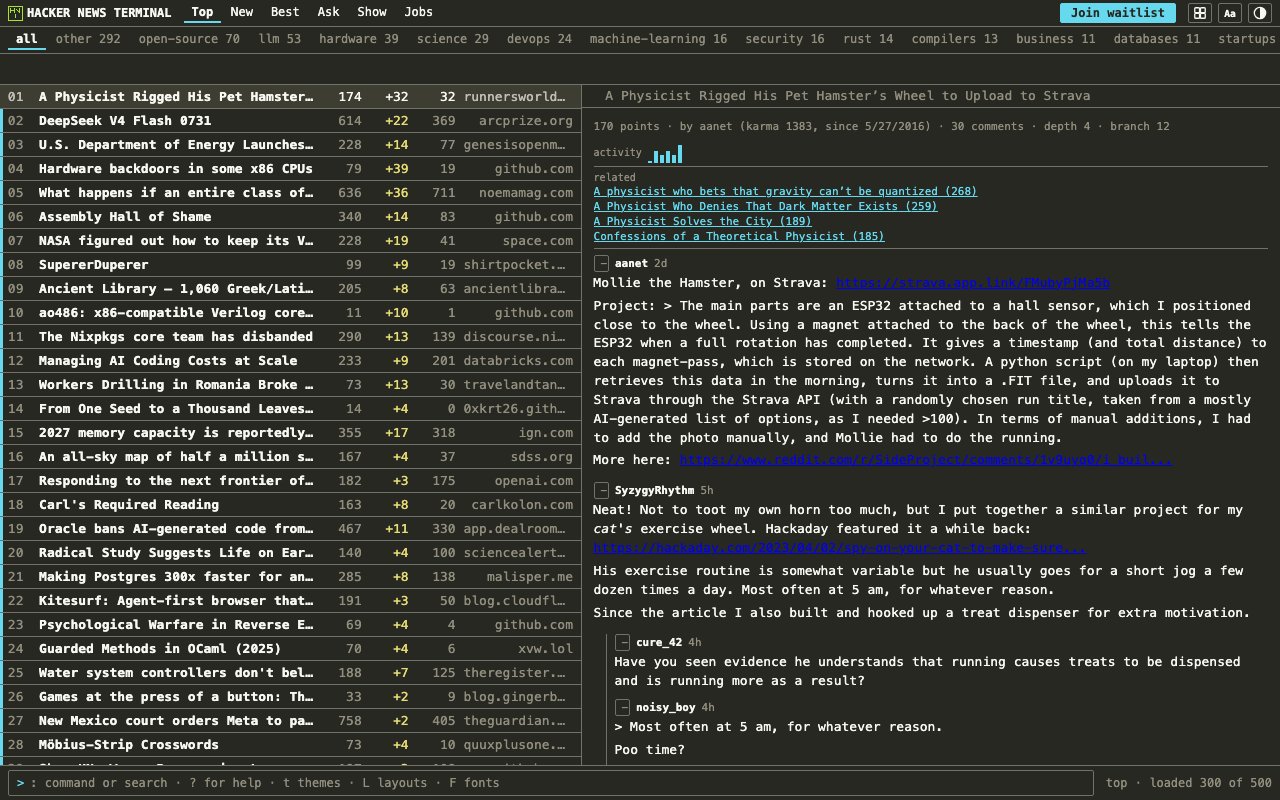
HNTerminal is a web-based Hacker News reader built for people who want more information density than the default orange site provides. It takes the same stories and comments from the Hacker News API and presents them in a high-density grid layout that lets you scan more headlines at once, with live signals showing which stories are gaining momentum and which discussions are getting heated. The standard Hacker News interface has used the same single-column list since 2007, which works fine for casual browsing but forces you to scroll through items one by one. If you check HN multiple times a day and want to spot trending stories quickly without wading through the entire front page, a denser view makes the process significantly faster.
The velocity indicators are the main feature that distinguishes HNTerminal from other readers. These signals show how fast a story is climbing the rankings rather than just displaying its current score. A story with ten upvotes in the first fifteen minutes ranks differently than one with fifty upvotes over six hours because the Hacker News algorithm decays with time and the gravity multiplier rises every forty-five minutes. By surfacing this velocity data, HNTerminal lets you spot stories that are about to hit the top of the front page before they get there, which matters if you want to participate in discussions while they are still forming rather than arriving after hundreds of comments have already shaped the conversation.
The controversy signals complement velocity by flagging discussions with unusually high comment activity relative to their score. On Hacker News, a post with a hundred comments but only thirty upvotes usually means people are arguing. The standard interface shows you both numbers, but you have to do the mental math yourself and scroll through the list comparing them. HNTerminal does that calculation automatically and highlights the threads where something contentious is happening, so you can find the heated discussions before they cool down or get flagged off the front page. For people who read HN for the arguments as much as the links, this surfaces the interesting threads faster.
The interface offers switchable themes for different lighting conditions and personal preference, so you can match your system appearance or pick something that reduces eye strain for all-day monitoring. Multiple layout options let you toggle between the dense grid view that shows the maximum number of stories and more traditional list views when you want to focus on reading rather than scanning. On wider screens with at least 1100 pixels of width, a split reader pane shows the discussion alongside the story list so you do not have to navigate away from the front page to read comments. This feature folds away on narrower windows to keep the interface usable on smaller displays, but the sweet spot is clearly a desktop monitor where you can see both at once.
Everything runs entirely client-side against the public Hacker News API. There is no account to create, no data stored on their servers, and no tracking beyond whatever happens in your browser. You load the site and it works immediately. This architecture means your reading habits stay private and the site cannot go down due to backend issues, though it also means you cannot sync reading history or preferences across devices. The tradeoff is simplicity and privacy at the cost of continuity if you use multiple machines.
HNTerminal fits developers, founders, and tech-news enthusiasts who already read Hacker News regularly but want a faster way to triage the front page. If you open HN in a browser tab and leave it there all day, this gives you a better dashboard for that habit. The product is not trying to replace mobile apps or terminal clients; it is specifically a web interface for desktop-width screens where information density makes sense. As of mid-2026, the typical Hacker News front-page post stays visible for only thirty to forty-five minutes before getting pushed down, compared to ninety to one hundred twenty minutes in 2025. When the window for catching rising content has shrunk this much, tools that surface velocity data become more useful than they were when posts lingered longer.
Access is completely free. There is no login, no premium tier advertised, and no visible monetization. The project appears to be a side effort from someone who wanted a better HN experience and shipped it publicly. The lack of infrastructure requirements keeps everything simple, but it also means there is no guarantee of long-term maintenance or support beyond whatever the creator decides to do. For a free tool with no account friction, that tradeoff is reasonable. You get a faster way to read Hacker News right now, and if the project disappears someday you have lost nothing but a bookmark.
Key Features
- High-density grid layout for scanning
- Live velocity signals for trending stories
- Controversy indicators for heated discussions
- Multiple switchable themes
- Split reader pane on wide screens
- No account or login required
Pros & Cons
What we like
- Shows more stories at a glance than default HN
- Velocity signals help spot rising content early
- Runs entirely client-side with no tracking
- Works immediately with no setup
Room for improvement
- Split pane requires wide browser window
- Side project with no guaranteed support
- No mobile-optimized view
- Limited to Hacker News content only
Frequently Asked Questions
What is HNTerminal?
Is HNTerminal free?
What are the velocity and controversy signals?
Does HNTerminal work on mobile?
Best For
Featured in
Alternatives to HNTerminal

CalendHub
Smart scheduling and calendar management for teams
Kevin Gabeci Toolkits
Seven AI toolkits for writing books, making music, cutting video, and building agents.

Eased Into AI
Learn AI from zero. No jargon, no hype, just steps that work.

Fix It Gently
Calm, plain-English fixes for everyday tech problems.
Reviews (0)
Badge builder
Add HNTerminal to your website
Choose a badge style and size, preview it here, then copy the generated HTML. Badge images are self-contained SVGs and do not require an external script.

<a href="https://toolindex.net/tools/hnterminal?ref=badge" target="_blank" rel="noopener">
  <img src="https://toolindex.net/badge/hnterminal/medium.svg" alt="HNTerminal - Listed on Tool Index" width="180" height="50" />
</a>How to use the badge
- 1. Pick the style, size, and theme that fit your layout.
- 2. Copy the generated HTML from the code block.
- 3. Paste it into your footer, homepage, or press page.
Standard badge available
The standard listing badge is available now. Score and circle badges are limited to tools currently ranked in the top 10 of a category.
Badge clicks return visitors to this profile with a referral tag so the source remains identifiable.
Related Tools

Confluence
Atlassian's long-running team wiki that anchors many enterprise knowledge stacks
Asana
Project management for teams that live in projects, tasks and dependencies
Kevin Gabeci Toolkits
Seven AI toolkits for writing books, making music, cutting video, and building agents.

Logseq
An open-source outliner notes app where every bullet is a first-class block
Work on HNTerminal? Request listing access or correction