
Gallery
About Instant
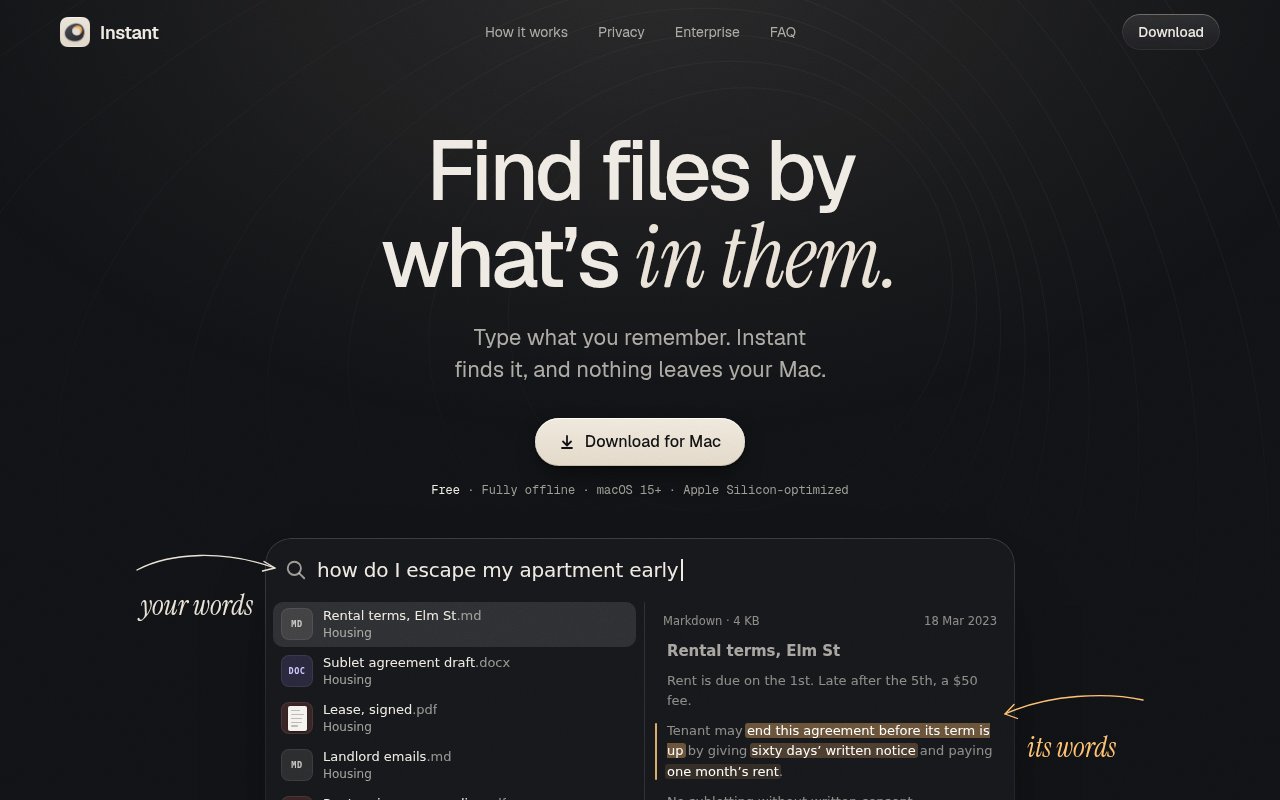
Instant is a local search app for finding files by what they contain rather than by an exact filename or keyword. It is meant for the moment when someone remembers the point of a document, a phrase from a scan, or the scene in a photo but can't remember where the file lives. A natural description can bring back documents, images, notes, receipts, and source files from the folders the user chooses. The result view surfaces the matching passage or image so there is enough context to recognize the right item without opening every likely file. That makes it a practical layer above a folder system that has grown too large to browse from memory.
The search is semantic, so the wording in a query doesn't have to match the wording in the file. Instant's own examples connect a casual question about leaving an apartment early with a lease passage about ending an agreement before its term. The same approach can find a gift idea from a note, advice from a veterinary PDF, or a remembered detail in a recipe. It also searches photos by their visual content without requiring tags. For scanned PDFs and receipts that have no text layer, it reads the scan and makes that material searchable alongside ordinary text. This is broader than title search, but it stays focused on retrieval rather than trying to chat about or rewrite private files.
Setup is deliberately small. The user downloads the Mac app, selects the folders to include, and lets it build a local index. A first index takes minutes for an average document collection and can take hours for a large photo library. Once that pass is done, Instant only reindexes changed files. The local search model needs about 1 GB of disk space and is downloaded once. Search is available from anywhere with Option and Space by default, and the shortcut can be changed. Results update with each key, which makes the app useful as a quick launcher as well as a place to run longer descriptive searches. The global shortcut means a search can begin over the app already in use. A rough memory can then be refined one word at a time as the ranked results and previews change.
Its supported material covers common personal and work archives. The site names PDF and scanned PDF, DOCX, RTF, ODT, Markdown, plain text, and source code, along with HEIC, JPEG, PNG, WebP, GIF, and TIFF images. That mix fits people whose information is scattered across contracts, exported notes, office files, screenshots, photos, and small text archives. Unlike search inside the Photos app, Instant can search images in every folder the user has selected. It is therefore most useful to Mac owners who retain files locally and often know what an item was about even when its title and location have faded from memory.
Privacy is the clearest reason to choose it over a cloud search service or a general AI chatbot. Instant says files and searches never leave the Mac, there is no account, and there is no cloud service involved in search. Both the index and search engine run locally. The app does contact the network for its search model once and for update checks. Anonymous usage counts are also part of the product, though they can be turned off in Settings. This posture avoids uploading a personal archive merely to make it searchable and keeps access tied to the machine and the folders the owner selected.
There are sensible boundaries. Instant currently requires macOS 15 or later and is optimized for Apple silicon, so it isn't a cross-platform answer for mixed Windows, Linux, and Mac environments. Indexing a very large photo collection takes time, and the roughly 1 GB local model is an extra storage cost. Its job is finding files, not organizing them, editing them, or answering broad questions with generated prose. Teams seeking private retrieval for internal systems are pointed to a separate enterprise offering from Perilla Labs, which can run in a company's cloud, servers, air-gapped environment, or on device.
The personal Mac app is genuinely free, with no account or paid consumer plan shown. That makes it easy to test on a selected folder before granting it access to a larger archive. The company invites organizations to contact it about the separate enterprise retrieval work, but that doesn't change the free access posture of the downloadable app. Instant is a strong fit when local privacy matters and ordinary filename search keeps failing. It is a narrower choice for anyone who needs collaboration, web access, or support beyond recent macOS on Apple hardware.
Key Features
- Semantic local file search
- Photo content search
- Scanned document reading
- Custom global keyboard shortcut
- Incremental local indexing
- Offline private search
Pros & Cons
What we like
- Finds files without exact keywords or filenames
- Keeps file contents and searches on the Mac
- Covers documents, scans, photos, and source code
- Needs no account and is free
Room for improvement
- Requires macOS 15 or later
- Large photo libraries can take hours to index
- Local search model uses about 1 GB
- Focused on retrieval rather than file organization
Frequently Asked Questions
What is Instant?
Do files leave the Mac?
Is Instant free?
What systems and files does Instant support?
Best For
Featured in
Alternatives to Instant
View all
CalendHub
Smart scheduling and calendar management for teams
Kevin Gabeci Toolkits
Seven AI toolkits for writing books, making music, cutting video, and building agents.

Eased Into AI
Learn AI from zero. No jargon, no hype, just steps that work.

Fix It Gently
Calm, plain-English fixes for everyday tech problems.
Reviews (0)
Badge builder
Add Instant to your website
Choose a badge style and size, preview it here, then copy the generated HTML. Badge images are self-contained SVGs and do not require an external script.

<a href="https://toolindex.net/tools/instant?ref=badge" target="_blank" rel="noopener">
  <img src="https://toolindex.net/badge/instant/medium.svg" alt="Instant - Listed on Tool Index" width="180" height="50" />
</a>How to use the badge
- 1. Pick the style, size, and theme that fit your layout.
- 2. Copy the generated HTML from the code block.
- 3. Paste it into your footer, homepage, or press page.
Standard badge available
The standard listing badge is available now. Score and circle badges are limited to tools currently ranked in the top 10 of a category.
Badge clicks return visitors to this profile with a referral tag so the source remains identifiable.
Related Tools

Confluence
Atlassian's long-running team wiki that anchors many enterprise knowledge stacks
Asana
Project management for teams that live in projects, tasks and dependencies
Kevin Gabeci Toolkits
Seven AI toolkits for writing books, making music, cutting video, and building agents.

Logseq
An open-source outliner notes app where every bullet is a first-class block
Work on Instant? Request listing access or correction