
It Was Never You
An iPhone app that swaps one person out of your photo library and puts someone else in their place
Gallery
About It Was Never You
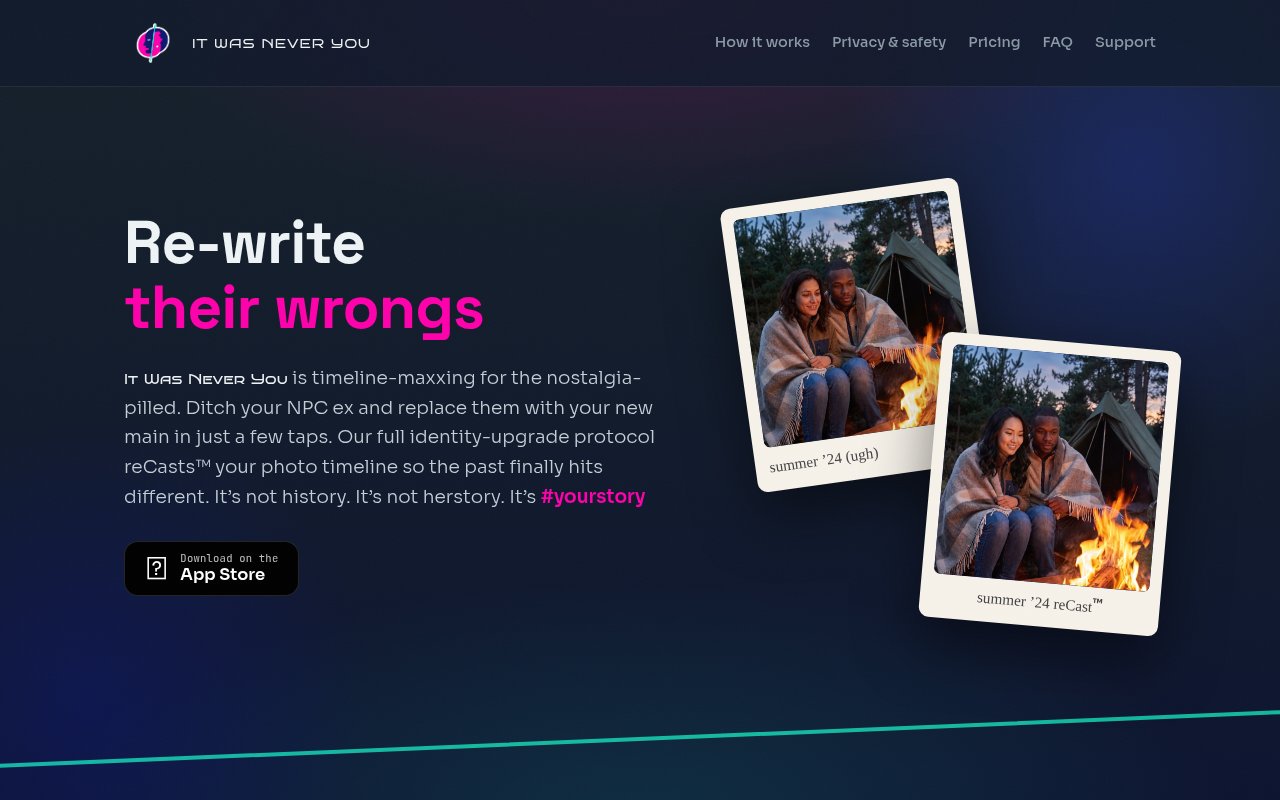
It Was Never You is an iPhone app that takes one person out of the photos in your library and puts a different person in their place. It's aimed at the moment when someone no longer belongs in your camera roll but the pictures themselves are worth keeping. Rather than deleting a year of photos because of who's standing in them, you keep the places, the trips and the light, with a face you'd rather see. The AI does the replacement, and the app writes the results straight back into the library you already use.
The problem is familiar to anyone who has scrolled past an ex in a memories widget. Photos and the people in them get tangled together, and the usual fixes are blunt. You either delete everything or leave it alone and wince every time it resurfaces. Generic editing apps can blur a face or crop someone out, but that leaves a hole and a photo that looks doctored, and doing it one image at a time across hundreds of pictures is nobody's idea of an evening. This app goes the other way and fills the gap with a real person you choose, across a whole batch, so the photo still reads as a photo.
The workflow has three steps. First you mark the person to remove by picking a photo of them and confirming their face, so the app knows who to look for. Then you choose the replacement, another photo of someone who has agreed to stand in, and the site is explicit that the replacement person's permission is required. Finally you select which photos to process. The app screens them on the phone, sends them for cloud processing, and returns the finished versions to your library. Nothing is destroyed along the way. Originals are preserved, edits can be undone inside the app, and the Revert to Original option in Apple Photos brings back the untouched version if you change your mind later. Processing time depends on how many photos you send in one go.
Privacy is where the app spends most of its words, which makes sense given what it's handling. Photos are checked on the device before anything is uploaded, so sensitive material never leaves the phone, and the app refuses sensitive content and any images of minors outright. Uploaded photos are processed in the cloud and automatically deleted within 72 hours, and the site states they aren't used for training and aren't shared with anyone. There's no account to create. The app identifies your device with an anonymous ID and asks for nothing else, which means no email, no login and no profile tied to what you edited.
It's for people who want to keep a photo history without a particular person in it. Breakups are the obvious case, and the name leaves little doubt about the intended mood, but the mechanics apply to anyone you'd rather not see when your phone decides to show you a highlight reel. It's a personal tool for your own library, not a general face-swap playground, and the consent requirement and content screening keep it pointed that way. If what you actually want is a retouching suite or a way to put your own face into film stills, this isn't built for that.
What sets it apart from the crowd of AI photo editors is the narrowness. It treats your timeline as the unit of work rather than a single image, it swaps identities across a batch instead of one photo at a time, and it writes the result back into the library you already use rather than into a separate gallery you'll forget about. The on-device screening, the 72 hour deletion window and the explicit permission language are unusual for an app in this category, and they're the parts to read before you decide whether the idea sits right with you. It also isn't a subscription. Credits are bought in packs and used when you need them, which fits a job most people do once rather than every month. The premise divides people, and the app doesn't pretend otherwise.
Access runs on credits. You get 10 free credits to start, with one credit per standard photo and two for an HD result, and any photo that fails to process is refunded automatically. The sensible way to evaluate it is with those free credits. Ten covers ten standard photos or five HD ones, which is enough to run a small batch from one event and see whether the replacement holds up across different angles and lighting before you commit a whole timeline to it, and since every edit can be reverted, nothing you try on a test set is permanent. Send a modest batch first, because processing time scales with how many photos you queue at once. Beyond that there are three packs. Starter is 10 credits for $2.99, Timeline is 50 for $9.99, and Clean Slate is 150 for $24.99. It's iPhone only and distributed through the App Store, and support is reachable at support@itwasneveryou.app. The developer is listed as Andrew Russell, so this is a small, focused app rather than a platform, and that's worth knowing when you weigh how much of your library to hand it.
Key Features
- Batch face replacement across a photo library
- On-device screening before upload
- Automatic deletion within 72 hours
- Undo and revert to original photos
- No account, anonymous device ID only
- Credit packs with an HD option
Pros & Cons
What we like
- Keeps the photos and drops the person instead of deleting everything
- Edits are reversible and originals are preserved
- Clear privacy posture with screening and 72 hour deletion
- Ten free credits to test before paying
Room for improvement
- iPhone only, with no Android or desktop version
- Photos are processed in the cloud, not on the device
- Some photos fail to process, though those credits are refunded
- Young app from a solo developer with a short track record
Frequently Asked Questions
What is It Was Never You?
Is It Was Never You free?
What happens to my photos?
Can I undo an edit?
Best For
Featured in
Alternatives to It Was Never You
View all
HairstylesPro
Try hundreds of hairstyles on your own photo before you commit to a cut

Recraft
AI image generator built around vector output and brand styles

Midjourney
Create stunning AI artwork from text prompts

Leonardo.ai
Image generation suite with fine-tuned models for game and product art
Our take
Tool Index Editorial · Oct 2026· 3.0/5
It Was Never You is an iPhone app that replaces one person with another across selected photos, then returns reversible edits to the photo library. It gives new users 10 credits, charges one credit for a standard image and two for HD, and refunds failed jobs. Paid packs cost $2.99 for 10 credits, $9.99 for 50, or $24.99 for 150.
The narrow batch workflow is clearer than a generic face swap playground, and we like the preserved originals, on device screening, no account design, and stated 72 hour server deletion. The underlying premise still carries obvious consent and misuse concerns. Images are processed in the cloud, results can be emotionally and factually misleading, and the app is iPhone only. Users should test the free batch, obtain the replacement person's permission, and keep expectations modest across varied angles and lighting.
Editorial opinion from the Tool Index team, written from the public product pages. Not a user review.
Reviews (0)
No reviews yet
Be the first to share your experience with It Was Never You
Sign in to write a reviewBadge builder
Add It Was Never You to your website
Choose a badge style and size, preview it here, then copy the generated HTML. Badge images are self-contained SVGs and do not require an external script.

<a href="https://toolindex.net/tools/it-was-never-you?ref=badge" target="_blank" rel="noopener">
  <img src="https://toolindex.net/badge/it-was-never-you/medium.svg" alt="It Was Never You - Listed on Tool Index" width="180" height="50" />
</a>How to use the badge
- 1. Pick the style, size, and theme that fit your layout.
- 2. Copy the generated HTML from the code block.
- 3. Paste it into your footer, homepage, or press page.
Standard badge available
The standard listing badge is available now. Score and circle badges are limited to tools currently ranked in the top 10 of a category.
Badge clicks return visitors to this profile with a referral tag so the source remains identifiable.
Related Tools
HairstylesPro
Try hundreds of hairstyles on your own photo before you commit to a cut
Recraft
AI image generator built around vector output and brand styles

AIMakeTattoo
Turn text descriptions into visual tattoo concepts with style and placement options
Flux by Black Forest Labs
Open and hosted image models that power half the AI art stack
Work on It Was Never You? Request listing access or correction