JogPad
Double-tap Shift to capture selected text into a lightweight macOS note pad
Gallery
About JogPad
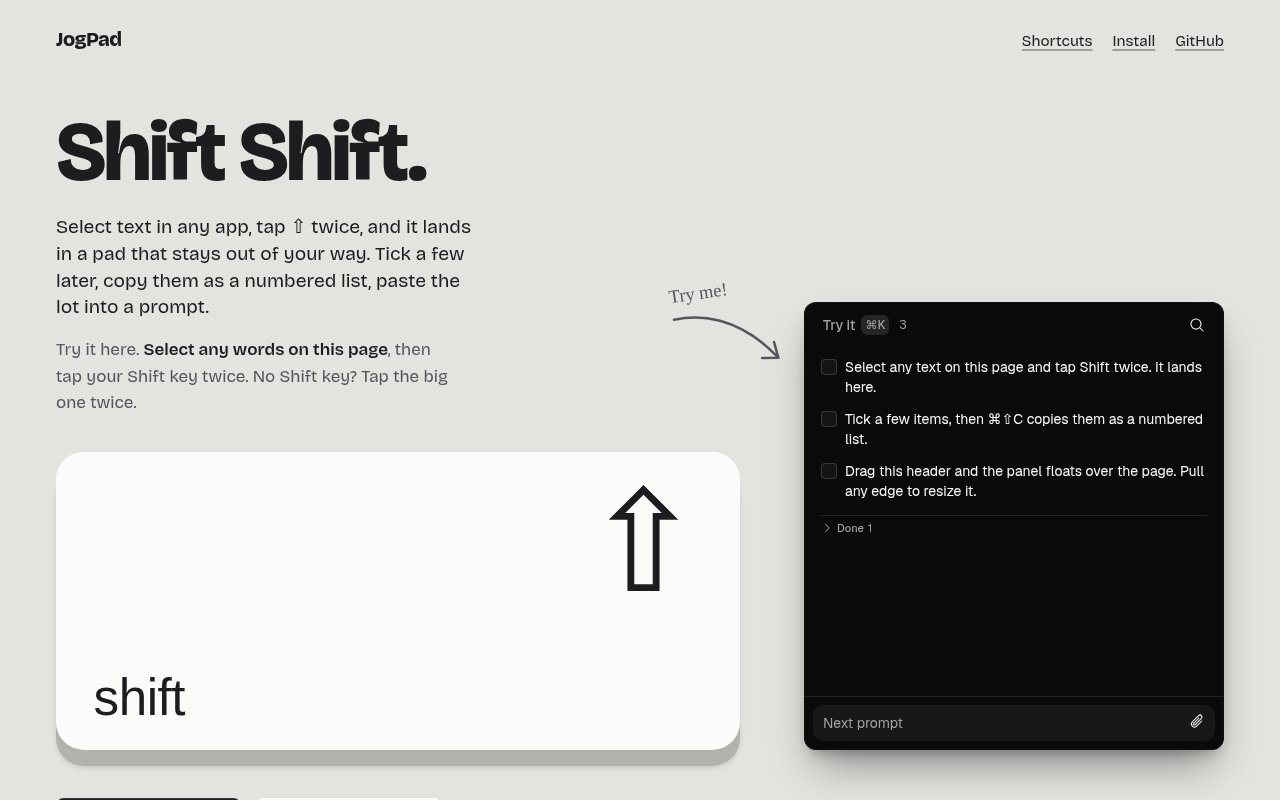
JogPad is a small macOS utility for capturing text without breaking your stride. You double-tap the Shift key anywhere on the system and whatever text is selected lands in a note pad, while you stay in the document, page or chat you were reading. If nothing is selected, the same gesture opens the pad so you can type a thought, and if the pad already has focus, it hides again. It's free, open source under the MIT license, and ships as a signed and notarized download.
The problem it goes after is the friction of saving a snippet. The usual path is select, copy, switch to a notes app, find the right place, paste, switch back, and by the third snippet you've lost the thread of what you were reading. JogPad collapses that into a keystroke that doesn't move focus, so a research session or a long code review turns into a list of captured pieces without the tab dance. The website frames it as keeping you reading where you were.
The gesture has three behaviors and that's the whole interface. With text selected, double Shift captures it and leaves you where you are. With nothing selected, double Shift opens the pad ready for typing. With the pad in front, double Shift hides it. That covers grabbing, jotting and getting the pad out of the way, and it means there's nothing to configure before the app is useful.
Everything lives in one plain markdown file in the app's support folder, so the notes are readable without JogPad and easy to back up or version. Inside the pad, items can be dragged to reorder, checked off, and auto-filed once completed. Notes are organized into pages you switch between with Cmd K, and full-text search covers every page. A Cmd Shift C shortcut exports the checked items as a numbered list, which the project describes as a way to assemble snippets into a prompt for an AI assistant and paste it in one go.
Setup is light. The app runs as a scratchpad with no special permissions at all, and asks for Accessibility and Input Monitoring only when you want the cross-app capture of selected text. There's no account, no sync and no telemetry. It's a universal binary for Apple Silicon and Intel Macs, and it auto-updates hourly on a choice of stable, beta or dev channels. The window is resizable with adjustable zoom levels, which matters for something that's meant to sit beside your real work rather than replace it. The website carries a browser-based demo of the pad, so you can try the interface before installing anything.
Updates arrive on three channels. Stable is the default, beta gets features earlier, and dev tracks the main branch, where the project publishes builds as it goes. The app checks hourly, so a fix lands without a manual download. That cadence, plus the open repository with its commit history, makes it easy to see what's changing before you switch channels.
It's for people on a Mac who read and write a lot and want a capture step that costs nothing. Developers collecting error messages and snippets, researchers pulling quotes, and anyone building up context for a language model prompt are the obvious fits. It's not a full notes app, and it isn't trying to be one, so people looking for sync across devices, rich formatting or a knowledge base will want something else alongside it.
Against a clipboard manager, the difference is intent. A clipboard history remembers everything you copied whether you wanted it or not, and it fades as the buffer fills. JogPad only keeps what you deliberately sent to it, holds it in an ordered list you can edit, and turns a selection of items into a paste-ready block on demand. That's a better fit for building a brief or a prompt than digging through a history.
What makes it different is the gesture and the restraint. Double Shift is quick to learn and hard to hit by accident, the capture doesn't steal focus, and the single markdown file keeps the whole thing transparent. The project is candid that it's a community recreation inspired by the public description of Copper by shadcn, built from that description with no shared code and no affiliation, which is worth knowing if you've seen the original. It's also early, at version 0.1.7 with a handful of GitHub stars, so expect changes between updates.
Access is free. There's no paid tier and no signup, and the source is on GitHub under fishballapp/jogpad for anyone who wants to build it themselves with Node, pnpm and a Rust toolchain. The developer is listed as Fishball Ltd, and the website carries the installation notes and a browser-based demo of the interface, but there's no published contact address.
Key Features
- Double Shift capture from any app
- Single plain markdown file storage
- Pages with Cmd K switching
- Full-text search across pages
- Numbered list export for prompts
- Stable, beta and dev update channels
Pros & Cons
What we like
- Capture without leaving what you're reading
- No account, sync or telemetry
- Notes stay in a readable markdown file
- Free and MIT licensed
Room for improvement
- macOS only
- Needs Accessibility and Input Monitoring for capture
- Early 0.x release with few users
- Not a full notes app, no sync across devices
Frequently Asked Questions
What is JogPad?
Is JogPad free?
Does it need special permissions?
Where are my notes stored?
Best For
Featured in
Alternatives to JogPad
View all
CalendHub
Smart scheduling and calendar management for teams
Kevin Gabeci Toolkits
Seven AI toolkits for writing books, making music, cutting video, and building agents.

Eased Into AI
Learn AI from zero. No jargon, no hype, just steps that work.

Fix It Gently
Calm, plain-English fixes for everyday tech problems.
Our take
Tool Index Editorial · Sep 2026· 3.5/5
JogPad is a free, MIT-licensed macOS scratchpad that captures selected text from any app when the user taps Shift twice. It is for researchers, developers, and heavy readers who want to collect snippets without leaving the current page. Notes stay in one Markdown file, can be searched and grouped into pages, and selected items can be copied as a numbered block for a brief or AI prompt.
We found the three-state shortcut and transparent storage more useful than another elaborate notes database. The browser demo also makes the interaction easy to judge before installing. System-wide capture requires Accessibility and Input Monitoring permission, which is substantial access for a small utility. There is no sync, rich knowledge base, or non-Mac version, and the project is still an early 0.1 release. As a deliberate capture pad rather than a second brain, it makes sense.
Editorial opinion from the Tool Index team, written from the public product pages. Not a user review.
Reviews (0)
Badge builder
Add JogPad to your website
Choose a badge style and size, preview it here, then copy the generated HTML. Badge images are self-contained SVGs and do not require an external script.

<a href="https://toolindex.net/tools/jogpad?ref=badge" target="_blank" rel="noopener">
  <img src="https://toolindex.net/badge/jogpad/medium.svg" alt="JogPad - Listed on Tool Index" width="180" height="50" />
</a>How to use the badge
- 1. Pick the style, size, and theme that fit your layout.
- 2. Copy the generated HTML from the code block.
- 3. Paste it into your footer, homepage, or press page.
Standard badge available
The standard listing badge is available now. Score and circle badges are limited to tools currently ranked in the top 10 of a category.
Badge clicks return visitors to this profile with a referral tag so the source remains identifiable.
Related Tools

Confluence
Atlassian's long-running team wiki that anchors many enterprise knowledge stacks
Asana
Project management for teams that live in projects, tasks and dependencies
Kevin Gabeci Toolkits
Seven AI toolkits for writing books, making music, cutting video, and building agents.

Logseq
An open-source outliner notes app where every bullet is a first-class block
Work on JogPad? Request listing access or correction