
Kinodesk
Local screen sharing optimized for high refresh rate streaming on capable hardware
Gallery
About Kinodesk
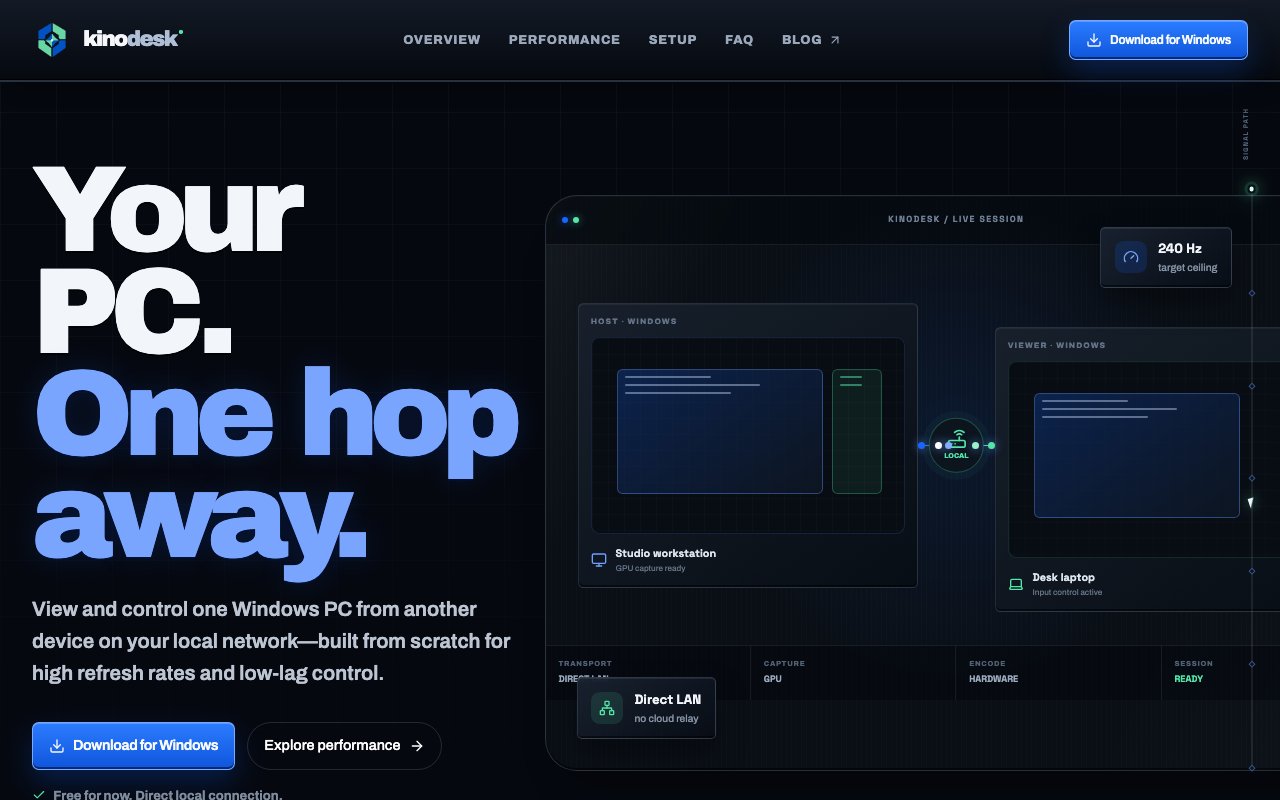
Kinodesk is a screen sharing application engineered for local network use where latency and frame rate matter more than reaching users across the globe. Instead of routing your display through cloud servers that add hops and introduce compression artifacts, it streams directly between devices on your local network. The design prioritizes responsiveness and smooth motion, making it suitable for scenarios where mainstream screen sharing tools feel sluggish or where you need playback at refresh rates that typical software caps at thirty frames per second. For users who have been frustrated by the gap between what their monitor displays and what the person on the other end actually sees, this focus on local performance addresses the root cause.
The product targets Windows users with capable hardware. If you have a gaming PC, a workstation with a dedicated GPU, or any machine that can push high frame rates locally, Kinodesk aims to take advantage of that horsepower rather than bottlenecking your output. This matters for use cases where fluid motion is not just a nicety but a requirement. Sharing gameplay footage, demonstrating animation work, reviewing video edits, or presenting motion graphics all suffer when the screen share cannot keep up with what is actually on your screen. Standard conferencing tools were never designed for this, and the compression they apply to keep bandwidth down destroys the fidelity that makes these visuals meaningful.
Under the hood, all traffic stays local. There is no cloud relay, no external server touching your screen content, and no round trip to a data center before your pixels reach the viewer. This architecture has dual benefits. Performance improves because packets travel a short physical distance with minimal hops and no external congestion to contend with. Privacy improves because your display data never touches infrastructure you do not control. For air-gapped environments, classified networks, or any situation where screen content should not leave the premises, this is a meaningful distinction from tools that quietly route everything through the vendor's cloud even when both parties are in the same building.
The interface includes real-time collaboration features beyond simple mirroring. Viewers can annotate the shared screen, draw on top of what they see, and leave comments on specific elements. This transforms passive watching into an interactive session where the person viewing can mark up exactly what they mean rather than trying to describe it verbally. Undo and redo functionality keeps the annotation process forgiving, so nobody has to worry about permanent marks or starting over. These tools make Kinodesk useful for design reviews where pointing at specific pixels matters, code walkthroughs where you want to highlight a line without losing your place, tech support within an office where describing the problem verbally would take longer than circling it, or any scenario where pointing at the screen is faster than words.
Kinodesk fits professionals and enthusiasts who need local screen sharing at a quality level that mainstream tools do not deliver. Creative teams reviewing high-fidelity work in progress, gaming setups where you want to share your screen to a nearby display without introducing visible input lag, internal tech support where cloud latency would frustrate the session, or environments where network security policies prohibit external traffic all represent natural use cases. The local-first posture also means no account is necessarily required to start streaming within your own network, which removes a layer of friction that most tools impose.
Documentation on the official site is sparse, and pricing details are not prominently displayed, so prospective users should expect to explore or reach out to the team for specifics. The product is Windows-first with unclear support for other platforms at this time. If you have tried other screen sharing tools and found them lacking for high-refresh, low-latency local use, Kinodesk offers a focused alternative that does not apologize for prioritizing performance over universal reach. It occupies a narrow lane, but for the users who need what it does, mainstream tools built for remote conferencing are not a substitute.
For anyone evaluating Kinodesk, the key question is whether local screen sharing at high fidelity solves a problem you actually have. If your workflow involves showing motion-intensive content to someone on the same network, the difference in smoothness and latency compared to cloud-routed tools can be dramatic. If your needs are remote collaboration across the internet, Kinodesk's local-first design is not going to help. The product is specialized, and that specialization is the point.
Key Features
- Local network screen streaming
- High refresh rate optimization
- Real-time annotation and markup tools
- No cloud server dependency
- Undo and redo for annotations
- Windows-first design for capable hardware
Pros & Cons
What we like
- Optimized for high refresh rates that standard tools do not support
- Traffic stays local so latency is minimal and privacy is better
- Annotation tools make viewing interactive rather than passive
- No reliance on external servers for core functionality
Room for improvement
- Documentation and pricing information are sparse
- Windows-first with unclear cross-platform support
- Best results require capable hardware
- Smaller user community and less mature than established tools
Frequently Asked Questions
What is Kinodesk?
Is Kinodesk free?
What platforms does Kinodesk support?
How is Kinodesk different from other screen sharing tools?
Best For
Featured in
Alternatives to Kinodesk
View all
CalendHub
Smart scheduling and calendar management for teams
Kevin Gabeci Toolkits
Seven AI toolkits for writing books, making music, cutting video, and building agents.

Eased Into AI
Learn AI from zero. No jargon, no hype, just steps that work.

Fix It Gently
Calm, plain-English fixes for everyday tech problems.
Reviews (0)
Badge builder
Add Kinodesk to your website
Choose a badge style and size, preview it here, then copy the generated HTML. Badge images are self-contained SVGs and do not require an external script.

<a href="https://toolindex.net/tools/kinodesk?ref=badge" target="_blank" rel="noopener">
  <img src="https://toolindex.net/badge/kinodesk/medium.svg" alt="Kinodesk - Listed on Tool Index" width="180" height="50" />
</a>How to use the badge
- 1. Pick the style, size, and theme that fit your layout.
- 2. Copy the generated HTML from the code block.
- 3. Paste it into your footer, homepage, or press page.
Standard badge available
The standard listing badge is available now. Score and circle badges are limited to tools currently ranked in the top 10 of a category.
Badge clicks return visitors to this profile with a referral tag so the source remains identifiable.
Related Tools

Confluence
Atlassian's long-running team wiki that anchors many enterprise knowledge stacks
Asana
Project management for teams that live in projects, tasks and dependencies
Kevin Gabeci Toolkits
Seven AI toolkits for writing books, making music, cutting video, and building agents.

Logseq
An open-source outliner notes app where every bullet is a first-class block
Work on Kinodesk? Request listing access or correction