
Koboyo Icons
Over 71,000 free hand-drawn SVG icons with native AI assistant integration
Gallery
About Koboyo Icons
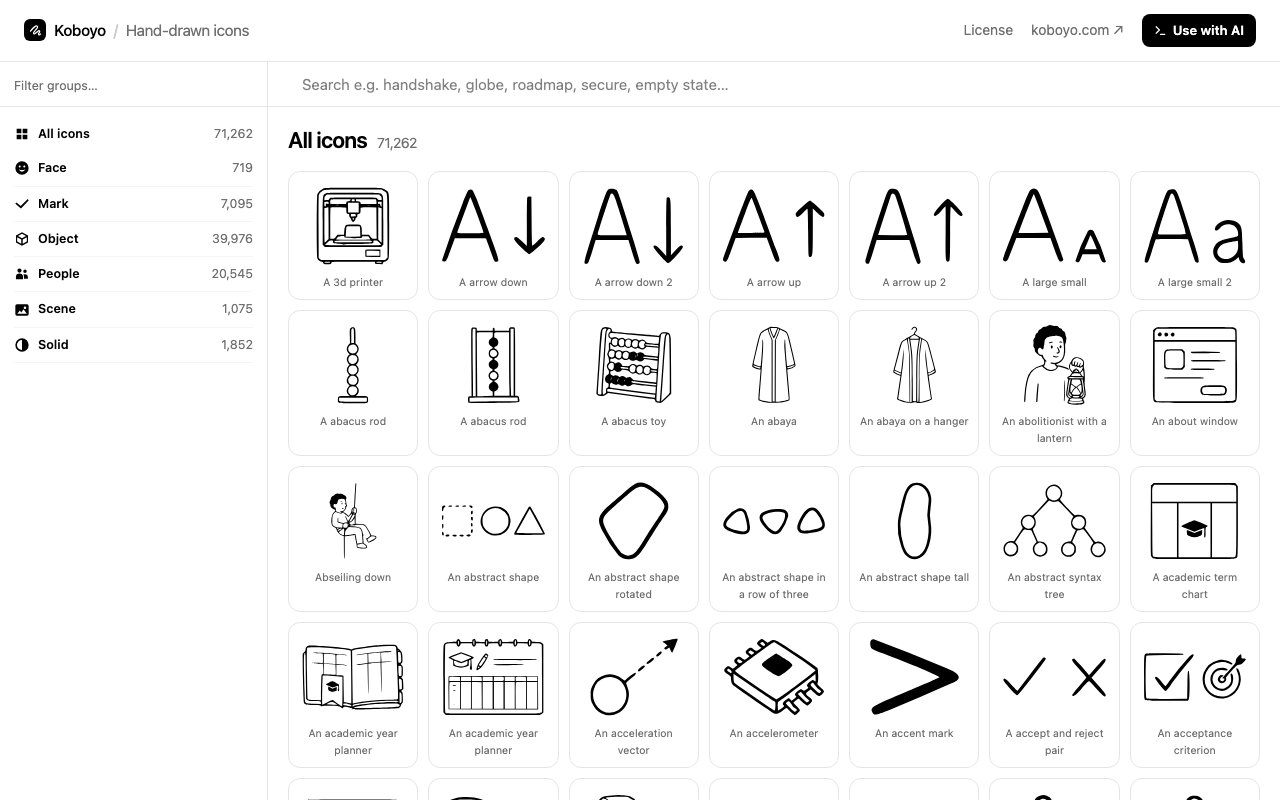
Koboyo Icons is a massive collection of over 71,000 hand drawn SVG icons available for free download and integration into digital projects of any scale. Unlike the geometric, pixel perfect icon sets that dominate most design systems with their clinical precision, these icons carry a distinctive sketched aesthetic that gives interfaces a warmer, more approachable feel. Every icon ships as scalable vector graphics, meaning they stay crisp at any resolution from tiny toolbar buttons to large hero graphics and remain easy to customize through CSS styling or direct SVG manipulation. The hand drawn quality isn't a limitation but a deliberate design choice for projects where personality matters more than sterile uniformity.
The library organizes icons across more than sixty subcategories covering virtually every subject you might need in a modern application or website. You'll find icons for agriculture and farming, animals and wildlife, business and finance, food and cooking, gaming and entertainment, technology and devices, transportation and vehicles, weather and nature, and dozens of other topics that span both common interface needs and specialized domains. The categorization makes browsing practical even with such a large collection, letting you drill down into specific themes when you have a clear need or explore broadly when looking for visual inspiration.
What sets Koboyo apart from typical icon libraries beyond the sheer volume is the hand drawn quality that runs through every single asset in the collection. These aren't icons generated from mathematically perfect circles and ruler straight lines fed through an automated design system. They have the slightly irregular edges, organic line weights, and natural character of illustrations made by a human hand, then converted to vector format for digital use without losing that handmade feel. This aesthetic works particularly well in projects aiming for a friendly, creative, or informal tone where clinical precision would feel cold and out of place. Children's apps, lifestyle brands, creative portfolios, and community platforms all benefit from iconography that feels like it was crafted rather than manufactured.
The platform includes native integration with AI development workflows through a Model Context Protocol interface that connects directly to compatible AI assistants. Developers working with Claude or similar AI tools can add Koboyo as an MCP source using a simple command line instruction, which lets the AI directly access and suggest icons during development conversations without requiring you to switch contexts to browse a website. You describe what you need, and your AI assistant can pull matching icons by category or description, keeping the creative flow uninterrupted. This matters increasingly for teams building with AI assistance where leaving the development environment to hunt for visual assets breaks concentration.
All icons are released under an open source license, so you can use them freely in commercial projects without worrying about attribution requirements, usage restrictions, or license fees accumulating as your project scales. The SVG format means you're getting actual source files rather than rasterized images that lock you into fixed sizes and colors. You can change colors by adjusting fill and stroke values in CSS or inline, scale to any dimension without quality loss, embed directly in HTML for instant rendering without additional HTTP requests, or import into design tools like Figma and Illustrator for further modification. For developers, this translates to smaller bundle sizes compared to icon fonts and more flexible runtime styling than image sprites allow.
The browsing interface presents icons in filterable grids where you can preview assets at various sizes before downloading. Individual icon pages show the SVG rendered at multiple scales so you can evaluate how the hand drawn style holds up when scaled down for small UI elements like navigation bars and form inputs or enlarged for hero graphics and marketing materials. The entire library is accessible through the web without account requirements or download limits, letting you grab exactly what you need immediately without friction.
Koboyo addresses the gap between bland corporate icon sets that look identical across every enterprise dashboard and expensive premium illustration libraries that charge per asset or require ongoing subscriptions. The hand drawn style adds genuine personality and visual differentiation without requiring custom illustration work or significant design budget. The size of the collection means you're unlikely to run out of options within a project or find yourself mixing incompatible styles because one set didn't have what you needed.
Key Features
- Over 71,000 hand-drawn SVG icons
- Model Context Protocol integration
- Organized category and subcategory browsing
- Permissive free license
- Works with Claude, Cursor, and VS Code
- Scalable vector format
Pros & Cons
What we like
- Massive library with a consistent hand-drawn style
- AI assistants can query icons programmatically via MCP
- Completely free with no account required
- SVG format scales cleanly at any size
Room for improvement
- Hand-drawn aesthetic doesn't suit every project
- No icon customization tools in the interface
- Browsing can be slow given the library size
- MCP integration requires compatible AI tools
Frequently Asked Questions
What is Koboyo Icons?
Is Koboyo Icons free?
How does the AI integration work?
Who is Koboyo Icons for?
Best For
Featured in
Alternatives to Koboyo Icons
View all
Framer
Visual website builder that lets designers ship production-grade marketing sites with real CMS, SEO controls, and code components.

Apatero Studio
Creator studio for AI image, video, audio, 3D, and avatars. Every model worth using, in one workspace.

Pixel Painters
Unlimited graphic design subscriptions built only for churches and ministries
Reviews (0)
Badge builder
Add Koboyo Icons to your website
Choose a badge style and size, preview it here, then copy the generated HTML. Badge images are self-contained SVGs and do not require an external script.

<a href="https://toolindex.net/tools/koboyo-icons?ref=badge" target="_blank" rel="noopener">
  <img src="https://toolindex.net/badge/koboyo-icons/medium.svg" alt="Koboyo Icons - Listed on Tool Index" width="180" height="50" />
</a>How to use the badge
- 1. Pick the style, size, and theme that fit your layout.
- 2. Copy the generated HTML from the code block.
- 3. Paste it into your footer, homepage, or press page.
Standard badge available
The standard listing badge is available now. Score and circle badges are limited to tools currently ranked in the top 10 of a category.
Badge clicks return visitors to this profile with a referral tag so the source remains identifiable.
Related Tools
Apatero Studio
Creator studio for AI image, video, audio, 3D, and avatars. Every model worth using, in one workspace.

Tailwind CSS
Rapidly build custom designs without leaving your HTML

Figma
Collaborative interface design tool

Marvel
Lightweight prototyping platform for turning images and screens into clickable mobile and web prototypes.
Work on Koboyo Icons? Request listing access or correction