
Lab
Use multiple LLM providers from a local-first, serverless browser workspace
Gallery
About Lab
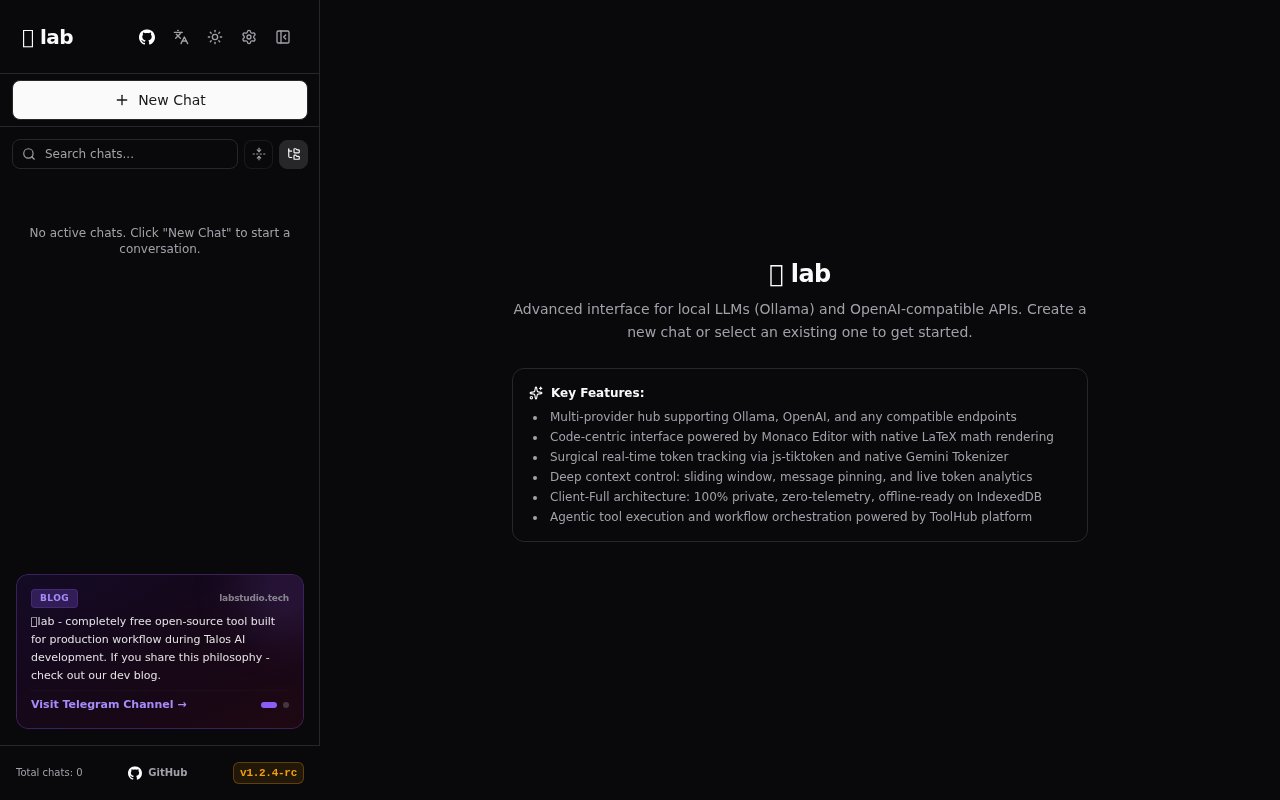
Lab is an open-source, local-first browser client for chatting with large language models and inspecting how each conversation uses context. It runs as a static front end with no application backend or server-side database. Provider settings, API keys, chats, messages, and model parameters are stored in the browser's IndexedDB, while requests go directly to the model endpoint the user selects. The project is aimed at individual developers and technically comfortable users who want an interface lighter than a full Open WebUI deployment and more provider-neutral than Google AI Studio. A hosted web app is available, and the same project can be built and served locally.
Provider support covers Ollama, OpenAI, Groq, OpenRouter, and other endpoints that implement an OpenAI-compatible API. Several providers can be configured at once, with quick model and conversation search for moving between them. That makes Lab useful for comparing responses or keeping local and hosted models in one workspace without sending account data through a separate Lab service. The distinction is important because using a hosted model still sends prompts to that chosen provider. Lab's privacy claim concerns its own architecture and local persistence. For Ollama, browser cross-origin restrictions require the local server to allow the Lab origin before the HTTPS app can connect.
Context management is the strongest part of the interface. Lab tracks token use in real time and breaks a thread down across user messages, assistant responses, tool calls, and system instructions. Important messages can be pinned so automated cleanup leaves them in place. A configurable sliding window removes older unpinned messages in first-in, first-out order after a chosen token threshold is crossed. Manual tools can remove the oldest messages, keep only a recent set, identify heavy token consumers, or replace large code blocks with placeholders while preserving the surrounding discussion. These controls give users a visible way to shape what is sent with the next turn instead of trusting an opaque context trimming policy.
Code and technical material get dedicated presentation. Responses use the Monaco editor, the same editor core found in Visual Studio Code, with folding and one-click copying for code blocks. KaTeX and LaTeX rendering handle inline and block mathematics. Per-chat controls expose temperature, top-p, frequency penalty, and presence penalty when a provider accepts them. Threads can be exported as clean Markdown, and a full workspace backup can be saved and restored as JSON. The interface is available in English, Russian, and Simplified Chinese, which is useful for a local tool whose stored conversation archive may span several models and subjects.
Lab also includes a ToolHub integration for model tool calls and multi-step execution. Users can inspect the execution steps and configure throttling delays rather than treating an agent loop as a hidden side effect of the chat. A voice engine adds push-to-talk speech input and sentence-level streaming text to speech, with speed control and filtering intended to keep code and mathematical notation out of spoken output. The progressive web app can be installed on desktop or mobile, caches its application assets for offline startup, and can notify the user when a long completion finishes. Actual model availability still depends on the selected endpoint, unless a local engine such as Ollama is used.
The hosted site uses Cloudflare's static page analytics, according to the repository. Running Lab locally through its Bun build removes that telemetry and can support a fully offline workspace when paired with a local model. The static build can also be placed on Cloudflare Pages, Vercel, Netlify, Nginx, Caddy, or another file server because it does not need a companion database. This low infrastructure footprint is the main operational difference from self-hosted chat systems built around containers, Python services, and persistent server databases. It also means there are no native multi-user accounts, central policy controls, shared workspaces, or enterprise identity features. Lab is intentionally a single-user client.
Lab is licensed under AGPL 3.0 and is free for personal use, self-hosting, and open-source modification. Companies that want to modify it internally or include it in proprietary software without the AGPL obligations are directed to obtain a commercial license. The project is young and some prominently discussed capabilities, including GraphMem knowledge graph memory, are marked as coming later rather than available in the public release. Users must also bring their own model access and understand provider billing. For someone who values granular context control, local chat storage, and a deployable static client, Lab already offers a practical daily workspace. Teams seeking shared administration or a managed all-inclusive subscription will find its individual, bring-your-own-provider model less suitable.
Key Features
- Local IndexedDB conversation storage
- Multi-provider model connections
- Granular context pruning controls
- Live token usage analytics
- Monaco code and LaTeX rendering
- Inspectable multi-step tool calls
Pros & Cons
What we like
- Runs without an application backend or database
- Keeps API keys and chat history in the browser
- Provides unusually precise context cleanup controls
- Can be hosted as a static site
Room for improvement
- Requires users to supply model endpoints and billing
- Ollama needs browser CORS configuration
- Single-user design lacks team administration
- Graph memory is announced but not public yet
Frequently Asked Questions
What is Lab?
Which model providers does Lab support?
Does Lab store API keys on a server?
Is Lab free?
Best For
Featured in
Alternatives to Lab
View all
Apatero AI
The creator studio for AI image, video, audio, 3D, and avatars, now at apatero.ai.

SoloDevStack
A solo developer blog built on head-to-head tool comparisons, 580+ posts deep.
Apatero Studio
Creator studio for AI image, video, audio, 3D, and avatars. Every model worth using, in one workspace.

Melodex
Turn your idea into an AI-generated music video
Our take
Tool Index Editorial · Sep 2026· 3.0/5
Lab is a free, open-source browser workspace for chatting with Ollama, OpenAI, and compatible model endpoints. It targets technical users who want Monaco-based code display, LaTeX, token tracking, context pruning, and inspectable tool execution without an application backend. Conversations live in IndexedDB, and the public app identifies itself as a release candidate.
The serverless design is easy to self-host and keeps chat history and provider keys in the browser. The tradeoff is that users bring their own endpoints, credentials, and model bills, while local Ollama connections may require browser configuration. We also saw little public documentation beyond the app shell and feature summary. It looks useful for individual experimentation, not yet like a governed team workspace.
Editorial opinion from the Tool Index team, written from the public product pages. Not a user review.
Reviews (0)
Badge builder
Add Lab to your website
Choose a badge style and size, preview it here, then copy the generated HTML. Badge images are self-contained SVGs and do not require an external script.

<a href="https://toolindex.net/tools/lab?ref=badge" target="_blank" rel="noopener">
  <img src="https://toolindex.net/badge/lab/medium.svg" alt="Lab - Listed on Tool Index" width="180" height="50" />
</a>How to use the badge
- 1. Pick the style, size, and theme that fit your layout.
- 2. Copy the generated HTML from the code block.
- 3. Paste it into your footer, homepage, or press page.
Standard badge available
The standard listing badge is available now. Score and circle badges are limited to tools currently ranked in the top 10 of a category.
Badge clicks return visitors to this profile with a referral tag so the source remains identifiable.
Related Tools
Apatero AI
The creator studio for AI image, video, audio, 3D, and avatars, now at apatero.ai.
Kevin Gabeci Toolkits
Seven AI toolkits for writing books, making music, cutting video, and building agents.

Warp
The modern terminal reimagined with AI and collaboration

Bolt.new
Prompt-to-deployed full-stack app inside the browser
Work on Lab? Request listing access or correction