
LazyReader
Android reader that streams ebooks and audiobooks straight from Dropbox, OneDrive or Nextcloud
Gallery
About LazyReader
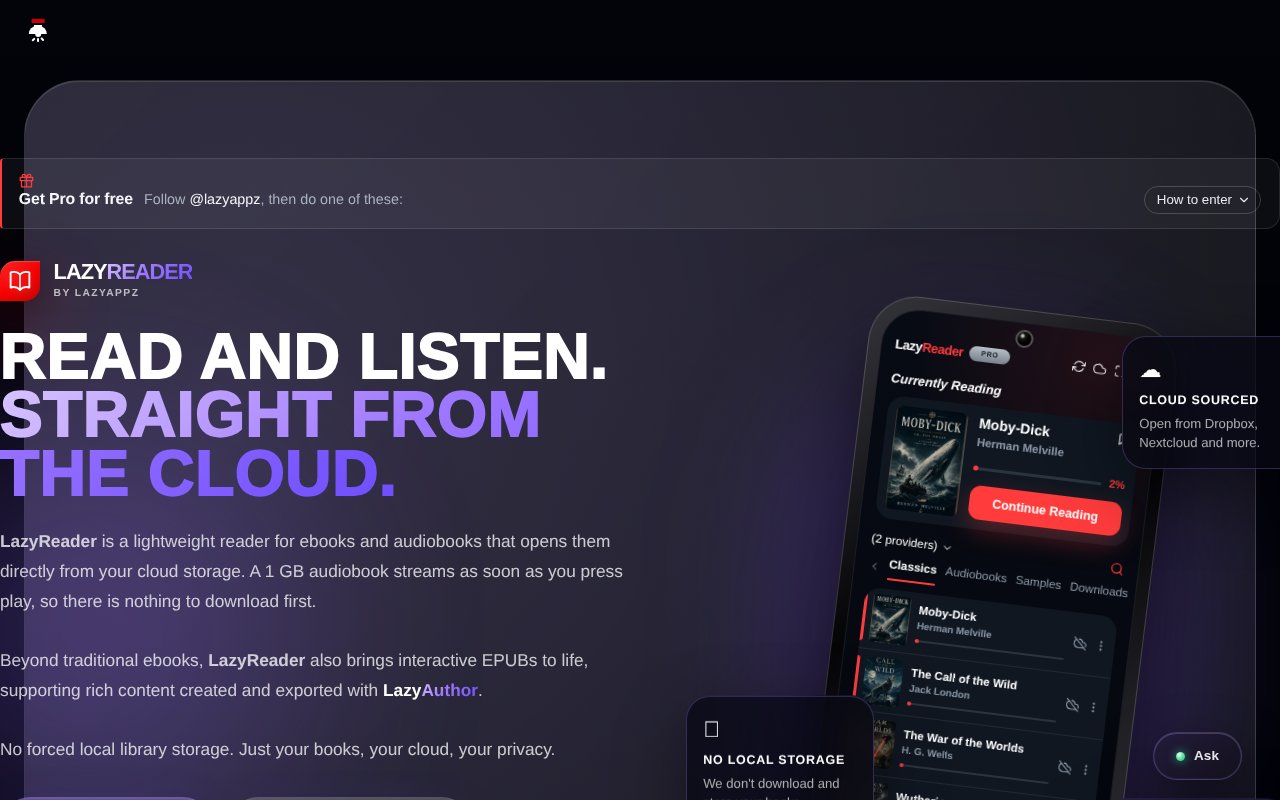
LazyReader is an Android app for reading ebooks and listening to audiobooks directly from your cloud storage. You link Dropbox, OneDrive or Nextcloud, your library appears, and you read or listen from where the files already sit. There's nothing to import, transfer or duplicate, and a one gigabyte audiobook plays when you press play instead of after a download. It's made by Lindocode Digital in South Africa.
The problem it goes after is the small tax that most reader apps impose. Files have to be copied onto the phone, storage fills up, and the copy on your tablet drifts from the copy on your phone. If your books already live in a cloud folder, the sensible thing is to read them there, and LazyReader is built on exactly that assumption. It keeps your place in sync across sessions and devices, so the book is wherever you are.
On the audiobook side it streams M4B, M4A and MP3 files with chapter navigation, a sleep timer, adjustable playback speed and lock screen controls, so you're not unlocking the phone to pause, and it drops a bookmark wherever the sleep timer stopped you. You can save a book for offline listening only when you actually want to. On the ebook side it handles EPUB with adjustable fonts, themes and brightness, highlights and notes, an offline dictionary for looking up a word without leaving the page, and read-aloud text-to-speech with sentence highlighting and its own sleep timer.
The Play listing describes the pitch in its own words, a clean, distraction-free reader for your ebooks and your audiobooks that reads them straight from your cloud storage, with nothing to import, transfer or duplicate. Linking a cloud takes a moment and the library appears, and the app keeps the reading and listening position in sync so a chapter started on one device continues on another. The offline option is deliberate rather than automatic. You download a title only when you know you'll be without a connection, and otherwise the storage stays untouched.
The feature that makes it more than a cloud file reader is linking editions. If you own both the ebook and the audiobook, you can join them into a single entry on the shelf, read on the train, listen while you cook, and pick the other edition up at the same chapter. Notes and character lists you make while listening stay attached to the book. The library can be viewed as a list, a grid or grouped by author, the interface comes in six languages, and there are no ads.
It's for readers with an existing cloud library who want a lightweight, distraction-free app rather than a store, and for audiobook listeners tired of downloading large files. It also supports interactive fiction EPUBs with rich content, which pairs with LazyAuthor, the developer's companion tool for creating them, so it's a natural home for that niche too. Read-aloud works on any EPUB, not only ones bought through a particular store. The six interface languages and the grouped-by-author library view are small touches, but they're the kind that matter to someone with a few hundred books in a folder.
The Pro programme is unusual. The site advertises Bronze and Silver Pro periods of 30 days, and runs promotions on TikTok, Instagram and Threads that award them, including a chance at Silver Pro forever. That's a launch tactic rather than a price list, and it's the main reason the tiers are hard to compare. The mockups on the site are labelled as the Pro edition, so the fuller experience appears to be the Pro one, though the site doesn't say which features are gated.
Against the download-first readers, the trade is clear. You need a connection for anything you haven't saved, and you're limited to three cloud providers, but you never manage files on the phone and your library stays wherever you already keep it. For people with a Nextcloud server in particular, that's the difference between a reader that respects their setup and one that wants to own it.
The caveats are that it's Android only, with no mention of iOS on the site, that it's an early release with a small install base, and that the free versus Pro split isn't spelled out. The Play listing showed just over a hundred installs and an update dated 7 September 2026 when we checked, so it's early days, but the app is being actively maintained. The privacy policy references POPIA, South Africa's data protection law.
Access is freemium. The app is a free install on Google Play with a free tier and Pro tiers whose prices aren't published on the site. Support is reachable at info@lindocode.com.
Key Features
- Streams from Dropbox, OneDrive and Nextcloud
- M4B, M4A and MP3 audiobook playback
- EPUB reader with highlights and notes
- Linked ebook and audiobook editions
- Read-aloud text-to-speech with sentence highlighting
- Offline dictionary and optional offline downloads
Pros & Cons
What we like
- No importing or duplicating files
- Reading position syncs across devices
- Sleep timer bookmarks where it stopped
- No ads and a distraction-free interface
Room for improvement
- Android only, no iOS app
- Pro tier prices aren't published
- Early release with a small install base
- Limited to three cloud providers
Frequently Asked Questions
What is LazyReader?
Is LazyReader free?
Which formats does it support?
Is there an iPhone version?
Best For
Featured in
Alternatives to LazyReader
View all
PropGPT
iOS app that uses AI to analyze player props, spreads, and bets across major sports leagues

Expo
The React Native framework and cloud build service that ships native iOS and Android apps without touching Xcode.

Glide
No-code platform that turns spreadsheets and databases into mobile and web apps, with computed columns and AI actions.

Fix It Gently
Calm, plain-English fixes for everyday tech problems.
Our take
Tool Index Editorial · Sep 2026· 3.0/5
LazyReader streams EPUB ebooks and M4B, M4A, or MP3 audiobooks from Dropbox, OneDrive, and Nextcloud on Android. We found the ability to link ebook and audiobook editions particularly useful, alongside chapter controls, sleep timers, read aloud, notes, offline downloads, and position sync. It is a reader for an existing cloud library rather than another store.
The public site leaves the free and Pro split unclear and doesn't publish normal Pro prices, relying instead on promotional Bronze and Silver periods. It is Android only and supports just three storage providers, so users outside that exact setup have no path in. The cloud native premise is good, but unclear packaging and an early public footprint make this one to test before depending on it.
Editorial opinion from the Tool Index team, written from the public product pages. Not a user review.
Reviews (0)
Badge builder
Add LazyReader to your website
Choose a badge style and size, preview it here, then copy the generated HTML. Badge images are self-contained SVGs and do not require an external script.

<a href="https://toolindex.net/tools/lazyreader?ref=badge" target="_blank" rel="noopener">
  <img src="https://toolindex.net/badge/lazyreader/medium.svg" alt="LazyReader - Listed on Tool Index" width="180" height="50" />
</a>How to use the badge
- 1. Pick the style, size, and theme that fit your layout.
- 2. Copy the generated HTML from the code block.
- 3. Paste it into your footer, homepage, or press page.
Standard badge available
The standard listing badge is available now. Score and circle badges are limited to tools currently ranked in the top 10 of a category.
Badge clicks return visitors to this profile with a referral tag so the source remains identifiable.
Related Tools

Sleep Suivour
Track your sleep, improve your rest
Glide
No-code platform that turns spreadsheets and databases into mobile and web apps, with computed columns and AI actions.
ProtoPie
High-fidelity prototyping tool that simulates sensor input, IoT triggers, and complex interactions without writing code.

FlutterFlow
Visual builder that compiles to real Flutter source code, producing native iOS, Android, web, and desktop apps from one project.
Work on LazyReader? Request listing access or correction