
Lowkey Studio
Browser based shader compositor for video effects, keyframing, and GLSL editing via WebGPU
Gallery
About Lowkey Studio
Lowkey Studio runs entirely in the browser as a shader-based compositor for video and image editing. Built on WebGPU technology, it delivers hardware-accelerated graphics processing without requiring any software installation. Users can drag and drop media files directly into the interface, arrange clips on a timeline, apply visual effects, and export finished compositions. The whole workflow happens in a browser tab, making it accessible from any machine with a modern web browser and compatible GPU. This removes the typical barriers of downloading installers, managing licenses, or worrying about platform compatibility that desktop video editors impose.
The timeline-based editing interface will feel familiar to anyone who has used video editing software before. Clips line up horizontally along the timeline, and users can trim, reposition, and layer them as needed. The compositor supports video files, static images, and audio tracks, allowing for complete multimedia projects within a single workspace. Cropping and scaling controls offer multiple fitting options including aspect ratio preservation, cover mode that fills the frame by cropping edges, and fit mode that shows the entire source within bounds while adding letterboxing if necessary. An inspector panel provides detailed adjustments for selected elements, giving precise control over positioning, timing, and effect parameters.
Shader effects form the core of what makes Lowkey Studio distinctive among browser-based editors. Rather than relying on preset filters with limited customization, the platform applies GPU shaders to transform visuals at a fundamental level. This approach leverages the parallel processing power of graphics hardware, enabling real-time previews of complex effects that would strain CPU-based alternatives attempting the same transformations. For creators interested in generative visuals, glitch aesthetics, custom post-processing looks, or experimental video art, the shader foundation provides capabilities beyond traditional video editors that ship with fixed effect libraries.
WebGPU handles the rendering pipeline, representing the latest standard for browser-based graphics performance. Previous web graphics technologies like WebGL served well for years but came with limitations that constrained what browsers could achieve. WebGPU unlocks more direct access to GPU compute capabilities, better memory management, and improved performance characteristics that matter for real-time video processing. As browser support for WebGPU continues expanding, Lowkey Studio's technical foundation positions it to improve alongside platform capabilities without requiring users to install updates or manage versions.
Content creators working on social media videos, motion graphics experiments, and visual art projects will find the most immediate use for Lowkey Studio. The browser-based access removes friction for quick edits when a full desktop application would be overkill or unavailable. Someone working from a borrowed computer, a library machine, or a device where they lack administrator permissions can still access professional-level compositing tools. Developers and technical artists who understand shaders can push the tool further, potentially customizing effects in ways that locked-down consumer editors don't permit. Remote collaborators benefit from the install-free access since sharing a link means instant access without lengthy setup instructions.
The project operates as open source with code available on GitHub, which means users can inspect the implementation, contribute improvements, or fork it for their own purposes. A Patreon supports ongoing development for those who want to back the project financially, but the software itself remains freely accessible without subscription fees or usage limits. This model attracts users who value transparency and community-driven development over proprietary alternatives that charge monthly for similar functionality. The open codebase also serves as a learning resource for developers interested in WebGPU implementation patterns and browser-based media processing.
Screenshot and recording capabilities capture work in progress or final output directly from the browser window. The rendering and export system produces downloadable files ready for distribution across platforms or further processing in other tools for additional polish. For workflows that need quick composition, visual experimentation, or shader-driven effects without the overhead of installing and licensing desktop software, Lowkey Studio fills a niche that few browser-based tools currently address. Its WebGPU foundation ensures the platform will only become more capable as browser graphics technology continues advancing.
Key Features
- Multi track timeline with drag and drop clips
- 78 bundled shader effects across categories
- Live GLSL and Slang shader editor
- Keyframing for position, scale, opacity, effects
- Masking with paint, chroma key, and mattes
- Audio reactive procedural property drivers
Pros & Cons
What we like
- Runs entirely in browser with no install required
- Live shader editing enables custom effect authoring
- Files stay local, nothing uploaded to servers
- MIT licensed and fully open source
Room for improvement
- Requires WebGPU support, limiting older browsers
- Interface has rough edges as the project matures
- Smaller community and documentation than established tools
- Export limited to WebM, PNG, or desktop app save
Frequently Asked Questions
What is Lowkey Studio?
Is Lowkey Studio free?
Who is Lowkey Studio for?
Does Lowkey Studio upload my files?
Best For
Featured in
Alternatives to Lowkey Studio
View allKling AI
Kuaishou's video model that punches above its weight on motion
Luma Dream Machine
Fast, photoreal video generation from the team behind Genie 3D

Zoom
The default video meeting tool of the post-2020 internet

Loom
Async video messages that replace meetings with a quick screen recording
Our take
Tool Index Editorial · Oct 2026· 2.5/5
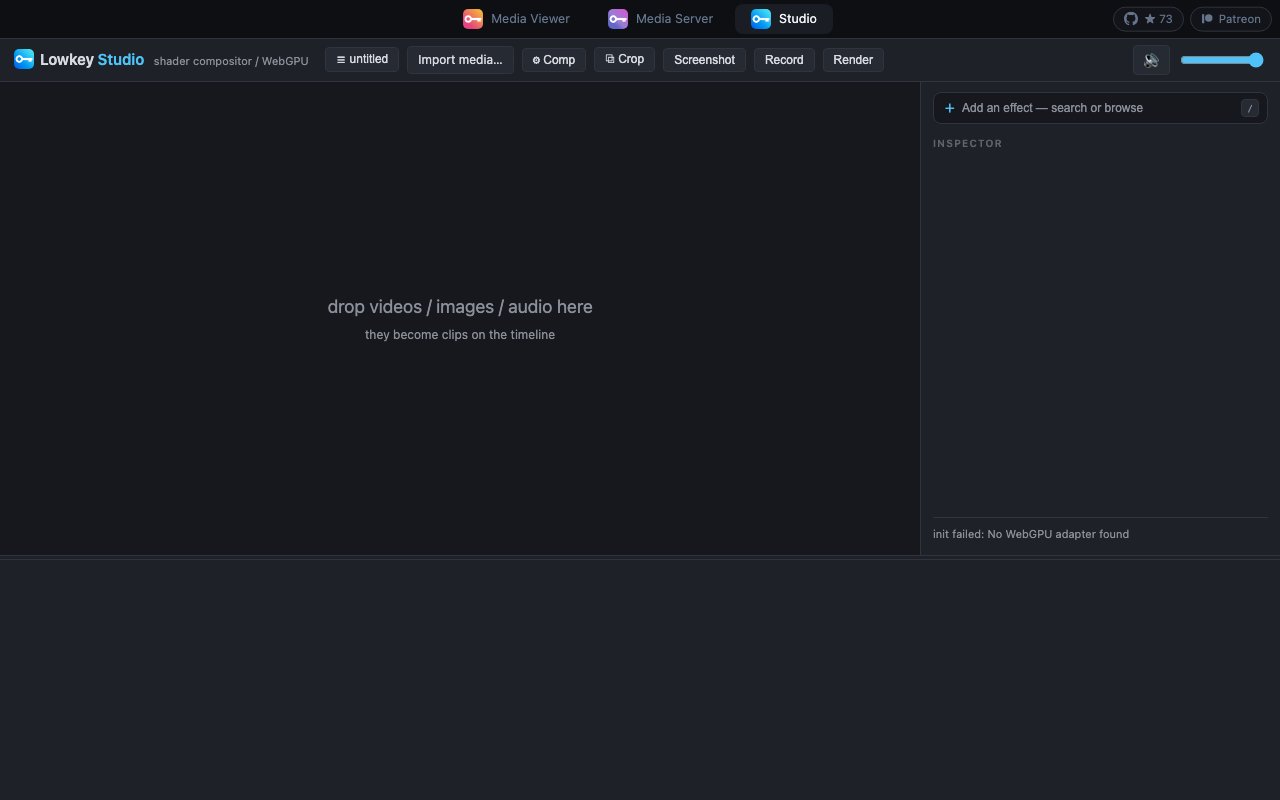
Lowkey Studio is a browser-based WebGPU compositor for layering video, images, audio, and shader effects on a timeline. The visible interface suggests a focused tool for technical artists who want shader-driven effects without installing a conventional editor. Its public page did not show pricing in our capture.
We could not properly try the editor because the page reported that no WebGPU adapter was found. That is an environment limitation, but it exposes the product's main weakness as well. Browser and GPU compatibility are prerequisites, and the captured site provided almost no explanatory documentation around the interface. Promising for experiments, but too lightly evidenced here for a stronger recommendation.
Editorial opinion from the Tool Index team, written from the public product pages. Not a user review.
Reviews (0)
Badge builder
Add Lowkey Studio to your website
Choose a badge style and size, preview it here, then copy the generated HTML. Badge images are self-contained SVGs and do not require an external script.

<a href="https://toolindex.net/tools/lowkey-studio?ref=badge" target="_blank" rel="noopener">
  <img src="https://toolindex.net/badge/lowkey-studio/medium.svg" alt="Lowkey Studio - Listed on Tool Index" width="180" height="50" />
</a>How to use the badge
- 1. Pick the style, size, and theme that fit your layout.
- 2. Copy the generated HTML from the code block.
- 3. Paste it into your footer, homepage, or press page.
Standard badge available
The standard listing badge is available now. Score and circle badges are limited to tools currently ranked in the top 10 of a category.
Badge clicks return visitors to this profile with a referral tag so the source remains identifiable.
Related Tools

Apatero AI
The creator studio for AI image, video, audio, 3D, and avatars, now at apatero.ai.

LocalClip
Local-first AI video clipper for Mac that turns long videos into vertical clips

Melodex
Turn your idea into an AI-generated music video
Apatero Studio
Creator studio for AI image, video, audio, 3D, and avatars. Every model worth using, in one workspace.
Work on Lowkey Studio? Request listing access or correction