Lutino
Thirty-second mood journaling with on-device insights tied to your sleep, steps and places
Gallery
About Lutino
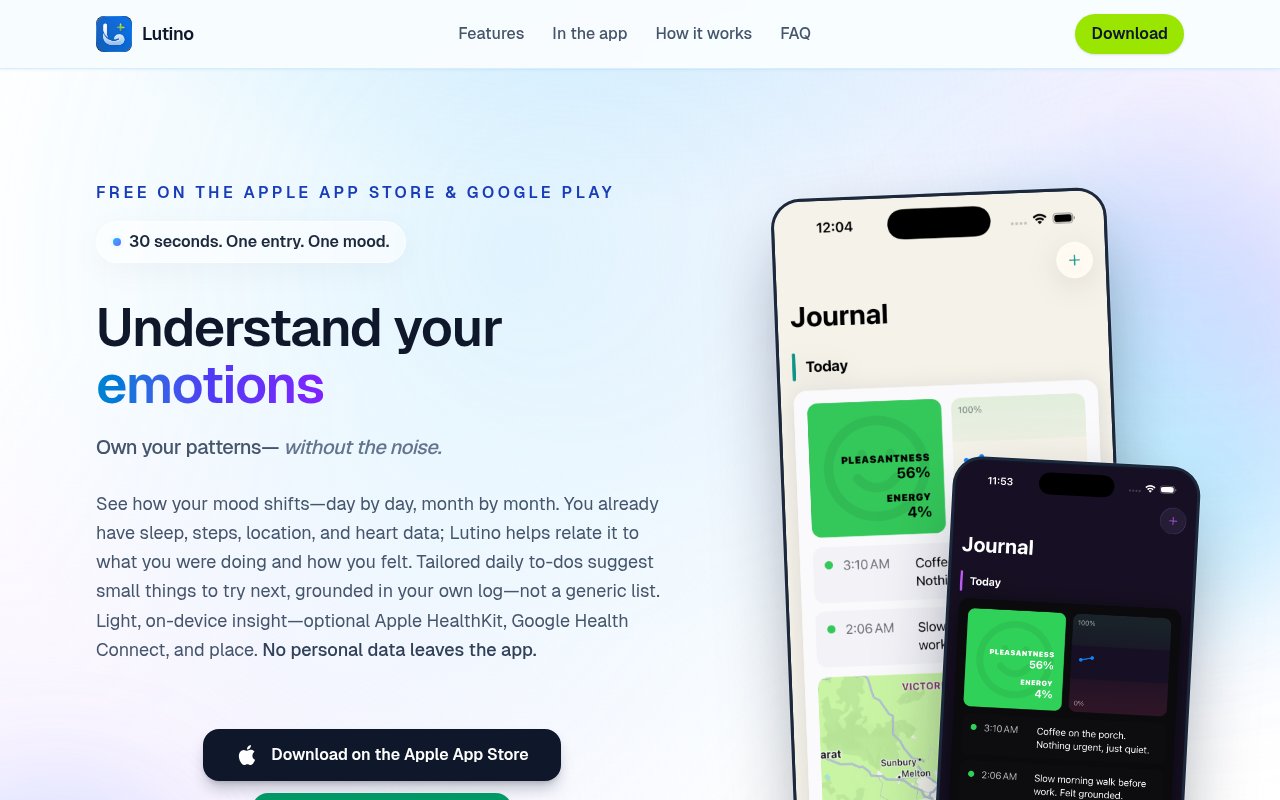
Lutino is a micro-journaling app for iPhone and Android built around one entry a day that takes about thirty seconds. You tap a mood, add a line if you feel like it, tag how you felt and what was going on, and that's the whole ritual. Over weeks the app relates those entries to what your phone already knows, sleep, steps, workouts, heart rate and the places you were, and shows you how your mood moves with them. It's free on both stores.
The problem it's aimed at is that most people already carry the data that would explain their good and bad days, but it sits in separate health dashboards as scattered stats. A sleep score in one place, a step count in another, and a vague memory of whether last Tuesday was a decent day. Lutino's job is to put the feeling and the context in the same story, so you can see the day as a whole rather than as a set of numbers.
Health and location are optional layers. If you connect Apple HealthKit or Google Health Connect, sleep, steps and heart data join the journal, and location can add place. Leave off anything you don't want. Everything sensitive, in the developer's words, stays on your phone. The analysis runs on the device. Your phone looks for recurring themes, what tends to show up when you're doing okay versus when you're not, and that work stays local. The developer is explicit that entries, health data and the analysis aren't uploaded for cloud processing, and that the marketing site's ordinary web analytics are separate from anything in the app.
From those patterns the app produces two things. Charts and heatmaps, day by day and month by month, built to show movement and contrast rather than to hand you a score or a streak to defend. And tailored daily to-dos, short suggestions for things to try today drawn from what has lined up with a better mood in your own history. On-device models can also surface reflection prompts grounded in your log. The app describes all of this as pattern-informed nudging, not a prescription, and it's clear that it isn't a medical or therapy app.
The how it works section lays the routine out in four steps. Log the mood, about thirty seconds, a tap and a line if you want it, enough for future you to remember what the day was like. Layer in health and place if those signals help your story, and skip anything that doesn't feel right. Let the on-device analysis look for recurring themes. Then peek when you're curious, some weeks barely opening the app and other weeks wanting the full view, with no guilt trip either way. The FAQ adds that small regular logs beat occasional essays when you're trying to see trends, so long entries aren't the point.
It's for people who want to understand their own moods without committing to long entries, a social feed or a gamified streak. Some weeks you'll barely open it and some weeks you'll want the full view, and the app is designed not to guilt you either way. Themes and accents can be tuned so the journal feels like a space you want to open.
What sets it apart from the crowded mood tracker category is the combination of a very small daily ask, health and place correlation, and a strict on-device privacy model. Plenty of apps track mood. Fewer tie it to sleep and steps, and fewer still do the analysis without sending your journal to a server. There's a dedicated in-the-app tour page with screenshots and copy for journaling, health and place, mood charts, tailored daily to-dos, on-device reflections and appearance settings, which is the best place to see what the screens actually look like before installing. The store links carry campaign tags so the developer knows which part of the site sent you, and the site is explicit that this reveals nothing about your journal.
Against the big mood trackers, the difference is temperament as much as features. Lutino doesn't want to be opened every day, doesn't score you, and doesn't turn your entries into a feed. Whether that restraint suits you is a matter of taste, and the free install makes it cheap to find out.
The caveats are that it's a new project by a single developer, Christopher Dingli, the site's screenshots were still marked as coming soon when we looked, and the privacy policy is described as being finalised. Access is free. Lutino is a free install on the Apple App Store and Google Play, and the site says that if paid options ever appear they'll be announced clearly in the app and store listings. The developer's email is published on the site for questions.
Key Features
- Thirty-second mood entries with tags
- Optional Apple HealthKit and Health Connect layers
- Optional location for place context
- On-device pattern analysis
- Mood charts and heatmaps by day and month
- Tailored daily to-dos from your own history
Pros & Cons
What we like
- Free on iOS and Android
- Nothing personal leaves the phone
- Health and place data are opt-in
- No streaks, scores or social feed
Room for improvement
- New app from a solo developer
- Screenshots and privacy policy still being finalised
- Insights need weeks of entries to become useful
- Not a clinical or therapy tool
Frequently Asked Questions
What is Lutino?
Is Lutino free?
Does my journal leave my phone?
Is it a mental health treatment app?
Best For
Featured in
Alternatives to Lutino
View all
PropGPT
iOS app that uses AI to analyze player props, spreads, and bets across major sports leagues

Expo
The React Native framework and cloud build service that ships native iOS and Android apps without touching Xcode.

Glide
No-code platform that turns spreadsheets and databases into mobile and web apps, with computed columns and AI actions.

Fix It Gently
Calm, plain-English fixes for everyday tech problems.
Our take
Tool Index Editorial · Sep 2026· 3.5/5
Lutino is a free iPhone and Android mood journal built around one short daily entry. It is for people who want to relate mood to optional sleep, step, workout, heart, and location signals without sending personal journal data to a cloud service. The site says entries and analysis stay on the phone, and both health and place access are optional.
We like the low effort routine, the absence of streak pressure, and the attempt to turn a personal history into modest daily suggestions rather than generic wellness tips. The limits deserve equal weight. This is not medical advice, useful patterns need enough consistent entries to emerge, and the public page still showed screenshot placeholders when we checked. As a free personal tracker it is promising, but it should not be treated as a clinical tool.
Editorial opinion from the Tool Index team, written from the public product pages. Not a user review.
Reviews (0)
Badge builder
Add Lutino to your website
Choose a badge style and size, preview it here, then copy the generated HTML. Badge images are self-contained SVGs and do not require an external script.

<a href="https://toolindex.net/tools/lutino?ref=badge" target="_blank" rel="noopener">
  <img src="https://toolindex.net/badge/lutino/medium.svg" alt="Lutino - Listed on Tool Index" width="180" height="50" />
</a>How to use the badge
- 1. Pick the style, size, and theme that fit your layout.
- 2. Copy the generated HTML from the code block.
- 3. Paste it into your footer, homepage, or press page.
Standard badge available
The standard listing badge is available now. Score and circle badges are limited to tools currently ranked in the top 10 of a category.
Badge clicks return visitors to this profile with a referral tag so the source remains identifiable.
Related Tools

Sleep Suivour
Track your sleep, improve your rest
Glide
No-code platform that turns spreadsheets and databases into mobile and web apps, with computed columns and AI actions.
ProtoPie
High-fidelity prototyping tool that simulates sensor input, IoT triggers, and complex interactions without writing code.

FlutterFlow
Visual builder that compiles to real Flutter source code, producing native iOS, Android, web, and desktop apps from one project.
Work on Lutino? Request listing access or correction