
MacAIApps
Curated directory of 577 AI-powered applications built specifically for macOS
Gallery
About MacAIApps
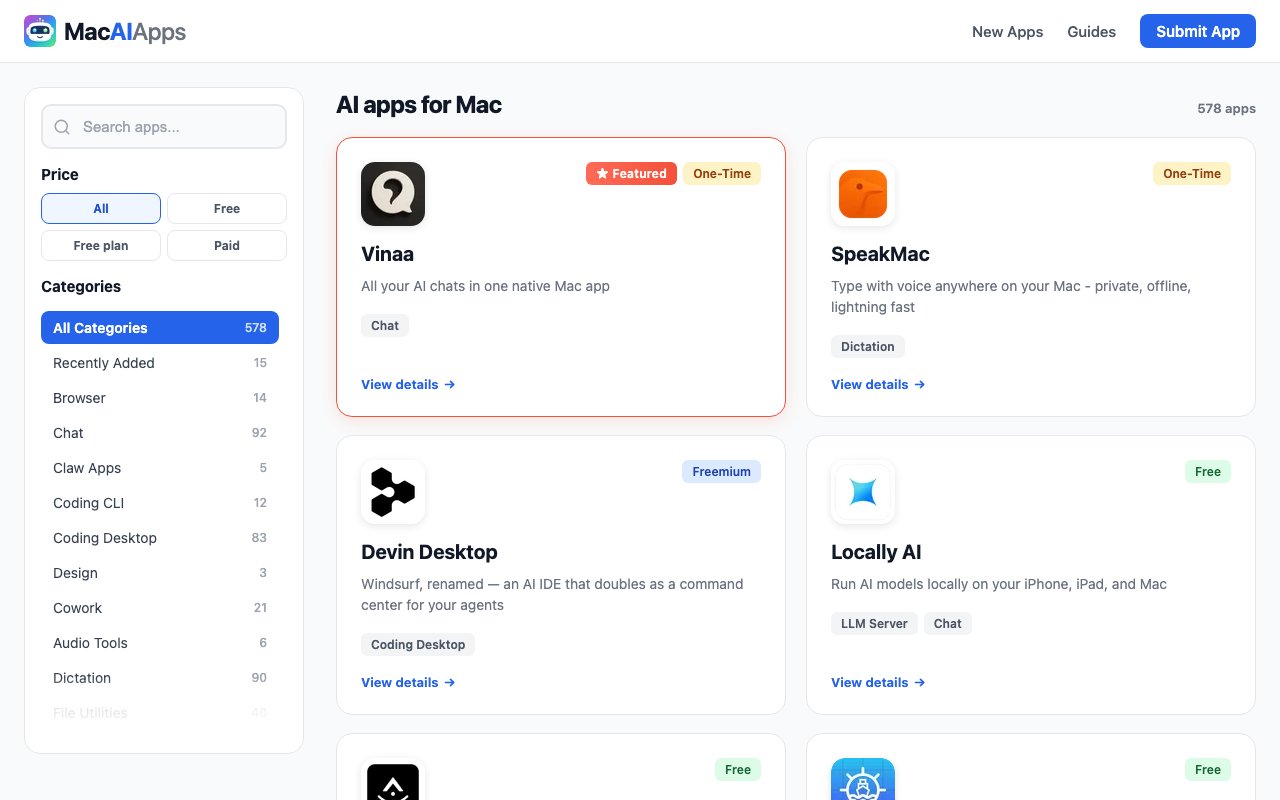
MacAIApps is a curated directory that catalogs AI powered applications built specifically for macOS. At the time of this review, it lists 577 tools across 23 categories, making it one of the larger collections focused exclusively on Mac native AI software. The directory exists because most AI tool listings mix web apps, mobile apps, Windows software, and platform agnostic services together. For someone working on a Mac who wants apps that actually run on their machine, integrate with macOS features, and take advantage of Apple Silicon optimization, generic directories waste time. MacAIApps filters for Mac compatibility upfront, so every listing represents software you can actually install and run.
The categories cover a broad range of use cases. Development tools include Coding Desktop and Coding CLI sections for AI coding assistants, plus LLM Servers for running local language models on your own hardware. Productivity spans Personal Knowledge Management, Study Assistants, and general productivity apps that help with daily work. Content creation categories cover Video Editing, Video Generation, Image Generation, and Design tools for creative professionals. Communication includes Chat applications, Meeting Assistants, Transcription, and Dictation software for people who spend time in meetings or need to convert speech to text. Specialized sections handle Audio Tools, File Utilities, Browser extensions, and more niche categories that don't fit elsewhere.
Each listing includes the app's core function and pricing model. The directory provides filtering by price, letting you narrow results to Free, Freemium, Paid, Subscription, or One time purchase options. A search function helps when you know what you're looking for. Recently added apps surface in a dedicated section so you can see what's new, and featured tools get highlighted placement for apps the editorial team considers noteworthy. This combination of browsing and filtering means you can approach the directory either by exploring categories or by searching for specific functionality.
The submission model is open but curated. Developers can submit their apps through a portal on the site, but the editorial team maintains control over what ultimately appears. This differs from pure submission based directories where anything submitted gets listed automatically. The curation adds a layer of filtering that keeps spam and low quality apps out, though it also means some apps may not appear if they haven't been discovered or approved yet. Developers who find errors in their listings can request corrections through the same portal.
MacAIApps skews heavily toward developer tools. The prominence of coding assistants, CLI tools, and local LLM servers reflects the developer audience that's most interested in running AI on their own hardware rather than through cloud APIs. This includes people who want to experiment with open source models locally, use AI coding agents that can access their filesystem, or integrate AI into their development workflow without sending code to external servers. The ability to run models locally matters for developers working on proprietary code or in regulated industries where data can't leave the machine. But the directory also covers mainstream categories for non technical users who simply want AI capabilities in their daily work, like transcription for meetings, image generation for creative projects, or chat interfaces for general queries.
The directory itself is completely free to browse without creating an account. You don't need to sign up or pay anything to search, filter, and view listings. The tools listed span the full pricing spectrum. Some are completely free and open source, released under permissive licenses that let you modify and redistribute them. Others charge monthly subscriptions that give you access to updates and support. Some offer one time purchases for perpetual licenses. The directory doesn't normalize pricing or provide cost comparisons between similar tools, so you'll need to check individual apps for current rates and licensing terms.
Additional resources on the site include guides and a blog with content about Mac AI software. The team provides transparency about their methodology for selecting and reviewing apps. They maintain social media presence for community engagement, which suggests an active team rather than a static directory. None of this is essential to the directory's core function of helping you find Mac AI apps, but it indicates ongoing maintenance and curation rather than a one time dump of links that will become outdated.
For Mac users tired of discovering a promising AI tool only to find it's Windows only or web based, MacAIApps provides a focused starting point. It won't replace hands on evaluation of the apps themselves, but it narrows the field to software that actually runs on macOS and can leverage Apple's hardware and operating system features. The developer tool emphasis makes it particularly useful for engineers looking for coding assistants, terminal utilities, and local model runners, though the breadth of categories serves a wider audience who just want AI features in their everyday Mac applications.
Key Features
- 577 AI apps organized by 25 categories
- Search and price filtering
- Featured apps and recent additions
- Developer submission portal
- System requirements listed per app
- Comparable alternatives for each tool
Pros & Cons
What we like
- Every listed tool runs natively on macOS
- Editorial research rather than self-submitted listings
- Strong developer tool coverage with CLI and LLM categories
- Free to browse with no account required
Room for improvement
- Only useful if you work on macOS
- No user reviews or ratings system
- Some categories are smaller than others
- Listings depend on editorial research capacity
Frequently Asked Questions
What is MacAIApps?
Is MacAIApps free to use?
How are apps added to MacAIApps?
Who is MacAIApps for?
Best For
Featured in
Alternatives to MacAIApps
View all
Apatero AI
The creator studio for AI image, video, audio, 3D, and avatars, now at apatero.ai.

SoloDevStack
A solo developer blog built on head-to-head tool comparisons, 580+ posts deep.
Apatero Studio
Creator studio for AI image, video, audio, 3D, and avatars. Every model worth using, in one workspace.

Melodex
Turn your idea into an AI-generated music video
Reviews (0)
Badge builder
Add MacAIApps to your website
Choose a badge style and size, preview it here, then copy the generated HTML. Badge images are self-contained SVGs and do not require an external script.

<a href="https://toolindex.net/tools/macaiapps?ref=badge" target="_blank" rel="noopener">
  <img src="https://toolindex.net/badge/macaiapps/medium.svg" alt="MacAIApps - Listed on Tool Index" width="180" height="50" />
</a>How to use the badge
- 1. Pick the style, size, and theme that fit your layout.
- 2. Copy the generated HTML from the code block.
- 3. Paste it into your footer, homepage, or press page.
Standard badge available
The standard listing badge is available now. Score and circle badges are limited to tools currently ranked in the top 10 of a category.
Badge clicks return visitors to this profile with a referral tag so the source remains identifiable.
Related Tools
Apatero AI
The creator studio for AI image, video, audio, 3D, and avatars, now at apatero.ai.
Kevin Gabeci Toolkits
Seven AI toolkits for writing books, making music, cutting video, and building agents.

Warp
The modern terminal reimagined with AI and collaboration

Bolt.new
Prompt-to-deployed full-stack app inside the browser
Work on MacAIApps? Request listing access or correction