
mboxreader
Turn Gmail backup files into a searchable, readable email archive in your browser
Gallery
About mboxreader
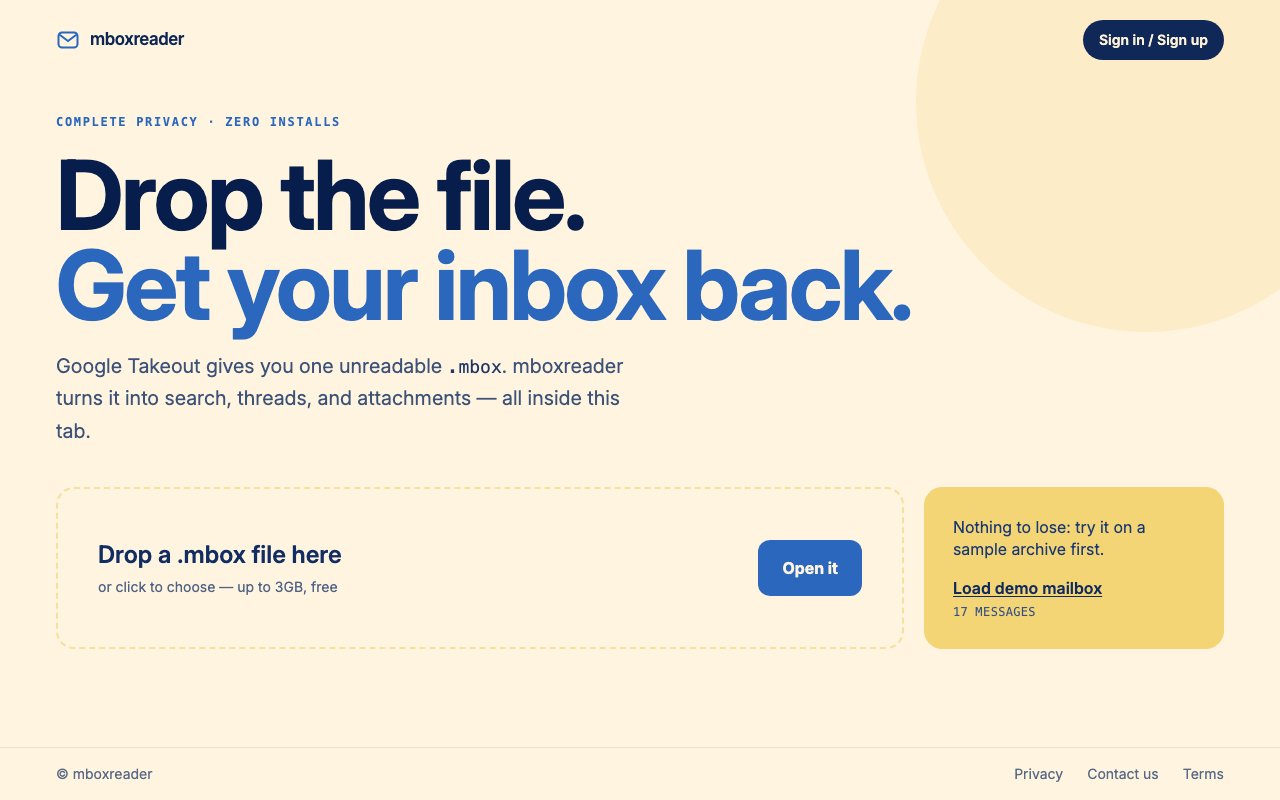
mboxreader is a browser based utility that opens .mbox files exported from Google Takeout and turns them into something you can actually read and search. If you have ever tried to open a Gmail backup directly, you know it is just a wall of raw text with headers, MIME boundaries, and base64 encoded attachments. This tool handles all of that parsing and presents your emails as threaded conversations you can browse the way you would in any mail client. There is no software to install, no account to create, and no server that touches your data. You drop in your file and start reading. The interface is clean and minimal, designed to get out of your way and let you focus on finding what you need in your archive.
The problem it solves is straightforward but surprisingly common. Google lets you export your entire mailbox through Takeout, which is useful for backups, legal discovery, switching providers, or just peace of mind. But the resulting .mbox file is not meant for human consumption. It is a concatenation of raw email messages in a format that dates back to the 1970s, predating most modern email conventions. Most people download it, realize they cannot open it with any standard application, and forget about it until they actually need something from that archive. mboxreader gives you a way to actually use that backup when you need it, without installing a desktop email client, spinning up a mail server, or importing everything into a new account just to search through old messages.
Processing happens entirely in your browser tab. When you drop in a file, JavaScript parses it locally, extracts the individual messages, decodes any encoded content, and renders them in a familiar inbox style interface. The file never leaves your machine, which matters when you are dealing with years of personal or business email that may contain sensitive information, financial records, or confidential conversations. Privacy is not an afterthought here. It is the whole point. There is no backend server receiving your data, no analytics on your content, and no cloud upload happening behind the scenes. Files up to 3GB are supported, which covers most individual Gmail exports from personal accounts. If your export is larger because you have been using Gmail for work or have accumulated years of correspondence, you would need to split it, but for a typical personal account this ceiling is plenty generous.
Once loaded, you get a search bar that lets you find specific messages by keyword, sender, or subject line. The search is fast enough for practical use even on larger archives, though performance depends on your browser and system resources. Conversation threading groups replies together so you can follow discussions without hunting through timestamps and manually piecing together who said what and when. This is particularly valuable when you are trying to reconstruct a conversation that happened years ago and spanned multiple messages. Attachments that were included in the original emails are accessible and downloadable, so if you are looking for a specific document or file that someone sent you, you can retrieve it directly from the archive without any additional steps.
The interface respects your system theme, so it matches dark or light mode automatically based on your operating system preferences. There is nothing revolutionary about the feature set. It is just a competent email reader that happens to work on a file format nobody else makes easy to open. You can try a demo mailbox before uploading your own data if you want to see how it works first. The demo contains 17 sample messages organized into threads, which gives a realistic preview of what browsing your own archive will feel like. This is helpful if you are not sure whether the tool will handle your specific export or if you just want to poke around before committing anything personal.
Who actually needs this? Anyone sitting on a Google Takeout export they have never opened. People who closed a Gmail account but kept the backup and now need to find something specific like a receipt, contract, or important conversation. Researchers or legal professionals who need to review historical email records without spinning up a full mail server or importing into Outlook or Thunderbird. Freelancers and consultants who want a searchable archive of client communication from projects that ended years ago. Small business owners who switched email providers but want to keep access to their old correspondence. It also works for anyone switching away from Gmail who wants to keep a readable copy of old conversations without relying on another cloud service or trusting another company with their data.
Where it fits in the broader landscape is as a lightweight viewer rather than a migration tool. It does not import your mail into another service or convert it to a different format like EML or PST. It just makes the archive readable and searchable in place. If that is all you need, it does the job without the overhead of heavier alternatives that want you to create accounts, install software, or pay subscription fees. The tool is completely free with no payment required and no premium tier in sight. It runs on the web, works in any modern browser including Chrome, Firefox, Safari, and Edge, and handles the file entirely on your device. For a single purpose utility, it does exactly what it advertises without trying to upsell you on features you did not ask for.
Key Features
- Browser based .mbox file reading
- Full text email search
- Conversation threading by subject
- Attachment access and download
- Up to 3GB file support
- Demo mailbox for preview
Pros & Cons
What we like
- Runs entirely in the browser with no installation
- Files stay local and never leave your machine
- Completely free with no signup required
- Handles large Gmail exports up to 3GB
Room for improvement
- Read only viewer, no export or conversion options
- Limited to .mbox format from Google Takeout
- No mobile app for on the go access
- Large files may slow down browser performance
Frequently Asked Questions
What is mboxreader?
Is mboxreader safe to use with personal emails?
How large of an mbox file can I open?
Do I need to create an account to use mboxreader?
Best For
Featured in
Alternatives to mboxreader
View all
CalendHub
Smart scheduling and calendar management for teams
Kevin Gabeci Toolkits
Seven AI toolkits for writing books, making music, cutting video, and building agents.

Confluence
Atlassian's long-running team wiki that anchors many enterprise knowledge stacks
Kibu
Vertical software for disability service providers covering compliance, documentation, and programming
Reviews (0)
Badge builder
Add mboxreader to your website
Choose a badge style and size, preview it here, then copy the generated HTML. Badge images are self-contained SVGs and do not require an external script.

<a href="https://toolindex.net/tools/mboxreader?ref=badge" target="_blank" rel="noopener">
  <img src="https://toolindex.net/badge/mboxreader/medium.svg" alt="mboxreader - Listed on Tool Index" width="180" height="50" />
</a>How to use the badge
- 1. Pick the style, size, and theme that fit your layout.
- 2. Copy the generated HTML from the code block.
- 3. Paste it into your footer, homepage, or press page.
Standard badge available
The standard listing badge is available now. Score and circle badges are limited to tools currently ranked in the top 10 of a category.
Badge clicks return visitors to this profile with a referral tag so the source remains identifiable.
Related Tools
Confluence
Atlassian's long-running team wiki that anchors many enterprise knowledge stacks
Asana
Project management for teams that live in projects, tasks and dependencies
Kevin Gabeci Toolkits
Seven AI toolkits for writing books, making music, cutting video, and building agents.

Logseq
An open-source outliner notes app where every bullet is a first-class block
Work on mboxreader? Request listing access or correction