
MidiSlayer
Learn to read sheet music by playing a connected MIDI keyboard
Gallery
About MidiSlayer
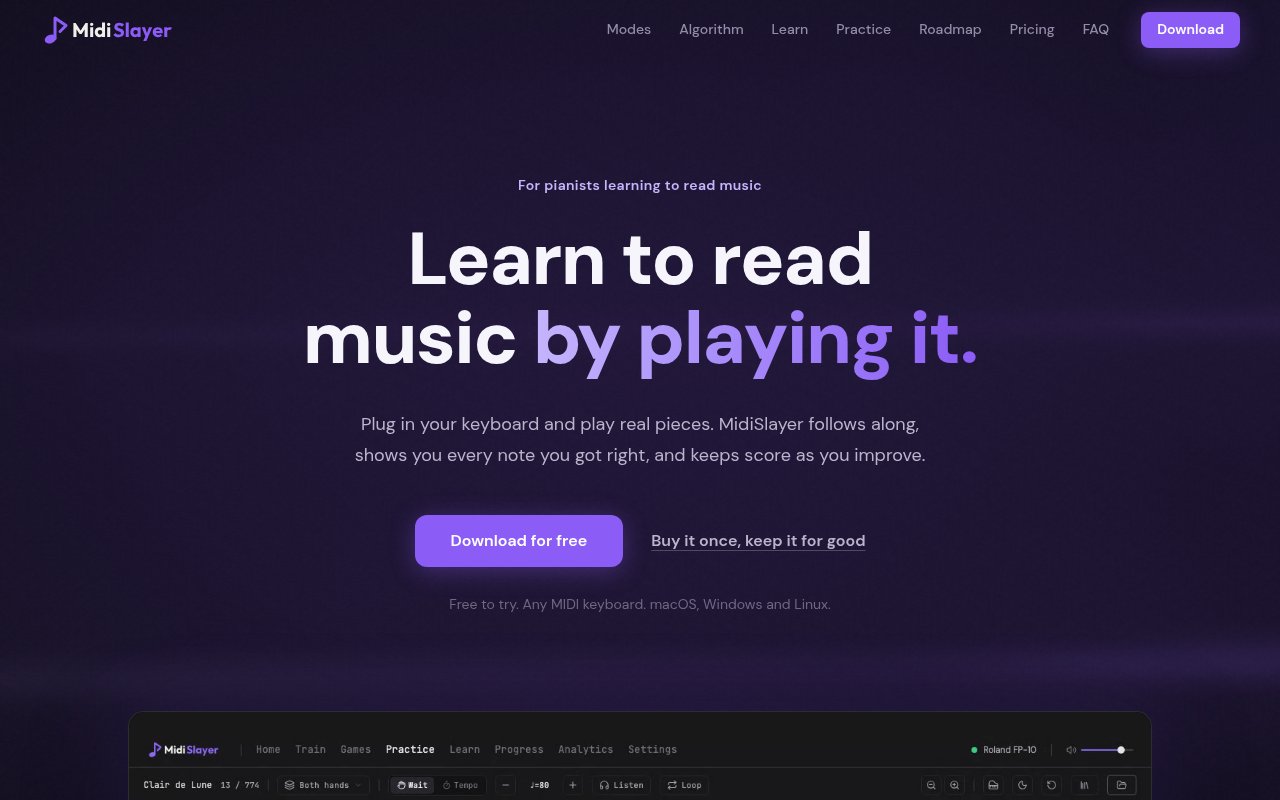
MidiSlayer is a desktop sight reading trainer for pianists who want to connect written notation with the keys under their fingers. Instead of asking learners to identify notes in a passive quiz, it listens to a USB MIDI keyboard and follows what they play. Notes appear on the staff, the player responds on the instrument, and the app shows which answers were right. It can also follow complete pieces one note at a time or at a set tempo. The aim is to make reading practice feel more like playing music and less like memorizing a chart. A built in screen keyboard makes it possible to explore without hardware, though the product is clearly designed around the feedback and timing it gets from real MIDI keys.
The app divides practice into training modes, games, and score practice. Its nine training modes cover note and chord flashcards, graded reading, arpeggios, scale patterns, intervals, key signatures, harmony, and chord progressions. Three arcade games add a score based route into repeated practice. The underlying loop stays consistent throughout. MidiSlayer presents something on the staff, listens for the response, and records the result. It weights future prompts according to performance, dealing unseen material frequently and bringing missed notes back more often. Notes that have become familiar still return occasionally. This adaptive selection removes the need to assemble a drill playlist before every session.
For complete music, MidiSlayer includes a library of 69 pieces that ranges from beginner melodies to substantial classical repertoire. Wait mode holds the cursor until the player finds each note, allowing someone to learn without keeping pace. Tempo mode adds a count in, metronome, and moving cursor, then marks played notes as early, late, or on time. The paid version can also open MusicXML and MXL files, engrave the score inside the app, and use the same wait and tempo modes with a learner's own exam piece or a teacher's arrangement. That import support keeps practice from being limited to the included catalog and gives advancing players a way to work on music they already care about.
A seven lesson course introduces the staff, Middle C, rhythm, time signatures, sharps, flats, key signatures, and a first week of practice. Each lesson leads into the relevant training mode, joining explanation with immediate playing. This makes MidiSlayer suitable for someone who can't yet read notation, not only for an experienced pianist trying to improve speed. Progress tools record sessions, notes played, practice time, streaks, points, ranks, personal bests, first try accuracy, weak notes, and slow notes. The app stores practice data in a local database by default. Optional synchronization can carry a smaller progress summary between computers, but normal training and games continue offline after the one time licence activation.
Practice isn't limited to silent drills and classical scores. The Session includes a backing band with drums and double bass, several groove styles, and tunes for improvising. It responds to how hard the player performs and provides a more musical break from note recognition. Exam mode takes the opposite approach, using timed attempts without hints and converting the score into a rank for each skill. Together with the daily game format and personal bests, these options give learners several reasons to return while keeping the core activity tied to reading and playing.
MidiSlayer runs on macOS, Windows, and Linux, including builds for Apple Silicon and Intel Macs as well as common Linux package formats. Any USB MIDI keyboard can provide input, from a basic controller to a digital piano. A full personal licence can be active on two computers in any mix of the supported desktop systems, and device slots can be managed through an optional account. The standard licence is for an individual's own playing. Teachers who want to use the product with pupils need Studio seats, which are billed annually. Tablet editions are on the roadmap, but iPad and Android support isn't part of the current desktop release.
The free version doesn't expire and doesn't require a card. It includes the full Note Flashcards mode, the Blitz game, one daily Cascade run, a jam session over the Pop Loop, the complete reading course, and the ability to browse and hear all 69 included scores, with four pieces playable. The full personal version costs $49.99 as a one time purchase and unlocks all nine training modes, three arcade games, the whole playable library, MusicXML import, exam mode, and use on two machines. Updates through version 1 are included. That makes MidiSlayer a freemium product with a useful permanent starter edition and a buy once upgrade, which is a notable alternative to subscription based music learning apps.
Key Features
- MIDI keyboard note detection
- Adaptive sight reading drills
- Wait and tempo practice modes
- MusicXML sheet music import
- Local progress and weakness tracking
- Windows macOS and Linux apps
Pros & Cons
What we like
- Turns notation practice into active keyboard playing
- Permanent free version has no trial clock
- Paid licence is a one time purchase
- Practice data stays local by default
Room for improvement
- A MIDI keyboard is needed for the full experience
- Mobile and tablet editions aren't available yet
- Full personal licence covers only two machines
- Teaching pupils requires separate Studio seats
Frequently Asked Questions
What is MidiSlayer?
Is MidiSlayer free?
Do I need a MIDI keyboard?
Can MidiSlayer use my own sheet music?
Best For
Featured in
Alternatives to MidiSlayer
View all
CalendHub
Smart scheduling and calendar management for teams
Kevin Gabeci Toolkits
Seven AI toolkits for writing books, making music, cutting video, and building agents.

Eased Into AI
Learn AI from zero. No jargon, no hype, just steps that work.

Fix It Gently
Calm, plain-English fixes for everyday tech problems.
Our take
Tool Index Editorial · Sep 2026· 4.0/5
MidiSlayer is a desktop sight-reading trainer that listens to a USB MIDI keyboard and scores notes, chords, timing, and complete pieces. We liked its combination of adaptive drills, wait and tempo modes, progress tracking, seven beginner lessons, 69 included scores, and MusicXML import. The permanent free edition is meaningful, while the full personal license is a $49.99 one time purchase for two computers.
MIDI input gives the app precise note data that microphone-based trainers struggle to capture, especially for chords and two-handed playing. That strength is also its main constraint. The full experience requires compatible keyboard hardware, there is no microphone mode, and iPad and Android versions remain on the roadmap. Teachers also need separate annually billed Studio seats rather than the personal license.
Editorial opinion from the Tool Index team, written from the public product pages. Not a user review.
Reviews (0)
Badge builder
Add MidiSlayer to your website
Choose a badge style and size, preview it here, then copy the generated HTML. Badge images are self-contained SVGs and do not require an external script.

<a href="https://toolindex.net/tools/midislayer?ref=badge" target="_blank" rel="noopener">
  <img src="https://toolindex.net/badge/midislayer/medium.svg" alt="MidiSlayer - Listed on Tool Index" width="180" height="50" />
</a>How to use the badge
- 1. Pick the style, size, and theme that fit your layout.
- 2. Copy the generated HTML from the code block.
- 3. Paste it into your footer, homepage, or press page.
Standard badge available
The standard listing badge is available now. Score and circle badges are limited to tools currently ranked in the top 10 of a category.
Badge clicks return visitors to this profile with a referral tag so the source remains identifiable.
Related Tools

Confluence
Atlassian's long-running team wiki that anchors many enterprise knowledge stacks
Asana
Project management for teams that live in projects, tasks and dependencies
Kevin Gabeci Toolkits
Seven AI toolkits for writing books, making music, cutting video, and building agents.

Logseq
An open-source outliner notes app where every bullet is a first-class block
Work on MidiSlayer? Request listing access or correction