
Gallery
About Mimzie
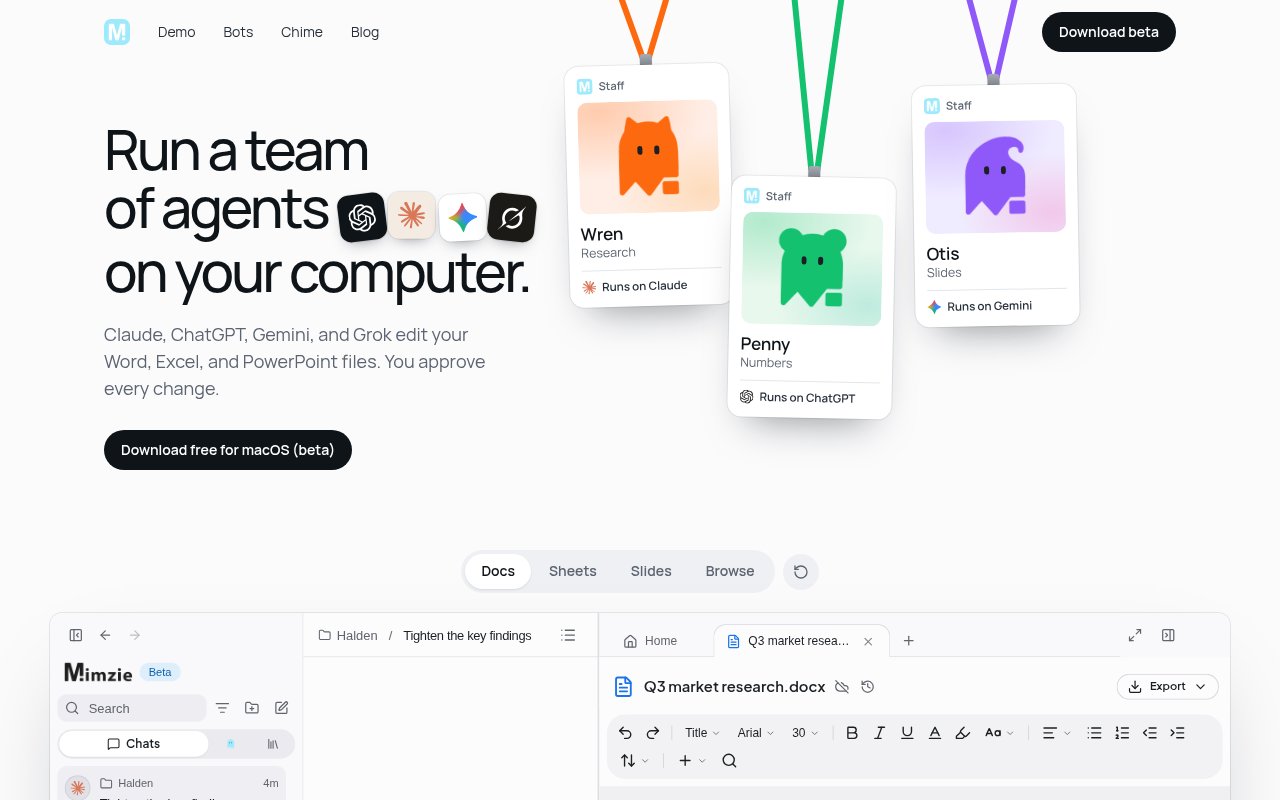
Mimzie is a desktop workspace for running several AI agents against real work files on a Mac. It brings Claude, ChatGPT, Gemini, Grok, and Mimzie's own agent into one place, then lets them work with Word documents, Excel spreadsheets, and PowerPoint presentations stored in project folders. The goal is to make agent work feel less like a sequence of disconnected chats and more like assigning work to a small team. Each bot can have a defined job, while a main bot can coordinate a larger request and return the combined result.
The product is designed around long-running, delegated work. A user can create bots for jobs such as research, numbers, slides, contracts, or follow-ups, choose which supported agent powers each one, and hand a project to the main bot. Mimzie shows the status and results of those runs in a shared workspace. The homepage's example has separate agents tightening findings in a document, working through a scorecard, preparing slides, checking a contract, and tracking follow-ups. This is a concrete team model rather than a single chat window with a list of interchangeable models. Run records can include the selected agent and model, progress, status, and results, giving the workspace a memory of what happened during a job.
Projects are folders containing ordinary files, including DOCX, XLSX, PPTX, and PDF material. Agents work on the computer and edit supported Office files directly. Proposed changes appear as tracked edits that the user can accept or reject, which keeps a person in control of the final document. The privacy policy also describes local working copies and recovery checkpoints, while signed-in work can be copied to Mimzie's cloud for sync, history, recovery, and use on another device. Cloud workspace content can include files, revision history, extracted text used for search, folders, chats, messages, agent run records, and proposed reviews. That mix gives the app a local execution model without claiming that everything stays only on the machine.
Mimzie is agent-neutral in a practical sense. It runs first-party agents under the accounts a user already has with their providers, and provider credentials stay on the device. The public site names Claude, ChatGPT, Gemini, and Grok, while the privacy documentation also refers to Claude Code, Codex, and Google Antigravity as agents that can run locally under a user's account. People can also use free Mimzie models or bring a key. Prompts and selected context still go to the chosen provider under that provider's own terms, so local orchestration doesn't remove the need to understand each model service's data policy. Integrations and plugins connected through an agent account are likewise managed by that provider rather than by Mimzie.
A companion feature called Chime adds push-to-talk dictation. Hold a key, speak, and release it, then Chime types the result into an agent or another application. On supported Macs, transcription and cleanup happen on the device. The privacy page says dictation audio, settings, the personal dictionary, snippets, and dictation history are stored locally unless a selected function needs to send data. Chime can also type into email, chat, and document apps, so it isn't restricted to the Mimzie workspace. Chime broadens the product from file editing into faster briefing, which is useful when an instruction is easier to explain aloud than to type into a long project chat.
The product best fits people who already pay for one or more major AI services and want a common desktop harness around them. Researchers, operators, analysts, and small teams can divide a project by role while continuing to work in familiar Office file formats. The tracked-change review is especially useful when an agent is drafting material that still needs a human decision. Mimzie is less suited to someone seeking a browser-only service or a settled enterprise platform. The public download is a macOS beta, so the product and its workflows are still young, and provider subscriptions remain separate.
Mimzie currently presents the desktop app as free and says it works with the AI plan a user already has at no additional Mimzie cost. The site offers a free macOS beta, including a separate Intel Mac download. That doesn't make every underlying agent free, since access and model usage can depend on existing provider plans or a user's own key. The privacy documentation also anticipates hosted usage and paid Mimzie plans, so the commercial model may expand. For now, its strongest proposition is a free coordinating layer for people who want to supervise multiple agents and review their edits in real files.
Key Features
- Multi-agent desktop workspace
- Claude, ChatGPT, Gemini, and Grok
- Direct Office file editing
- Accept or reject tracked edits
- Role-based bot teams
- Chime push-to-talk dictation
Pros & Cons
What we like
- Keeps one person in control of proposed edits
- Works with familiar Word, Excel, and PowerPoint files
- Uses existing agent accounts and subscriptions
- Coordinates specialized bots inside one project
Room for improvement
- Currently presented as a macOS beta
- Underlying AI subscriptions may still cost money
- Cloud sync means signed-in work isn't device-only
- Provider data terms still apply to agent requests
Frequently Asked Questions
What is Mimzie?
Which AI agents work with Mimzie?
Is Mimzie free?
Does Mimzie make changes without review?
Best For
Featured in
Alternatives to Mimzie
View all
Stack AI
No-code platform for building and deploying enterprise AI agents and workflows on a visual canvas

Almanac
A hosted, source-cited wiki that turns your files into context your AI agents can use

Demi AI
Demi helps busy professionals eliminate repetitive admin work across their favorite tools.
n8n
Fair-code workflow automation with 400+ integrations
Reviews (0)
Badge builder
Add Mimzie to your website
Choose a badge style and size, preview it here, then copy the generated HTML. Badge images are self-contained SVGs and do not require an external script.

<a href="https://toolindex.net/tools/mimzie?ref=badge" target="_blank" rel="noopener">
  <img src="https://toolindex.net/badge/mimzie/medium.svg" alt="Mimzie - Listed on Tool Index" width="180" height="50" />
</a>How to use the badge
- 1. Pick the style, size, and theme that fit your layout.
- 2. Copy the generated HTML from the code block.
- 3. Paste it into your footer, homepage, or press page.
Standard badge available
The standard listing badge is available now. Score and circle badges are limited to tools currently ranked in the top 10 of a category.
Badge clicks return visitors to this profile with a referral tag so the source remains identifiable.
Related Tools

OpenBenchmarks
Public, externally validated benchmarks that help agents pick SaaS APIs
Almanac
A hosted, source-cited wiki that turns your files into context your AI agents can use

Wizard
Self-extending Rust terminal AI agent that works with any model

Chariot
Elastic cloud infrastructure for deploying and scaling AI agent fleets with persistent storage
Work on Mimzie? Request listing access or correction