Mosaicora OG Image Designer
Create polished Open Graph images in your browser with templates and instant PNG export
Gallery
About Mosaicora OG Image Designer
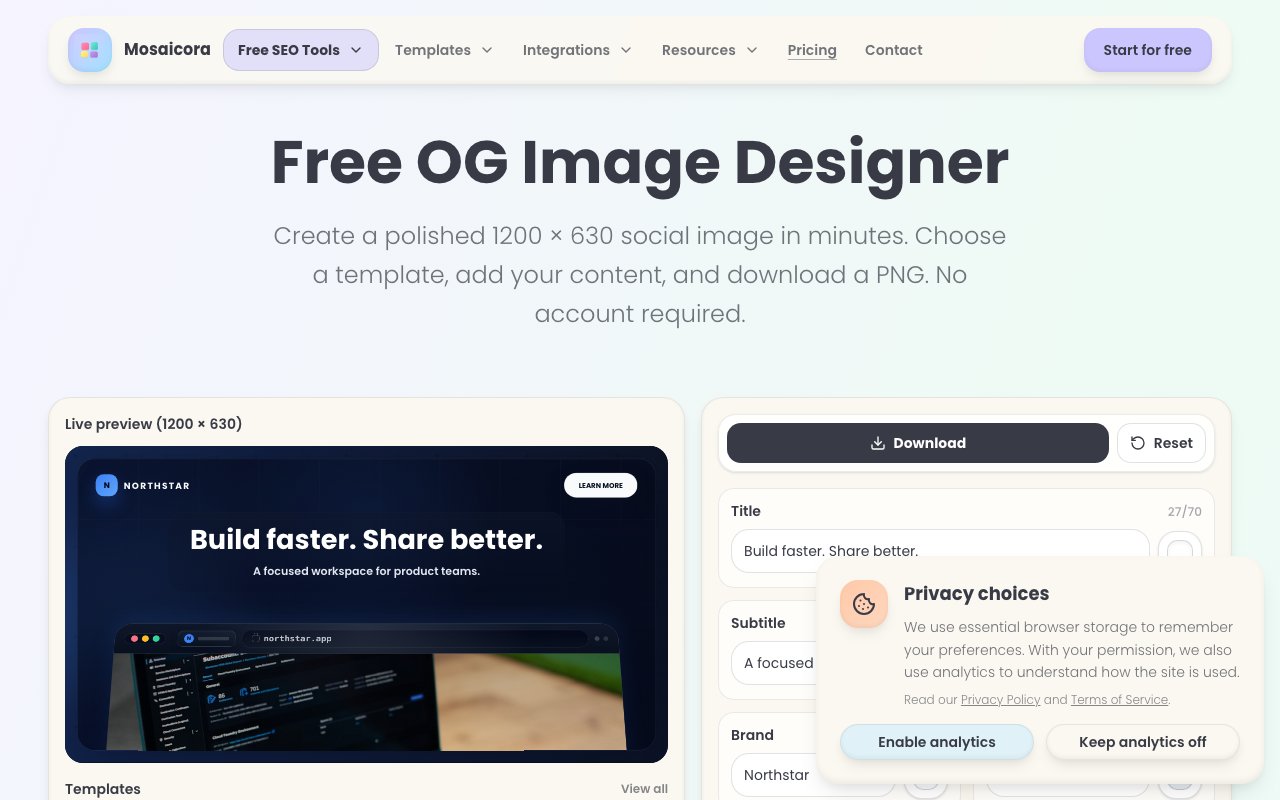
Mosaicora OG Image Designer is a browser-based tool for creating Open Graph images, the preview cards that appear when you share a link on social platforms. You pick a template, customize the text and colors, and export a 1200 by 630 pixel PNG ready for use. The whole process runs in the browser with no signup required, and uploaded images never leave your machine because all rendering happens locally. That local-first approach means you can create preview cards for confidential projects without worrying about assets landing on someone else's server. It also means the tool works offline once the page loads, which is a nice bonus for people working on unreliable connections or in environments where every external request gets logged.
The problem it solves is the friction between needing polished social previews and not having a designer on call. Open Graph images matter more than most people realize. A strong preview card can double click-through rates on a shared link, turning a flat URL into something that catches attention in a crowded feed. The visual thumbnail is often the deciding factor between a click and a scroll-past. But creating these images usually means opening Figma, fighting with export dimensions, or paying for a design tool subscription you barely use. Mosaicora handles the sizing and layout constraints so you can focus on the message rather than the mechanics of producing the image. You do not need to remember that LinkedIn wants 1200 by 627 while Twitter works better at 1200 by 630. The tool just gives you the right size and lets you move on with your day.
The free designer includes ten templates spanning categories like SaaS, ecommerce, articles, business, homepages, tech news, and recipes. Each template is editable: swap the title, change the subtitle, add your website name, adjust background patterns, tweak colors, and upload your own images or logos. The controls are simple enough that you can produce a finished card in a few minutes even if design is not your day job. There is no learning curve comparable to professional design software, just straightforward fields and sliders that update the preview in real time. You see exactly what you are going to export before you download it, so there are no surprises when you upload the image to your site. What you see is genuinely what you get.
For users who want more, creating a free Mosaicora account unlocks the advanced designer. That tier adds extra templates, expanded controls, the ability to save your work, reusable brand setups, and integrated site workflows. If you are producing Open Graph images regularly for a blog or product launch calendar, the saved brand settings alone save time because you set your colors, fonts, and logo once and apply them to every new card without re-uploading assets. The workflow integration means you can generate images as part of a publishing routine rather than treating each one as a standalone task. For teams managing multiple properties, the brand presets keep everything consistent without a style guide document that nobody reads. Consistency is half the battle in brand presentation, and automation handles it better than documentation.
The platform offers guidance on best practices as well. Keep your message scannable with one clear idea per image. Maintain strong contrast between text and background so the card reads on any device, including small mobile screens and dimly lit rooms. Position important details away from the edges because different platforms crop previews differently, and you do not want your headline cut off on LinkedIn while it looks fine on X. Following those rules means your images look intentional whether someone shares your link on a social network, a messaging app, or a Slack channel. The tips are practical rather than theoretical, the kind of advice that comes from watching thousands of preview cards succeed or fail in the wild.
All exports come out at the standard Open Graph size, so you do not have to resize afterward or remember arcane dimension requirements. The PNG format works everywhere, and because processing is local, there is no upload latency or privacy concern about sending screenshots to a server. Mosaicora fits anyone shipping content online who wants social previews that look professional without hiring a designer, wrestling with general-purpose image editors, or learning yet another design tool. Bloggers, indie hackers, marketers, and product teams all fall into the target audience. It does one thing well and gets out of your way, which is exactly what a utility like this should do. If you have ever spent more time fighting with image dimensions than writing the content itself, this tool exists to fix that imbalance.
Key Features
- Ten free OG image templates
- Live preview as you edit
- Browser-only image processing
- Instant PNG export at 1200x630
- Reusable brand kits on paid tier
- Open Graph checker for auditing
Pros & Cons
What we like
- No account required for basic use
- Images stay local, never uploaded during editing
- Covers common template categories out of the box
- Paired checker validates how cards render across platforms
Room for improvement
- Free tier limited to ten templates
- No vector or layered export options
- Brand kits require a free account
- Focused on OG images, not general design
Frequently Asked Questions
What is Mosaicora OG Image Designer?
Is Mosaicora free?
Do my images get uploaded to Mosaicora servers?
Who is Mosaicora for?
Best For
Featured in
Alternatives to Mosaicora OG Image Designer
View all
Framer
Visual website builder that lets designers ship production-grade marketing sites with real CMS, SEO controls, and code components.

Apatero Studio
Creator studio for AI image, video, audio, 3D, and avatars. Every model worth using, in one workspace.

Pixel Painters
Unlimited graphic design subscriptions built only for churches and ministries
Reviews (0)
No reviews yet
Be the first to share your experience with Mosaicora OG Image Designer
Sign in to write a reviewBadge builder
Add Mosaicora OG Image Designer to your website
Choose a badge style and size, preview it here, then copy the generated HTML. Badge images are self-contained SVGs and do not require an external script.

<a href="https://toolindex.net/tools/mosaicora?ref=badge" target="_blank" rel="noopener">
  <img src="https://toolindex.net/badge/mosaicora/medium.svg" alt="Mosaicora OG Image Designer - Listed on Tool Index" width="180" height="50" />
</a>How to use the badge
- 1. Pick the style, size, and theme that fit your layout.
- 2. Copy the generated HTML from the code block.
- 3. Paste it into your footer, homepage, or press page.
Standard badge available
The standard listing badge is available now. Score and circle badges are limited to tools currently ranked in the top 10 of a category.
Badge clicks return visitors to this profile with a referral tag so the source remains identifiable.
Related Tools
Apatero Studio
Creator studio for AI image, video, audio, 3D, and avatars. Every model worth using, in one workspace.

Tailwind CSS
Rapidly build custom designs without leaving your HTML

Figma
Collaborative interface design tool

Marvel
Lightweight prototyping platform for turning images and screens into clickable mobile and web prototypes.
Work on Mosaicora OG Image Designer? Request listing access or correction