ToText
Turn audio and video into editable transcripts, summaries, and subtitle files
Gallery
About ToText
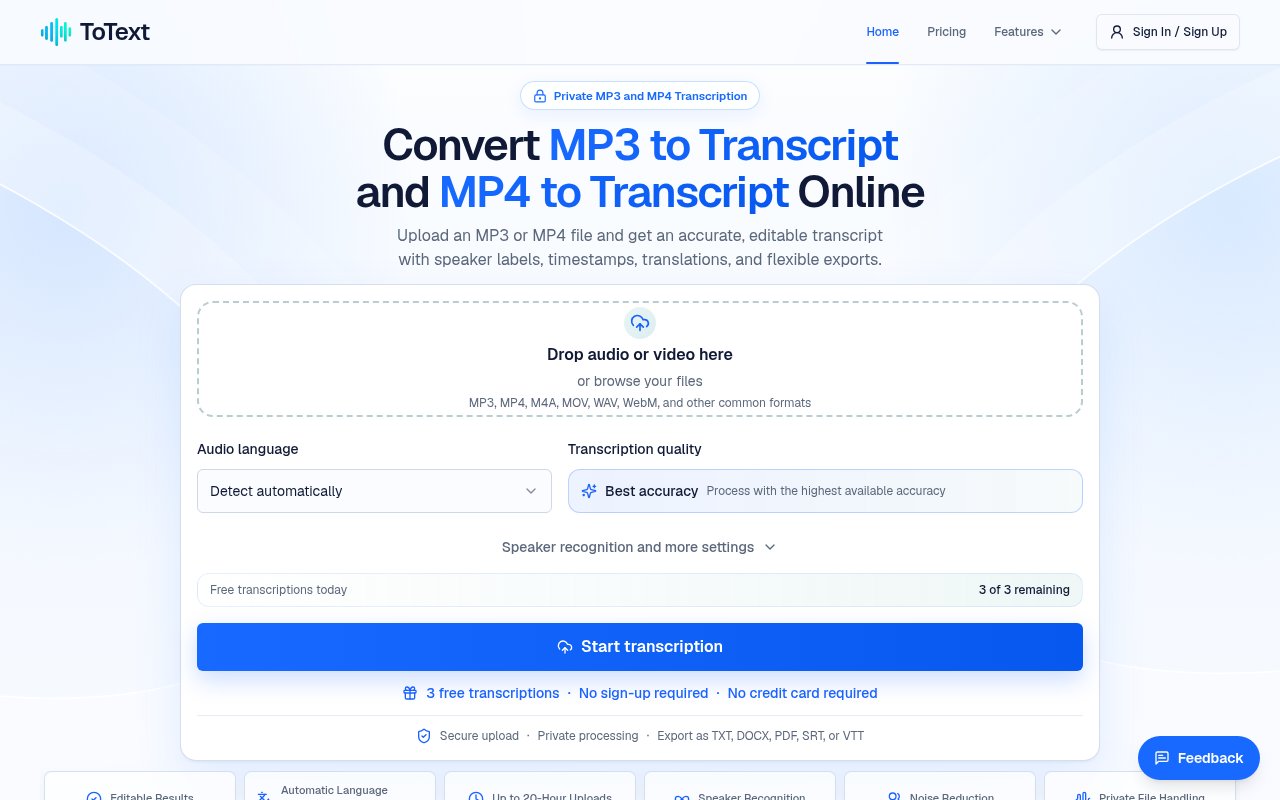
ToText is an online transcription workspace for turning recorded audio and video into searchable, editable text. It accepts MP3 and MP4 alongside common formats such as M4A, MOV, WAV, and WebM, then keeps the recording and its time-aligned transcript together in the browser. That makes it useful when listening from beginning to end would be slow, or when a recording needs to become notes, quotations, captions, or a document that other people can scan. It isn't positioned as live dictation. The workflow starts with a file that already exists and that the user owns or has permission to process.
The basic process is direct. A user uploads a recording, selects the spoken language or leaves automatic language detection on, and chooses transcription settings before starting the job. ToText processes the speech into timestamped segments, with optional speaker recognition for conversations involving more than one voice. The result remains linked to playback, so selecting a segment returns to the corresponding moment in the audio or video. Search helps locate a phrase in a long conversation, while the editor allows wording, punctuation, and speaker labels to be corrected before anything is downloaded. Custom vocabulary can supply names, acronyms, and specialist terms that the general transcription model may not know.
The same source can feed several useful views. Along with the complete transcript, ToText can generate a concise summary, meeting notes, chapters, action items, answers, and an English translation. Those views stay connected to the uploaded recording, which gives the user a practical way to check important claims against the source instead of treating generated text as final. The export menu covers reading documents and timed media formats. TXT, DOCX, and PDF suit notes or reports, while SRT, VTT, and ASS retain cues for caption workflows. CSV, JSON, and XLSX provide structured versions for analysis or another application. Saved corrections carry through to later downloads.
ToText fits researchers, journalists, students, educators, podcasters, meeting-heavy teams, and video creators who already have recordings to work through. An interview can become a searchable source with editable speaker labels. A lecture or webinar can become notes and chapters. A podcast can supply a transcript and a starting point for show notes. A recorded demonstration can become subtitle files without first extracting a separate audio track. The browser workspace is particularly helpful when accuracy matters enough to require review, since uncertain wording can be checked at its timestamp rather than found by scrubbing through an entire file.
The product's strongest distinction is that transcription, source playback, correction, secondary AI views, and export live in one workflow. A bare speech recognition service may return a block of text, while ToText retains timing and gives the user tools for turning that first draft into several deliverables. Speaker recognition and noise reduction can help with difficult material, though the site is careful that quality still depends on microphones, accents, background noise, vocabulary, and overlapping speech. Automatic output therefore needs human checking before names, numbers, quotations, or published captions are trusted. The ability to rename speakers and edit segments makes that review possible, but it doesn't remove the work.
Privacy and control are addressed through encrypted uploads, private account-associated jobs, and dashboard deletion controls. A job isn't shared unless the user creates a share link. Those controls are useful for ordinary authorized recordings, although anyone handling sensitive interviews or internal meetings still needs to apply their own retention and sharing rules. The site supports long uploads on paid access, up to 20 hours, which broadens the range from voice notes to extended events. Very long recordings also make the editor, search, and timestamps more valuable, while increasing the importance of a deliberate review pass.
Access is freemium. The site advertises up to three free files each day and includes the first 20 minutes of each file without requiring a credit card, so a new user can test the transcription quality, editor, and exports on real material. Paid access covers longer complete recordings. That is a practical evaluation path, but users with frequent long sessions should expect to move beyond the daily allowance. ToText is best understood as an editable first-draft system with flexible outputs, not a promise that automated transcription will replace listening. For people who want one browser workspace between a recording and a reviewed document or subtitle file, it covers that path with little setup.
Key Features
- Editable timestamped transcripts
- Automatic language detection
- Speaker recognition and labels
- Source-linked browser playback
- Summaries and meeting notes
- Document and subtitle exports
Pros & Cons
What we like
- Keeps transcript review connected to source playback
- Exports both documents and timed subtitle formats
- Supports audio and video without separate conversion
- Free daily allowance makes quality easy to test
Room for improvement
- Automated wording still needs careful human review
- Free processing covers only the first 20 minutes
- No live microphone dictation workflow
- No stated native integrations with publishing platforms
Frequently Asked Questions
What is ToText?
Is ToText free?
Which files and exports does ToText support?
Does ToText identify speakers automatically?
Best For
Featured in
Alternatives to ToText
View all
CalendHub
Smart scheduling and calendar management for teams

Apatero AI
The creator studio for AI image, video, audio, 3D, and avatars, now at apatero.ai.
Apatero Studio
Creator studio for AI image, video, audio, 3D, and avatars. Every model worth using, in one workspace.

Melodex
Turn your idea into an AI-generated music video
Our take
Tool Index Editorial · Sep 2026· 4.0/5
ToText turns uploaded audio and video into editable, timestamped transcripts, then keeps playback, speaker labels, summaries, and exports in one browser workspace. We found support for common media formats and a useful export range covering documents, subtitles, and structured data. A 300 minute pack costs $9.90, while unlimited plans cost $19.90 monthly or $149 yearly.
This holds up best for interviews, meetings, lectures, and caption drafts where the user needs to verify wording against the recording. The linked editor is the important part, not the AI summaries. Automatic transcripts still need human review for names, numbers, accents, and overlapping speech, and the one time pack omits noise reduction and the broader AI workspace.
Editorial opinion from the Tool Index team, written from the public product pages. Not a user review.
Reviews (0)
Badge builder
Add ToText to your website
Choose a badge style and size, preview it here, then copy the generated HTML. Badge images are self-contained SVGs and do not require an external script.

<a href="https://toolindex.net/tools/mp3-to-transcript?ref=badge" target="_blank" rel="noopener">
  <img src="https://toolindex.net/badge/mp3-to-transcript/medium.svg" alt="ToText - Listed on Tool Index" width="180" height="50" />
</a>How to use the badge
- 1. Pick the style, size, and theme that fit your layout.
- 2. Copy the generated HTML from the code block.
- 3. Paste it into your footer, homepage, or press page.
Standard badge available
The standard listing badge is available now. Score and circle badges are limited to tools currently ranked in the top 10 of a category.
Badge clicks return visitors to this profile with a referral tag so the source remains identifiable.
Related Tools

Confluence
Atlassian's long-running team wiki that anchors many enterprise knowledge stacks
Asana
Project management for teams that live in projects, tasks and dependencies
Apatero AI
The creator studio for AI image, video, audio, 3D, and avatars, now at apatero.ai.
Kevin Gabeci Toolkits
Seven AI toolkits for writing books, making music, cutting video, and building agents.
Work on ToText? Request listing access or correction