NGPDFs
Fifty plus PDF tools that run entirely in your browser, with no uploads, accounts, or watermarks
Gallery
About NGPDFs
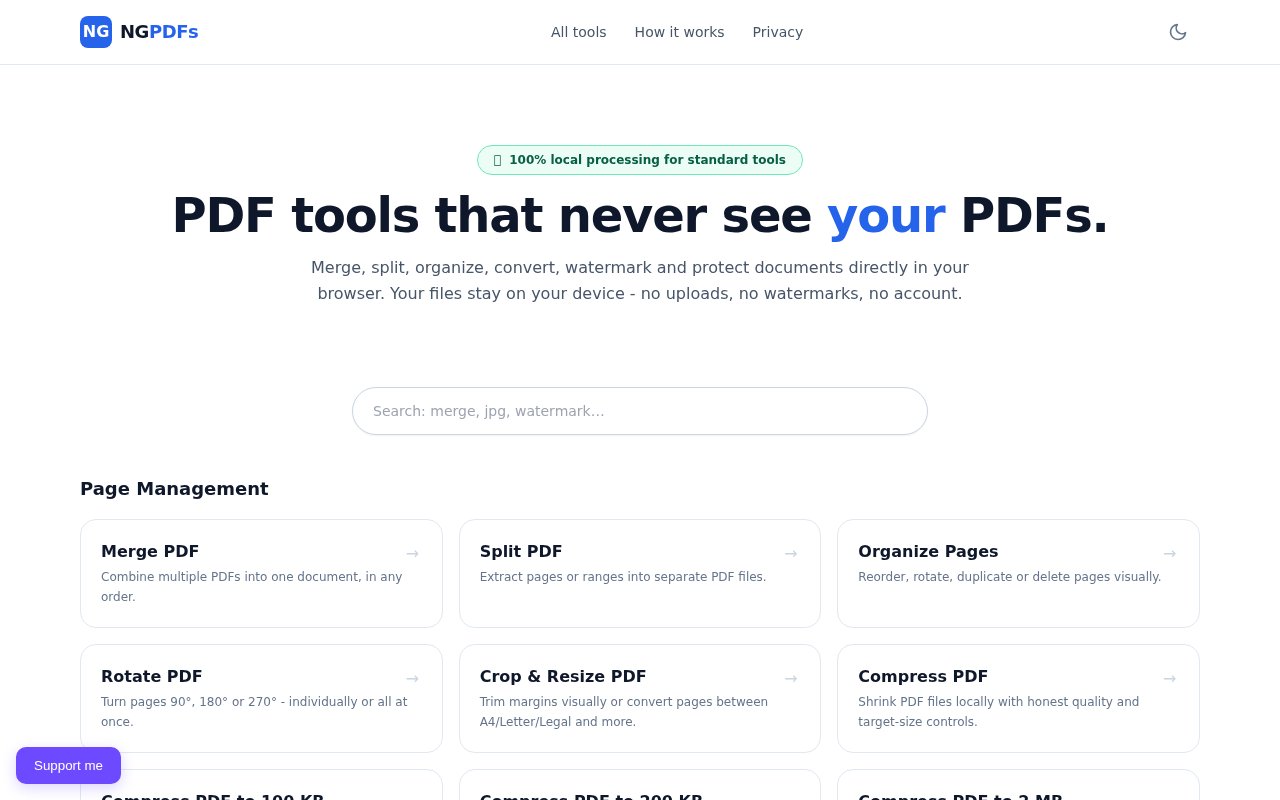
NGPDFs is a suite of more than fifty PDF tools that run entirely inside your browser. Merge, split, organize, rotate, crop, compress, watermark, fill forms, add page numbers, convert to and from Office formats, extract text, redact, encrypt and run OCR, all without your file ever leaving your device. There's no upload, no account, no email and no watermark on the output, and after the first visit the whole thing works offline as a progressive web app. The tagline on the site is PDF tools that never see your PDFs, and the architecture is built to make that literally true.
The problem it solves is the one hiding behind every free online PDF site. Convenient as they are, most of them work by uploading your document to a server, which is exactly what you don't want to do with a contract, a medical record, a tax form or a client file. NGPDFs takes the opposite position. The site describes itself as privacy-first by architecture rather than by policy, meaning the tools are built so that a server never sees the document, instead of promising to delete it afterwards. The difference shows up in small ways too. There's no account to tie your documents to, no email capture before the download, and no watermark stamped on the output as a nudge to upgrade.
Technically, every standard operation runs in a Web Worker using WebAssembly-ready libraries, with pdf-lib and PDF.js doing the heavy lifting. A file is validated by its magic bytes, handed to the worker as a transferable buffer, processed, verified, and returned to you as a download. The OCR tool runs Tesseract compiled to WebAssembly, with English and Spanish available today because each language model is several megabytes, and it skips pages that already contain text unless you force it. A service worker caches the app shell and processing assets, which is what makes offline use possible. Compression is offered both as a general tool and as presets that aim at specific sizes, which is the form the problem usually takes when an upload form rejects your file.
The catalogue is wide. Page tools cover merging, splitting, organizing, rotating, cropping, flattening and compressing to target sizes. Conversions go from images, Markdown, CSV, Excel, PowerPoint, HTML and ebooks into PDF, and from PDF out to JPG, Word, Excel, PowerPoint, HTML, EPUB and plain text. Security tools include encryption, password removal, manual and automatic PII redaction, metadata removal, a privacy scanner and a fingerprint check. There are also a few unusual ones, such as turning a PDF into audio or into a handwriting-style rendering. Form filling, flattening, headers and footers, page numbers and colour inversion round out the editing side, and a hash tool under diagnostics lets you verify a file's fingerprint.
It's for anyone who handles documents they can't or shouldn't upload, which means lawyers, clinicians, accountants, HR teams, journalists and ordinary people dealing with their own paperwork. It also suits people who work on planes, in the field or on slow connections, since once loaded it doesn't need the network at all. Nothing about it requires technical skill. You pick a tool, drop a file, and download the result. Students and small businesses get the everyday operations, merging a scan into a report or shrinking a brochure for email, without paying for a desktop suite.
What sets it apart is the honesty of the disclosure model. The stated rule is that if a tool can run locally it will, and any tool that genuinely needs the network will say exactly what leaves your device before it does. The only telemetry is a support widget that receives anonymous usage counters like the tool name and a duration bucket, never file names, contents or extracted text. The site keeps a how-it-works page and a diagnostics page for anyone who wants to check the claims. That transparency extends to naming the libraries it's built on, which is rare for a consumer PDF site.
NGPDFs is free, with no paid tier, no sign-up and no watermark. The tradeoffs are the ones that come with doing everything in a browser. Very large files are limited by your device's memory rather than a server's, OCR covers two languages so far, and the operator behind the site isn't named, so support is thin. For everyday PDF work on documents you'd rather keep to yourself, it's hard to argue with the model. The privacy page spells out which categories of tool run locally, from merging and splitting to text extraction, metadata removal and fingerprinting, and states that the only third party in the picture is the support widget.
Key Features
- More than fifty in-browser PDF tools
- No uploads, accounts or watermarks
- Offline use as a progressive web app
- OCR with Tesseract in WebAssembly
- Conversion to and from Office, image and ebook formats
- Redaction, encryption and metadata removal
Pros & Cons
What we like
- Documents never leave your device
- Free with no sign-up
- Works offline after the first load
- Explicit disclosure for anything that needs the network
Room for improvement
- Large files depend on your device's memory
- OCR limited to English and Spanish for now
- Operator isn't named and support is thin
- Browser processing is slower than a native app on big jobs
Frequently Asked Questions
What is NGPDFs?
Is NGPDFs free?
Does it work offline?
How does it keep files private?
Best For
Featured in
Alternatives to NGPDFs
View all
CalendHub
Smart scheduling and calendar management for teams
Kevin Gabeci Toolkits
Seven AI toolkits for writing books, making music, cutting video, and building agents.

Eased Into AI
Learn AI from zero. No jargon, no hype, just steps that work.

Fix It Gently
Calm, plain-English fixes for everyday tech problems.
Our take
Tool Index Editorial · Sep 2026· 3.5/5
NGPDFs is a free collection of browser-based PDF tools with no account, upload or watermark. Its catalog covers common page operations, conversion, forms, signing and privacy work, and the documented pipeline uses workers plus PDF.js and pdf-lib to keep files on the device. Offline caching is a particularly good fit for sensitive documents and unreliable connections.
We like the local-first model and the unusually concrete explanation of how bytes move through the app. We found one credibility gap today. The homepage advertises OCR, encryption and redaction, while the engineering page still lists those capabilities as future work. That page may be stale, but users should verify the specific tool they need before trusting the catalog. Large jobs also depend on local memory and CPU. The core merge, split and markup case looks strong; the wider suite needs consistency.
Editorial opinion from the Tool Index team, written from the public product pages. Not a user review.
Reviews (0)
Badge builder
Add NGPDFs to your website
Choose a badge style and size, preview it here, then copy the generated HTML. Badge images are self-contained SVGs and do not require an external script.

<a href="https://toolindex.net/tools/ngpdfs?ref=badge" target="_blank" rel="noopener">
  <img src="https://toolindex.net/badge/ngpdfs/medium.svg" alt="NGPDFs - Listed on Tool Index" width="180" height="50" />
</a>How to use the badge
- 1. Pick the style, size, and theme that fit your layout.
- 2. Copy the generated HTML from the code block.
- 3. Paste it into your footer, homepage, or press page.
Standard badge available
The standard listing badge is available now. Score and circle badges are limited to tools currently ranked in the top 10 of a category.
Badge clicks return visitors to this profile with a referral tag so the source remains identifiable.
Related Tools

Confluence
Atlassian's long-running team wiki that anchors many enterprise knowledge stacks
Asana
Project management for teams that live in projects, tasks and dependencies
Kevin Gabeci Toolkits
Seven AI toolkits for writing books, making music, cutting video, and building agents.

Logseq
An open-source outliner notes app where every bullet is a first-class block
Work on NGPDFs? Request listing access or correction