Nod
macOS app that listens to your calls and builds a searchable memory of decisions and commitments
Gallery
About Nod
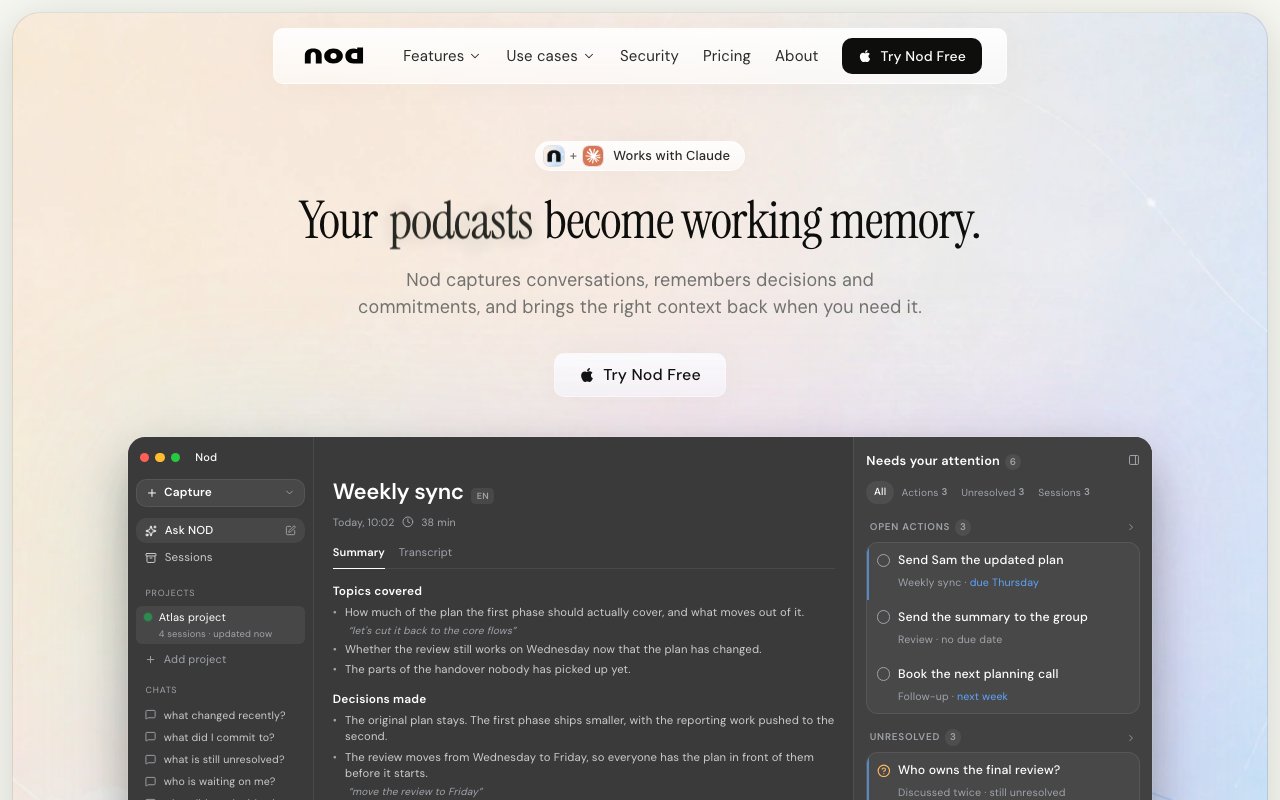
Nod captures every meeting, call, and voice conversation on your Mac, then transforms that audio into searchable, structured records you can query months or even years later. The app extracts decisions, commitments, and action items automatically, building a growing database of institutional memory that becomes exponentially more valuable the longer you use it and the more conversations it processes. Unlike one-off transcription tools that hand you a wall of unformatted text after each meeting and leave you to figure out what actually matters, Nod lets you ask natural language questions across your entire conversation history and receive answers complete with citations pointing back to specific moments in specific recorded sessions.
The capture approach fundamentally sets Nod apart from traditional meeting assistants that announce their presence to everyone on the call. The app listens through your Mac's audio system rather than integrating with meeting platforms as a visible participant that shows up in the attendee list. That means no bot appears in Zoom, Google Meet, Microsoft Teams, Slack huddles, Discord calls, or FaceTime sessions. Your colleagues and clients have no indication that recording is active unless you choose to tell them explicitly. This architecture works seamlessly across fourteen different languages, automatically detecting and following whatever language the meeting happens to be conducted in, and it handles phone calls routed through your Mac just as easily as video conferences without requiring special configuration.
During active calls, a floating panel stays accessible without pulling your attention away from the conversation itself. You can catch up on content you missed if you joined late or stepped away briefly, surface suggested follow-up questions based on what's been discussed, or draft reply messages in real time while still appearing fully engaged to other participants. The panel provides context without demanding that you split your attention between participating meaningfully and taking comprehensive notes that you'd never have time to write otherwise.
After meetings end, AI-powered summaries highlight the key outcomes that actually matter for moving work forward: decisions that were made and agreed upon, questions that remain open and need further discussion, and action items assigned to specific people with clear ownership. Direct quotes from the conversation link back to their source audio, so you can verify context whenever something seems ambiguous or confirm exact wording before sending a recap email to stakeholders who weren't present. This verification capability proves invaluable when memories differ about what was actually said versus what people remember hearing.
The searchable library organizes sessions by projects and custom tags, making it practical to maintain separate contexts for different clients, products, initiatives, or time periods. When you need to remember what a customer said about pricing concerns three months ago, what your cofounder committed to during a strategy session last quarter, or exactly how the design team justified a particular technical decision, you can ask Nod directly in plain English and receive grounded answers based on actual recorded conversations rather than reconstructed memories that fade and distort over time.
Privacy architecture reflects how genuinely sensitive conversation data can be for both individuals and organizations. Audio never saves to disk in any listenable form whatsoever; the app transcribes in roughly five-second chunks, then discards the raw audio immediately after transcription completes. Stored data encrypts at rest using AES-256 encryption and protects in transit using TLS 1.2 or higher. No AI model providers train their systems on your conversations regardless of which underlying language models process the transcription. Row-level database security ensures that only you can access your recordings and transcripts, and the app provides complete export options in both JSON and Markdown formats if you ever want to migrate your conversation archive elsewhere or back it up locally.
Individual sessions or entire accounts can be deleted directly from the application interface with no hidden retention periods or bureaucratic deletion request processes. An optional ambient context feature lets the app read on-screen text to help answer questions like what you were working on at a particular time, though this capability remains disabled by default and requires explicit activation if you find it useful for your workflow.
Pricing offers two straightforward tiers: a basic plan at nine dollars monthly and a more capable pro plan at twenty-nine dollars monthly, with a free trial available for thorough evaluation before committing any payment information. For founders tracking investor conversations and customer feedback, salespeople documenting discovery calls and demo presentations, product managers preserving user research and stakeholder decisions, recruiters organizing interview sessions across multiple candidates, or anyone whose professional life involves high-volume conversations across multiple platforms and contexts, Nod provides a way to stop losing critical information to forgotten notes, unreliable memory, and transcripts nobody ever reads. The tool transforms transient spoken conversations into permanent, searchable assets without requiring visible recording bots or complex integrations with every communication platform you use.
Key Features
- Local meeting recording without joining as a bot
- Transcription with decision and action item extraction
- Searchable library across all past conversations
- Real-time floating panel during live calls
- Support for 14 languages
- Claude integration for enhanced note access
Pros & Cons
What we like
- Records calls without adding a visible meeting bot
- Extracts decisions and commitments automatically
- Works across Zoom, Meet, Teams, Slack, and more
- Local processing with encrypted storage
Room for improvement
- macOS only, no Windows or mobile version
- Monthly pricing adds up for individual users
- Ambient context feature may feel intrusive
- Requires calls to route through your Mac
Frequently Asked Questions
What is Nod?
Does Nod join my meetings as a bot?
Is Nod free?
What platforms does Nod support?
Best For
Featured in
Alternatives to Nod
View all
CalendHub
Smart scheduling and calendar management for teams
Kevin Gabeci Toolkits
Seven AI toolkits for writing books, making music, cutting video, and building agents.

Eased Into AI
Learn AI from zero. No jargon, no hype, just steps that work.

Fix It Gently
Calm, plain-English fixes for everyday tech problems.
Our take
Tool Index Editorial · Oct 2026· 4.0/5
Nod turns calls, voice notes, and surrounding work on a Mac into searchable memory with source-linked answers, summaries, decisions, and commitments. We found its cross-session questions more useful than a pile of meeting transcripts, and the local speaker labeling, full export, invisible capture, and promise that audio is never stored address several common meeting bot frustrations. After the free trial, annual plans start at $12 per month, with Pro at $24.
The invisible recording design creates a responsibility that the product can't solve. Users must understand consent and recording rules wherever participants are located. Nod is also macOS only, Starter includes eight capture hours monthly, and generated synthesis can miss nuance. It is a strong fit for call-heavy individual work when disclosure and verification are handled properly.
Editorial opinion from the Tool Index team, written from the public product pages. Not a user review.
Reviews (0)
Badge builder
Add Nod to your website
Choose a badge style and size, preview it here, then copy the generated HTML. Badge images are self-contained SVGs and do not require an external script.

<a href="https://toolindex.net/tools/nod?ref=badge" target="_blank" rel="noopener">
  <img src="https://toolindex.net/badge/nod/medium.svg" alt="Nod - Listed on Tool Index" width="180" height="50" />
</a>How to use the badge
- 1. Pick the style, size, and theme that fit your layout.
- 2. Copy the generated HTML from the code block.
- 3. Paste it into your footer, homepage, or press page.
Standard badge available
The standard listing badge is available now. Score and circle badges are limited to tools currently ranked in the top 10 of a category.
Badge clicks return visitors to this profile with a referral tag so the source remains identifiable.
Related Tools

Confluence
Atlassian's long-running team wiki that anchors many enterprise knowledge stacks
Asana
Project management for teams that live in projects, tasks and dependencies
Kevin Gabeci Toolkits
Seven AI toolkits for writing books, making music, cutting video, and building agents.

Logseq
An open-source outliner notes app where every bullet is a first-class block
Work on Nod? Request listing access or correction