Notes Plus
A Markdown-first Apple Notes alternative for Mac with LaTeX, Excalidraw, Mermaid, and Kanban boards
Gallery
About Notes Plus
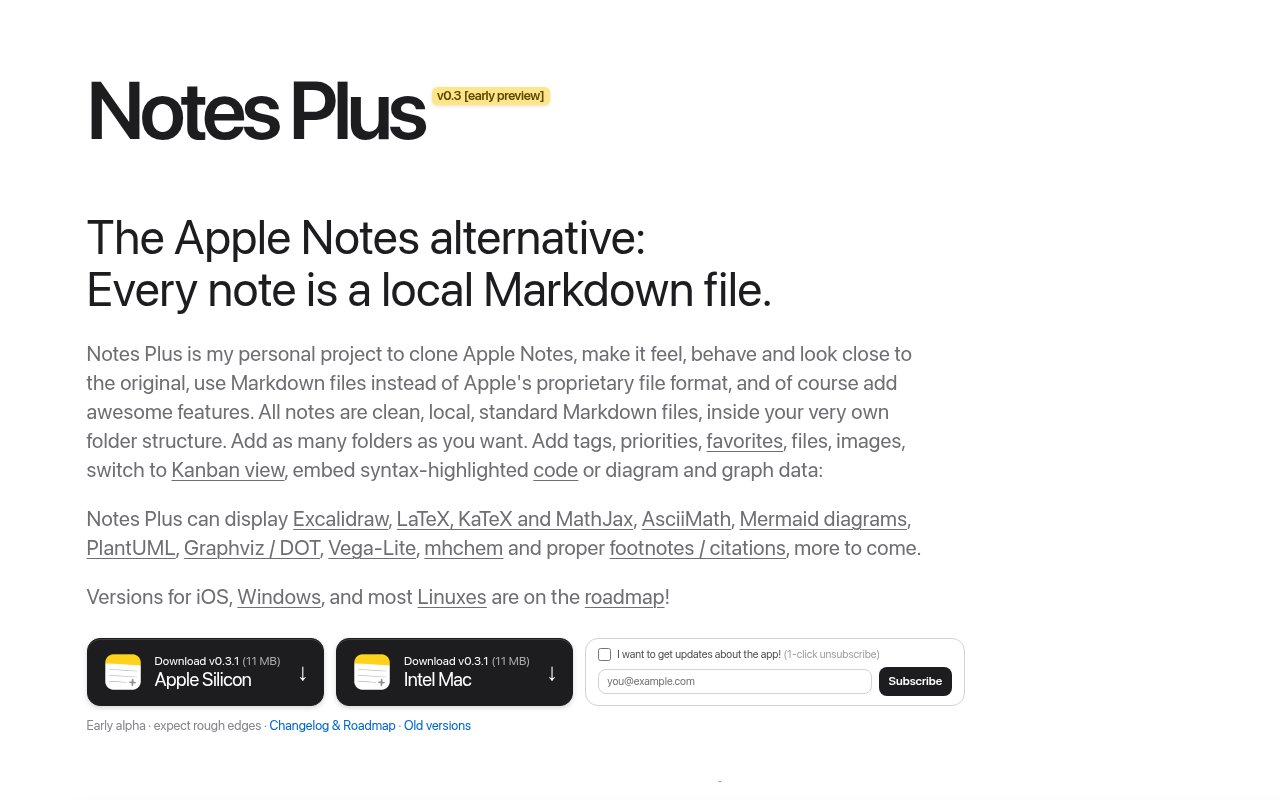
Notes Plus is a macOS notes app that looks and feels like Apple Notes but stores every note as a plain Markdown file in a folder you choose. That single decision is the product. Your notes aren't locked in a proprietary database, they're standard text files that any editor, sync tool, or script can read, and the app is the pleasant front end on top of them. The site's own framing is a Markdown Apple Notes clone with LaTeX, Excalidraw, and the rest, which is about right. It's early software from an unnamed developer, currently at version 0.3.1, and the site is candid about that.
The problem it addresses is lock-in and limited formatting at the same time. Apple Notes is fast and everywhere, but getting notes out of it is painful and it can't render an equation, a diagram, or a chart. Markdown editors solve portability but often feel like code editors, with a folder tree and a preview pane rather than a notes list. Notes Plus aims for the middle, a familiar notes interface with a rendering engine that handles the technical content Apple Notes can't, on top of files you could open in any text editor tomorrow. The Apple Notes export problem in particular is one people hit when they try to leave, and Notes Plus attacks it from the other direction by accepting pasted content with its formatting intact.
Under the hood it reads and writes clean, local, standard Markdown files inside your own folder structure. Organisation comes from tags, priority markers, and favorites with custom colors, layered on top of the folders rather than replacing them. Tags and priorities carry custom colors, so the notes list still reads like a notes app rather than a directory listing. There are three editor modes, raw text, split view, and visual editing, so you can write in whichever you prefer for a given note and switch when a table or an equation needs a closer look. Rendering covers LaTeX through KaTeX, MathJax, and AsciiMath, Excalidraw drawings, Mermaid diagrams, PlantUML, Graphviz, Vega-Lite charts, and footnotes. A Kanban view lays notes out as a JIRA-style board with swimlanes and drag-and-drop, which turns a folder of notes into a light task board without a separate tool or a second file format.
Migration is handled through copy and paste. Content pasted from Apple Notes or from ChatGPT keeps its formatting, which is the realistic path for most people moving over, since it doesn't require a bulk export step first and lets you move a few notes at a time. Everything stays on disk. The site doesn't mention a cloud sync service of its own, so syncing between machines is whatever you already use for the folder, such as iCloud Drive, Dropbox, or a Git repository, and the same goes for backups. Because the files are ordinary Markdown, the app is also disposable in the good sense. If it stalls or you outgrow it, the folder still opens in any other editor with nothing to convert.
It's for people on a Mac who write technical notes, students and researchers with equations, engineers with architecture diagrams, and anyone who wants their notes to outlive the app that created them. It's also aimed squarely at Apple Notes users who like the interface but have hit its ceiling, and at people who have bounced off heavier knowledge tools and want something closer to a notes app. Anyone who drafts in ChatGPT will appreciate that pasted output keeps its formatting instead of arriving as a wall of text. It requires macOS Sequoia or newer and ships as an 11 MB download for both Apple Silicon and Intel Macs.
What sets it apart from other Markdown apps is the combination of an Apple Notes style interface, an unusually wide rendering stack, and the Kanban board, all on top of files you own. The caveat is maturity. At the time of writing it's version 0.3.1, an early alpha preview, so expect rough edges, missing features, and a changing feature set, and keep a backup of the folder since the files are yours to lose. iOS, Windows, and Linux versions are on the roadmap but don't exist yet, which makes it Mac-only for now, and there's no published developer name or source repository to judge the project's momentum by. There's no mention of encryption, plugins, or a mobile companion either, so the feature set is the rendering stack, the board, and the file format.
Access is free while the app is in alpha and beta testing, with a beta list to join on the site and direct downloads for both Mac architectures. After the stable release the plan is a $19 one-time payment for a lifetime license, so there's no subscription in the model and no account required to use it. That price is well under what most note apps ask for in a year, and the site is explicit that it's a one-time payment rather than a recurring one. The site doesn't publish a contact email, so questions and bug reports go through the beta signup, and the sensible way to try it is to point it at a copy of a notes folder and see how the rendering holds up on your own files.
Key Features
- Local Markdown files in your own folders
- Raw, split, and visual editor modes
- LaTeX, KaTeX, MathJax, and AsciiMath rendering
- Excalidraw, Mermaid, PlantUML, and Graphviz support
- Kanban board view with swimlanes
- Paste import from Apple Notes and ChatGPT
Pros & Cons
What we like
- Notes are plain files you keep and can read anywhere
- Renders equations and diagrams Apple Notes can't
- Free during the alpha with a $19 lifetime license planned
- Small 11 MB download for Apple Silicon and Intel
Room for improvement
- Early alpha at version 0.3.1, expect rough edges
- macOS Sequoia or newer only, other platforms on the roadmap
- No built-in sync, you bring your own folder sync
- No published contact, source, or developer details
Frequently Asked Questions
What is Notes Plus?
Is Notes Plus free?
Does Notes Plus sync between devices?
What Mac do I need?
Best For
Featured in
Alternatives to Notes Plus
View all
CalendHub
Smart scheduling and calendar management for teams
Kevin Gabeci Toolkits
Seven AI toolkits for writing books, making music, cutting video, and building agents.

Eased Into AI
Learn AI from zero. No jargon, no hype, just steps that work.

Fix It Gently
Calm, plain-English fixes for everyday tech problems.
Our take
Tool Index Editorial · Sep 2026· 3.5/5
Notes Plus is a local Markdown notes app with an Apple Notes style interface, visual and raw editing, diagrams, math, code, tags, and a Kanban view. Version 0.4 now runs on macOS and Windows, with iCloud sync on Mac. It is free during testing, and the planned final license is a one time $19 purchase. Technical writers and researchers get an unusually broad renderer while keeping ordinary files in their own folders.
We like the portable storage model and the ability to leave the app without exporting a proprietary database. The current release is explicitly an early alpha, and both Windows support and iCloud sync are labeled experimental with repeated backup warnings. There is no mobile version yet, and the wide rendering stack creates plenty of edge cases. Try it on a copied folder first and keep independent backups.
Editorial opinion from the Tool Index team, written from the public product pages. Not a user review.
Reviews (0)
Badge builder
Add Notes Plus to your website
Choose a badge style and size, preview it here, then copy the generated HTML. Badge images are self-contained SVGs and do not require an external script.

<a href="https://toolindex.net/tools/notes-plus?ref=badge" target="_blank" rel="noopener">
  <img src="https://toolindex.net/badge/notes-plus/medium.svg" alt="Notes Plus - Listed on Tool Index" width="180" height="50" />
</a>How to use the badge
- 1. Pick the style, size, and theme that fit your layout.
- 2. Copy the generated HTML from the code block.
- 3. Paste it into your footer, homepage, or press page.
Standard badge available
The standard listing badge is available now. Score and circle badges are limited to tools currently ranked in the top 10 of a category.
Badge clicks return visitors to this profile with a referral tag so the source remains identifiable.
Related Tools

Confluence
Atlassian's long-running team wiki that anchors many enterprise knowledge stacks
Asana
Project management for teams that live in projects, tasks and dependencies
Kevin Gabeci Toolkits
Seven AI toolkits for writing books, making music, cutting video, and building agents.

Logseq
An open-source outliner notes app where every bullet is a first-class block
Work on Notes Plus? Request listing access or correction