
Octoweb
A free, open-source keyboard-first macOS browser with an AI sidebar and an MCP server for agents
Gallery
About Octoweb
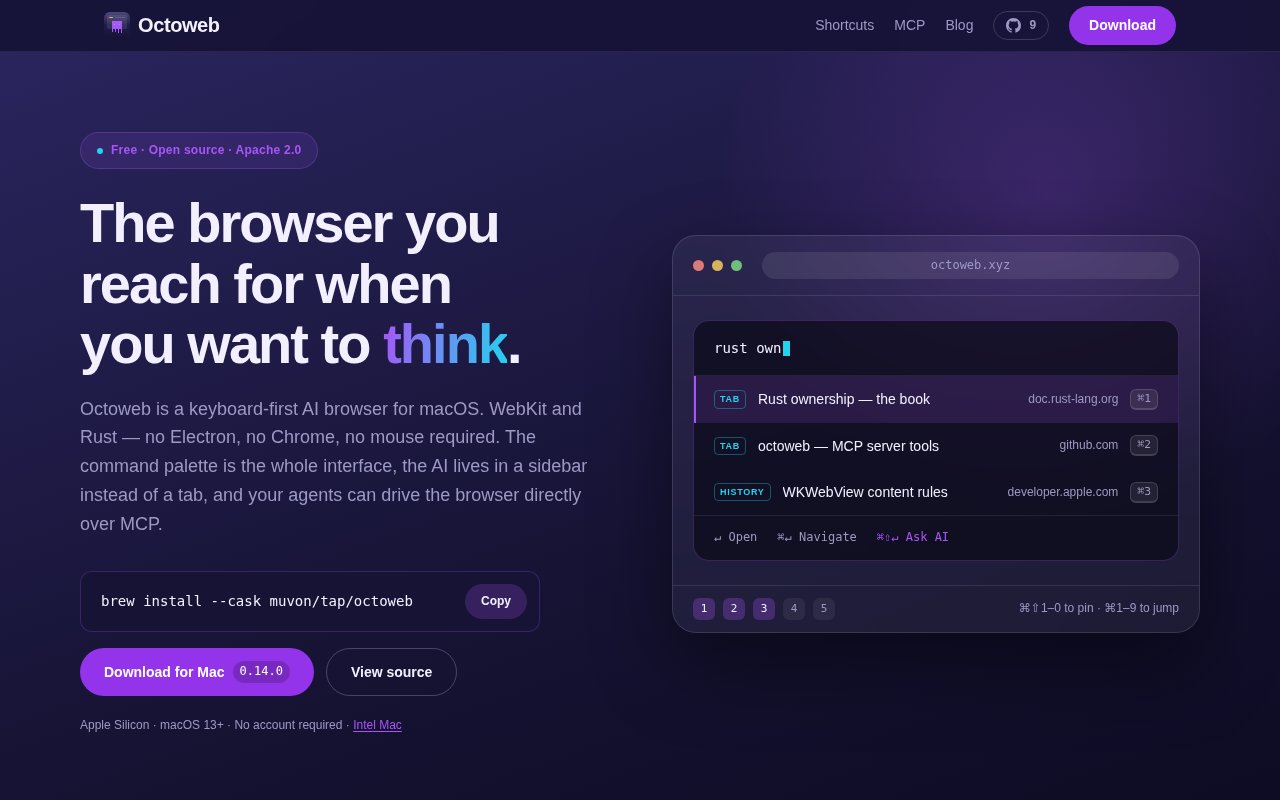
Octoweb is a free, open-source web browser for macOS built around the keyboard and an AI sidebar. It's written in Rust on top of WebKit rather than Electron or Chromium, so it uses the system rendering engine, and its interface starts from a command palette instead of a row of tabs. The AI side runs through a local agent runtime, and the browser exposes an MCP server so external agents can drive it. It's licensed under Apache 2.0 and installs with a single Homebrew command.
The idea is that a browser for people who think in shortcuts shouldn't make them reach for the mouse. Cmd Shift P opens the command palette for navigation, search, fuzzy matching over open tabs and history, and tab management. Cmd 1 through Cmd 9 jump to numbered slots holding pinned pages. There's a save-for-later reading queue, find in page, screenshots, built-in PDF and DOCX viewers, and tab hibernation when memory gets tight. Workspaces are isolated with their own data stores, cookies and sessions, so a work identity and a personal one never bleed into each other.
A session starts in the palette. Type a few characters to jump to an open tab, a history entry or a search, hit Enter, and the page fills the window. Pin the handful of pages you live in to the numbered slots and they're one chord away. When something needs reading later, queue it instead of leaving a tab open. The whole model assumes the hands stay on the keys, which is also why the browser was built from scratch rather than skinned over an existing one.
Workspaces matter more than they sound. Each one has its own storage, cookies and sessions, so keeping two accounts on the same service apart is a matter of switching workspace rather than opening a private window. Tab hibernation frees memory from pages you haven't touched in a while, and the built-in PDF and DOCX viewers mean documents open in place instead of landing in a download folder.
The AI sidebar opens with Cmd Shift A and is powered by octomind, a plug-in agent runtime that talks to the browser over ACP, an open agent protocol. Agents can render interactive interfaces in the sidebar through A2UI, so an agent can show a form or a set of choices rather than a wall of text, and Cmd Shift E applies an AI transformation to the text you're editing inline, in any text field. A proactive learning mode that analyzes browsing patterns is available but off by default, and it runs locally. Content blocking uses WebKit's own content rule lists, so ad and tracker filtering happens in the engine rather than in an extension.
The MCP server is the piece that will interest people building agents. It listens on localhost port 3434 and exposes roughly thirty browser control tools, so a coding assistant or any other MCP client can open pages, read them and act on them in a real WebKit browser with the user's sessions, without stealing focus from whatever the person is doing. That turns Octoweb into a browser automation target that doesn't need a separate headless install.
The browser needs no account, and the agent runtime it talks to is local, so which model sits behind the sidebar is a matter of how octomind is configured rather than something the browser decides. That keeps Octoweb a thin, inspectable layer between the page and whatever assistant you've chosen, and it's the reason the whole thing can be read end to end on GitHub.
It's for developers and power users on macOS 13 or later, Apple Silicon or Intel, who are comfortable living in a command palette and want their browser to participate in agent workflows rather than sit outside them. It's less suited to people who rely on the Chrome extension ecosystem, since it's WebKit-based, or to anyone who wants a familiar tab bar and mouse-driven interface.
What makes it different is the combination. Keyboard-first browsers exist, AI sidebars exist, and browser automation servers exist, but here all three are one native app with a small footprint, no account, and a codebase you can read. The project is honest about being experimental. It's at version 0.14.0 with a release on 5 September 2026, a small GitHub following, and the fast release cadence of an early project, so features move and occasionally break.
Access is free and open source. There's no paid tier and no account. Install it with brew install --cask muvon/tap/octoweb, download a build from GitHub Releases, or compile from source, and support the project through GitHub Sponsors if you want to. It's developed by Muvon Un Limited, and the repository at github.com/muvon/octoweb is the place for issues, since no contact address is published on the site.
Key Features
- Command palette navigation and tab search
- Numbered slots for pinned pages
- AI sidebar via local octomind runtime
- MCP server with browser control tools
- Isolated workspaces with separate cookies
- Native WebKit rendering in Rust
Pros & Cons
What we like
- Free, Apache 2.0, no account
- Lightweight native app, not Electron
- Agents can drive it without stealing focus
- Workspaces keep identities separate
Room for improvement
- macOS 13 or later only
- No Chrome extension ecosystem
- Experimental, features change between releases
- Keyboard-first design has a learning curve
Frequently Asked Questions
What is Octoweb?
Is Octoweb free?
What is the MCP server for?
Does it run on Windows or Linux?
Best For
Featured in
Alternatives to Octoweb
View all
Apatero AI
The creator studio for AI image, video, audio, 3D, and avatars, now at apatero.ai.

SoloDevStack
A solo developer blog built on head-to-head tool comparisons, 580+ posts deep.
Apatero Studio
Creator studio for AI image, video, audio, 3D, and avatars. Every model worth using, in one workspace.

Melodex
Turn your idea into an AI-generated music video
Our take
Tool Index Editorial · Sep 2026· 3.5/5
Octoweb is a free, Apache-licensed macOS browser for developers and keyboard-heavy power users. It replaces the usual tab chrome with a command palette, isolates workspaces and cookies, adds a local-agent sidebar, and exposes 29 browser controls over MCP. WebKit and Rust keep it native to the Mac, while page memory, link hints, built-in document viewing, and configurable shortcuts make the browser more than an automation shell.
We found the MCP server and session isolation genuinely differentiated, especially for agents that need a real logged-in browser without taking over the foreground. The project is also experimental, at version 0.15 on the captured page, and its unconventional interface asks users to relearn basic navigation. It runs only on macOS 13 or later and cannot offer the Chrome extension ecosystem. Octoweb is exciting for tinkerers, but too early to be the only browser holding critical sessions.
Editorial opinion from the Tool Index team, written from the public product pages. Not a user review.
Reviews (0)
Badge builder
Add Octoweb to your website
Choose a badge style and size, preview it here, then copy the generated HTML. Badge images are self-contained SVGs and do not require an external script.

<a href="https://toolindex.net/tools/octoweb?ref=badge" target="_blank" rel="noopener">
  <img src="https://toolindex.net/badge/octoweb/medium.svg" alt="Octoweb - Listed on Tool Index" width="180" height="50" />
</a>How to use the badge
- 1. Pick the style, size, and theme that fit your layout.
- 2. Copy the generated HTML from the code block.
- 3. Paste it into your footer, homepage, or press page.
Standard badge available
The standard listing badge is available now. Score and circle badges are limited to tools currently ranked in the top 10 of a category.
Badge clicks return visitors to this profile with a referral tag so the source remains identifiable.
Related Tools
Apatero AI
The creator studio for AI image, video, audio, 3D, and avatars, now at apatero.ai.
Kevin Gabeci Toolkits
Seven AI toolkits for writing books, making music, cutting video, and building agents.

Warp
The modern terminal reimagined with AI and collaboration

Bolt.new
Prompt-to-deployed full-stack app inside the browser
Work on Octoweb? Request listing access or correction