
OnlinClipboard
Move text, images, and files between devices with temporary one-use shares
Gallery
About OnlinClipboard
OnlinClipboard is a free browser-based clipboard for moving text, images, and files between devices or people without creating an account. It fills the small but common gap between copying something on one screen and needing it on another. A user creates a temporary share, then opens it through a link, QR code, or short passcode on the receiving browser. There is no synchronization app to install and no need for both devices to use the same operating system or account. It works best for intentional, short-lived transfers rather than permanent storage or ongoing collaboration.
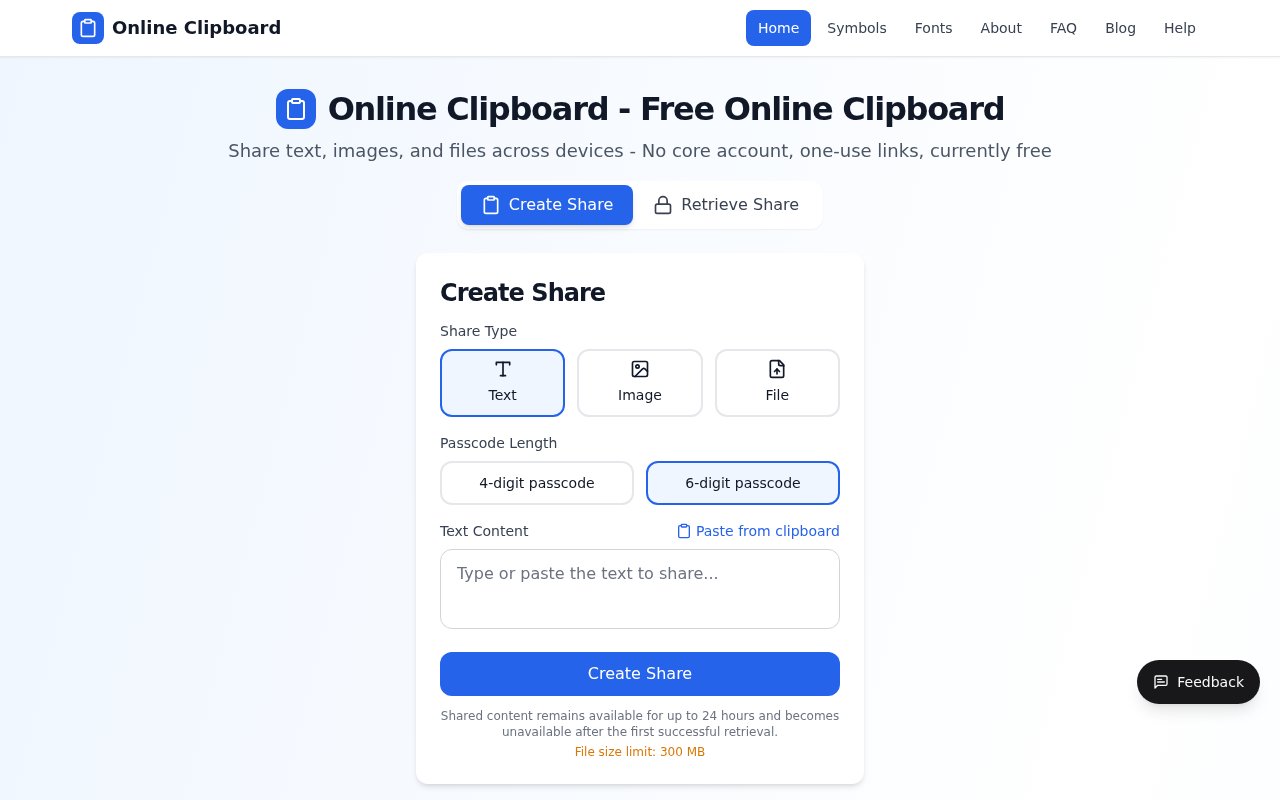
The creation flow starts by choosing text, image, or file. Text can be pasted into the page, while images and other files can be uploaded up to a stated 300 MB limit. The sender selects either a four-digit or six-digit passcode and creates the share. A generated link is convenient when it can be sent directly, a passcode is easy to type or read aloud to a nearby person, and a QR code makes a desktop-to-phone handoff quick. The recipient follows the link or uses the retrieval view with the code, then saves the content on the destination device. The browser is the only client required on either side.
Every share is deliberately temporary. Content remains available for no more than 24 hours and becomes unavailable after the first successful retrieval. That behavior is useful for a note, URL, screenshot, PDF, or ordinary document that only needs to cross the gap once. It also means the product is not trying to become a cloud drive. There are no folders, share histories, long-lived public download pages, version control, or recovery screens. Once an item has been opened or expired, the sender should expect it to be gone. The recipient therefore needs to save anything important during that first access.
The tool suits people working across a laptop and phone, mixed operating systems, managed computers where installing a sync utility is impractical, or brief exchanges with another person. A developer can move a code snippet to a test device. A presenter can send a PDF to a tablet. Someone setting up a phone can transfer a long address or URL without typing it again. A colleague can hand over an image without adding it to a permanent shared folder. These are small tasks, but the one-page workflow avoids the extra steps of emailing yourself, signing in to storage, or pairing devices through a vendor-specific ecosystem.
OnlinClipboard explains its data path in useful detail. Transfers use HTTPS. Share metadata and text are processed in Cloudflare D1, while uploaded images and files are placed in Cloudflare R2. A successful retrieval marks a share as used and begins the relevant deletion flow, while scheduled cleanup removes items that reach the 24-hour limit. The core clipboard does not require registration. That lowers friction, although it doesn't make the service anonymous. Infrastructure providers may still process network and browser information for delivery, security, and abuse prevention, and operational logs or temporary caches can follow different retention periods.
The security model depends on keeping the generated access details private. Anyone who obtains a valid link or passcode may retrieve the share first, and the service cannot stop a legitimate recipient from saving or forwarding what they open. Four-digit and six-digit codes are convenient for nearby transfers, but they are not a substitute for named permissions or a dedicated secure exchange system. The site specifically advises against uploading passwords, recovery codes, medical records, financial details, or anything that would cause serious harm if disclosed. For ordinary low-risk content, the short lifecycle and one-use design reduce how long material remains available online. Those boundaries make the product easy to understand. It is not a backup service, team workspace, password manager, encrypted messenger, or distribution host for many recipients. It is a temporary bridge between browsers. The 300 MB ceiling is generous for an occasional clipboard transfer, though uploads near the limit can still fail on a slow connection, in a memory-constrained browser, or when a device cannot keep the request active. Splitting or compressing a large item may be more reliable. Repeated downloads, named access controls, and collaboration should be handled by another service designed for those jobs.
Access is currently free, with no paid tier shown and no login required for the main create and retrieve workflow. That makes OnlinClipboard easy to try whenever a quick cross-device handoff is needed. The tradeoff is intentional impermanence. A user gives up account history, recovery, and repeated retrieval in exchange for a lightweight share that disappears after use or within a day. As long as the content is suitable for that model and the access details are sent carefully, it provides a focused alternative to leaving one-off attachments in email or creating permanent links in a storage account.
Key Features
- One-use temporary shares
- Text image and file support
- Link passcode and QR access
- Automatic 24-hour expiration
- No-account core workflow
- Uploads up to 300 MB
Pros & Cons
What we like
- Works across devices through any modern browser
- Requires no account for core sharing
- Removes shares after retrieval or expiration
- Handles text images and ordinary files
Room for improvement
- A share can be retrieved only once
- No account history or recovery screen
- Passcodes are limited to four or six digits
- Large uploads depend on browser and connection stability
Frequently Asked Questions
What is OnlinClipboard?
Is OnlinClipboard free?
How long does a share remain available?
How large can an uploaded file be?
Best For
Featured in
Alternatives to OnlinClipboard
View all
CalendHub
Smart scheduling and calendar management for teams
Kevin Gabeci Toolkits
Seven AI toolkits for writing books, making music, cutting video, and building agents.

Eased Into AI
Learn AI from zero. No jargon, no hype, just steps that work.

Fix It Gently
Calm, plain-English fixes for everyday tech problems.
Our take
Tool Index Editorial · Sep 2026· 3.5/5
OnlinClipboard moves text, images, and files between browsers through a temporary link, passcode, or QR code. We found the workflow direct, with no account, a 300 MB limit, one successful retrieval, and automatic expiry within 24 hours. The core service is currently free.
It is handy for a quick laptop-to-phone handoff or an ordinary file that does not deserve a permanent cloud folder. The one-use model also creates a hard edge because there is no history, recovery, cancellation dashboard, or second download. Four- and six-digit passcodes are convenience controls, not strong access control, so confidential records, credentials, and anything costly to expose should go through a purpose-built secure service.
Editorial opinion from the Tool Index team, written from the public product pages. Not a user review.
Reviews (0)
Badge builder
Add OnlinClipboard to your website
Choose a badge style and size, preview it here, then copy the generated HTML. Badge images are self-contained SVGs and do not require an external script.

<a href="https://toolindex.net/tools/online-clipboard?ref=badge" target="_blank" rel="noopener">
  <img src="https://toolindex.net/badge/online-clipboard/medium.svg" alt="OnlinClipboard - Listed on Tool Index" width="180" height="50" />
</a>How to use the badge
- 1. Pick the style, size, and theme that fit your layout.
- 2. Copy the generated HTML from the code block.
- 3. Paste it into your footer, homepage, or press page.
Standard badge available
The standard listing badge is available now. Score and circle badges are limited to tools currently ranked in the top 10 of a category.
Badge clicks return visitors to this profile with a referral tag so the source remains identifiable.
Related Tools

Confluence
Atlassian's long-running team wiki that anchors many enterprise knowledge stacks
Asana
Project management for teams that live in projects, tasks and dependencies
Kevin Gabeci Toolkits
Seven AI toolkits for writing books, making music, cutting video, and building agents.

Logseq
An open-source outliner notes app where every bullet is a first-class block
Work on OnlinClipboard? Request listing access or correction