
Jev Playground
Compare open-source Jev alternatives and call them through an OpenAI-compatible API
Gallery
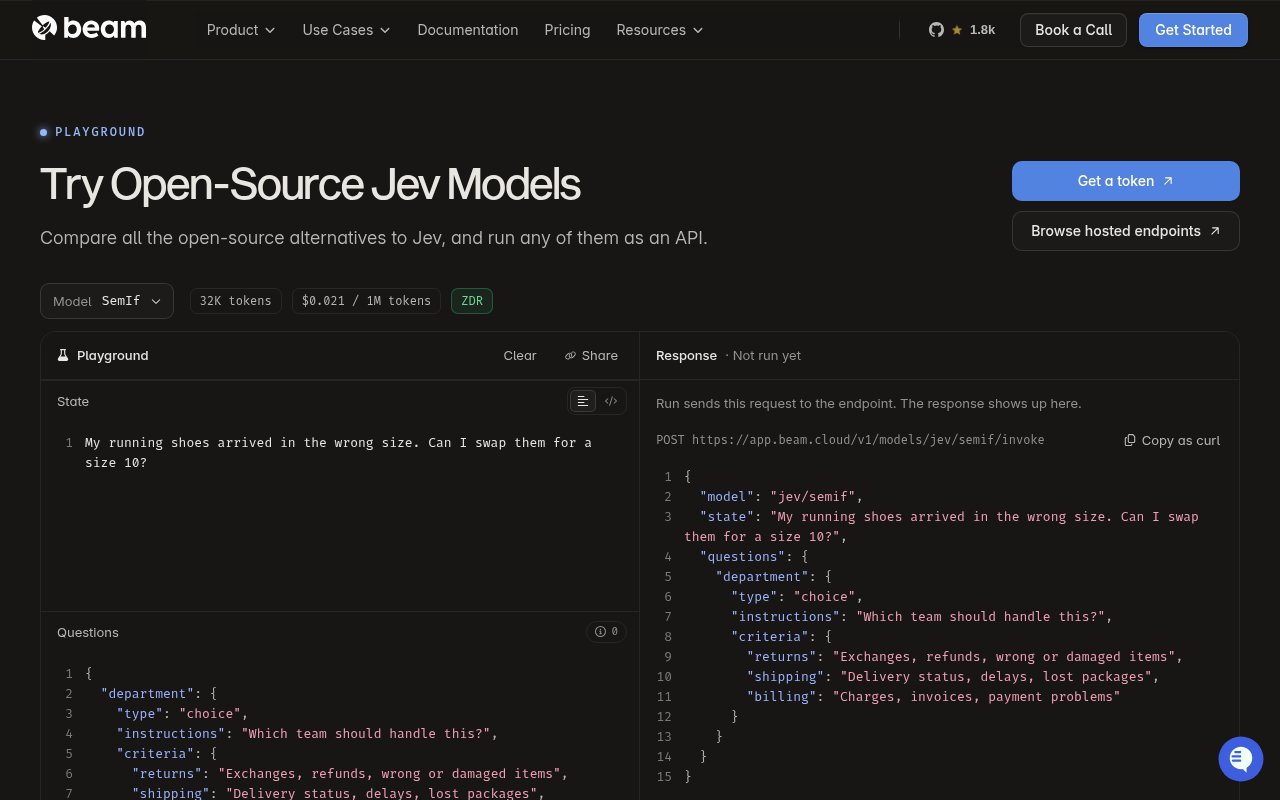
About Jev Playground
Jev Playground is a Beam-hosted workspace for trying open-source decision models against structured questions. Instead of asking a chat model for a long free-form answer, a user supplies some state, defines the decisions to make, and gives each decision explicit instructions or criteria. The model returns structured results that can be inspected in the browser or requested through an API. It is aimed at developers exploring classification, routing, moderation, evaluation, and other tasks where a predictable decision shape matters more than conversational prose.
The default example makes the interaction easy to understand. A customer message about receiving running shoes in the wrong size appears as the state. A department question defines possible choices for returns, shipping, and billing, with a short explanation of what belongs in each category. Users can edit both sides, add more questions, choose a hosted model from the catalog, and run the request. The response appears beside the input, which supports quick iteration on wording and criteria before anything is wired into an application.
The page is also a comparison surface for open-source alternatives to Jev. That matters when a team wants decision-model behavior but doesn't want to treat a single model as the only option. Trying the same state and question schema against different hosted endpoints can reveal differences in judgment, latency, or output behavior. The playground is not presented as a benchmark suite, and it doesn't replace an evaluation set drawn from the team's own data. It does make the early part of model selection more concrete than reading model cards without running representative examples. The question structure gives experiments more discipline than a loose prompt. Each named question can describe the decision it needs and define the criteria behind available choices. Several questions can be added to one state, which is useful when a single item needs more than one bounded assessment. Developers can then keep the schema stable while changing the example state or selected model. That consistency makes failures easier to examine, though a serious comparison still needs a larger set of representative cases and an explicit way to score the returned judgments.
Once a model and request shape look useful, the playground shows how to call the same endpoint from code. Beam provides an OpenAI-compatible API and displays request examples for curl, Python, and JavaScript. The sample includes the selected model, the state, the question definition, and the bearer token needed for an authenticated request. A developer can create a Beam account, obtain a workspace token, and move the browser experiment into a product without translating it into a completely different interface. The response in code follows the same JSON-oriented decision pattern shown by the playground.
This setup fits backend engineers, applied AI teams, and product developers who need explicit decisions from text. A support team could route incoming requests to a department. An operations product could classify a case against a fixed set of criteria. A moderation workflow could ask several bounded questions about one item, while an evaluation team could compare how models respond to carefully chosen edge cases. The tool is less suited to open-ended writing or broad chat experiences because its main strength is defining questions and criteria that produce structured answers.
Jev Playground is narrower than Beam's general cloud platform. Beam also offers serverless inference, task queues, sandboxes, GPU training, and other infrastructure, but this page keeps the first interaction focused on hosted decision models. That focus reduces setup during exploration, while the API path provides a route into production. Users should still account for authentication, usage cost, model changes, and application-level validation. A model's structured response is easier to process than prose, but it remains a model judgment and should be tested against the consequences of the decision being automated.
Beam uses a freemium, usage-based posture around the playground and API. Its Developer tier has no monthly platform fee, then compute is charged according to use, while paid Team and custom Growth tiers add capacity and support options. The playground page asks users to create an account and get a workspace token for API access. That makes browser exploration approachable and leaves the ongoing cost tied to the Beam resources behind the hosted endpoint. It is a practical fit for teams that want to test open decision models quickly, then integrate the chosen option through a familiar API shape.
Key Features
- Open decision model catalog
- Editable state and questions
- Choice criteria definitions
- Side-by-side response testing
- OpenAI-compatible model API
- Curl, Python, JavaScript examples
Pros & Cons
What we like
- Makes structured model behavior easy to inspect
- Supports comparison across open models
- Carries playground requests into an API
- Developer tier has no monthly fee
Room for improvement
- Requires a Beam token for API use
- Usage charges apply beyond the platform tier
- Focused on decisions rather than general chat
- Production use still needs application-level validation
Frequently Asked Questions
What is Jev Playground?
What kind of tasks does it support?
Can a playground request be used in an application?
Is Jev Playground free?
Best For
Featured in
Alternatives to Jev Playground

Apatero AI
The creator studio for AI image, video, audio, 3D, and avatars, now at apatero.ai.

SoloDevStack
A solo developer blog built on head-to-head tool comparisons, 580+ posts deep.
Apatero Studio
Creator studio for AI image, video, audio, 3D, and avatars. Every model worth using, in one workspace.

Melodex
Turn your idea into an AI-generated music video
Our take
Tool Index Editorial · Oct 2026· 3.5/5
Jev Playground gives developers a compact place to send structured state and choice questions to several open Jev-style decision models, then carry the same request into an API. We found the editable JSON and generated curl, Python, and JavaScript path clear enough for early routing or classification experiments. The selected SemIf endpoint showed a tiny token price, while Beam's wider infrastructure is usage based.
The captured playground had not actually run its sample, so it demonstrated the interface rather than the quality or calibration of any model. A single example is no substitute for an evaluation set, and API use needs a Beam token plus production validation. It is useful for narrowing candidates, but teams should resist treating a structured response as a verified decision.
Editorial opinion from the Tool Index team, written from the public product pages. Not a user review.
Reviews (0)
Badge builder
Add Jev Playground to your website
Choose a badge style and size, preview it here, then copy the generated HTML. Badge images are self-contained SVGs and do not require an external script.

<a href="https://toolindex.net/tools/open-jev-playground?ref=badge" target="_blank" rel="noopener">
  <img src="https://toolindex.net/badge/open-jev-playground/medium.svg" alt="Jev Playground - Listed on Tool Index" width="180" height="50" />
</a>How to use the badge
- 1. Pick the style, size, and theme that fit your layout.
- 2. Copy the generated HTML from the code block.
- 3. Paste it into your footer, homepage, or press page.
Standard badge available
The standard listing badge is available now. Score and circle badges are limited to tools currently ranked in the top 10 of a category.
Badge clicks return visitors to this profile with a referral tag so the source remains identifiable.
Related Tools
Apatero AI
The creator studio for AI image, video, audio, 3D, and avatars, now at apatero.ai.
Kevin Gabeci Toolkits
Seven AI toolkits for writing books, making music, cutting video, and building agents.

Warp
The modern terminal reimagined with AI and collaboration

Bolt.new
Prompt-to-deployed full-stack app inside the browser
Work on Jev Playground? Request listing access or correction