
OpenSpender
A self-custodial USDC wallet that lets AI agents pay for APIs and each other within set allowances
Gallery
About OpenSpender
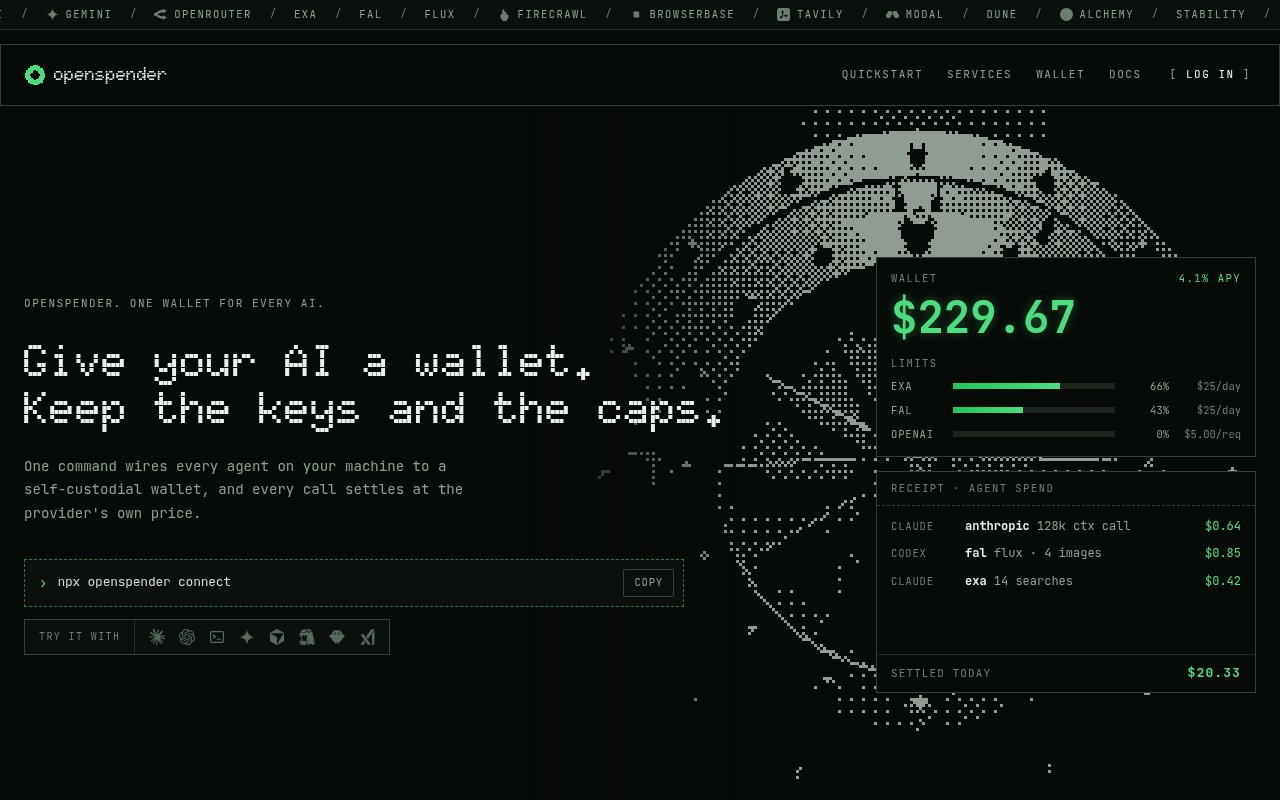
OpenSpender is a self-custodial wallet that lets AI agents pay for things. You fund one wallet with USDC on Base, connect your agents to it with a single command, and give each agent an allowance with hard limits. From then on an agent can call a paid API, settle the charge from its allowance, and get the response back, and it can pay another agent the same way, all without anyone handing it an API key or a card number.
The problem it targets is that agents keep running into paywalls they can't get through. Every metered service wants its own key, keys leak, and the alternative of a shared company card gives an autonomous process far more spending power than anyone intended. OpenSpender turns the payment itself into the credential. The provider issues a price, the wallet pays it, and the request goes through, with no key exchange and no standing account to be drained.
Setup is npx openspender connect, which configures Claude Code, Codex, Cursor, Gemini, OpenCode, Hermes, OpenClaw, Grok and ChatGPT over MCP and generates an allowance token for each. Anything that speaks the OpenAI or Anthropic wire format can also be pointed at the router by setting its base URL to openspender.com/v1 and passing the allowance token as the auth token, which makes curl and the OpenAI SDK work unmodified. When a provider answers with a 402 Payment Required challenge, the router checks the allowance, signs the payment and retries the request transparently.
Allowances are where the control lives. Each one carries a per-request cap, a daily cap, an optional total cap and a list of allowed hosts, and editing or deleting it lands on the agent at its next request, so revoking is immediate. The site counts 14,572 x402 endpoints and 142 MPP services reachable this way, spanning model APIs from Anthropic, OpenAI and Gemini, image generation from FLUX and Stability, search and crawl from Exa and Firecrawl, and compute from Modal and Alchemy. Every call lands in one ledger that shows the service, the units and the charge to a fraction of a cent, and in the agent-to-agent case both sides receive identical receipts. The docs give a feel for the prices involved. A Claude request through the router starts around $0.001, an Exa search costs about $0.007, and a FLUX image about $0.003, with the most expensive calls listed at $0.40 or more per request. The router itself fronts Anthropic, OpenAI, Exa, Tavily, FAL, BlockRun and Pinata, and it's the same base URL for all of them, so an agent that already knows how to call Anthropic keeps calling Anthropic and simply stops needing a key.
It's built for developers running autonomous agents that need to buy tool calls, models or data on their own, and for anyone experimenting with agents that sell services to each other. If you've wanted a coding agent to call a paid search or a paid crawler mid-task without pre-buying a subscription to each, this is the shape of tool that makes it safe to let it.
What sets it apart is the custody model and the fee model. OpenSpender never holds your funds, the wallet stays under your control, and you can top it up, move money out or empty it whenever you like. There's no subscription and no markup, so each request settles at the provider's own price and that's the entire bill, which the site illustrates with a run of eight calls totalling $0.2112 and nothing added on top. The limits are the flip side of that design. It's USDC on Base, so you need to be comfortable holding a stablecoin on a blockchain, the reachable services are the ones that speak x402 or MPP, and it's a young product from Trigger Labs whose support channel is an X account rather than an email address. Compared with the two ways people usually solve this, a shared API key per service or a prepaid subscription to each, the trade is clear. Shared keys are unlimited by default and painful to rotate once an agent has seen them. Subscriptions mean paying for services an agent might use, before it uses them. An allowance is the opposite shape, a budget that's spent only when a request actually happens and that dies the moment you revoke it. The cost is the crypto rail underneath, which is a non-starter for some teams and exactly the point for others.
Access is free. There's no plan to pick and no account fee, you pay providers what they charge and nothing more. Getting started means running the connect command, funding the wallet, and setting the first allowance, and the docs and quickstart on the site walk through the environment-variable route for tools that aren't on the MCP list.
Key Features
- Self-custodial USDC wallet on Base
- One-command MCP setup for major agents
- Per-request, daily and total allowance caps
- x402 and MPP payment standard support
- OpenAI and Anthropic compatible router
- Agent-to-agent payments with matching receipts
Pros & Cons
What we like
- No subscription and no markup on provider prices
- Revoking an allowance takes effect on the next request
- Payment replaces API keys, so nothing to leak
- Works with curl and SDKs that speak OpenAI or Anthropic formats
Room for improvement
- Requires holding USDC on the Base chain
- Only services that speak x402 or MPP are reachable
- Support runs through an X account, no email
- Young product with a short track record
Frequently Asked Questions
What is OpenSpender?
Does OpenSpender charge fees?
Does OpenSpender hold my money?
Which agents work with OpenSpender?
Best For
Featured in
Alternatives to OpenSpender
View all
Almanac
A hosted, source-cited wiki that turns your files into context your AI agents can use

Demi AI
Demi helps busy professionals eliminate repetitive admin work across their favorite tools.

Lindy
No-code AI agents that handle email, meetings, and recurring workflows
Vapi
Build voice AI agents that take and place phone calls
Our take
Tool Index Editorial · Sep 2026· 2.5/5
OpenSpender currently presents itself as credit cards and banking for AI agents, with just-in-time single-use cards, merchant controls, purchase approvals and an activity ledger. That is materially different from the USDC wallet described in this listing, which we could not verify on today's public site. The current product is aimed at people who want agents to buy food, travel or software without handing them an unrestricted card.
The control model looks sensible on the page, especially per-purchase limits, allowed merchants and explicit approvals. However, access is only through a waitlist, pricing is not published, and the site gives no self-serve product to evaluate today. The concept is interesting, but the mismatch with the listing and the lack of live access make this one to watch rather than recommend.
Editorial opinion from the Tool Index team, written from the public product pages. Not a user review.
Reviews (0)
Badge builder
Add OpenSpender to your website
Choose a badge style and size, preview it here, then copy the generated HTML. Badge images are self-contained SVGs and do not require an external script.

<a href="https://toolindex.net/tools/openspender?ref=badge" target="_blank" rel="noopener">
  <img src="https://toolindex.net/badge/openspender/medium.svg" alt="OpenSpender - Listed on Tool Index" width="180" height="50" />
</a>How to use the badge
- 1. Pick the style, size, and theme that fit your layout.
- 2. Copy the generated HTML from the code block.
- 3. Paste it into your footer, homepage, or press page.
Standard badge available
The standard listing badge is available now. Score and circle badges are limited to tools currently ranked in the top 10 of a category.
Badge clicks return visitors to this profile with a referral tag so the source remains identifiable.
Related Tools

OpenBenchmarks
Public, externally validated benchmarks that help agents pick SaaS APIs
Almanac
A hosted, source-cited wiki that turns your files into context your AI agents can use

Wizard
Self-extending Rust terminal AI agent that works with any model

Chariot
Elastic cloud infrastructure for deploying and scaling AI agent fleets with persistent storage
Work on OpenSpender? Request listing access or correction