
Orglet
Run a configurable team of AI workers from a local desktop app
Gallery
About Orglet
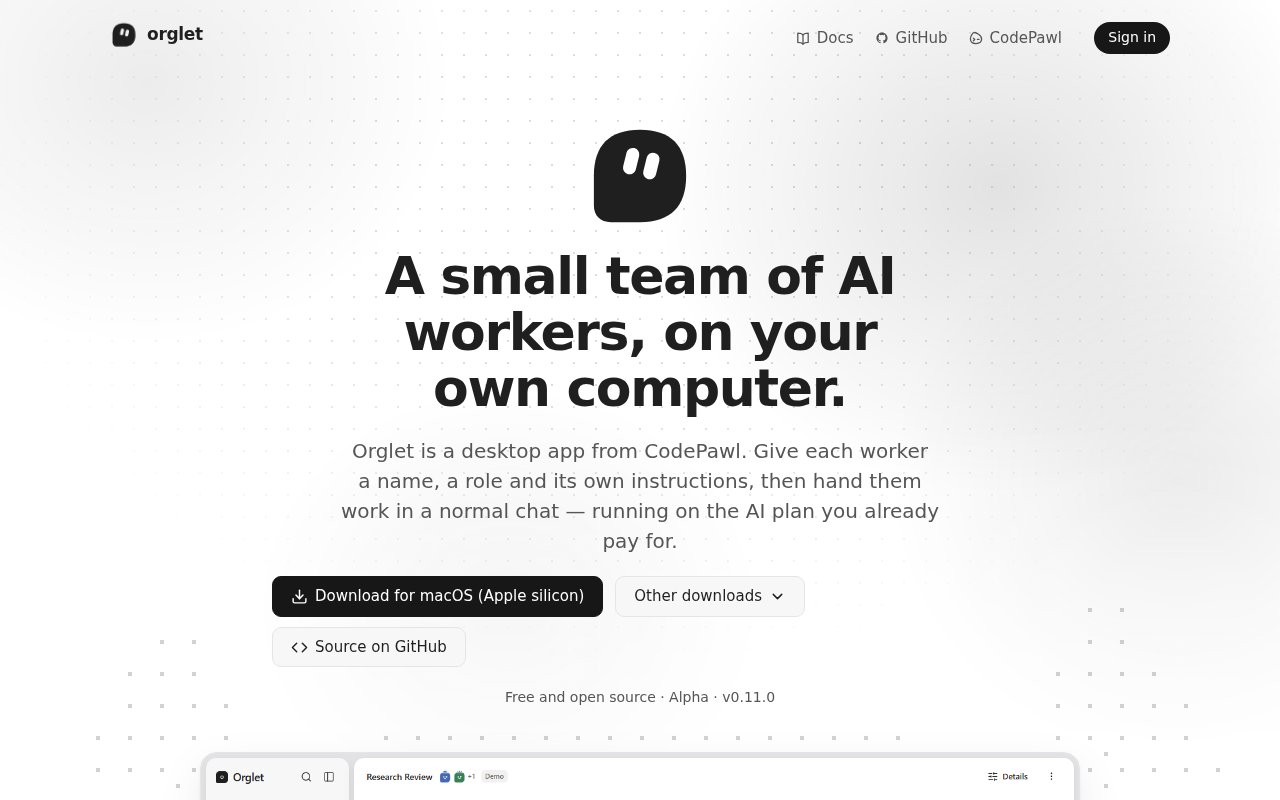
Orglet is a desktop app for running a small team of AI workers on a personal computer. Instead of opening several separate assistants and repeatedly explaining who should do what, a user can give each worker a name, role, and set of instructions, then hand the group work through a familiar chat. The app is aimed at people who already use coding agents or local models and want a clearer place to organize recurring roles, shared conversations, files, and results. It turns the coordination layer into a visible workspace, so the user can see the configured members and keep related activity together instead of treating every agent session as an isolated exchange.
The basic unit is an orglet, a configured group that can work inside chats and channels. A lead can split a request into member jobs and return one report, while tags, replies, and reactions help the user follow the discussion. Workers can connect to Claude Code, Codex, Cursor Agent, and Gemini CLI installed on the same computer. Orglet also documents connections through API keys and Ollama, along with cost limits. This lets a team mix existing provider access and local models without making the desktop app itself another model vendor. It also keeps provider choice separate from the roles and conversations organized in Orglet.
The chat workspace goes beyond a row of bot responses. Users can attach files, inspect reports, follow what an orglet did, see what is currently running, and schedule a request to repeat daily or weekly. A chat's file area can open and edit text or code, mark up images and PDFs, and save versions. There is also a terminal command for choosing a chat and composing interactively, plus operating system links and a Send to flow that can open the relevant item in Orglet. Together, those pieces make it useful for work that moves between a graphical workspace, project files, and a terminal. The activity view matters when several members take part, since it gives the user a place to follow the run and read the combined report rather than reconstructing the sequence from separate tools.
Local control is a central part of the product. Workers, chats, and attached files live in a local database rather than an Orglet server, and the documentation explains where that data is stored, how upgrades treat it, and how to roll back. Permission switches, a selected working folder, memory, a Library, and proposals that require approval give users places to define what a worker can access or change. Settings cover connections, costs, backups, erasure, and updates. An optional CodePawl account exists, but it isn't required to start using the app. The app therefore keeps its core work usable without making a new hosted account the owner of the project history.
Orglet fits individual developers, technical creators, and small teams that want repeatable AI roles without sending their project history to another coordination service. It can keep a researcher, implementer, reviewer, or other specialist available with consistent instructions. Scheduled work is useful when the same request needs to run every day or week, although schedules depend on the computer being available. The model providers still determine what each worker can do, how much usage is available, and what that usage costs. Teams also remain responsible for choosing sensible permissions and reviewing proposals before letting workers act on important files.
What makes Orglet distinct is the combination of local storage, open source code, and support for AI access a user may already have. It doesn't ask someone to rebuild their workflow around a hosted multi-agent service. It places coordination on the desktop and leaves the actual model connection explicit. That also makes its tradeoffs easy to see. It is still an alpha product, Windows has the ready-made build, and macOS or Linux users currently need to run it from source. A young project will also have a smaller contributor base and fewer polished integrations than mature hosted platforms.
Orglet is released under the AGPL 3.0 license, with its full source available on GitHub. CodePawl presents it as open source and doesn't require a separate Orglet subscription. Users may still need a paid plan or API usage with their chosen AI provider, so open source access doesn't mean the underlying model calls are free. A demo path is available for trying the interface before connecting a real model. That access posture makes Orglet most compelling for someone comfortable choosing providers, managing local software, and accepting an alpha product in exchange for control over the workspace and data.
Key Features
- Configurable AI worker teams
- Multi-provider model connections
- Local chat and file storage
- Scheduled recurring requests
- File editing and markup
- Terminal chat command
Pros & Cons
What we like
- Keeps chats and files on the user's computer
- Works with several existing AI plans and local models
- Combines team chats, files, schedules, and reports
- Open source under the AGPL 3.0 license
Room for improvement
- Still labeled as an alpha product
- macOS and Linux currently run from source
- Requires separate model access for real work
- Local schedules depend on the computer being available
Frequently Asked Questions
What is Orglet?
Which AI connections does Orglet support?
Does Orglet store work in the cloud?
Is Orglet free?
Best For
Featured in
Alternatives to Orglet
Rememori
Embedded memory engine for AI agents in TypeScript with zero dependencies

Almanac
A hosted, source-cited wiki that turns your files into context your AI agents can use
Lindy
No-code AI agents that handle email, meetings, and recurring workflows
Vapi
Build voice AI agents that take and place phone calls
Our take
Tool Index Editorial · Oct 2026· 3.5/5
Orglet organizes several AI workers into local chats, channels, reports, schedules, and file workspaces. We found its support for Claude Code, Codex, Cursor Agent, Gemini CLI, API keys, and Ollama appealing because users can keep the provider access they already have. Local storage, explicit folders, and approval controls also give the coordination layer sensible boundaries.
Orglet is free and open source, but model access may still cost money. More importantly, it is alpha software, and the site tells users to expect rough edges and verify worker output. Desktop builds now cover macOS and Windows, with Linux marked experimental, while scheduled work depends on the computer being available. It is promising for technical early adopters, not yet a low maintenance team standard.
Editorial opinion from the Tool Index team, written from the public product pages. Not a user review.
Reviews (0)
Badge builder
Add Orglet to your website
Choose a badge style and size, preview it here, then copy the generated HTML. Badge images are self-contained SVGs and do not require an external script.

<a href="https://toolindex.net/tools/orglet?ref=badge" target="_blank" rel="noopener">
  <img src="https://toolindex.net/badge/orglet/medium.svg" alt="Orglet - Listed on Tool Index" width="180" height="50" />
</a>How to use the badge
- 1. Pick the style, size, and theme that fit your layout.
- 2. Copy the generated HTML from the code block.
- 3. Paste it into your footer, homepage, or press page.
Standard badge available
The standard listing badge is available now. Score and circle badges are limited to tools currently ranked in the top 10 of a category.
Badge clicks return visitors to this profile with a referral tag so the source remains identifiable.
Related Tools

OpenBenchmarks
Public, externally validated benchmarks that help agents pick SaaS APIs
Almanac
A hosted, source-cited wiki that turns your files into context your AI agents can use

Wizard
Self-extending Rust terminal AI agent that works with any model

Chariot
Elastic cloud infrastructure for deploying and scaling AI agent fleets with persistent storage
Work on Orglet? Request listing access or correction