PalTool
Open source palette converter and image optimizer for animations and graphics
Gallery
About PalTool
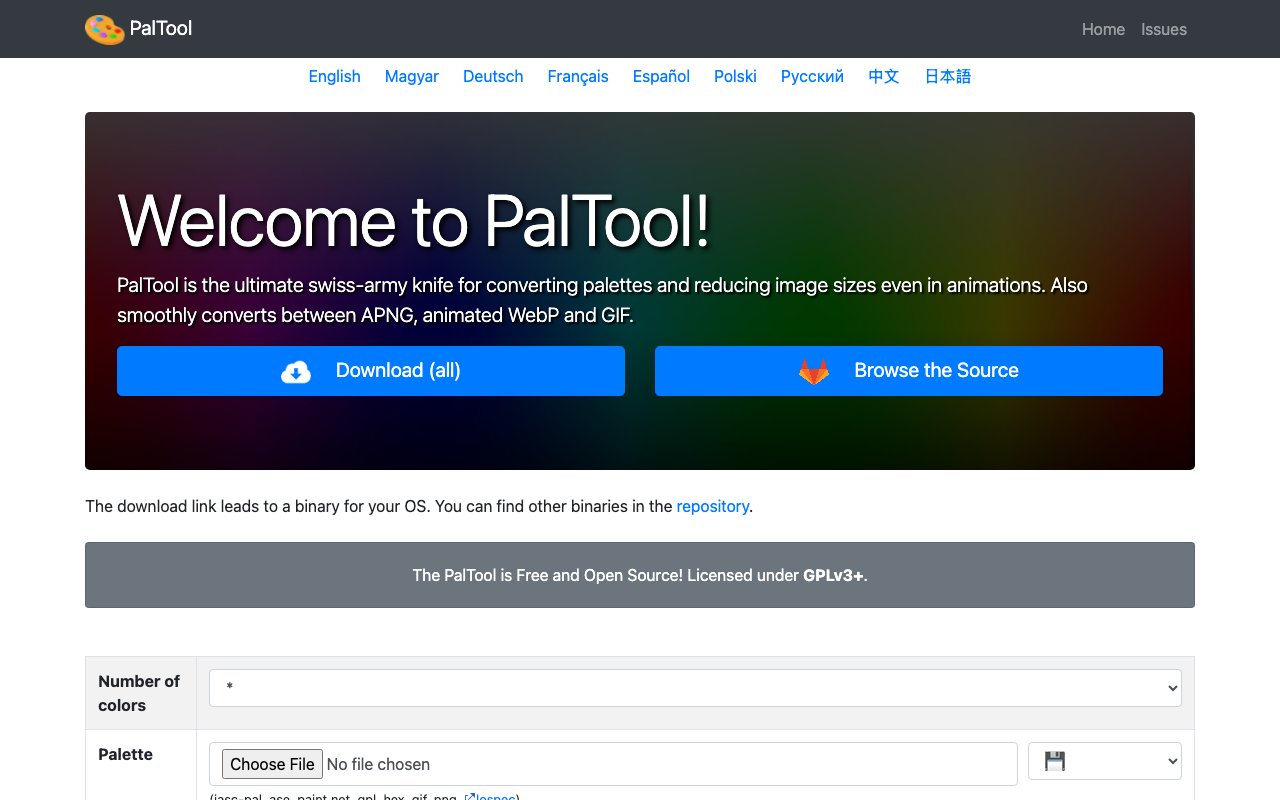
PalTool is a command line utility for converting color palettes and reducing image file sizes, including animations. It sits at the intersection of pixel art tooling and image optimization, handling the kind of palette work that designers and developers often do by hand or with multiple separate tools. The project is open source under GPLv3+ and ships binaries for Linux and Windows, so you can run it without compiling anything or paying for anything. If you work with constrained color counts, whether for retro game development, pixel art, or web optimization, PalTool does the tedious conversion and quantization work for you.
The core problem it solves is palette management across formats. If you have ever needed to take a color palette from one application and use it in another, you know the friction involved. Different tools export different formats, and manually transcribing hex codes is error-prone and tedious. PalTool reads palettes in JASC-PAL, ASE, Paint.NET, GPL, HEX, GIF, PNG, and even Lospec format, then writes them out to whichever format you actually need. It also quantizes images to a specific number of colors, which is useful for retro game development, pixel art workflows, or simply shrinking file sizes without losing the visual identity of an image. The quantization process can include dithering to preserve detail when reducing color counts, and you can adjust significant bits per channel from one to eight for fine control over the output. This level of granularity is rare in free tools.
For animation work, PalTool converts between APNG, animated WebP, and GIF while preserving palette consistency across frames. That matters when you are targeting the web and need the smallest possible file without breaking the animation or introducing banding artifacts. Web developers spend real time chasing down the right format for a given browser matrix, and PalTool handles that conversion without requiring Photoshop or a suite of online converters. It can also flatten an animation down to a single frame if you only need a still image for a thumbnail or preview. The tool supports alpha channels throughout, so transparency is not quietly dropped during conversion the way it sometimes is with simpler tools. If you have ever lost transparency during a format conversion and had to redo the work, you will appreciate this.
On the input side, PalTool accepts PNG, WebP, GIF, JPG, BMP, PSD, TGA, HDR, PIC, PNM, QOI, and QOI2. Output options are PNG, WebP, GIF, or raw PAL files. That breadth means you can use it as a single stop for most palette and quantization tasks rather than chaining together multiple utilities, each with its own quirks and flags. It also supports palette ramp generation, which is handy when you need a smooth gradient or want to build a cohesive palette from scratch. Decolorization with palette mapping lets you take a color image and convert it to grayscale while still referencing a palette, and per-block color limiting gives you control over how colors are reduced within different regions of an image. These features add up to a tool that handles edge cases gracefully.
The audience is anyone working with constrained color counts. Pixel artists use it to enforce a specific palette across multiple assets, ensuring visual consistency in a sprite sheet or tileset. Game developers targeting low-spec or retro hardware use it to shrink sprites and tilesets while staying within memory budgets. Web developers use the animation conversion to pick the smallest format for a given target, saving bandwidth without sacrificing quality. Because it runs from the command line, it fits into build pipelines, batch scripts, and automated workflows without needing a graphical interface or manual intervention. You can drop it into a Makefile or CI job and forget about it.
PalTool stands out from general-purpose image editors because it treats palettes as first-class objects rather than afterthoughts buried in export dialogs. You can extract a palette from one image and apply it to another with a single command. You can generate a palette ramp from scratch or map an image's colors to a specific target palette. The focus is narrow but deep, covering a set of tasks that would otherwise require a patchwork of tools, browser-based converters, or manual labor in an image editor. It does one family of tasks well and stays out of the way for everything else.
Access is completely free and open source. You download a binary or build from source, and there is nothing to sign up for, no account to create, and no license to manage. The project is maintained on GitLab with documentation and example usage available in the repository. If you need palette conversion, image quantization, or animated format juggling in a scriptable, dependency-light package that runs locally on your machine, PalTool is purpose-built for exactly that. The community around it is small but active, and issues are tracked publicly so you can see what is being worked on.
Key Features
- APNG WebP and GIF format conversion
- Configurable dithering and color quantization
- Per block color limiting
- Web based and native command line versions
- Wide input format support including PSD and TGA
- Palette generation and application
Pros & Cons
What we like
- Completely free with GPLv3 open source license
- Works in browser or as native command line tool
- Fine grained control over color reduction and dithering
- Handles animation formats not just static images
Room for improvement
- Command line interface requires technical comfort
- Web version requires JavaScript enabled
- Support limited to GitLab issues and community
- Focused on paletted graphics which limits general use
Frequently Asked Questions
What is PalTool?
Is PalTool free?
How do I use PalTool?
Who is PalTool for?
Best For
Featured in
Alternatives to PalTool
View all
Framer
Visual website builder that lets designers ship production-grade marketing sites with real CMS, SEO controls, and code components.

Apatero Studio
Creator studio for AI image, video, audio, 3D, and avatars. Every model worth using, in one workspace.

Pixel Painters
Unlimited graphic design subscriptions built only for churches and ministries
Our take
Tool Index Editorial · Oct 2026· 3.5/5
PalTool is a free GPLv3+ palette and image utility for color reduction, dithering, palette conversion, and animation conversion between APNG, WebP, and GIF. We found surprising depth in its public interface, including alpha preservation, per-block color limits, palette ramps, many input formats, and a choice between browser use and native binaries. Pixel artists and game developers can also fit it into scripted asset pipelines.
The interface is dense and assumes users already understand quantization, significant bits, and palette formats. Documentation and support are much thinner than the feature list, and the narrow focus won't replace a general image editor. For technical users with constrained-color assets, it is capable and unusually specific, but newcomers should expect experimentation.
Editorial opinion from the Tool Index team, written from the public product pages. Not a user review.
Reviews (0)
Badge builder
Add PalTool to your website
Choose a badge style and size, preview it here, then copy the generated HTML. Badge images are self-contained SVGs and do not require an external script.

<a href="https://toolindex.net/tools/paltool?ref=badge" target="_blank" rel="noopener">
  <img src="https://toolindex.net/badge/paltool/medium.svg" alt="PalTool - Listed on Tool Index" width="180" height="50" />
</a>How to use the badge
- 1. Pick the style, size, and theme that fit your layout.
- 2. Copy the generated HTML from the code block.
- 3. Paste it into your footer, homepage, or press page.
Standard badge available
The standard listing badge is available now. Score and circle badges are limited to tools currently ranked in the top 10 of a category.
Badge clicks return visitors to this profile with a referral tag so the source remains identifiable.
Related Tools
Apatero Studio
Creator studio for AI image, video, audio, 3D, and avatars. Every model worth using, in one workspace.

Tailwind CSS
Rapidly build custom designs without leaving your HTML

Figma
Collaborative interface design tool

Marvel
Lightweight prototyping platform for turning images and screens into clickable mobile and web prototypes.
Work on PalTool? Request listing access or correction