
Papiers
Save, understand, search, and share research from papers, articles, and the web
Gallery
About Papiers
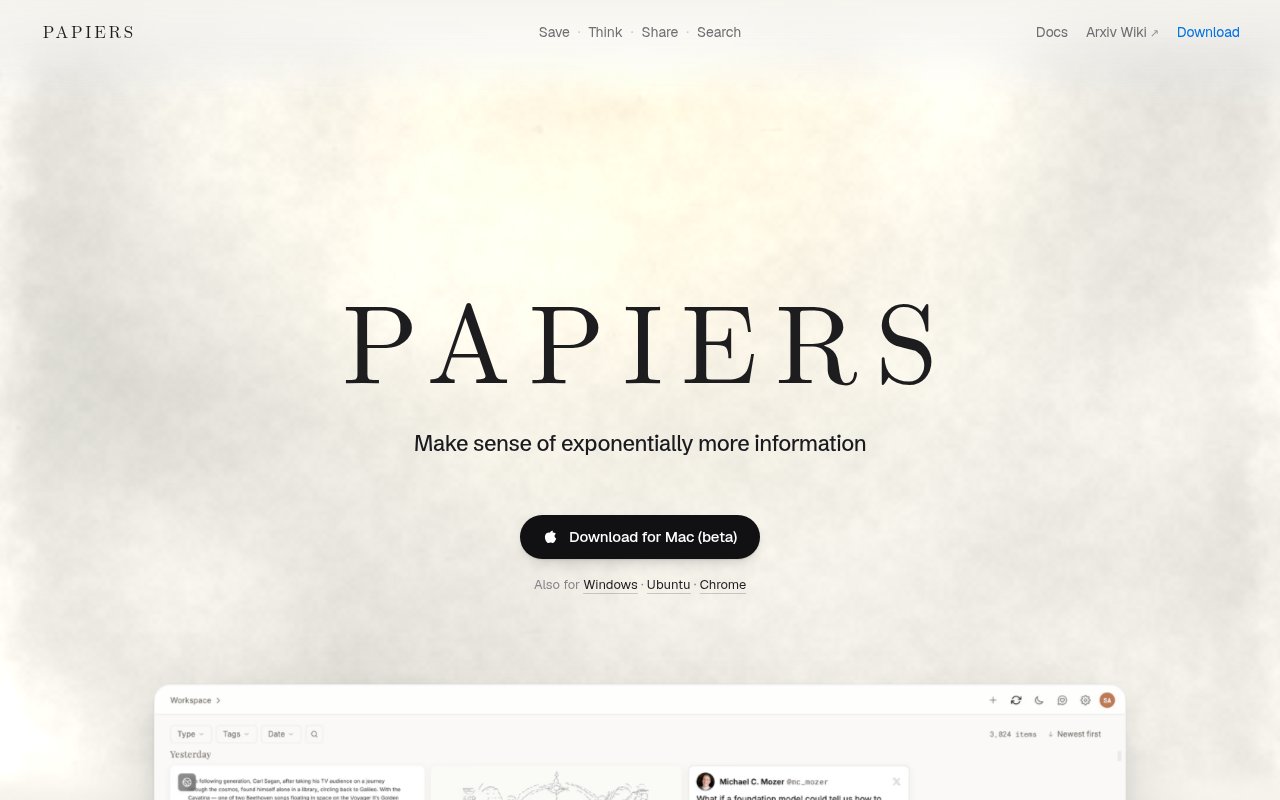
Papiers is a research workspace for collecting sources, reading them closely, and finding connections across the material a person has already studied. It can save papers, articles, tweets, and other web content rather than limiting a library to uploaded PDFs. The product is available as a Mac app, a Windows app, an Ubuntu app in beta, and a Chrome extension. Those entry points make it useful for research that begins in several places. A paper may arrive through a journal link, an article through browsing, and a useful discussion through a social post. Papiers gives those items a shared home and then adds tools for understanding, searching, and sharing what the reader found.
The Save part of the workflow is intentionally broad. A reader can capture a formal research paper alongside the less formal sources that helped explain or challenge it. That matters because practical research rarely stays inside one format. Technical teams often move between papers, documentation, commentary, and public discussion while forming a view of a topic. The Chrome extension provides a direct route from web browsing into Papiers, while the desktop downloads give Mac, Windows, and Ubuntu users a dedicated application for returning to their collection. Ubuntu support is labeled beta, so Linux users should expect a less settled build than the Mac and Windows versions. The homepage does not show a mobile app download.
Once something is saved, the Think workflow covers reading, highlighting, and asking questions. For research papers, Papiers also describes searchable summaries, wiki-style breakdowns, and interactive PDF tooling. These views give readers several levels of detail. A summary can help decide whether a paper deserves attention, a structured breakdown can make its main ideas easier to scan, and the PDF remains the place to inspect the source directly. Highlighting lets someone mark the passages that matter within that reading process. Asking questions can help with orientation or clarify how a section relates to the rest of the document, but the original wording and evidence still deserve checking when a conclusion will guide research or implementation.
Search goes beyond matching a new query against titles. Papiers says its answers can use the reader's prior notes, chats, and annotations, which makes the accumulated work part of later retrieval. Someone revisiting a topic does not have to rely only on remembering which paper held a particular detail. Their own highlights and written context can contribute to the answer. This is an important distinction from a general search engine, which knows the public material but not the user's path through it. It also separates Papiers from a plain reference folder. The value can grow as the user actually reads, annotates, and asks questions, because those interactions create more personal context for a later search.
The Share workflow turns highlights into screenshots that can be passed to colleagues or used in a discussion. This gives a reader a compact way to show the exact passage that prompted an observation without sending someone a full document and a page number alone. Papiers therefore fits researchers, engineers, students, analysts, and technical founders who collect sources over time and need to communicate what they found. It is especially relevant when the useful research trail mixes academic work with articles and online conversation. Someone who only opens an occasional PDF may not need the wider workspace, while a regular reader can benefit from keeping capture, annotation, contextual search, and shareable excerpts together.
Papiers uses a freemium model. Its pricing page directly identifies Free, Plus, and Pro plans, so there is a no-cost tier alongside paid upgrades. The JavaScript-rendered public pricing body did not expose current prices, quotas, or the precise boundary between tiers to text access, so those details should be confirmed in the live page before purchase. The same caution applies when judging AI-generated summaries or answers. Papiers can organize the path from source capture to understanding, and it can bring a reader's own notes and annotations into later questions, but it does not remove the need to evaluate the source. The free entry point gives each reader a practical way to test that fit before choosing Plus or Pro. A sensible trial is to save material the user already knows, compare the generated views with the originals, and see whether later searches recover the context that person actually recorded.
Key Features
- Cross-format research saving
- Desktop and Chrome access
- Interactive reading and highlighting
- Questions inside saved content
- Search across notes and annotations
- Shareable highlight screenshots
Pros & Cons
What we like
- Keeps papers, articles, and social posts together
- Uses prior research context in later answers
- Turns highlights into easy-to-share images
- Offers desktop apps and a browser extension
Room for improvement
- Ubuntu desktop support is still in beta
- No mobile app download is shown
- Current prices and tier limits aren't publicly readable
- AI answers still require source verification
Frequently Asked Questions
What is Papiers?
Is Papiers free?
What can Papiers save?
How does Papiers search past research?
Best For
Featured in
Alternatives to Papiers
View all
Apatero AI
The creator studio for AI image, video, audio, 3D, and avatars, now at apatero.ai.

SoloDevStack
A solo developer blog built on head-to-head tool comparisons, 580+ posts deep.
Apatero Studio
Creator studio for AI image, video, audio, 3D, and avatars. Every model worth using, in one workspace.

Melodex
Turn your idea into an AI-generated music video
Our take
Tool Index Editorial · Sep 2026· 3.5/5
Papiers brings papers, articles, posts, notes, highlights, and AI questions into one research workspace. We found desktop apps, a Chrome extension, Zotero import, search across prior reading, an Atlas paper view, presentation creation, and agent access through a CLI. Free includes the core workspace, Plus costs $10 monthly, and Pro costs $20 monthly.
Its value will depend on whether search and generated explanations faithfully recover the user's sources, which still need direct checking. Mac is labeled beta on the homepage, Ubuntu support is also presented as less settled, and no mobile app is shown. The pricing page describes usage only as multiples of Free rather than publishing exact document and question quotas, so heavy researchers should confirm limits before committing.
Editorial opinion from the Tool Index team, written from the public product pages. Not a user review.
Reviews (0)
Badge builder
Add Papiers to your website
Choose a badge style and size, preview it here, then copy the generated HTML. Badge images are self-contained SVGs and do not require an external script.

<a href="https://toolindex.net/tools/papiers?ref=badge" target="_blank" rel="noopener">
  <img src="https://toolindex.net/badge/papiers/medium.svg" alt="Papiers - Listed on Tool Index" width="180" height="50" />
</a>How to use the badge
- 1. Pick the style, size, and theme that fit your layout.
- 2. Copy the generated HTML from the code block.
- 3. Paste it into your footer, homepage, or press page.
Standard badge available
The standard listing badge is available now. Score and circle badges are limited to tools currently ranked in the top 10 of a category.
Badge clicks return visitors to this profile with a referral tag so the source remains identifiable.
Related Tools
Apatero AI
The creator studio for AI image, video, audio, 3D, and avatars, now at apatero.ai.
Kevin Gabeci Toolkits
Seven AI toolkits for writing books, making music, cutting video, and building agents.

Warp
The modern terminal reimagined with AI and collaboration

Bolt.new
Prompt-to-deployed full-stack app inside the browser
Work on Papiers? Request listing access or correction