
Particle
Self-hostable read-later app with content trimming and offline storage
Gallery
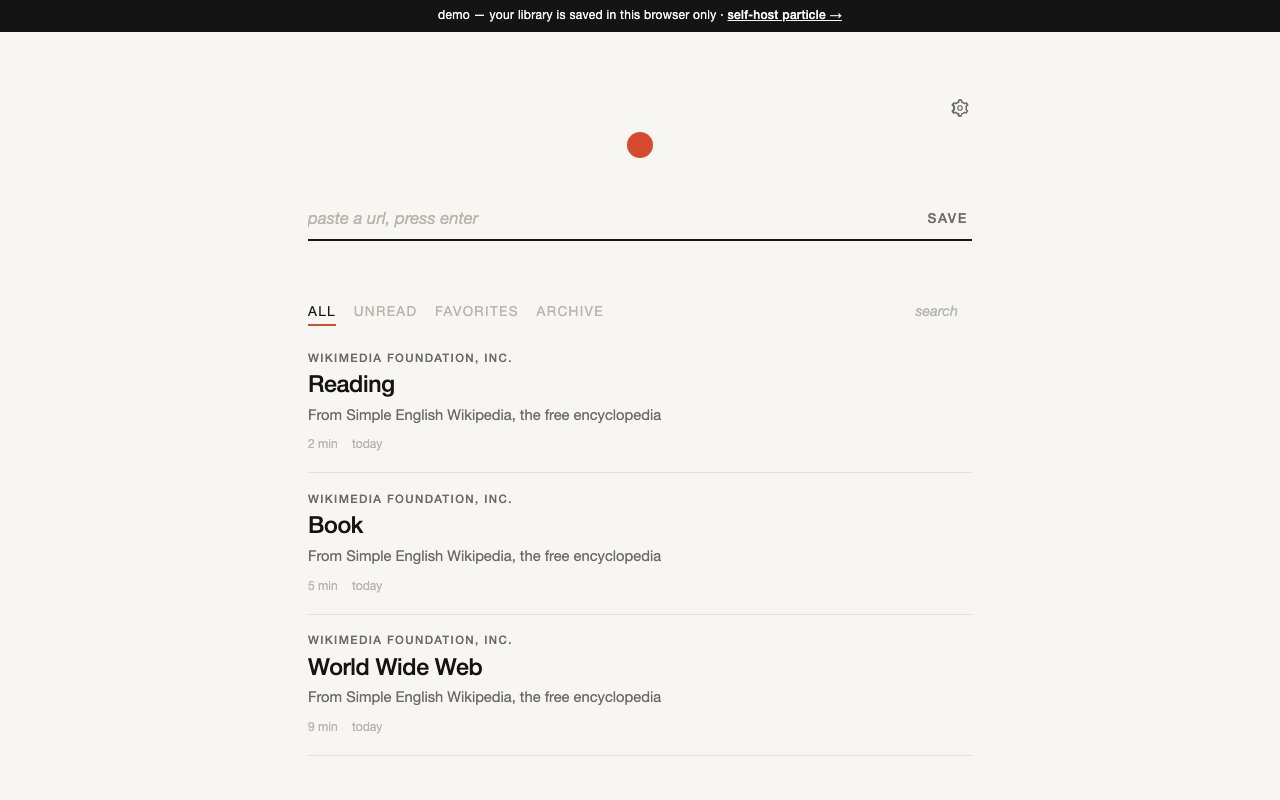
About Particle
Particle is an open source read later application that saves articles from the web and stores them in a single SQLite database file. You paste a URL or use the bookmarklet to save articles, then read them in a clean interface without ads or distractions. The project runs entirely in your browser or on your own server if you choose to self host with Docker. There's no account required, no subscription, and no third party service that owns your data. Your reading list is a file you control, not a service you're renting.
The problem Particle addresses is the ever growing pile of articles you intend to read but never get back to. Browser tabs multiply. Bookmarks accumulate. Services like Pocket or Instapaper fill up with hundreds of unread items until the backlog feels insurmountable and you give up. Particle takes a simpler approach. Save articles you want to read, organize them into lists, and actually read them in an interface designed for focused reading. The philosophy is that a personal library you control works better than a cloud service that might shut down, change its terms, or monetize your reading habits in ways you didn't agree to.
The standout feature is content trimming. After saving an article, you can click on paragraphs or select text to mark them for removal. The saved version keeps only the sections you actually care about. Ads, sidebars, author bios, related article widgets, promotional content, and newsletter signup prompts all disappear. When you come back to read the article, you see a cleaned up version that contains just the material you wanted. This makes Particle function more like a personal archive where you curate what stays rather than a passive bookmark that captures everything including the junk. The trimming happens at the paragraph level or through text selection, giving you fine grained control over what gets preserved.
The reading interface supports multiple themes including light, sepia, and dark modes. You can change the typeface and adjust the text size to match your reading preferences. There's a text to speech option if you prefer listening to articles rather than reading them, which is useful for long form content or when you want to consume articles while doing other tasks. Tabs at the top of the interface let you filter your library by all articles, unread items, favorites, or archived content. You can also create custom lists that appear as additional tabs, which is useful for organizing articles by topic, project, or reading priority.
Storage uses SQLite, which means your entire library is a single portable file you can back up, move between machines, or store wherever you want. There are two operating modes. The browser only version stores data locally in your browser's storage. This works fine for trying the app but limits you to one device and puts your data at risk if you clear browser data or switch browsers. The self hosted version runs in Docker and stores the database on your server. This gives you access from any device, persistent storage that won't disappear when you clear cache, and full control over where your data lives.
Self hosting is straightforward if you're comfortable with Docker. The official image is published to GitHub's container registry. You run a single command to pull the image and start the container, exposing the web interface on your preferred port and mounting a volume for persistent storage. The documentation provides the exact command, which makes setup a one liner rather than a multi step configuration process. For people who don't want to manage infrastructure, the browser only version requires zero setup beyond dragging the bookmarklet to your toolbar.
The project is completely free and open source. There's no pricing page because there's nothing to pay for. The source code is available on GitHub under crnst8/particle. No account is required to use the browser version. There are no ads, no tracking, no data collection, and no upsells to a premium tier. The audience is readers who want control over their reading list and developers who prefer self hosted solutions to cloud services. Anyone who has been burned by a service shutting down and losing their data, or anyone who simply prefers owning their tools rather than subscribing to them, will appreciate that Particle is just software you run yourself.
One limitation to be aware of is that there's no export feature and no undo for deleting your library. If you delete everything, it's gone. The developer notes this clearly in the interface, so you're not surprised. Backups of the SQLite file are your responsibility if you want recoverability. Sync across devices requires the self hosted setup since the browser version is local only. There's no mobile app, just the browser interface which works on phones but isn't a native experience. These are reasonable tradeoffs for a free open source tool maintained by a single developer, but worth knowing before you commit your reading list to it.
Key Features
- Single SQLite file for portable storage
- Content trimming to remove unwanted sections
- Self-hosting via Docker one-liner
- Bookmarklet for saving from any page
- Light, sepia, and dark reading themes
- Audio playback for article narration
Pros & Cons
What we like
- Data stays local or on your own server
- Trim articles down to just the parts you want
- No account or payment required
- Portable SQLite file you can back up or move
Room for improvement
- No mobile app, browser-based only
- Self-hosting requires some Docker knowledge
- Smaller project, limited community support
- No sync across devices without self-hosting
Frequently Asked Questions
What is Particle?
Is Particle free?
How do I self-host Particle?
Does Particle sync across devices?
Best For
Featured in
Alternatives to Particle

CalendHub
Smart scheduling and calendar management for teams
Kevin Gabeci Toolkits
Seven AI toolkits for writing books, making music, cutting video, and building agents.

Eased Into AI
Learn AI from zero. No jargon, no hype, just steps that work.

Fix It Gently
Calm, plain-English fixes for everyday tech problems.
Reviews (0)
Badge builder
Add Particle to your website
Choose a badge style and size, preview it here, then copy the generated HTML. Badge images are self-contained SVGs and do not require an external script.

<a href="https://toolindex.net/tools/particle?ref=badge" target="_blank" rel="noopener">
  <img src="https://toolindex.net/badge/particle/medium.svg" alt="Particle - Listed on Tool Index" width="180" height="50" />
</a>How to use the badge
- 1. Pick the style, size, and theme that fit your layout.
- 2. Copy the generated HTML from the code block.
- 3. Paste it into your footer, homepage, or press page.
Standard badge available
The standard listing badge is available now. Score and circle badges are limited to tools currently ranked in the top 10 of a category.
Badge clicks return visitors to this profile with a referral tag so the source remains identifiable.
Related Tools

Confluence
Atlassian's long-running team wiki that anchors many enterprise knowledge stacks
Asana
Project management for teams that live in projects, tasks and dependencies
Kevin Gabeci Toolkits
Seven AI toolkits for writing books, making music, cutting video, and building agents.

Logseq
An open-source outliner notes app where every bullet is a first-class block
Work on Particle? Request listing access or correction