
Pastecmd
End-to-end encrypted copy and paste between your phone and computer, nothing to install
Gallery
About Pastecmd
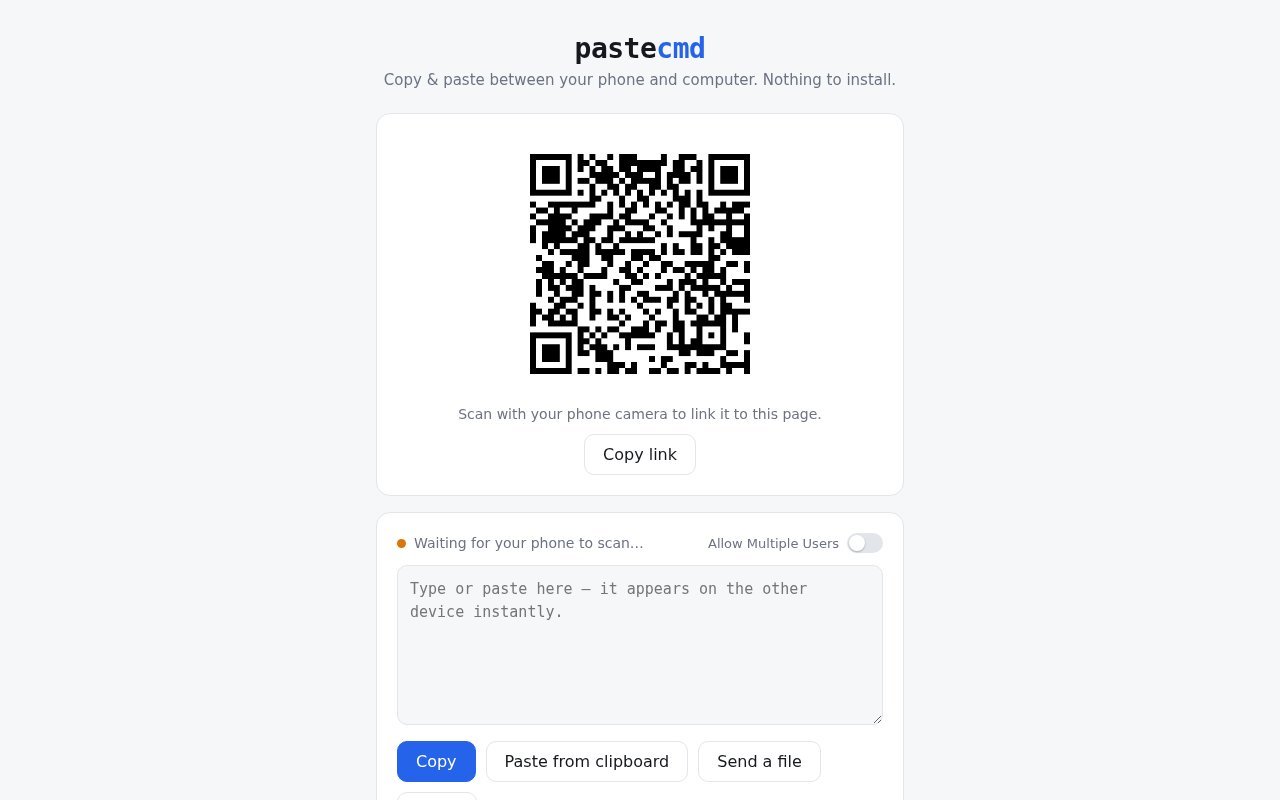
Pastecmd is a browser-based clipboard bridge between a phone and a computer. You open the page on the computer, scan the QR code it shows with the phone camera, and the two devices share a short-lived session where text, files, and screenshots move in either direction. There's nothing to install on either side and no account to create, which is the whole pitch. It's a page you open when you need it and forget when you're done, and the site sums itself up in one line, copy and paste between your phone and computer with nothing to install.
The problem it solves is small and constant. A link, a one-time code, a paragraph of text, or a photo sits on one device and you need it on the other. The usual workarounds are emailing yourself, messaging a chat with only you in it, or finding a cable. AirDrop and Nearby Share help only when both devices sit inside the same ecosystem, and clipboard sync apps want an install and an account on every machine, which is exactly what you can't do on a locked-down work laptop or a machine that isn't yours. Pastecmd goes after the mixed case, a phone and a PC of any make, with a page that works wherever there's a browser and a camera.
Using it takes a few seconds. Load pastecmd.com on the computer and the page shows a QR code, or a link you can copy and send instead for a device that can't scan. Scan it and the phone joins the session. From there the controls are plain verbs. Paste from the clipboard, send a file, drag a file onto the page, or paste a screenshot straight in, and it appears on the other device. Files can be up to 50 MB. Each session is limited to two devices, and the page tells you when both slots are taken, with the advice that if the second device isn't yours then someone else may have the link and you should start a fresh session. There's also a switch to allow multiple users if you want more than two devices on purpose, a clear button to empty what's been shared, a try again control for a transfer that stalls, and a start-new-session button for when you want to wipe the slate and get a fresh code.
The security posture is stated plainly on the page. Transfers are end-to-end encrypted, nothing is stored, and sessions expire after ten minutes idle. That combination is the design. Pastecmd isn't a cloud clipboard with history, it's a pipe that closes itself, so once a session ends there's no archive sitting on a server to leak later. Close the tab and the session is gone along with whatever passed through it, which is the behaviour you want for a one-time code or a document you'd rather not leave in a chat history. The site doesn't publish a technical writeup of how keys are exchanged between the two devices, so anyone who needs to audit the cryptography before trusting it with sensitive material will want to read the page source or ask the maintainer rather than take the label on faith.
It fits anyone who moves between a phone and a computer during the day and wants a disposable channel between them. Support staff pushing a URL to a customer's phone, developers grabbing a screenshot from a device for a bug report, people on a locked-down work laptop where installing sync apps isn't allowed, teachers moving a photo of the whiteboard onto the classroom PC, and anyone who's tired of emailing themselves. Because it runs in the browser it works on a borrowed or public machine too, and the ten-minute expiry limits what gets left behind when you walk away from the keyboard without remembering to close anything.
What sets it apart is restraint. Plenty of clipboard sync tools exist, but most ask for an account, install a background agent, keep history on a server, or only work within one vendor's devices. Pastecmd does none of that, and the two-device limit and short expiry read as features rather than gaps, because they keep the blast radius of a leaked link small. The trade-off is equally clear. There's no history, no persistent pairing, and no way to have your clipboard mirrored all day across several machines, so it isn't a replacement for a full sync tool if that's what you're after. It's the thing you reach for a few times a week, not a background service.
Access is free. The site shows no pricing, no plans, and no sign-up, and it doesn't publish a contact address or a source repository, so it's best treated as a handy utility rather than a supported product with a roadmap. That also means there's nobody to escalate to if something breaks, and the fix for a stuck transfer is a new session. The way to evaluate it is to open the page on two devices and try a paste, which takes about as long as reading this listing.
Key Features
- QR code device pairing in the browser
- End-to-end encrypted transfers
- Text, file, and screenshot sharing
- File transfers up to 50 MB
- Sessions expire after ten minutes idle
- No install and no account
Pros & Cons
What we like
- Works across any phone and computer with a browser
- Nothing is stored on a server after the session
- No account, no install, no setup
- Two-device limit keeps a leaked link contained
Room for improvement
- No history or persistent pairing between devices
- Two devices per session unless you opt in to more
- No published details on the key exchange
- Thin site with no docs, contact, or source code
Frequently Asked Questions
What is Pastecmd?
Is Pastecmd free?
Does Pastecmd store what I send?
How many devices can join a session?
Best For
Featured in
Alternatives to Pastecmd
View all
CalendHub
Smart scheduling and calendar management for teams
Kevin Gabeci Toolkits
Seven AI toolkits for writing books, making music, cutting video, and building agents.

Eased Into AI
Learn AI from zero. No jargon, no hype, just steps that work.

Fix It Gently
Calm, plain-English fixes for everyday tech problems.
Our take
Tool Index Editorial · Sep 2026· 3.5/5
Pastecmd is a disposable browser bridge for sending text, screenshots, and files between a phone and a computer. Pairing is a QR scan, files can be up to 50 MB, and sessions expire after ten idle minutes. It is a good fit for mixed device setups or locked down computers where installing a sync client is not practical, and the page presents it as free with no account.
We found the interface appropriately small and the two device default sensible. The site claims end to end encryption and no storage, but it doesn't publish a protocol explanation, source repository, maintainer, or support channel. That makes it fine for ordinary transfers but harder to recommend for secrets or regulated documents. There is also no history or persistent pairing, which is the price of the disposable design.
Editorial opinion from the Tool Index team, written from the public product pages. Not a user review.
Reviews (0)
Badge builder
Add Pastecmd to your website
Choose a badge style and size, preview it here, then copy the generated HTML. Badge images are self-contained SVGs and do not require an external script.

<a href="https://toolindex.net/tools/pastecmd?ref=badge" target="_blank" rel="noopener">
  <img src="https://toolindex.net/badge/pastecmd/medium.svg" alt="Pastecmd - Listed on Tool Index" width="180" height="50" />
</a>How to use the badge
- 1. Pick the style, size, and theme that fit your layout.
- 2. Copy the generated HTML from the code block.
- 3. Paste it into your footer, homepage, or press page.
Standard badge available
The standard listing badge is available now. Score and circle badges are limited to tools currently ranked in the top 10 of a category.
Badge clicks return visitors to this profile with a referral tag so the source remains identifiable.
Related Tools

Confluence
Atlassian's long-running team wiki that anchors many enterprise knowledge stacks
Asana
Project management for teams that live in projects, tasks and dependencies
Kevin Gabeci Toolkits
Seven AI toolkits for writing books, making music, cutting video, and building agents.

Logseq
An open-source outliner notes app where every bullet is a first-class block
Work on Pastecmd? Request listing access or correction