
PCalen
Create customizable calendars, planners, and trackers for printing or PDF export
Gallery
About PCalen
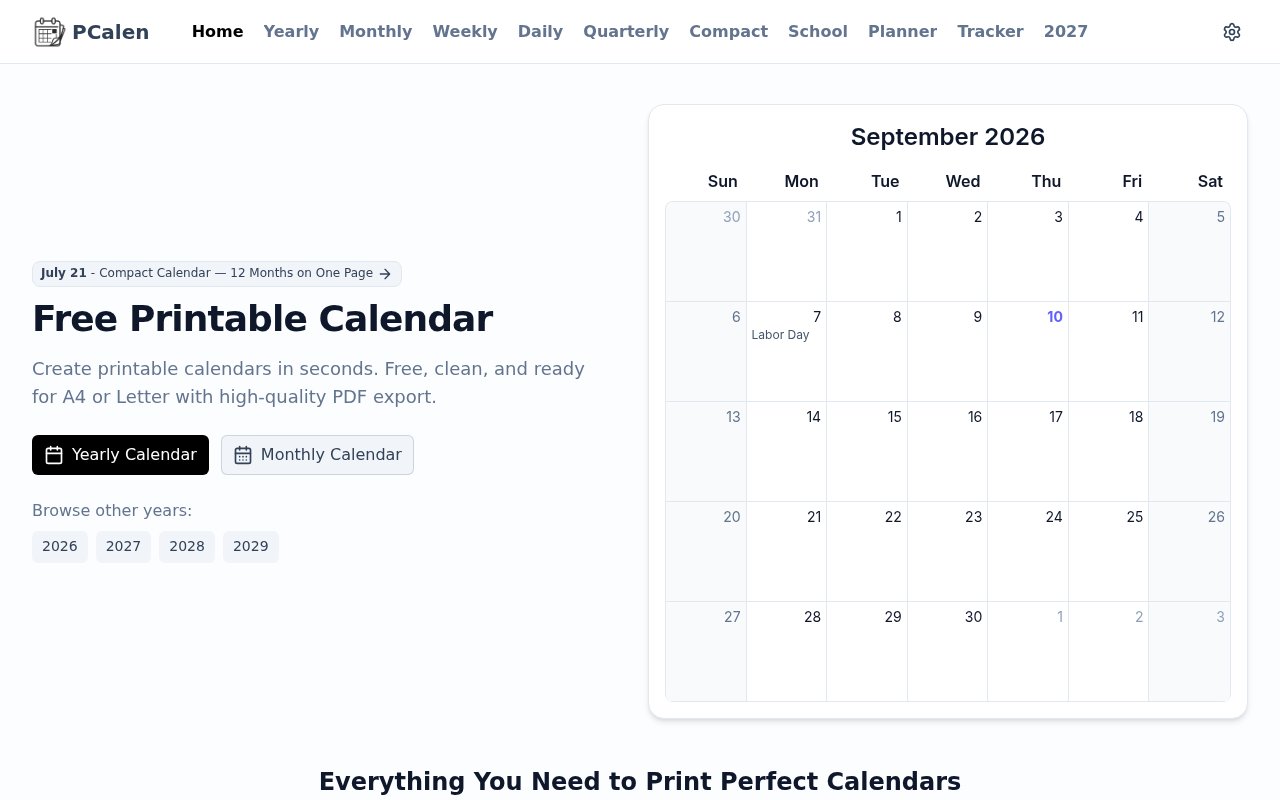
PCalen is a free browser-based calendar generator for people who want a schedule they can print, write on, and keep in view. It turns a chosen year, month, week, day, quarter, or school period into a clean layout sized for common paper formats. Instead of starting with a blank document or wrestling with a spreadsheet grid, a user can pick a purpose-built view, adjust how it looks, and preview the result before sending it to a printer. PDF and PNG export make the same output useful when a paper copy is not the final destination. The product stays focused on practical planning pages rather than meetings, notifications, or account-based collaboration.
The main calendar collection covers several planning scales. Yearly views give a broad overview, monthly pages leave room for date-level planning, and weekly layouts offer columns with adjustable time ranges for more detailed scheduling. Daily, quarterly, compact, and school calendar options address narrower formats without requiring a separate template editor. PCalen also supports public, bank, and school holidays across multiple countries. Users can show week numbers, highlight weekends, change the first day of the week, and control whether dates from adjoining months appear. These settings make it possible to adapt one basic calendar to regional conventions, work routines, or classroom needs. A weekly page can display several consecutive weeks, which works for a short project or shift cycle. Its time range can be narrowed to the hours that matter, and optional half-hour guidelines add precision without changing the overall layout.
Customization extends beyond the dates. The preview controls cover paper sizes including A4, Letter, Legal, Tabloid, A5, and Poster, along with orientation and margins. A binding edge offset helps when pages will be punched and filed in a planner. Font choices can be changed for titles and body content, while color-coded notes can be attached to dates and carried into printed or exported output. Notes are stored locally, and the About page says calendar generation happens in the browser without sending the data to PCalen's servers. That local approach is useful for a personal schedule, although it also means the product is not presenting itself as a cloud calendar that follows a user between devices. The preview step lets someone check page fit before committing paper, an important detail when switching between portrait and landscape or moving from a home printer to a larger format.
Beyond dated calendars, PCalen includes undated planning pages and focused trackers. Its planner section offers monthly and weekly layouts, an hourly daily timeline, and a two-week view that can suit sprint planning or rotating schedules. Tracker templates cover habits, budgets, fitness, and a baby's daily routine. The budget page separates planned and actual income and expenses, while the fitness log provides places for workout details and notes. The templates use the same print-oriented approach, so a user can format them for the available paper and download a high-quality PDF. This breadth makes PCalen useful to students, households, teachers, office teams, and anyone assembling a paper planner. It can support a family schedule on a refrigerator, a project overview on a wall, or an individual routine in a binder.
What distinguishes PCalen is the combination of layout variety and print control inside a straightforward web tool. Many calendar apps assume the schedule will stay on a phone or computer. PCalen starts from the opposite goal and treats paper dimensions, margins, orientation, and legibility as first-class choices. It can export a single page, a high-resolution image, or an entire year as one PDF, which reduces repetitive work when a full calendar is needed. The tool also avoids forcing every planning need into the same grid. A broad yearly overview, a time-blocked week, an undated planner, and a budget tracker remain distinct formats while sharing a consistent workflow.
PCalen is genuinely free according to its homepage, About page, and template pages, with no paid subscription shown. A user can open a layout and begin customizing it without creating an account. That access model fits quick, occasional jobs as well as a recurring personal planning routine. The tradeoff is that it is intentionally a printable generator, not a shared scheduling system with invitations, live updates, reminders, or external calendar synchronization. Its local processing and local note storage favor privacy and simplicity over cross-device continuity. For someone who wants a polished paper calendar without design software or a recurring bill, that narrow focus is likely the main reason to choose it.
Key Features
- Multiple printable calendar views
- Planner and tracker templates
- International holiday display
- Paper and margin controls
- Local color-coded notes
- PDF and PNG export
Pros & Cons
What we like
- Covers calendars, planners, and practical trackers
- Supports paper sizes from A5 to Poster
- Processes calendar data locally in the browser
- Exports pages without an account or subscription
Room for improvement
- Focused on printing rather than live calendar syncing
- Local notes do not provide cross-device continuity
- Print results still rely on the browser dialog
- Detailed layouts may need margin and font tuning
Frequently Asked Questions
What is PCalen?
Is PCalen free?
What formats can PCalen export?
Does PCalen send calendar data to its servers?
Best For
Featured in
Alternatives to PCalen
View all
CalendHub
Smart scheduling and calendar management for teams
Kevin Gabeci Toolkits
Seven AI toolkits for writing books, making music, cutting video, and building agents.

Eased Into AI
Learn AI from zero. No jargon, no hype, just steps that work.

Fix It Gently
Calm, plain-English fixes for everyday tech problems.
Our take
Tool Index Editorial · Sep 2026· 4.0/5
PCalen generates printable calendars, planners, and trackers with unusually good control over paper size, margins, orientation, holidays, fonts, and notes. We found the live preview and range of yearly, monthly, weekly, school, habit, budget, fitness, and baby layouts more complete than a basic template site. It is free, needs no account, and produces PDF or PNG files locally in the browser.
It is an easy recommendation for households, students, teachers, and anyone assembling a paper planner. Its limits follow directly from that focus. There are no invitations, reminders, shared live updates, or calendar synchronization, and locally stored notes do not automatically follow the user to another device. Detailed pages may still need a test print and a little margin tuning.
Editorial opinion from the Tool Index team, written from the public product pages. Not a user review.
Reviews (0)
Badge builder
Add PCalen to your website
Choose a badge style and size, preview it here, then copy the generated HTML. Badge images are self-contained SVGs and do not require an external script.

<a href="https://toolindex.net/tools/pcalen?ref=badge" target="_blank" rel="noopener">
  <img src="https://toolindex.net/badge/pcalen/medium.svg" alt="PCalen - Listed on Tool Index" width="180" height="50" />
</a>How to use the badge
- 1. Pick the style, size, and theme that fit your layout.
- 2. Copy the generated HTML from the code block.
- 3. Paste it into your footer, homepage, or press page.
Standard badge available
The standard listing badge is available now. Score and circle badges are limited to tools currently ranked in the top 10 of a category.
Badge clicks return visitors to this profile with a referral tag so the source remains identifiable.
Related Tools

Confluence
Atlassian's long-running team wiki that anchors many enterprise knowledge stacks
Asana
Project management for teams that live in projects, tasks and dependencies
Kevin Gabeci Toolkits
Seven AI toolkits for writing books, making music, cutting video, and building agents.

Logseq
An open-source outliner notes app where every bullet is a first-class block
Work on PCalen? Request listing access or correction