PDFidelity
Translate research PDFs while preserving columns, citations, tables, and formulas
Gallery
About PDFidelity
PDFidelity is an AI-assisted PDF translator built for academic and technical reading. It translates the text of a paper while trying to preserve the structures that make the source usable, including two-column layouts, tables, figures, citations, references, and mathematical formulas. The result is intended for reading and study rather than for rebuilding a document by hand after copying its text into a generic translator. Users upload a PDF, choose a language, wait for processing, and receive translated and bilingual output that can be compared with the original. The service is most relevant to researchers, graduate students, technical professionals, and journal clubs working across languages.
The narrow focus on research documents shapes how the product works. Publisher PDFs often contain running headers, numbered sections, dense columns, footnotes, formula blocks, figure captions, and references that lose their context when text is extracted into a plain page. PDFidelity keeps the page composition connected to the translated content so a table remains readable and a citation marker still points into the reference list. Formulas are left in their original mathematical form while nearby prose is translated. Captions can be translated without separating them from their figures, which helps readers follow an argument without repeatedly returning to the untranslated file to locate each visual element.
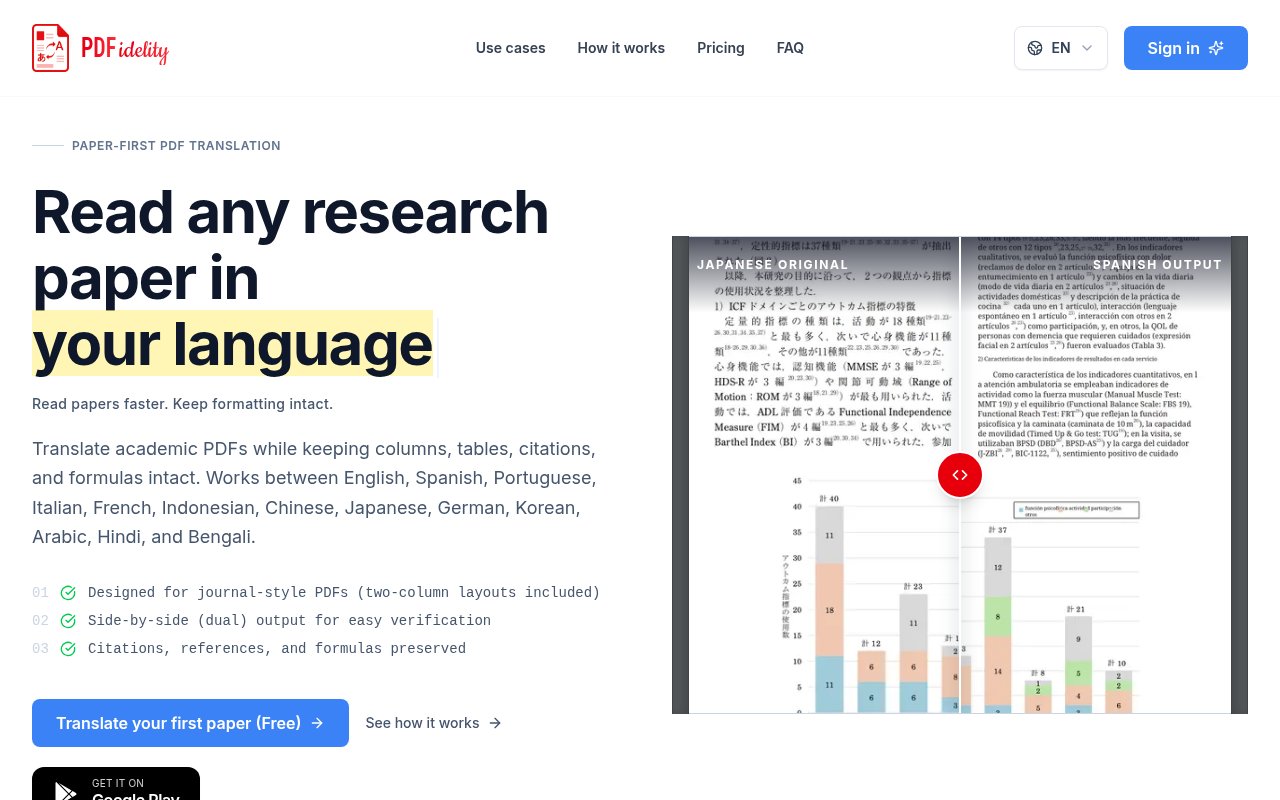
PDFidelity also produces a dual PDF for side-by-side checking. That matters because machine translation is useful for comprehension but still benefits from verification, especially when a term carries a specialized meaning. A bilingual result lets someone compare an important sentence with the source before quoting it, taking notes, or discussing it with a research group. The site shows a documented Japanese to Spanish case using an open academic article and presents the opening page and a complex chart for visual comparison. The example is described as an automatic, unretouched output, giving prospective users something more concrete to inspect than a generic promise about layout preservation.
The service supports translation among English, Spanish, Portuguese, Italian, French, Indonesian, Chinese, Japanese, German, Korean, Arabic, Hindi, and Bengali. It works best with text-based PDFs from publishers, including journal papers, theses, chapters, and technical reports. Scanned or image-only files may produce less accurate results because the service has to contend with recognition quality before translation. Highly artistic brochures, catalogs, and marketing layouts are also outside its strongest use case. PDFidelity is not positioned as a source of certified legal translation, so material requiring an official translator or formal validation needs a different workflow.
File handling is straightforward but worth considering before uploading unpublished or sensitive work. PDFidelity says every uploaded PDF is automatically deleted no later than five days after upload, including files processed on active paid plans. Translation time varies with file length and complexity, although the site says most research papers are ready within minutes and the user is notified when processing finishes. The workflow is account based, and the initial allowance can be tried without a credit card. A Google Play version is also available for readers who prefer a mobile route, while the web application remains the clearest place to examine plans and document fit.
Pricing is freemium. New users receive 15 pages to test the translation and retained layout. The Read plan costs $3.99 per month for 200 pages, with up to 50 pages in one translation. Study costs $7.99 per month for 750 pages and keeps the same 50-page per-translation limit. Research costs $14.99 per month for 1,500 pages and raises the per-translation limit to 100 pages. Each subscription includes translated and bilingual PDFs with formatting preservation. Those limits make the plans easy to compare by monthly reading volume, although a long thesis or book still needs to be processed in selected ranges rather than as one unlimited job.
PDFidelity stands out most when the document's visual organization carries meaning. General translation tools may handle a pasted paragraph well, but they do not necessarily return a paper that still reads like a paper. Here, the layout-preserving PDF is the product rather than a secondary export. The tradeoff is a deliberately constrained scope. Results depend on selectable source text and a reasonably conventional academic layout, translation still deserves human review, and uploaded files remain on the service for a stated deletion window rather than being processed wholly on the device. For readers who regularly abandon foreign-language papers because the formatting collapses during translation, the free allowance offers a practical way to test the output on their own material before choosing a plan.
Key Features
- Academic layout preservation
- Bilingual side-by-side output
- Tables and figure retention
- Citation and reference preservation
- Formula-safe text translation
- Thirteen supported languages
Pros & Cons
What we like
- Keeps research papers readable after translation
- Makes important passages easy to compare with source text
- Publishes a real unretouched layout example
- Offers a no-card free test allowance
Room for improvement
- Scanned PDFs can have reduced accuracy
- Artistic layouts fall outside its strongest use case
- Translations still need review for specialized terminology
- Long documents face per-translation page limits
Frequently Asked Questions
What is PDFidelity?
Is PDFidelity free?
Which PDFs work best with PDFidelity?
How long does PDFidelity keep uploaded files?
Best For
Featured in
Alternatives to PDFidelity
View all
Apatero AI
The creator studio for AI image, video, audio, 3D, and avatars, now at apatero.ai.

SoloDevStack
A solo developer blog built on head-to-head tool comparisons, 580+ posts deep.
Apatero Studio
Creator studio for AI image, video, audio, 3D, and avatars. Every model worth using, in one workspace.

Melodex
Turn your idea into an AI-generated music video
Our take
Tool Index Editorial · Sep 2026· 3.5/5
PDFidelity translates academic PDFs while trying to preserve columns, tables, citations, references, formulas, and the original reading order. It is aimed at researchers, students, and journal clubs working across its 13 listed languages. The site offers a first paper free and shows paid reading plans, though the captured page does not expose their prices.
The side-by-side bilingual output is the right design for checking important passages, and we appreciate the published Japanese-to-Spanish example rather than a purely verbal claim. Results will depend heavily on the source. Scanned or image-only documents and artistic layouts are not its strong case, specialized terminology still needs human review, and preserving a formula's appearance does not validate the surrounding translation.
Editorial opinion from the Tool Index team, written from the public product pages. Not a user review.
Reviews (0)
Badge builder
Add PDFidelity to your website
Choose a badge style and size, preview it here, then copy the generated HTML. Badge images are self-contained SVGs and do not require an external script.

<a href="https://toolindex.net/tools/pdfidelity?ref=badge" target="_blank" rel="noopener">
  <img src="https://toolindex.net/badge/pdfidelity/medium.svg" alt="PDFidelity - Listed on Tool Index" width="180" height="50" />
</a>How to use the badge
- 1. Pick the style, size, and theme that fit your layout.
- 2. Copy the generated HTML from the code block.
- 3. Paste it into your footer, homepage, or press page.
Standard badge available
The standard listing badge is available now. Score and circle badges are limited to tools currently ranked in the top 10 of a category.
Badge clicks return visitors to this profile with a referral tag so the source remains identifiable.
Related Tools
Apatero AI
The creator studio for AI image, video, audio, 3D, and avatars, now at apatero.ai.
Kevin Gabeci Toolkits
Seven AI toolkits for writing books, making music, cutting video, and building agents.

Warp
The modern terminal reimagined with AI and collaboration

Bolt.new
Prompt-to-deployed full-stack app inside the browser
Work on PDFidelity? Request listing access or correction