PDF Press
Browser-based PDF imposition and print production without file uploads
Gallery
About PDF Press
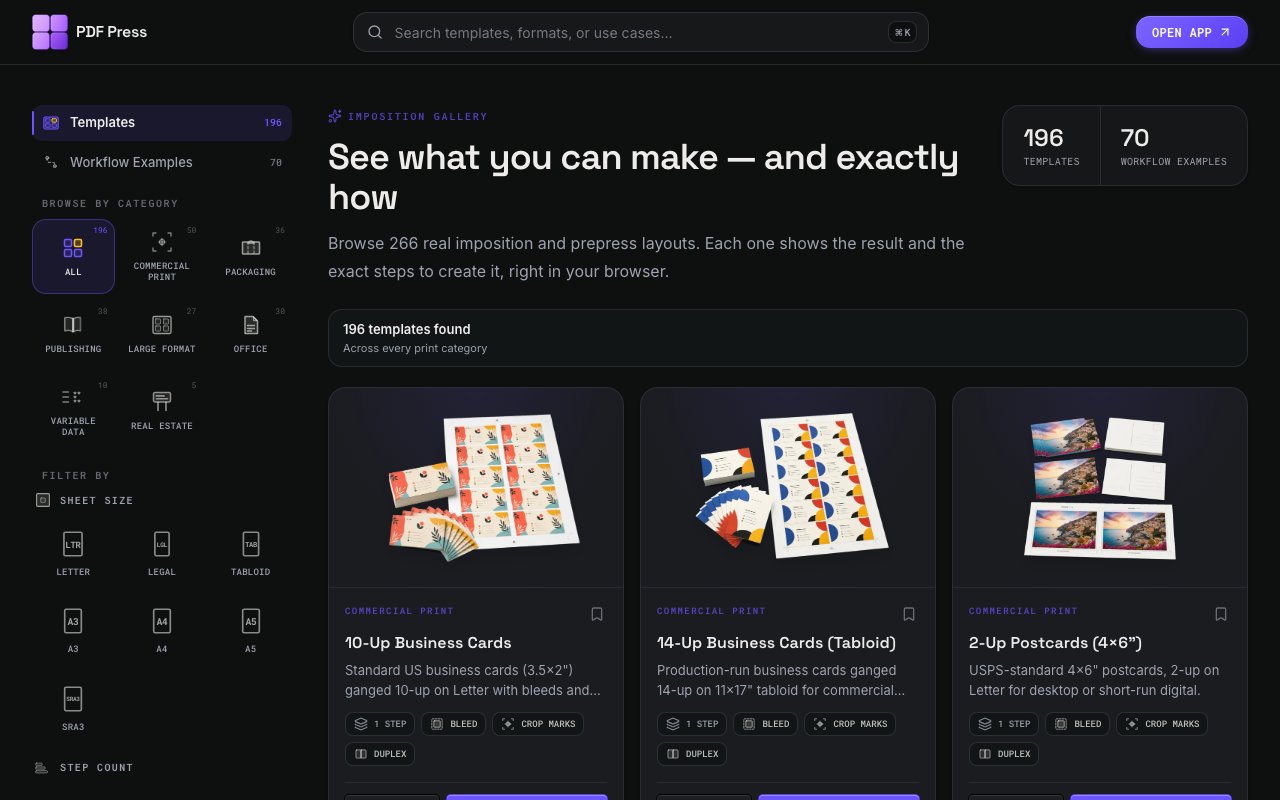
PDF Press is a browser based imposition tool that arranges PDF pages onto larger press sheets for professional printing. Imposition is the prepress process of positioning multiple pages on a single sheet so they fold and cut correctly after printing, and it's traditionally required expensive desktop software or deep knowledge of print production workflows. This tool brings those capabilities to the browser with no installation required and no file uploads to external servers. Everything processes locally in your browser, which addresses both privacy concerns and the practical reality that print files are often large and slow to transfer. You don't need to trust a third party with your content, and you aren't waiting for uploads to complete before you can start working.
The core functionality covers the layouts that print shops and copy centers use daily. Saddle stitch booklets arrange pages so they print, fold, and staple into magazines or brochures. Perfect bound signatures handle thicker publications that get glued spines. N up grids place multiple copies of the same page or different pages onto a single sheet for efficient cutting. Step and repeat tiles a single design across the sheet for stickers, labels, or business cards. Gang sheets combine different designs to minimize waste when cutting. Cut and stack layouts optimize for finishing workflows where printed sheets get cut in stacks rather than individually. Each layout type has parameters you can adjust for your specific needs, from sheet dimensions to gutter widths to bleed allowances.
Beyond basic imposition, the platform includes production marks that print professionals expect. Crop marks show where to trim. Registration marks help align color separations on multi pass printing. Color bars verify ink density across the press run. Cutter marks guide automated finishing equipment. Fold lines indicate where to crease. You can configure sheet sizes, bleeds, gutters, and margins to match your specific printer and finishing equipment. Real time preview shows exactly how the final press sheet will look before you commit to export, which catches layout errors before they waste paper and press time. This preview capability alone saves significant trial and error compared to blind exporting and hoping for the best.
The tool suite extends well beyond imposition into general PDF manipulation and prepress tasks. Splitting, merging, rotating, resizing, compressing, and repairing PDFs are all available. Variable data printing lets you merge spreadsheet information to create personalized tickets, badges, name tags, or addressed labels where each output is unique. Preflight checks catch common problems like missing fonts, incorrect color modes, or transparency issues that cause printing failures. Color management with ICC profiles ensures accurate reproduction across different devices and paper stocks. JDF export integrates with automated print workflows in production environments. The platform claims over 70 total tools, making it a fairly comprehensive prepress environment rather than just an imposition calculator.
The audience spans from small copy shops and independent print providers to designers preparing files for production and event organizers printing their own badges and signage. Schools and churches that do internal printing benefit from the booklet features. Indie publishers using print on demand services can impose their own files for local proofing or short runs. Photographers creating albums and portfolios can arrange their images for professional output. Anyone who's ever needed to print multiple business cards per sheet or create a folded pamphlet will find relevant functionality. The browser based approach means you don't need to maintain licenses for desktop software across multiple workstations, and updates happen automatically without version management headaches.
Pricing follows a freemium model. The free tier allows 5 downloads total with 8 hour cooldowns between uses, which is enough to test the tool and handle occasional projects but not enough for regular production work. The Pro tier unlocks unlimited downloads with monthly and yearly billing options, with pricing that varies by location. Enterprise licensing provides concurrent user access for teams along with priority support. Local processing means your files stay on your machine regardless of which tier you're on, so the pricing difference is about usage volume rather than privacy levels. For print operations that have been paying for heavyweight desktop imposition software or struggling with clunky web alternatives, PDF Press offers a capable middle ground that handles real production work without the overhead of traditional tools or the limitations of simpler free options.
Key Features
- Booklet imposition for saddle and perfect binding
- N-up, gang sheet, and step-and-repeat layouts
- Crop marks, registration marks, and color bars
- Variable data printing from spreadsheets
- CMYK conversion with ICC profiles
- Client-side processing with no file uploads
Pros & Cons
What we like
- No install required and works in any browser
- Files stay local, no server uploads
- Covers most prepress tasks in one tool
- Variable data printing included
Room for improvement
- Free tier limited to 5 downloads with cooldown
- No offline mode despite client-side processing
- Complex impositions may require learning curve
- No native desktop app for heavy batch work
Frequently Asked Questions
What is PDF Press?
Is PDF Press free?
Do my files get uploaded?
Can I do variable data printing?
Best For
Featured in
Alternatives to PDF Press
View all
Framer
Visual website builder that lets designers ship production-grade marketing sites with real CMS, SEO controls, and code components.

Apatero Studio
Creator studio for AI image, video, audio, 3D, and avatars. Every model worth using, in one workspace.

Pixel Painters
Unlimited graphic design subscriptions built only for churches and ministries
Reviews (9)
Worth a look
PDF Press solves a real problem for me without making a fuss about it. What stands out is how it handles n-up, gang sheet, and step-and-repeat layouts. What stands out is how little babysitting it needs. No regrets so far.
Two months in, no regrets
Three months of PDF Press later, here is what holds up. Got real value out of booklet imposition for saddle and perfect binding. It fits well for generating gang sheets for cut-and-stack jobs. No regrets so far.
Recommended without reservation
Found PDF Press on a Show HN thread and I am glad I clicked. Their take on no install required and works in any browser is genuinely good. Hard to imagine going back to my old setup.
Pulled its weight from week one
Found PDF Press on a Show HN thread and I am glad I clicked. The covers most prepress tasks in one tool is more useful than I expected. Glad I made the switch.
Finally something that fits
Tried PDF Press on a side project first, then rolled it out everywhere. Got real value out of client-side processing with no file uploads. Found it works best for generating gang sheets for cut-and-stack jobs. It earns its place in my stack.
Recommended without reservation
Picked PDF Press for the price, stayed for the quality. What stands out is how little babysitting it needs. It just works, day after day, without surprises. It earns its place in my stack.
Finally something that fits
Tried PDF Press on a side project first, then rolled it out everywhere. What stands out is how it handles covers most prepress tasks in one tool. Would sign up again without thinking twice.
Two months in, no regrets
Hadn't planned on switching, but PDF Press was hard to ignore. It has shaved real time off my week. It earns its place in my stack.
Finally something that fits
Have been running PDF Press for a while, here is where I land. What stands out is how little babysitting it needs. Mostly using it for preflighting pdfs before sending to a print shop. Glad I made the switch.
Badge builder
Add PDF Press to your website
Choose a badge style and size, preview it here, then copy the generated HTML. Badge images are self-contained SVGs and do not require an external script.

<a href="https://toolindex.net/tools/pdfpress?ref=badge" target="_blank" rel="noopener">
  <img src="https://toolindex.net/badge/pdfpress/medium.svg" alt="PDF Press - Listed on Tool Index" width="180" height="50" />
</a>How to use the badge
- 1. Pick the style, size, and theme that fit your layout.
- 2. Copy the generated HTML from the code block.
- 3. Paste it into your footer, homepage, or press page.
Standard badge available
The standard listing badge is available now. Score and circle badges are limited to tools currently ranked in the top 10 of a category.
Badge clicks return visitors to this profile with a referral tag so the source remains identifiable.
Related Tools
Apatero Studio
Creator studio for AI image, video, audio, 3D, and avatars. Every model worth using, in one workspace.

Tailwind CSS
Rapidly build custom designs without leaving your HTML

Figma
Collaborative interface design tool

Marvel
Lightweight prototyping platform for turning images and screens into clickable mobile and web prototypes.
Work on PDF Press? Request listing access or correction