
Peelaway
Turn photos into styled artwork and production-ready image edits
Gallery
About Peelaway
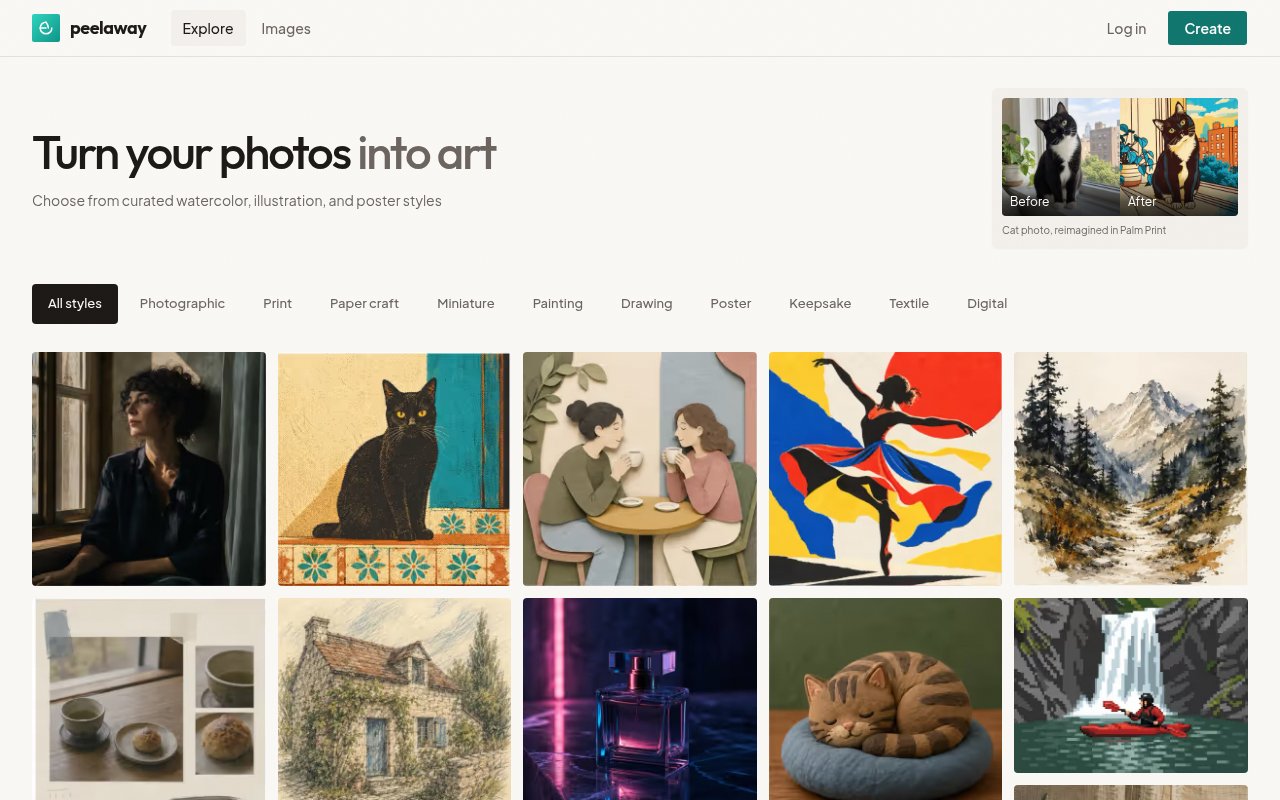
Peelaway is an AI image creation and editing product built around two related needs. A casual creator can upload a photo and reinterpret it through a curated visual style, while a team can send focused cleanup jobs through a web tool, REST API, or MCP connection. The public gallery covers looks inspired by screen prints, paper craft, miniature scenes, painting, drawing, posters, keepsakes, textiles, and digital art. Rather than asking everyone to invent the perfect style prompt, Peelaway presents named treatments with examples that show the source image and the resulting direction. Browsing categories and before-and-after examples helps a person decide whether the goal is a photographic finish, a print effect, or a more illustrative result before first spending credits. It also provides focused tools for fashion shots, image edits, and YouTube thumbnails.
For the creative workflow, a user starts with a photo, a written direction, or both, then chooses how far to move from the original. That can mean turning a pet portrait into a colorful print, changing the mood of a photograph, or preparing a more polished visual for publication. Plain-language editing covers practical tasks too, including object removal, background removal, surface cleanup, distraction removal, lighting changes, and restyling. JPEG, PNG, and WebP are the supported web formats for the editing workflow. Peelaway recommends treating results as drafts to review, especially around texture, fine edges, repeated patterns, reflections, or areas where removed objects covered important scene detail.
The developer surface turns those edits into asynchronous jobs. An API request sends base64-encoded image data with a natural-language instruction, then receives a job identifier. Callers can poll for a pending, done, or error state, or provide a public HTTPS webhook for a signed callback when processing finishes. A completed result includes a short-lived signed URL along with dimensions, format, processing time, and credit metadata. REST callers can attach an idempotency key so a retry doesn't create a duplicate charge. The same contract supports collection processing within an account's batch and concurrency limits, which makes it more useful for catalog cleanup or repeatable photography work than a browser-only editor.
Peelaway also exposes three MCP tools for submitting an edit, checking job status, and retrieving the result. A compatible assistant connects to one remote MCP URL and signs in through OAuth. If the client can't complete the OAuth path, the user can create a revocable API key and pass it as a bearer token. The assistant can then accept an image and edit request in the current conversation, follow the job, and bring the finished result back. MCP and REST share the same job states, credits, and result model, so teams don't have to maintain a separate image pipeline for an agent. Public OpenAPI, MCP manifest, llms.txt, and skill files make the contract inspectable before integration.
The product fits individual creators, photographers, commerce teams, developers, and people building image tools into an AI assistant. A commerce team can standardize background removal and cleanup while routing exceptions to a person. A photographer can describe recurring distractions across a shoot but keep final creative judgment over difficult frames. A developer can add a bounded editing step to an application without building job tracking and result delivery from scratch. Peelaway is careful about the boundary of that automation. It doesn't certify an asset for a marketplace, promise that every catalog image will look identical, or guarantee unchanged pixels outside an optional mask, so teams still need their own quality checks.
Access is paid and credit based. The Starter subscription is listed at $10 per month after a discounted first month and includes 20 image credits plus all curated styles. Plus and Pro are listed at $30 and $100 per month with 200 and 1,000 credits, and their published trials require a payment method and convert after three days or 50 images, whichever comes first. Annual billing advertises a discount, and one credit balance is shared across styles and tools. Some product pages invite users to start with free credits or a verified free account, but the pricing page doesn't publish an ongoing free tier. That makes Peelaway easiest to evaluate through its limited trial access, then judge on the quality of its styles, edits, and integration workflow.
Key Features
- Curated visual style gallery
- Plain-language image editing
- Background and object removal
- Fashion and thumbnail tools
- REST API with signed results
- OAuth-ready MCP connection
Pros & Cons
What we like
- Balances creative styles with practical cleanup tools
- Shares one job model across REST and MCP
- Returns structured status and result metadata
- Provides public machine-readable integration contracts
Room for improvement
- Subscriptions use a finite monthly credit balance
- Image API edits require an existing image
- Difficult textures and edges still need review
- Trials require a payment method
Frequently Asked Questions
What is Peelaway?
Can developers integrate Peelaway?
Does Peelaway work with AI assistants?
Is Peelaway free?
Best For
Featured in
Alternatives to Peelaway
View all
HairstylesPro
Try hundreds of hairstyles on your own photo before you commit to a cut

Recraft
AI image generator built around vector output and brand styles

Midjourney
Create stunning AI artwork from text prompts

Leonardo.ai
Image generation suite with fine-tuned models for game and product art
Our take
Tool Index Editorial · Sep 2026· 2.5/5
Peelaway presents a browser gallery for turning photos into artwork through named visual styles. It appears aimed at casual creators who prefer choosing from examples such as print, paper craft, painting, poster, textile, and digital looks rather than writing a detailed prompt. We found a working style browser with before-and-after presentation and dozens of examples, but the captured public page says little about editing controls, output limits, or pricing.
The visual catalog is easy to browse and gives users a concrete idea of the available aesthetics. That is about as far as we can confidently go from today's public page. There is no visible pricing, credit explanation, resolution policy, or meaningful product documentation in the capture, and access requires moving into the creation flow. Until those basics are easier to inspect, Peelaway is harder to evaluate than competing image tools with transparent limits and terms.
Editorial opinion from the Tool Index team, written from the public product pages. Not a user review.
Reviews (0)
Badge builder
Add Peelaway to your website
Choose a badge style and size, preview it here, then copy the generated HTML. Badge images are self-contained SVGs and do not require an external script.

<a href="https://toolindex.net/tools/peelaway?ref=badge" target="_blank" rel="noopener">
  <img src="https://toolindex.net/badge/peelaway/medium.svg" alt="Peelaway - Listed on Tool Index" width="180" height="50" />
</a>How to use the badge
- 1. Pick the style, size, and theme that fit your layout.
- 2. Copy the generated HTML from the code block.
- 3. Paste it into your footer, homepage, or press page.
Standard badge available
The standard listing badge is available now. Score and circle badges are limited to tools currently ranked in the top 10 of a category.
Badge clicks return visitors to this profile with a referral tag so the source remains identifiable.
Related Tools
HairstylesPro
Try hundreds of hairstyles on your own photo before you commit to a cut
Recraft
AI image generator built around vector output and brand styles

AIMakeTattoo
Turn text descriptions into visual tattoo concepts with style and placement options
Flux by Black Forest Labs
Open and hosted image models that power half the AI art stack
Work on Peelaway? Request listing access or correction