Photosynthesis
iPhone camera app that fires two lenses at once and fuses them into one high resolution photo
Gallery
About Photosynthesis
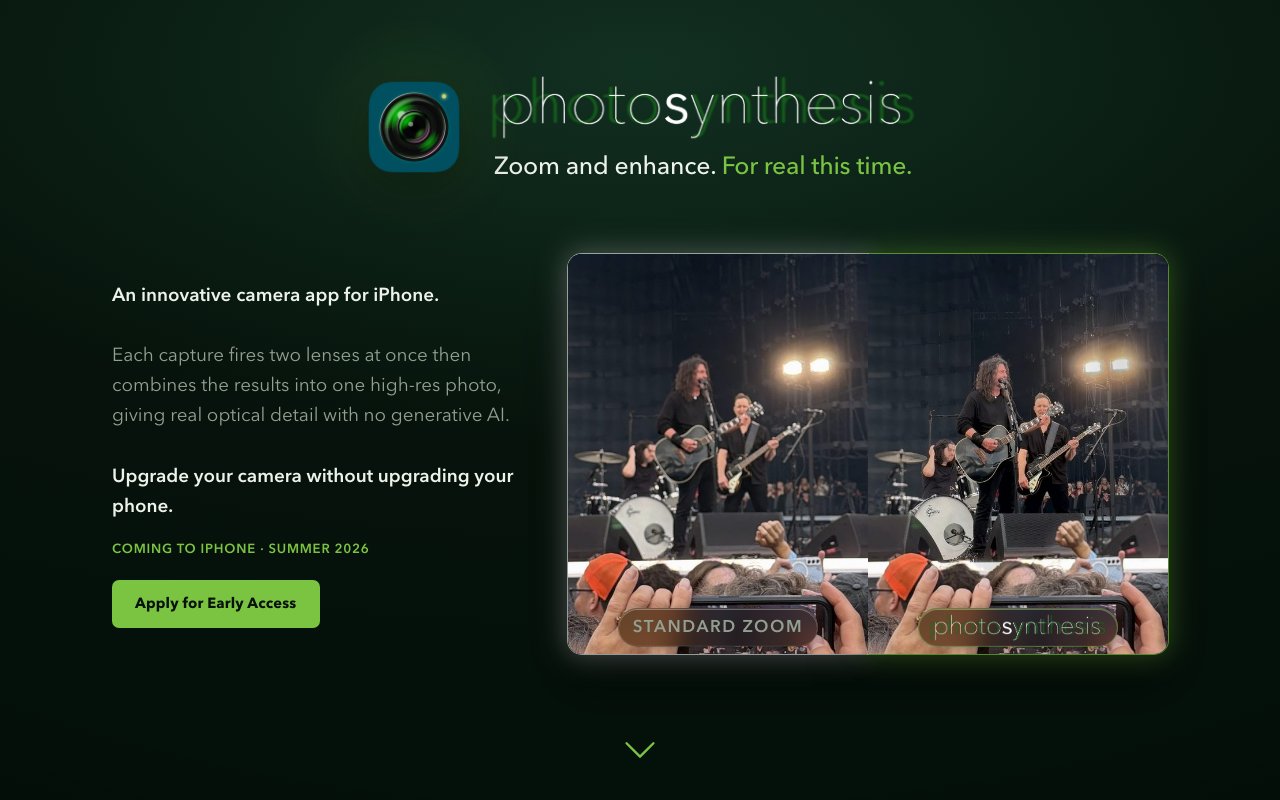
Photosynthesis is an iPhone camera app that captures images from two lenses simultaneously and combines them into a single high resolution photograph. The idea is simple but the execution is surprisingly rare. You press the shutter once, and the app fires both lenses, aligns the results, matches the colors, and outputs a fused image that has more detail than either capture alone. There is no generative AI filling in missing pixels. The extra resolution comes from real optical data captured by each lens. That distinction matters because AI upscaling introduces artifacts and invented detail, while Photosynthesis keeps everything grounded in what the sensors actually saw. The result is a photograph that could not exist from a single lens.
The problem it solves is the trade off most iPhone photographers know well. The wide lens gives you the field of view you want, but it loses detail compared to the telephoto or main sensor. The telephoto captures more detail, but you lose context. Shooting with one means sacrificing the other, and neither choice is ideal when you want both scope and sharpness. Photosynthesis lets you have both by stitching the captures together so the detailed lens fills in the center while the wider lens provides the edges. The result is a photograph with more resolution and more context than either lens could deliver alone. For print work, concert photography, cityscapes, or any scene where you want to zoom into the center without losing the surrounding frame, this approach delivers what cropping or zooming cannot.
In practice, you frame your shot with on screen brackets showing where the detailed lens coverage lands within the wider field of view. Press the shutter, and the app handles the rest. It works on any iPhone with two or more rear lenses, going back to the iPhone 11. On two-lens iPhones, it pairs the main 1x camera with the ultra-wide 0.5x lens. On three-lens Pro models, you get a choice between 1x plus the zoom lens or 1x plus the ultra-wide, and a beta feature can even combine all three lenses for maximum coverage. The specific pairing depends on your hardware, but the workflow remains the same. Close-range subjects can present alignment challenges due to parallax between the lenses, but the app includes manual correction tools to handle those cases.
The app includes a built in editor with standard adjustment tools like exposure, contrast, highlights, shadows, and white and black point controls. Cropping, rotation, flipping, and straightening are all there. There are also custom editing tools designed specifically for two-lens photos, including alignment adjustment if the automatic stitching needs a nudge and a paint-over tool for correcting ghosting artifacts on moving subjects. If you cannot get the alignment right, each lens layer can be exported independently so you at least keep both captures. Custom themes and app icons are available for subscribers who want to personalize the interface. A comparison view lets you toggle between the fused result and what a single lens would have captured, which helps you see exactly what the dual-lens approach adds.
For professionals who want to take the fused image further, Photosynthesis exports layered Photoshop documents that preserve each lens layer for fine-grained editing. It also exports spatial 3D photos and side-by-side 3D formats, which is useful for viewing on devices that support stereoscopic depth like the Apple Vision Pro. A custom Photosynthesis file format preserves layers for reimporting and continued editing within the app itself. iCloud backup is available for those who want their originals synced across devices, and subscription users can enable auto-transfer to a custom folder or automatic export to the Photos app so finished images flow into their existing workflow.
Pricing follows a freemium model. Every user gets a fourteen-day trial with unlimited access to all features. After that, capture and editing remain free with no restrictions, but you can only export three finished photos per month on the free tier. Backups to iCloud continue to work regardless of subscription status. An unlimited subscription removes the export cap and unlocks professional formats like layered PSD and spatial 3D, along with custom themes, app icons, and auto-backup to a custom folder. Exact subscription pricing is not published on the landing page, but the value proposition targets photographers who export frequently enough for three per month to feel limiting.
The app is set to launch in summer 2026 and is not yet available on the App Store. You can sign up on the website to be notified when it goes live or apply for early access. If you shoot on an iPhone and find yourself wishing you could get more detail without cropping or more field of view without losing sharpness, Photosynthesis offers a practical solution grounded in real optics rather than AI upscaling. The marketing shows examples from concert stages, bookshop interiors, cityscapes, and landscapes, all situations where capturing both context and detail in a single shot matters. It is a single purpose tool that does one thing and does it thoroughly, filling a gap that Apple's own Camera app does not address.
Key Features
- Simultaneous dual lens capture
- Automatic alignment and color matching
- Built in editor with adjustments and cropping
- Layered Photoshop document export
- Spatial 3D photo export
- iCloud backup for originals
Pros & Cons
What we like
- Real optical detail with no generative AI
- Works on any iPhone from the 11 onwards
- Professional export formats for further editing
- Simple one press capture workflow
Room for improvement
- iOS only with no Android support
- Free tier limits exports to three per month
- Not yet available until summer 2026
- Results depend on iPhone model and lens pairing
Frequently Asked Questions
What is Photosynthesis?
Which iPhones does Photosynthesis support?
Is Photosynthesis free?
When will Photosynthesis be available?
Best For
Featured in
Alternatives to Photosynthesis

PropGPT
iOS app that uses AI to analyze player props, spreads, and bets across major sports leagues

Expo
The React Native framework and cloud build service that ships native iOS and Android apps without touching Xcode.

Glide
No-code platform that turns spreadsheets and databases into mobile and web apps, with computed columns and AI actions.

Fix It Gently
Calm, plain-English fixes for everyday tech problems.
Reviews (0)
Badge builder
Add Photosynthesis to your website
Choose a badge style and size, preview it here, then copy the generated HTML. Badge images are self-contained SVGs and do not require an external script.

<a href="https://toolindex.net/tools/photosynthesis?ref=badge" target="_blank" rel="noopener">
  <img src="https://toolindex.net/badge/photosynthesis/medium.svg" alt="Photosynthesis - Listed on Tool Index" width="180" height="50" />
</a>How to use the badge
- 1. Pick the style, size, and theme that fit your layout.
- 2. Copy the generated HTML from the code block.
- 3. Paste it into your footer, homepage, or press page.
Standard badge available
The standard listing badge is available now. Score and circle badges are limited to tools currently ranked in the top 10 of a category.
Badge clicks return visitors to this profile with a referral tag so the source remains identifiable.
Related Tools

Sleep Suivour
Track your sleep, improve your rest
Glide
No-code platform that turns spreadsheets and databases into mobile and web apps, with computed columns and AI actions.
ProtoPie
High-fidelity prototyping tool that simulates sensor input, IoT triggers, and complex interactions without writing code.

FlutterFlow
Visual builder that compiles to real Flutter source code, producing native iOS, Android, web, and desktop apps from one project.
Work on Photosynthesis? Request listing access or correction