
PlugClaw
Thumb-sized AI agent hardware that runs tasks locally with privacy-first architecture
Gallery
About PlugClaw
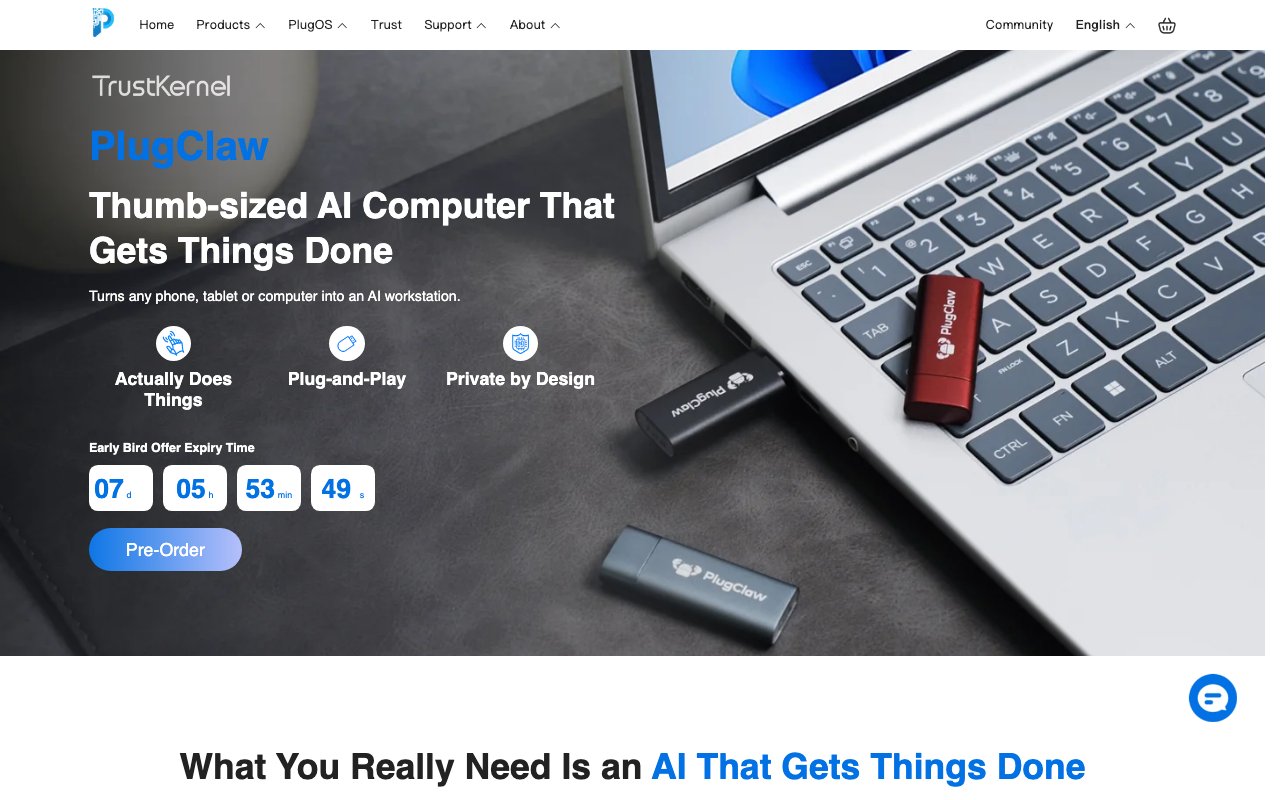
PlugClaw is a thumb sized USB-C device that functions as a standalone AI computer. You plug it into a phone, tablet, laptop, or desktop and it runs AI agent tasks in isolated hardware separate from your host system. The device handles automation, messaging, browser tasks, and scheduled workflows while keeping your data on the device rather than sending it to cloud servers you don't control. Think of it as a physical AI assistant that lives on your keychain instead of running as software on your main machine.
The technical architecture is what makes it different from software based AI assistants. PlugClaw runs a dual layer operating system with an isolated Android environment handling app automation and a separate Ubuntu environment running the AI agent. The hardware isolation means the agent operates independently of your host device's storage and memory. Your phone or laptop sees PlugClaw as a connected device, but the agent can't access your files, browser history, or other data on the host system. This is a fundamentally different security model than software assistants that run inside your device and have access to everything you do.
The device measures 50mm by 19mm by 8mm and weighs about 14 grams, small enough to carry on a keychain or slip into a pocket. Inside is a MediaTek Helio G80 octa core processor with either 4GB or 6GB of RAM and either 64GB or 128GB of storage depending on the model you choose. The operating system is called PlugOS, which is a hardened Android build designed for security. It connects via USB-C 2.0 and works with iOS, macOS, Android, Windows, and Linux hosts. You get a consistent workspace regardless of which device you plug into, which is useful if you switch between machines throughout the day.
Capabilities include message automation where the agent replies to messages in your tone based on your style preferences. You can train it on how you write and it will compose responses that sound like you. Browser automation handles tasks like summarizing trending topics, researching subjects, or publishing content to platforms you use. The built in Android GUI agent can navigate apps visually, clicking buttons and filling forms the way a human would. This visual automation approach means it can work with apps that don't have APIs or that you can't integrate programmatically. You can trigger tasks immediately, schedule them for later, or set them to run automatically when conditions are met. The interface supports natural language requests so you don't need to learn a scripting syntax.
Privacy is the central selling point. Conversations and operational data are stored locally on the PlugClaw hardware's encrypted storage, not on your host device and not in cloud services. When cloud processing is required for AI inference, it happens in what the company calls confidential computing environments with additional privacy protections. The device comes preloaded with Claude, ChatGPT, Gemini, DeepSeek, and other frontier models, or you can bring your own API keys if you prefer to use your own accounts. There's a duress password feature and a self destruct capability for situations where you need to wipe the device quickly without leaving traces.
The pricing model is a one time hardware purchase with no monthly subscription. AI usage is pay as you go based on token consumption at rates that align with official API pricing. Activation includes 1,500 free credits, which is enough for several thousand basic conversations according to the company. After that you top up credits as needed. This structure means you pay for what you use rather than a flat monthly fee regardless of usage. Hardware pricing isn't published on the website, suggesting it's either in preorder phase or requires contacting sales to get current pricing.
The target audience breaks down into a few groups. Privacy conscious professionals who want AI capabilities but don't trust cloud services with their data. People who want to automate routine tasks without learning to code or setting up complex software on their machines. Users who prefer a physical device they can unplug and remove rather than a background service that's always running and always connected. Anyone who has ever wished they could get the benefits of AI assistants without the surveillance tradeoffs that typically come with them will find the hardware isolation approach appealing.
The tradeoff compared to software agents is obvious. You have to carry another device, even if it's small. You have to plug it in to use it. You're limited to what the hardware can do rather than having full system access. Software assistants running on your main device can access everything, which makes them more capable but also more invasive. PlugClaw can't read your files or your browsing history, which limits what it can help with but also limits what it can expose. Whether this tradeoff makes sense depends on how seriously you take data separation and whether you're comfortable trusting software level sandboxing to keep an AI agent contained.
Key Features
- Thumb-sized USB-C AI hardware
- Isolated Android plus Ubuntu agent environment
- Message automation in your tone
- Browser and app GUI automation
- Supports Claude, ChatGPT, Gemini, or BYO API key
- Duress password and self-destruct feature
Pros & Cons
What we like
- Data stays on the device, not your host system
- Works across iOS, Android, macOS, Windows, and Linux
- No monthly subscription, just pay-as-you-go tokens
- Physical device you can unplug and remove
Room for improvement
- Requires carrying additional hardware
- Upfront hardware cost before you can test
- Newer product with limited community feedback
- GUI automation depends on app layouts not changing
Frequently Asked Questions
What is PlugClaw?
Which AI models does it support?
How much does PlugClaw cost?
What devices does it work with?
Best For
Featured in
Alternatives to PlugClaw

Stack AI
No-code platform for building and deploying enterprise AI agents and workflows on a visual canvas

Almanac
A hosted, source-cited wiki that turns your files into context your AI agents can use

Demi AI
Demi helps busy professionals eliminate repetitive admin work across their favorite tools.
Vapi
Build voice AI agents that take and place phone calls
Reviews (0)
Badge builder
Add PlugClaw to your website
Choose a badge style and size, preview it here, then copy the generated HTML. Badge images are self-contained SVGs and do not require an external script.

<a href="https://toolindex.net/tools/plugclaw?ref=badge" target="_blank" rel="noopener">
  <img src="https://toolindex.net/badge/plugclaw/medium.svg" alt="PlugClaw - Listed on Tool Index" width="180" height="50" />
</a>How to use the badge
- 1. Pick the style, size, and theme that fit your layout.
- 2. Copy the generated HTML from the code block.
- 3. Paste it into your footer, homepage, or press page.
Standard badge available
The standard listing badge is available now. Score and circle badges are limited to tools currently ranked in the top 10 of a category.
Badge clicks return visitors to this profile with a referral tag so the source remains identifiable.
Related Tools

OpenBenchmarks
Public, externally validated benchmarks that help agents pick SaaS APIs
Almanac
A hosted, source-cited wiki that turns your files into context your AI agents can use

Wizard
Self-extending Rust terminal AI agent that works with any model

Chariot
Elastic cloud infrastructure for deploying and scaling AI agent fleets with persistent storage
Work on PlugClaw? Request listing access or correction