Plux
Plan trips together with itineraries, budgets, maps, chat, and exports
Gallery
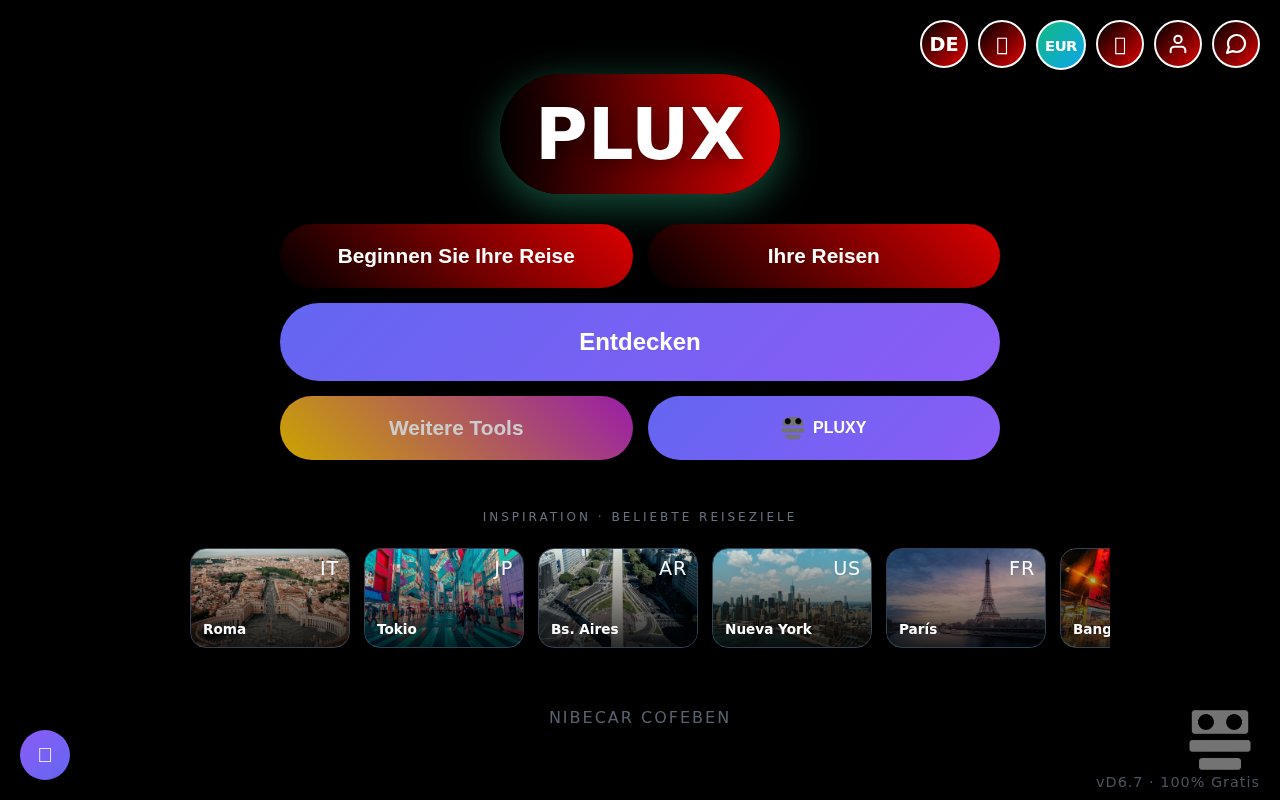
About Plux
Plux is a free, open-source travel planning app for organizing a journey from the browser. It brings the itinerary, budget, map, checklist, calendar, weather, and group discussion into one workspace, so a trip doesn't have to be spread across documents and chat threads. The product is designed to work without a login and has no advertising. Plans are customizable rather than locked to one generated structure. That low-friction setup makes it easy to start outlining a trip before deciding how much structure the group really needs. It also removes the usual first step of asking every participant to register before anyone can see what the organizer has in mind. Because the app is browser-based, participants can enter the planning space without installing a separate desktop or mobile package.
The core of Plux is a day-by-day itinerary. Travelers can arrange plans around each date, keep track of the places they want to visit, and view the trip on a map. A calendar gives the schedule another useful perspective, while a checklist holds the practical tasks that sit around the itinerary. Weather forecasts add context for the planned dates. Together, these views cover the recurring questions in trip planning about what happens each day, where it happens, what still needs doing, and whether the plan suits the expected conditions. Suggestions are part of the same experience, giving the group ideas that can be fitted into the schedule instead of maintained in a separate inspiration list. The map then gives those dated activities a geographic view, making it easier to see how the selected places relate to the plan.
Money is handled inside the same workspace. Plux can calculate travel budgets and includes a currency converter, which is useful when a group is comparing costs away from home. The planning data can be exported to PDF or a calendar, giving travelers a portable summary and a way to carry scheduled items into the tools they already use. Those exports also reduce the risk that every member of a group needs to keep the live app open simply to check the agreed plan. A PDF works as a fixed snapshot for the journey, while calendar export places dated plans alongside the rest of a traveler's commitments.
Collaboration is a central part of the product rather than an extra sharing step. Plux supports real-time editing with friends and family, along with chat for discussing choices while the itinerary changes. Suggestions and customization help the group shape the plan instead of accepting a fixed generated schedule. An AI agent is also included among the planning tools. The site presents it as one part of a broader collaborative workspace, so travelers can use assistance without giving up the maps, dates, costs, and manual controls needed to make the trip their own. The combination is suited to the messy middle of planning, when several people are still adjusting days, talking through options, and checking the effect on the budget.
The app best fits friends, couples, and families coordinating a trip together, especially when they want a single shared place for both decisions and logistics. A solo traveler can still use the itinerary, budget, map, checklist, and forecast features, but the real-time editing and chat are more valuable once several people are involved. Plux is also appealing to travelers who don't want to create another account or watch ads while they plan. Its interface supports English, Spanish, French, German, and Italian, which gives mixed-language groups more room to work in the language they prefer. That language coverage is useful for international groups, although the app's travel data and collaboration features remain the main reason to choose it.
Plux is free software released under the MIT license, and the hosted browser app is presented as free to use. There is no paid tier described on its public listings. The open license gives technically inclined users a way to inspect, modify, and reuse the source rather than depending only on a closed hosted service. The main tradeoff is maturity. It is a very young project with a small repository community and a broad set of features that may not have the depth of a specialist budgeting, mapping, or booking product. It also organizes the trip rather than selling the flight or hotel, so reservations and supplier terms remain outside the workspace. For groups that value open code, no login, live collaboration, and a practical set of planning views, it offers an unusually accessible place to assemble the journey.
Key Features
- Day-by-day itinerary builder
- Real-time group collaboration
- Travel budgets and currency conversion
- Integrated maps and weather
- Trip chat and AI agent
- PDF and calendar exports
Pros & Cons
What we like
- Free and open source under the MIT license
- Works without requiring a user login
- Keeps group chat and live edits together
- Exports plans to PDF and calendar formats
Room for improvement
- Young project with a small source community
- No commercial support plan is described
- Organizes travel but doesn't handle bookings
- Broad feature set may lack specialist depth
Frequently Asked Questions
What is Plux?
Is Plux free?
Does Plux require an account?
Can a group plan together in Plux?
Best For
Featured in
Alternatives to Plux

CalendHub
Smart scheduling and calendar management for teams
Kevin Gabeci Toolkits
Seven AI toolkits for writing books, making music, cutting video, and building agents.

Eased Into AI
Learn AI from zero. No jargon, no hype, just steps that work.

Fix It Gently
Calm, plain-English fixes for everyday tech problems.
Our take
Tool Index Editorial · Oct 2026· 3.5/5
Plux puts itineraries, group expenses, maps, checklists, chat, and travel assistance into one browser workspace. It is best for friends or families coordinating a multi stop trip and deciding who paid for what. We found an unusually wide set of planning views, sharing options, and export tools, and the public app states that it is completely free.
Breadth is also the main drawback. The captured interface mixed German and Spanish labels in the same view, and the number of panels can overwhelm someone who only needs a schedule. Weather, currency, and AI suggestions also need independent checking before travel. Plux is generous and functional, but its presentation needs more consistency before it feels dependable for an important group trip.
Editorial opinion from the Tool Index team, written from the public product pages. Not a user review.
Reviews (0)
Badge builder
Add Plux to your website
Choose a badge style and size, preview it here, then copy the generated HTML. Badge images are self-contained SVGs and do not require an external script.

<a href="https://toolindex.net/tools/plux?ref=badge" target="_blank" rel="noopener">
  <img src="https://toolindex.net/badge/plux/medium.svg" alt="Plux - Listed on Tool Index" width="180" height="50" />
</a>How to use the badge
- 1. Pick the style, size, and theme that fit your layout.
- 2. Copy the generated HTML from the code block.
- 3. Paste it into your footer, homepage, or press page.
Standard badge available
The standard listing badge is available now. Score and circle badges are limited to tools currently ranked in the top 10 of a category.
Badge clicks return visitors to this profile with a referral tag so the source remains identifiable.
Related Tools

Confluence
Atlassian's long-running team wiki that anchors many enterprise knowledge stacks
Asana
Project management for teams that live in projects, tasks and dependencies
Kevin Gabeci Toolkits
Seven AI toolkits for writing books, making music, cutting video, and building agents.

Logseq
An open-source outliner notes app where every bullet is a first-class block
Work on Plux? Request listing access or correction