
PrimeTask
Offline-first work OS with tasks, CRM, and canvas views you buy once and own forever
Gallery
About PrimeTask
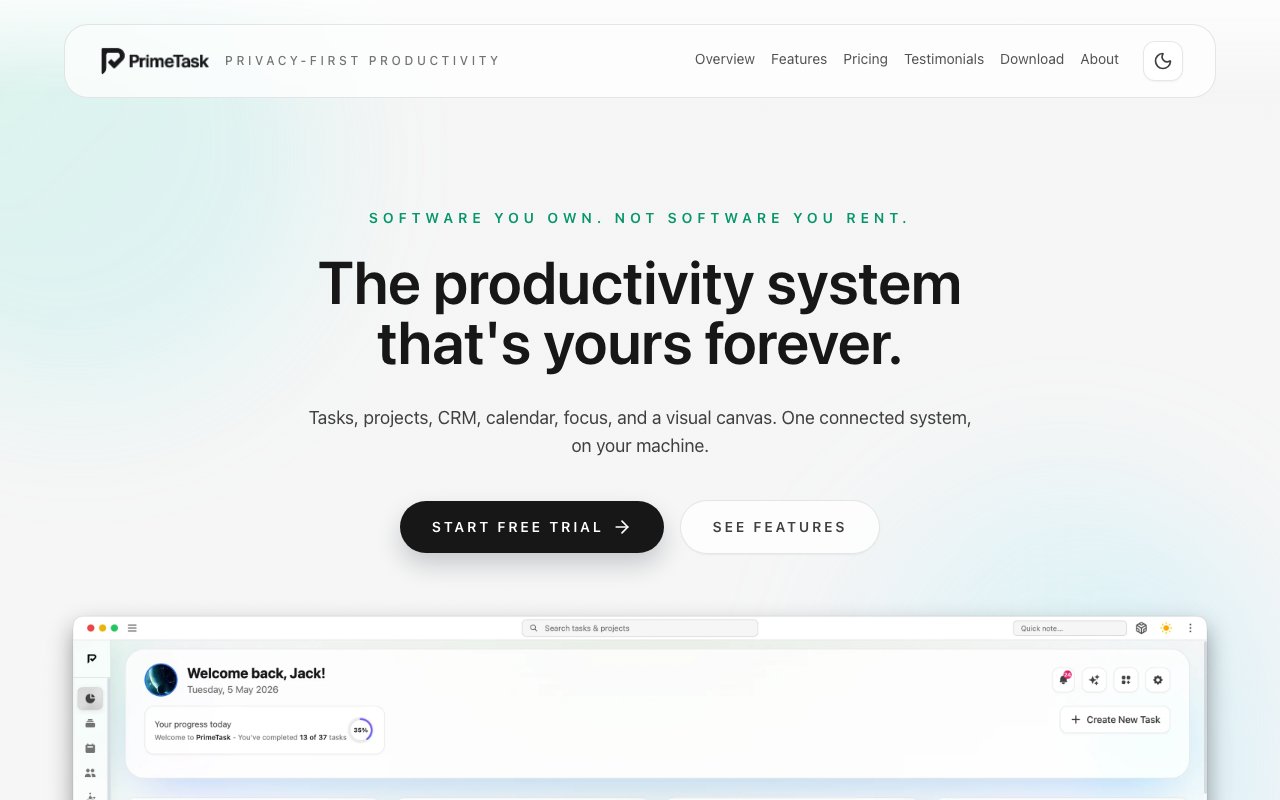
PrimeTask is a desktop productivity application that bundles task management, project tracking, a lightweight CRM, calendar views, focus timers, and a visual canvas into one offline-first package. The product targets freelancers, consultants, small agencies, and solo business owners who want a single tool instead of juggling multiple subscriptions. It runs entirely on macOS with local data storage, meaning nothing touches a server unless you explicitly set up integrations. The pitch is simple: buy it once, own it forever, and never worry about monthly fees eating into your margins.
The task management side lets you type in natural language. Something like "Call Sarah Tuesday high priority" gets parsed into a task with a due date and priority flag already attached. From there you can view your work as a list, a kanban board, a calendar, a Gantt chart, or a day planner. Projects get their own workspace with goals, milestones, health status indicators, and progress bars that roll up from individual tasks. The flexibility in visualization means you can match the view to how you think about work rather than forcing your brain into whatever layout the software dictates. Some people want kanban columns while others need a timeline. PrimeTask supports both without requiring add-ons or configuration headaches.
There's support for 14 different custom field types, including financial rollups if you're tracking project budgets or deal values. This level of customization lets you mold the system around your specific workflow rather than adapting how you work to fit software limitations. The system also includes a visual canvas called PrimeFlow where you can drag projects, tasks, contacts, and custom data nodes into a connected diagram. It's useful for mapping out workflows or visualizing how different pieces of your business relate to each other. For consultants managing multiple clients or agencies juggling several active projects, this spatial view helps maintain context that lists and boards can obscure.
The CRM module handles contacts, deal pipelines, activity logs, and what the developers call relationship workspaces. You can track a potential client from first contact through closed deal, log calls and emails along the way, and tie contacts directly to projects or tasks. It's not Salesforce, but it covers the basics a solo operator or small team actually needs without the enterprise complexity or enterprise pricing. Focus mode adds Pomodoro-style timers with break tracking and session statistics, which is handy if you're trying to log deep work hours or just need structure to stay on task through a scattered workday.
Integration with Apple's ecosystem runs deep. PrimeTask syncs bidirectionally with Apple Reminders and Calendar, works with Siri voice commands, and even supports Apple Watch. If you capture tasks throughout your day using Siri or the Reminders widget, those items flow into PrimeTask without manual entry. The more interesting angle is the AI integration through what they call "bring your own AI." Using MCP protocols, you can connect Claude, Cursor, or a local language model to over 100 tools inside the app. This means you can ask an AI assistant to query your tasks, update projects, or pull CRM data without sending anything to external servers. For anyone concerned about feeding client information into cloud AI services, this local-first AI integration addresses a real worry.
Pricing follows the one-time purchase model that's become rare in productivity software. The Standard tier costs $69 and covers two devices with access to 190 features. The Pro tier jumps to $139 for four devices and 290 features, adding advanced capabilities like the full CRM module and deeper custom field options. Both tiers include lifetime updates, which means you're not paying again when new versions ship. There's a 14-day free trial to test everything out and a 14-day money-back guarantee if it doesn't fit your workflow. Compare this to annual subscriptions for similar tools and the math starts favoring PrimeTask within the first year or two.
The tool positions itself against subscription-based competitors by emphasizing ownership and privacy. Your data stays on your Mac in local files you can back up however you want. There's no account requirement, no telemetry, no server dependency. For someone tired of paying monthly for Notion, Asana, or Todoist, and who works primarily on macOS, PrimeTask offers a credible alternative. The tradeoff is that you lose cloud sync and collaboration features that team-oriented tools provide. This is built for individuals or very small teams where everyone sits at the same machine or doesn't need real-time collaboration.
The application is mature enough to cover serious productivity workflows but niche enough that it won't be the right fit for everyone. If you need cross-platform support, web access, or team collaboration, look elsewhere. If you want a single offline app that handles tasks, projects, CRM, and focus tracking without ongoing costs or cloud dependencies, PrimeTask delivers a comprehensive package at a fixed price. The feature density rivals subscription tools costing more per year than PrimeTask costs once, making it worth serious consideration for macOS users who value ownership over convenience.
Key Features
- One-time purchase licensing
- Offline-first local storage
- Task and project management
- Built-in CRM with deal pipelines
- Visual canvas for connections
- Apple ecosystem sync
Pros & Cons
What we like
- Pay once and own it forever
- Data stays on your device with AES-256 encryption
- No telemetry or cloud dependency
- Integrates with Apple Reminders and Calendar
Room for improvement
- Mac only for now, Windows coming later
- No free tier, only a trial
- Smaller ecosystem than subscription tools
- No web or mobile companion app yet
Frequently Asked Questions
What is PrimeTask?
Is PrimeTask free?
Does PrimeTask work on Windows?
How does the Apple integration work?
Best For
Featured in
Alternatives to PrimeTask

CalendHub
Smart scheduling and calendar management for teams
Kevin Gabeci Toolkits
Seven AI toolkits for writing books, making music, cutting video, and building agents.

Confluence
Atlassian's long-running team wiki that anchors many enterprise knowledge stacks
Velprium
Digital bullet journal that syncs with Google Calendar for time tracking and weekly reviews
Reviews (10)
Two months in, no regrets
Have been running PrimeTask for a while, here is where I land. Their take on integrates with apple reminders and calendar is genuinely good.
Exactly what I needed
Tried PrimeTask on a side project first, then rolled it out everywhere. Their take on built-in crm with deal pipelines is genuinely good. No regrets so far.
Solid daily driver
PrimeTask solves a real problem for me without making a fuss about it. It does what it says, which is rarer than it should be. The output quality holds up better than I expected. Hard to imagine going back to my old setup.
Pulled its weight from week one
PrimeTask solves a real problem for me without making a fuss about it. Got real value out of apple ecosystem sync. Glad I made the switch.
Pulled its weight from week one
Started using PrimeTask casually, now it is pinned in my dock. Where it really wins is one-time purchase licensing. Recommending it to people in a similar spot.
Pulled its weight from week one
Three months of PrimeTask later, here is what holds up. The core workflow is smooth once you are set up. Support actually answered when I had a question, which surprised me. No regrets so far.
It just works
Three months of PrimeTask later, here is what holds up. What stands out is how it handles visual canvas for connections. Mostly using it for managing freelance projects without monthly fees.
Finally something that fits
PrimeTask has quietly become part of my daily flow. Got real value out of visual canvas for connections. Mostly using it for tracking client relationships in a local crm. Would sign up again without thinking twice.
Worth a look
Came to PrimeTask after getting frustrated with what I had before. Where it really wins is apple ecosystem sync. Found it works best for managing freelance projects without monthly fees. Glad I made the switch.
Solid daily driver
Came to PrimeTask after getting frustrated with what I had before. Performance has been steady even when I lean on it hard. Support actually answered when I had a question, which surprised me. Glad I made the switch.
Badge builder
Add PrimeTask to your website
Choose a badge style and size, preview it here, then copy the generated HTML. Badge images are self-contained SVGs and do not require an external script.

<a href="https://toolindex.net/tools/primetask?ref=badge" target="_blank" rel="noopener">
  <img src="https://toolindex.net/badge/primetask/medium.svg" alt="PrimeTask - Listed on Tool Index" width="180" height="50" />
</a>How to use the badge
- 1. Pick the style, size, and theme that fit your layout.
- 2. Copy the generated HTML from the code block.
- 3. Paste it into your footer, homepage, or press page.
Standard badge available
The standard listing badge is available now. Score and circle badges are limited to tools currently ranked in the top 10 of a category.
Badge clicks return visitors to this profile with a referral tag so the source remains identifiable.
Related Tools
Confluence
Atlassian's long-running team wiki that anchors many enterprise knowledge stacks
Asana
Project management for teams that live in projects, tasks and dependencies
Kevin Gabeci Toolkits
Seven AI toolkits for writing books, making music, cutting video, and building agents.

Logseq
An open-source outliner notes app where every bullet is a first-class block
Work on PrimeTask? Request listing access or correction