Velprium
Digital bullet journal that syncs with Google Calendar for time tracking and weekly reviews
Gallery
About Velprium
Velprium is a calendar journal that layers structured data and review capabilities onto Google Calendar, transforming scheduled events into queryable time records that reveal patterns in how time actually gets spent. It addresses a gap that calendar applications typically ignore: while they excel at scheduling future activities and sending reminders, they offer almost nothing for understanding past time usage or identifying trends in how days and weeks unfold. Velprium treats calendar entries as data points that can be enriched with notes, moods, ratings, projects, and custom properties, then filtered and analyzed to answer questions like where time goes, which activities feel worthwhile, and what patterns emerge over weeks or months of tracking.
The core functionality lets users attach metadata to any calendar event without modifying the original Google Calendar entry. Someone might tag a meeting with a project name, rate how productive it felt on a five-point scale, add a status like completed or cancelled or rescheduled, note their mood before and after, or write a quick reflection about what happened. These properties exist in Velprium's separate data layer, keeping the Google Calendar itself clean and unchanged while enabling much richer tracking and analysis. The system then allows filtering events by any of these dimensions, so users can pull up everything related to a specific client project, see all meetings rated two stars or lower from the past quarter, review cancelled commitments to understand scheduling patterns, or track cumulative time spent on different categories over any date range.
Four distinct views present this information in different ways depending on what users need at any given moment. The Diary view shows a chronological log of events, functioning like a traditional journal but populated automatically from calendar data with minimal manual input required. The Week view splits time by areas or categories, useful for seeing at a glance how hours distributed across work, personal projects, client obligations, health, or any other domains a user cares to track. The Review view provides daily, weekly, and project-level analytics, surfacing trends and patterns that would be invisible when looking at individual days in isolation. An Ask view introduces an AI agent that can help with scheduling decisions based on the accumulated data and observed patterns.
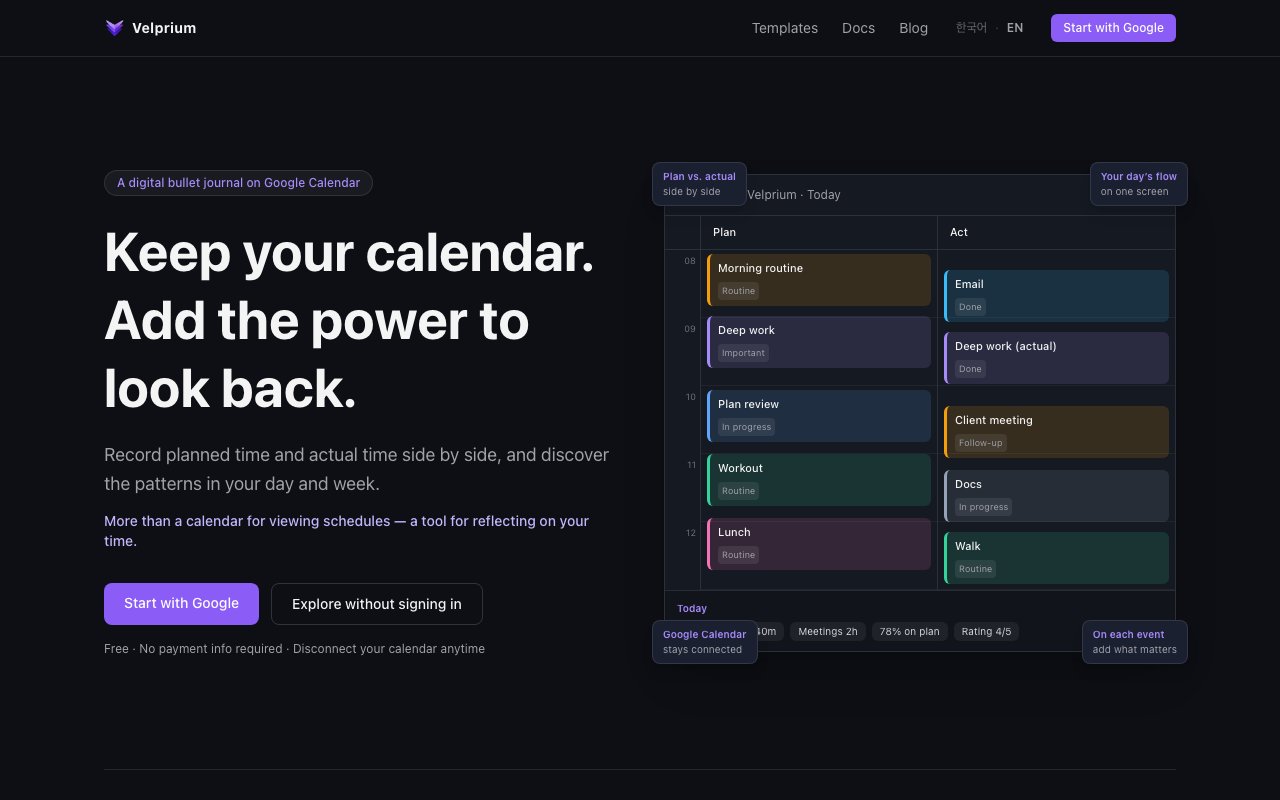
An optional Plan versus Actual feature lets users compare what they intended to do with what they actually did. This appeals to anyone who schedules tasks optimistically then wonders at the end of the week why nothing went according to plan. By tracking deviations systematically over time, users can identify whether certain activities consistently run over their allocated time, which commitments tend to get cancelled or rescheduled repeatedly, where their planning assumptions fail most often, and what realistic time estimates should look like based on historical data. The feature transforms vague feelings about time management into concrete patterns that can inform better planning decisions.
The platform provides templates for common use cases: bullet journaling for daily reflection and task tracking, client work management for freelancers and consultants who need to log billable time, workday organization for employees who want to understand their productivity patterns, and comprehensive life logging for users tracking everything from meals to workouts to social activities. These templates configure default properties, views, and categories to match specific workflows, reducing setup friction for users who know what kind of tracking they want but would rather not build the structure from scratch. Templates also serve as examples of what structured calendar journaling can look like, helping new users understand the possibilities.
Target users include consultants and freelancers tracking billable time across multiple clients, knowledge workers trying to understand where their days disappear, managers reviewing how they spend time on different responsibilities, and anyone who uses Google Calendar as their primary scheduling tool but feels like they lack meaningful visibility into their actual time usage. The product is particularly relevant for people who have tried dedicated time-tracking apps but found them too demanding to maintain, since Velprium builds on data that already exists in the calendar rather than requiring separate logging for every activity.
Velprium connects through Google OAuth and runs as a web application built with Next.js. It stores all Velprium-specific data separately from Google Calendar and doesn't modify original calendar events, so users can disconnect at any time without affecting their calendar. The platform explicitly states that data is never used for AI training, addressing a common concern about cloud services that process personal information. The service is free to start with no payment information required, and core features including calendar sync, all four views, and full property management remain available without charge.
Key Features
- Google Calendar sync with read-only connection
- Plan versus actual time tracking
- Weekly and monthly review aggregations
- Event tags, ratings, and custom properties
- AI scheduling assistant
- Multiple view modes including week and diary
Pros & Cons
What we like
- Non-destructive, never modifies your Google Calendar events
- Weekly reviews auto-aggregate time and ratings
- Free core features with no credit card required
- Adds bullet journal style metadata to standard calendar events
Room for improvement
- Only supports Google Calendar for now
- Apple Calendar integration not yet available
- Newer product with smaller user community
- Depends on consistent calendar use to be valuable
Frequently Asked Questions
What is Velprium?
Does Velprium modify my Google Calendar?
Is Velprium free?
Who is Velprium for?
Best For
Featured in
Alternatives to Velprium

CalendHub
Smart scheduling and calendar management for teams
Kevin Gabeci Toolkits
Seven AI toolkits for writing books, making music, cutting video, and building agents.

PrimeTask
Offline-first work OS with tasks, CRM, and canvas views you buy once and own forever
Kibu
Vertical software for disability service providers covering compliance, documentation, and programming
Reviews (11)
Finally something that fits
Three months of Velprium later, here is what holds up. The output quality holds up better than I expected. Performance has been steady even when I lean on it hard. Worth it for what I get out of it.
Finally something that fits
Have been running Velprium for a while, here is where I land. Where it really wins is plan versus actual time tracking. Easy yes for anyone weighing the same trade offs.
Recommended without reservation
Velprium solves a real problem for me without making a fuss about it. The plan versus actual time tracking is more useful than I expected. The core workflow is smooth once you are set up. Mostly using it for comparing time allocation patterns across months.
Worth a look
Started using Velprium casually, now it is pinned in my dock. What stands out is how it handles event tags, ratings, and custom properties. Found it works best for running weekly reviews on work and personal time balance. Recommending it to people in a similar spot.
Solid daily driver
Three months of Velprium later, here is what holds up. The thing I keep coming back to is how reliable it is. It earns its place in my stack.
Worth a look
Started using Velprium casually, now it is pinned in my dock. Got real value out of google calendar sync with read-only connection. No regrets so far.
Pulled its weight from week one
Velprium has quietly become part of my daily flow. Support actually answered when I had a question, which surprised me. The defaults are sensible, so I was not fighting settings on day one. It earns its place in my stack.
Exactly what I needed
Velprium has quietly become part of my daily flow. The interface stays out of my way, which I appreciate. It just works, day after day, without surprises. Would sign up again without thinking twice.
It just works
Started using Velprium casually, now it is pinned in my dock. The free core features with no credit card required is more useful than I expected. It handles the boring parts so I can focus on the work that matters. It fits well for adding notes and ratings to calendar events after the fact. Worth it for what I get out of it.
Quietly excellent
Picked Velprium for the price, stayed for the quality. What stands out is how it handles weekly and monthly review aggregations. The core workflow is smooth once you are set up. Found it works best for adding notes and ratings to calendar events after the fact. Recommending it to people in a similar spot.
Pulled its weight from week one
Came to Velprium after getting frustrated with what I had before. What stands out is how little babysitting it needs. Worth it for what I get out of it.
Badge builder
Add Velprium to your website
Choose a badge style and size, preview it here, then copy the generated HTML. Badge images are self-contained SVGs and do not require an external script.

<a href="https://toolindex.net/tools/velprium?ref=badge" target="_blank" rel="noopener">
  <img src="https://toolindex.net/badge/velprium/medium.svg" alt="Velprium - Listed on Tool Index" width="180" height="50" />
</a>How to use the badge
- 1. Pick the style, size, and theme that fit your layout.
- 2. Copy the generated HTML from the code block.
- 3. Paste it into your footer, homepage, or press page.
Standard badge available
The standard listing badge is available now. Score and circle badges are limited to tools currently ranked in the top 10 of a category.
Badge clicks return visitors to this profile with a referral tag so the source remains identifiable.
Related Tools

Confluence
Atlassian's long-running team wiki that anchors many enterprise knowledge stacks
Asana
Project management for teams that live in projects, tasks and dependencies
Kevin Gabeci Toolkits
Seven AI toolkits for writing books, making music, cutting video, and building agents.

Logseq
An open-source outliner notes app where every bullet is a first-class block
Work on Velprium? Request a listing correction