
Punchy
PIN based punch clock for household workers with no apps or tracking required
Gallery
About Punchy
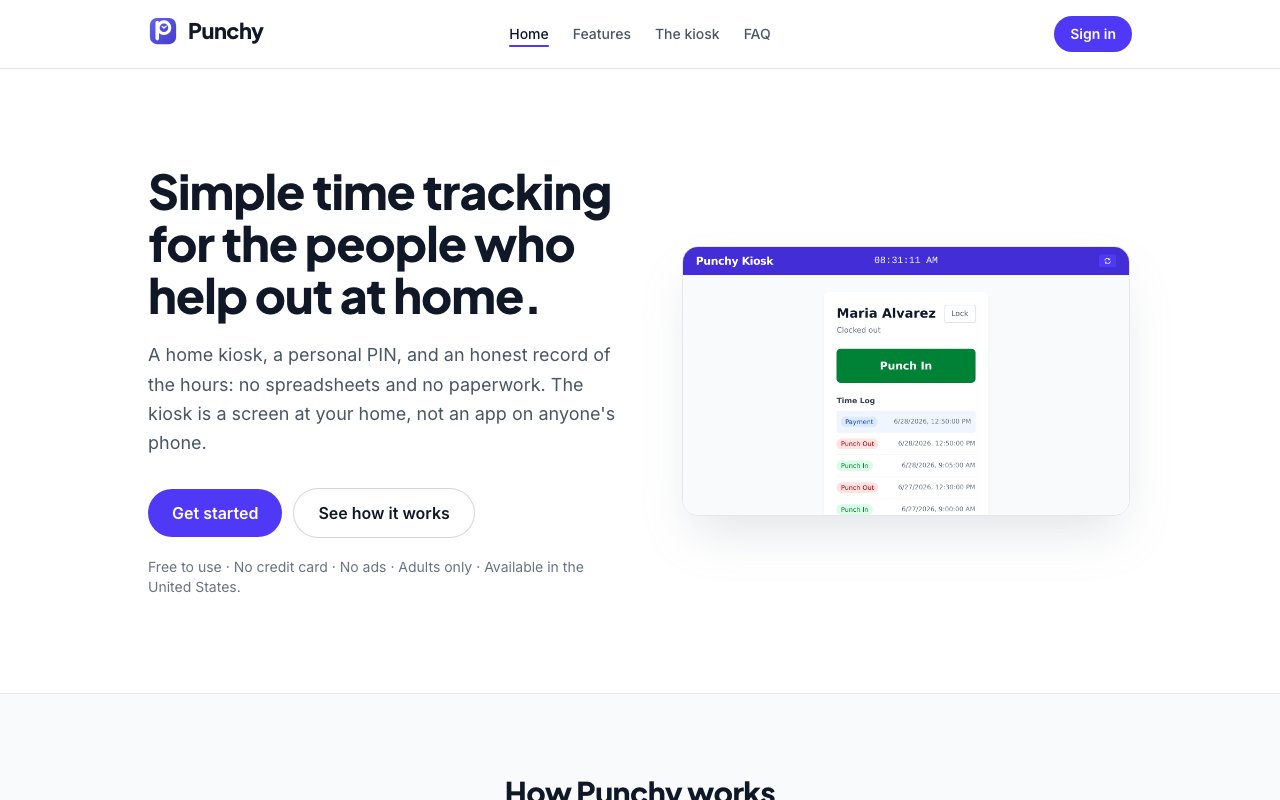
Punchy is a punch clock for households that employ hourly help. Instead of an app that workers have to install, it puts a kiosk on a spare tablet or phone in your home, and the people who work for you clock in and out by tapping a personal PIN when they arrive and leave. The site sums up the whole philosophy as a screen at your home, not an app on anyone's phone, and every design decision in the product follows from that one choice. Your side of it is a dashboard that tallies hours automatically and keeps track of what you've already paid. The kiosk itself is just a web page pinned open on the device, so any spare tablet or phone with a browser can do the job.
The problem it goes after is mundane and very real. If you pay a house cleaner, gardener, dog walker, tutor, or caregiver by the hour, the record keeping usually lives in scribbled notes, text message threads, and memory. When it's time to settle up, someone ends up reconstructing arrival times from recollection, rounding in whichever direction feels fair that day, and hoping nothing gets counted twice. That's an awkward conversation waiting to happen with a person you rely on and probably like. Punchy replaces the reconstruction with timestamps that were captured the moment they actually happened, which protects both sides of the arrangement equally. The fix is structural rather than clever, since a timestamped log that both sides watched being created is a neutral record, and the totals stop being anyone's word against anyone else's.
Setup takes a few minutes. You create an account, add each worker by name, and assign every person their own PIN. Then you open the kiosk link on whatever device will live near the door, and a QR code gets the kiosk onto that tablet or phone quickly. From then on, workers tap in their PIN and press the punch in or punch out button, and the entry logs automatically. Nobody who works for you has to create an account, install software, or hand over personal information just to record their hours, which also means there's nothing for them to forget at home or fail to charge.
On your side, the dashboard shows who's clocked in right now and running totals by worker and by period, so the question of how many hours this week never requires math. Because the totals break down by period, comparing this month against last or pulling a single week's hours before payday is a glance rather than a project. Payment tracking is built in as well. You log what you've paid and mark hours as paid, which prevents the classic mistake of paying for the same hours twice. When you need the records somewhere else, everything exports to CSV at any time, whether that's for payroll software, tax season, or simply a backup that lives on your own machine.
Privacy is where Punchy plants its flag. There's no GPS and no location data, because a punch is simply a tap at your kiosk, so the only thing recorded is the time. Workers' personal phones stay out of the arrangement entirely. The site also commits to no ads, no selling of data, and no cross-site trackers, with only anonymous, cookie-free usage statistics collected, and it says it gathers only the data needed for the core function. If you leave, you can permanently delete your account and everything associated with it. For household employment, where asking someone to install monitoring software on their own phone can sour a good working relationship before it starts, that posture is the product's strongest argument.
The scope is deliberately narrow. Punchy is for adults in the United States who employ household help, per its own terms, and it doesn't try to be a scheduling tool, an HR platform, or a payroll processor. It tracks hours in, hours out, and whether those hours have been paid, and it stops there. That restraint keeps the kiosk simple enough that you can hand a PIN to someone who has never heard of the product and they'll have it figured out on their first arrival, no training or onboarding required. The buttons say punch in and punch out, the PIN is four taps, and that's the entire interaction. If you need shift planning, invoicing, or tax filing, you'll pair it with something else, and the CSV export is the bridge for doing exactly that.
Punchy is free to use, and no credit card is required to get started. There's no paid tier visible on the site today, so the entire feature set, from the kiosk and the live dashboard through payment marking and CSV export, comes at no cost. If your current time tracking system for household help is a mix of paper, trust, and mental arithmetic, this is a low-effort upgrade that treats everyone involved like an adult and asks almost nothing in return.
Key Features
- PIN based punch in and out
- Dedicated kiosk mode for home devices
- Automatic hour calculation and totals
- Payment status tracking per worker
- CSV export for payroll records
- No GPS or location tracking
Pros & Cons
What we like
- Workers need only a PIN, no app or account required
- No location tracking or invasive permissions
- Free with no credit card needed
- Dead simple interface that anyone can use
Room for improvement
- Requires a dedicated device left at home
- No shift scheduling or advanced HR features
- No mobile app for remote management
- Limited to household use cases, not broader teams
Frequently Asked Questions
What is Punchy?
Is Punchy free?
Do workers need to install an app?
Does Punchy track worker locations?
Best For
Featured in
Alternatives to Punchy

CalendHub
Smart scheduling and calendar management for teams
Kevin Gabeci Toolkits
Seven AI toolkits for writing books, making music, cutting video, and building agents.

Eased Into AI
Learn AI from zero. No jargon, no hype, just steps that work.

Fix It Gently
Calm, plain-English fixes for everyday tech problems.
Reviews (0)
Badge builder
Add Punchy to your website
Choose a badge style and size, preview it here, then copy the generated HTML. Badge images are self-contained SVGs and do not require an external script.

<a href="https://toolindex.net/tools/punchy?ref=badge" target="_blank" rel="noopener">
  <img src="https://toolindex.net/badge/punchy/medium.svg" alt="Punchy - Listed on Tool Index" width="180" height="50" />
</a>How to use the badge
- 1. Pick the style, size, and theme that fit your layout.
- 2. Copy the generated HTML from the code block.
- 3. Paste it into your footer, homepage, or press page.
Standard badge available
The standard listing badge is available now. Score and circle badges are limited to tools currently ranked in the top 10 of a category.
Badge clicks return visitors to this profile with a referral tag so the source remains identifiable.
Related Tools

Confluence
Atlassian's long-running team wiki that anchors many enterprise knowledge stacks
Asana
Project management for teams that live in projects, tasks and dependencies
Kevin Gabeci Toolkits
Seven AI toolkits for writing books, making music, cutting video, and building agents.

Logseq
An open-source outliner notes app where every bullet is a first-class block
Work on Punchy? Request listing access or correction