
RDLTR
Save links from any device and clear them from an inbox-style reading queue
Gallery
About RDLTR
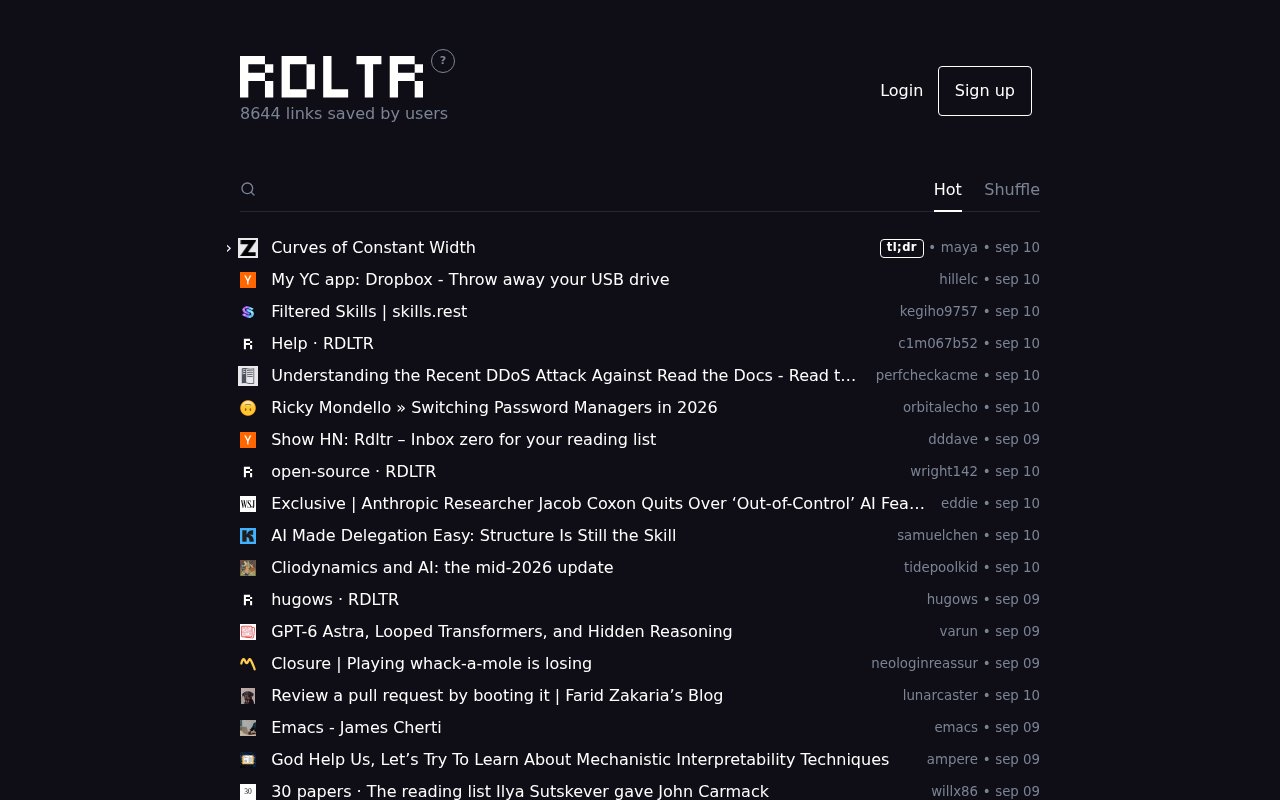
RDLTR is a read-later service built around the idea of inbox zero. It gives each user a queue for links they intend to read, then removes an item from the active list when they open or mark it as read. The link can remain available in the archive instead of disappearing for good. This is a small but meaningful change from bookmark managers whose default view grows forever. RDLTR is for readers who want saved articles to feel like a finite queue they can work through, while still keeping enough history to find a useful page again.
Saving is designed to work wherever a link appears. On the web app, a user can paste a URL into the page or drag one into the feed. Browser extensions for Chrome and Firefox add one-click saving, a keyboard shortcut, and a context menu for saving a linked page without opening it first. An Apple Shortcut covers the iOS and macOS share sheet, and a personal bookmarklet works in other browsers. Each account claims a handle and receives a page at an RDLTR profile URL, so the same queue is accessible across desktop and mobile instead of being tied to one browser's local reading list.
The queue itself favors quick navigation. Opening a saved link clears it from the unread feed, while a separate read action can do the same without opening it. Keyboard commands move between items, open a link, request a summary, mark an item read, change the sort, and search the collection. Sorting options include date, site, and a shuffle-style luck view. The main site also exposes public feeds from other users and aggregate views such as topics and trends, which turns the service into a lightweight place to discover what other people have saved. Anyone who only wants a private personal queue should note that profiles are public by default.
RDLTR includes a summary action, but it doesn't present itself as a closed AI system with its own model. The extension sends the current page to the user's selected service, with support documented for Claude, ChatGPT, Gemini, and Perplexity. When article text is available, that text and the source URL are passed along so the selected service can summarize or answer questions about the page. This keeps the choice of assistant with the reader, but it also means the page content is processed under that provider's privacy policy. The archive action similarly opens a URL through an outside archive service, with Medium pages routed through Freedium.
Search and retention are part of the paid Plus tier. Plus members get summaries before opening a link, search across read and unread items, a private profile, and an archive that keeps read links. The help page describes the annual price as a flat $30. Public profiles can also be followed through RSS, and the service publishes a simple authenticated API for saving a URL programmatically. That API makes it possible to connect a script or another personal workflow without relying on a browser extension. The public help currently concentrates on adding links, navigation, and RSS, and it doesn't document a bulk export feature.
The product suits people who collect essays, documentation, news, and research from several devices but don't want to maintain a carefully tagged knowledge base. It asks for very little organization at capture time. Save the link, see it in the queue, read it, and let it move out of the way. That makes RDLTR less elaborate than tools centered on annotations, highlighting, folders, or collaborative libraries. Its own handles, public feeds, and discovery pages add a social layer, yet the core loop remains personal. Readers who prefer a clean feed and keyboard control are more likely to appreciate that narrow scope than people building a permanent research repository.
There is a free entry point for claiming a handle, saving links, and using the basic feed, with Plus providing the clearest long-term archive and privacy features. Authentication is handled through Neologin, and RDLTR says it doesn't receive or store a password. It stores saved URLs, titles, descriptions, and article text because those are needed for search and reading features. The service says it uses Umami for page-view analytics, has no third-party trackers, and doesn't sell data or use it for advertising. Users can request deletion of their account and saved links by email. The practical buying decision is therefore less about a complex plan matrix and more about whether private lists, summaries, complete search, and permanent history are worth the annual Plus fee.
Key Features
- Inbox-style reading queue
- Chrome and Firefox extensions
- Cross-device save shortcuts
- External AI summary handoff
- Read and unread search
- RSS feed and save API
Pros & Cons
What we like
- Clears opened links from the active reading queue
- Accepts links from browsers, Apple devices, and scripts
- Offers fast keyboard navigation throughout the feed
- Lets readers choose their preferred AI summary service
Room for improvement
- Reading profiles are public unless Plus privacy is enabled
- Summaries send page content to a selected external AI service
- Full archive and bottomless search require the paid tier
- Public help doesn't document a bulk export feature
Frequently Asked Questions
What is RDLTR?
How can links be saved to RDLTR?
Does RDLTR generate AI summaries?
Is RDLTR free?
Best For
Featured in
Alternatives to RDLTR
View all
CalendHub
Smart scheduling and calendar management for teams
Kevin Gabeci Toolkits
Seven AI toolkits for writing books, making music, cutting video, and building agents.

Eased Into AI
Learn AI from zero. No jargon, no hype, just steps that work.

Fix It Gently
Calm, plain-English fixes for everyday tech problems.
Our take
Tool Index Editorial · Sep 2026· 3.5/5
RDLTR treats saved reading as an inbox to clear rather than a bookmark collection to curate forever. We found a crisp capture flow across the web, browser extensions, an Apple shortcut, a bookmarklet, and an API, plus strong keyboard navigation. Basic use is free, while Plus costs a flat $30 per year for private pages, summaries, full search, and a permanent archive.
This suits readers who want low-friction capture and a finite queue, not researchers building a heavily annotated library. The most important caveat is that a profile is public unless the user pays for Plus privacy. Summaries also hand article content to the user's chosen external AI service, and the public help does not show a bulk export path. That keeps the product pleasantly small, but also limits its value as a durable knowledge base.
Editorial opinion from the Tool Index team, written from the public product pages. Not a user review.
Reviews (0)
Badge builder
Add RDLTR to your website
Choose a badge style and size, preview it here, then copy the generated HTML. Badge images are self-contained SVGs and do not require an external script.

<a href="https://toolindex.net/tools/rdltr?ref=badge" target="_blank" rel="noopener">
  <img src="https://toolindex.net/badge/rdltr/medium.svg" alt="RDLTR - Listed on Tool Index" width="180" height="50" />
</a>How to use the badge
- 1. Pick the style, size, and theme that fit your layout.
- 2. Copy the generated HTML from the code block.
- 3. Paste it into your footer, homepage, or press page.
Standard badge available
The standard listing badge is available now. Score and circle badges are limited to tools currently ranked in the top 10 of a category.
Badge clicks return visitors to this profile with a referral tag so the source remains identifiable.
Related Tools

Confluence
Atlassian's long-running team wiki that anchors many enterprise knowledge stacks
Asana
Project management for teams that live in projects, tasks and dependencies
Kevin Gabeci Toolkits
Seven AI toolkits for writing books, making music, cutting video, and building agents.

Logseq
An open-source outliner notes app where every bullet is a first-class block
Work on RDLTR? Request listing access or correction