
Rekody
Free open-source voice dictation for macOS that types at your cursor in any app
Gallery
About Rekody
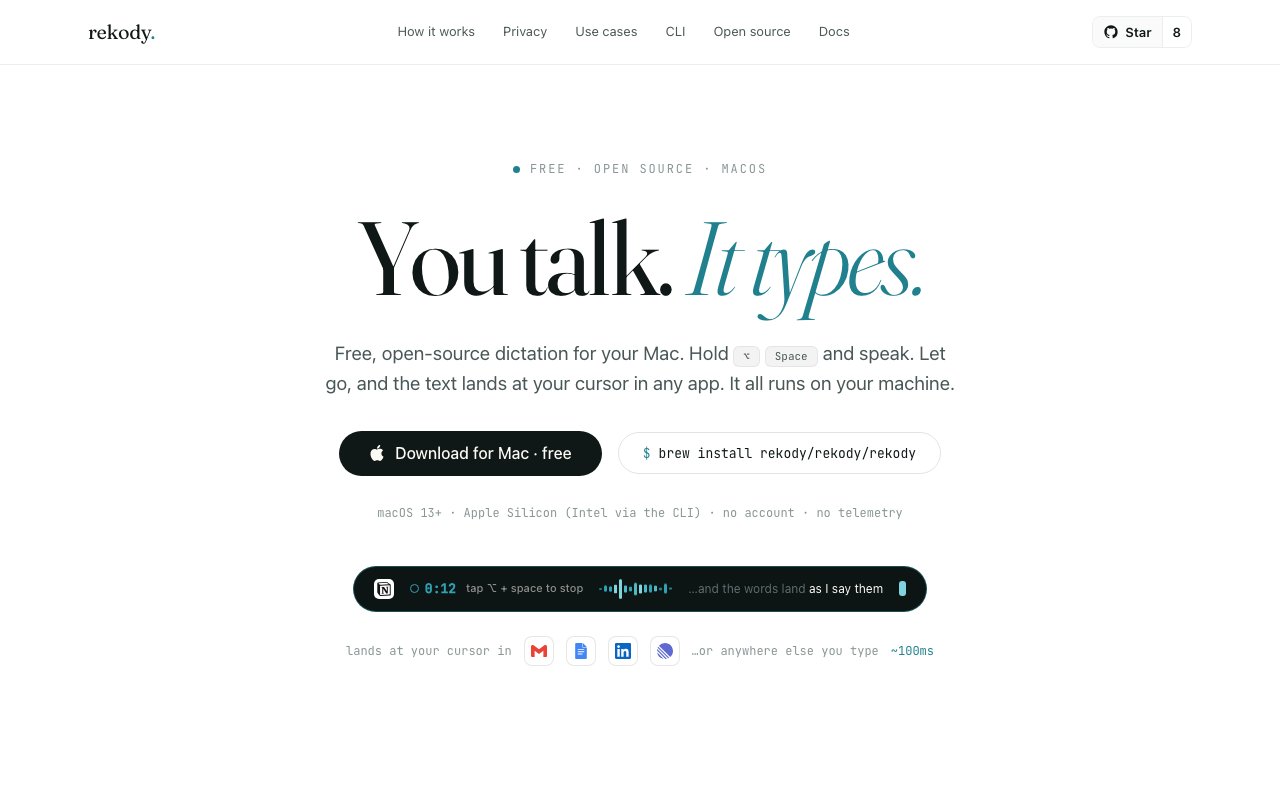
Rekody is a voice dictation app for macOS with a very short description of itself. You talk, it types. You hold Option and Space, say what you mean, let go, and the text lands at your cursor in whatever app you were already in. There's no window to switch to and no per-app setup, because it types where you were going to type anyway.
There are two modes and the difference is just how you press the shortcut. Hold it down and it records while you speak, showing a floating pill that displays a live waveform, a timer, and which app it's about to type into. Release and the final text drops in. Quick-tap the same shortcut instead and it goes hands-free, staying on as long as you keep talking until you tap again to stop, which is the mode for longer dictation or when your hands are busy. Words appear as you say them rather than arriving in a block at the end, and the site measures roughly 100 milliseconds from key release to final text.
The privacy posture is the reason the project exists and it's stated in unusually checkable terms. Transcription happens on your machine with zero network calls during dictation. Speech models download once at setup, and after that dictation never touches the network. There's no account, no analytics, no telemetry, no cloud sync, and no audio saved off your machine. As the site puts it, there is no Rekody server your voice could be sent to. Because the code is MIT-licensed on GitHub, none of that has to be taken on trust, which is the point they're making by shipping it open source. Cloud engines do exist as an option, and the site is upfront that they're optional and labeled as such rather than quietly switched on.
Under the hood you can swap the speech engine to match the tradeoff you want. The default is an on-device Nemotron engine running English only at around 50 milliseconds of latency. Local Whisper is the other offline option, covering more than 100 languages at one to three seconds. If you're willing to leave the machine, Deepgram Nova-3 sits around 200 milliseconds, with Groq and Cohere available too. An LLM post-processing pass cleans out filler words and adapts formatting to context, so the output reads like writing rather than a transcript.
Past the basics there's more depth than a dictation shortcut usually carries. A skills system reshapes raw dictation into a particular shape, so the same spoken sentence can come out as an email, a note, or a commit message. Custom vocabulary keeps your jargon and product names from getting mangled. A history browser lets you search and review past dictations with statistics attached. It can also save audio and transcripts locally as a training dataset if you want to fine-tune against your own voice later, and that stays on your disk.
The site makes the privacy position legible by publishing it as a table rather than a paragraph of assurances. Data sent to us reads zero bytes. Analytics events, none. Audio saved to disk, none. Account required, no. Cloud sync, never. Update checks are manual for the CLI. It's a short list and every line on it is falsifiable against the repository, which is the entire argument for shipping a tool like this open source in the first place.
It's a native binary at roughly 35MB rather than an Electron app, which is a real difference in a category where 200MB wrappers are normal. It needs macOS 13 or later and targets Apple Silicon, with Intel Macs supported through the CLI instead. You'll need to grant Accessibility and Microphone permissions, since typing into other apps requires it. Install by dragging to Applications for the app, which then auto-updates, or with a single Homebrew command for the CLI, and there's a curl installer plus make and cargo paths from source if you'd rather. The site claims you'll be running in about a minute, and given there's no account step that's plausible. The project keeps public issues, discussions, a contributing guide, a changelog, a security policy and an EULA alongside the MIT license, which is more governance scaffolding than most tools this size put up. It's free and MIT-licensed, with no paid tier, no upsell and nothing gated. The honest caveat is maturity. The project is at a 0.x version with a small number of GitHub stars, so this is an early tool with a small community rather than a settled one, and if you need on-device dictation in a language other than English you'll be running the slower local Whisper path. For a Mac user who wants dictation that stays on the machine and can read the source to confirm it, that's a reasonable trade.
Key Features
- Hold-to-talk and hands-free dictation modes
- On-device transcription with no network calls
- Skills that reshape dictation per context
- Custom vocabulary for jargon and product names
- Searchable dictation history browser
- Swappable engines including local Whisper
Pros & Cons
What we like
- Dictation runs entirely on your Mac by default
- MIT-licensed, so the privacy claims are verifiable in source
- Roughly 35MB native binary instead of an Electron wrapper
- Types at the cursor in any macOS app with no per-app setup
Room for improvement
- macOS only, with Intel Macs limited to the CLI
- Default on-device engine handles English only
- Early 0.x project with a very small community
- Needs Accessibility and Microphone permissions to function
Frequently Asked Questions
What is Rekody?
Is Rekody free?
Does my voice get sent to a server?
What do I need to run Rekody?
Best For
Featured in
Alternatives to Rekody

CalendHub
Smart scheduling and calendar management for teams
Kevin Gabeci Toolkits
Seven AI toolkits for writing books, making music, cutting video, and building agents.

Confluence
Atlassian's long-running team wiki that anchors many enterprise knowledge stacks
Kibu
Vertical software for disability service providers covering compliance, documentation, and programming
Reviews (7)
Decent with some rough edges
Rekody solves a real problem for me without making a fuss about it. Got real value out of dictation runs entirely on your mac by default. The interface stays out of my way, which I appreciate. It would be a five if not for needs accessibility and microphone permissions to function. Worth it for what I get out of it.
Genuinely impressed
Three months of Rekody later, here is what holds up. The roughly 35mb native binary instead of an electron wrapper is more useful than I expected. Performance has been steady even when I lean on it hard. Worth it for what I get out of it.
Genuinely impressed
Three months of Rekody later, here is what holds up. Support actually answered when I had a question, which surprised me. Performance has been steady even when I lean on it hard. Worth it for what I get out of it.
It just works
Started using Rekody casually, now it is pinned in my dock. Support actually answered when I had a question, which surprised me. It fits well for drafting email without touching the keyboard. No regrets so far.
Two months in, no regrets
Came to Rekody after getting frustrated with what I had before. Got real value out of mit-licensed, so the privacy claims are verifiable in source. Mostly using it for replacing a cloud dictation tool for privacy reasons. It earns its place in my stack.
Pulled its weight from week one
Came to Rekody after getting frustrated with what I had before. The types at the cursor in any macos app with no per-app setup is more useful than I expected. The defaults are sensible, so I was not fighting settings on day one. Would sign up again without thinking twice.
Solid daily driver
Found Rekody on a Show HN thread and I am glad I clicked. Their take on custom vocabulary for jargon and product names is genuinely good. Support actually answered when I had a question, which surprised me. Found it works best for drafting email without touching the keyboard. Hard to imagine going back to my old setup.
Badge builder
Add Rekody to your website
Choose a badge style and size, preview it here, then copy the generated HTML. Badge images are self-contained SVGs and do not require an external script.

<a href="https://toolindex.net/tools/rekody?ref=badge" target="_blank" rel="noopener">
  <img src="https://toolindex.net/badge/rekody/medium.svg" alt="Rekody - Listed on Tool Index" width="180" height="50" />
</a>How to use the badge
- 1. Pick the style, size, and theme that fit your layout.
- 2. Copy the generated HTML from the code block.
- 3. Paste it into your footer, homepage, or press page.
Standard badge available
The standard listing badge is available now. Score and circle badges are limited to tools currently ranked in the top 10 of a category.
Badge clicks return visitors to this profile with a referral tag so the source remains identifiable.
Related Tools
Confluence
Atlassian's long-running team wiki that anchors many enterprise knowledge stacks
Asana
Project management for teams that live in projects, tasks and dependencies
Kevin Gabeci Toolkits
Seven AI toolkits for writing books, making music, cutting video, and building agents.

Logseq
An open-source outliner notes app where every bullet is a first-class block
Work on Rekody? Request listing access or correction