Riff Calendar
An iPhone calendar that zooms continuously from six months to one day
Gallery
About Riff Calendar
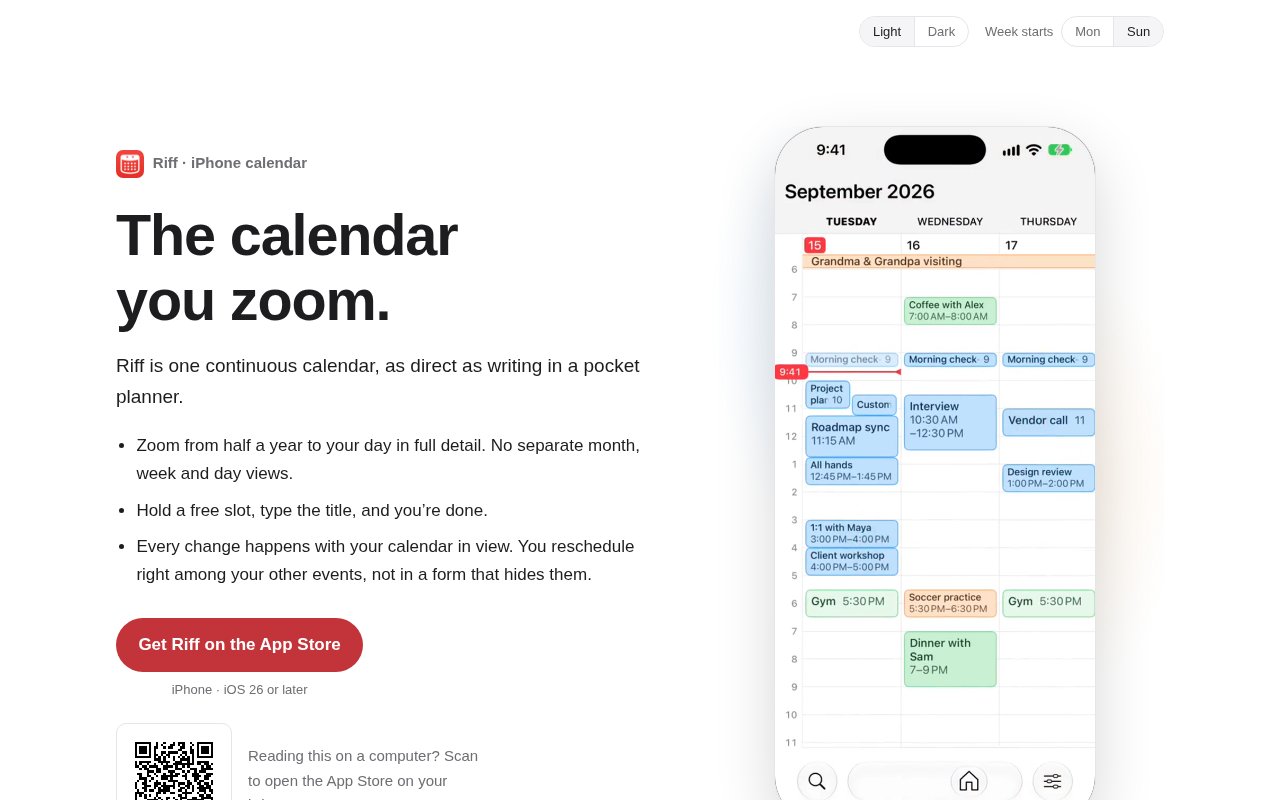
Riff Calendar is an iPhone calendar built around one continuous, zoomable timeline. Instead of making someone jump between separate month, week, and day screens, it lets them move from roughly half a year of context down to a detailed day by pinching and scrolling. The idea is closer to handling a paper planner than navigating a stack of calendar modes. Dates and events stay visible as the scale changes, so a person can first understand the shape of a busy period and then move closer to plan an hour. It is a focused alternative to full productivity suites, aimed at people who want the calendar itself to be direct and spatial.
Creating an event starts on the timeline rather than in a form. A user holds an open time, types a title, adjusts the start by sliding the event, and drags its lower edge to set the duration. All-day events begin with a hold below the date. Dragged times snap to round values by default, while pausing or moving the time tag allows exact placement. When the beginning of a familiar title is typed, Riff can suggest a previous event along with its usual duration, place, and alert. Those suggestions come from the calendars already on the phone and require no separate rules. Rescheduling also happens in context. The event lifts from its old slot, the user scrolls to another day or week, and then places it among the events already there.
The same continuous view can include planning context that normally lives elsewhere. Daily weather appears beside each date, with an hourly forecast when the view reaches a single day. An event tied to a location can show the weather for that place. Riff can also shade the hours between sunset and sunrise, which is useful when scheduling outdoor plans. Both weather and daylight are optional settings. The app includes reminders alongside events, search by title or place, quick alerts, travel-aware time zones, repeating events, links, notes, Siri and Shortcuts actions, and controls for jumping to a date. Its zoom interaction is designed to work with one thumb, keeping the central navigation usable on a phone.
Widgets carry the same visual approach onto the Home Screen and Lock Screen. The Schedule widget draws events at their actual hours and shows their duration, with the number of visible days depending on widget size. The small widget can show as many as three days, the medium as many as a week, and the large as many as two weeks. A Month widget shows the current month or the current and following month, while an Up Next widget focuses on the next events. This matters for someone who wants to glance at the shape of a day instead of reading a flat agenda. It also reinforces Riff's main distinction, which is treating time and event length as visual information rather than reducing every view to a list.
Riff works directly with the calendar database on the iPhone. It supports the iCloud, Google, Exchange, and other accounts that Apple Calendar can already see, with no Riff account and no import step. Events created or moved in the app appear in other calendar clients because Riff edits the existing calendars rather than making copies. Removing the app doesn't remove those calendars or their events. The developer says Riff has no server, account, or analytics and collects no data. Event information travels between Apple's calendar database and the screen, which is a notably simple privacy posture. The tradeoff is a narrow platform footprint. Riff requires an iPhone running iOS 26 or later and currently has no dedicated iPad, Mac, Android, or Apple Watch app.
There are a few other boundaries worth knowing before adopting it. Users can answer invitations inside Riff but cannot send new invitations from it, so creating an invite still requires Apple Calendar. The product is also made by one independent developer, which can be appealing to people who value a coherent design but means its roadmap and support capacity are smaller than those of a large calendar vendor. The app supports light and dark appearances as well as larger text, stronger contrast, and reduced motion settings for different viewing needs. Riff is free to try for three weeks with every feature included and doesn't request payment details for the trial. Afterward, the App Store offers monthly, yearly, and one-time lifetime purchase options, all of which unlock the complete app and may be shared through Family Sharing. For iPhone users who dislike calendar mode switching, its continuous zoom, in-place event editing, visual widgets, and local data model form a clear and practical package.
Key Features
- Continuous six-month-to-day zoom
- In-place event creation
- Contextual drag rescheduling
- Weather and daylight overlays
- True-scale calendar widgets
- Direct Apple calendar access
Pros & Cons
What we like
- Keeps calendar context visible while editing events
- Works with calendars already connected to the iPhone
- Requires no account, import, analytics, or server
- Offers subscription and lifetime purchase choices
Room for improvement
- Requires an iPhone running iOS 26 or later
- No dedicated iPad, Mac, Android, or Watch app
- Cannot send new calendar invitations
- Maintained by one independent developer
Frequently Asked Questions
What is Riff Calendar?
Does Riff replace my existing calendars?
Does Riff collect calendar data?
Is Riff Calendar free?
Best For
Featured in
Alternatives to Riff Calendar
View all
CalendHub
Smart scheduling and calendar management for teams
Kevin Gabeci Toolkits
Seven AI toolkits for writing books, making music, cutting video, and building agents.

Eased Into AI
Learn AI from zero. No jargon, no hype, just steps that work.

Fix It Gently
Calm, plain-English fixes for everyday tech problems.
Reviews (0)
Badge builder
Add Riff Calendar to your website
Choose a badge style and size, preview it here, then copy the generated HTML. Badge images are self-contained SVGs and do not require an external script.

<a href="https://toolindex.net/tools/riff?ref=badge" target="_blank" rel="noopener">
  <img src="https://toolindex.net/badge/riff/medium.svg" alt="Riff Calendar - Listed on Tool Index" width="180" height="50" />
</a>How to use the badge
- 1. Pick the style, size, and theme that fit your layout.
- 2. Copy the generated HTML from the code block.
- 3. Paste it into your footer, homepage, or press page.
Standard badge available
The standard listing badge is available now. Score and circle badges are limited to tools currently ranked in the top 10 of a category.
Badge clicks return visitors to this profile with a referral tag so the source remains identifiable.
Related Tools

Confluence
Atlassian's long-running team wiki that anchors many enterprise knowledge stacks
Asana
Project management for teams that live in projects, tasks and dependencies
Kevin Gabeci Toolkits
Seven AI toolkits for writing books, making music, cutting video, and building agents.

Logseq
An open-source outliner notes app where every bullet is a first-class block
Work on Riff Calendar? Request listing access or correction