
Robot Recipes Mise
Schedule every dish in a meal so they reach the table together
Gallery
About Robot Recipes Mise
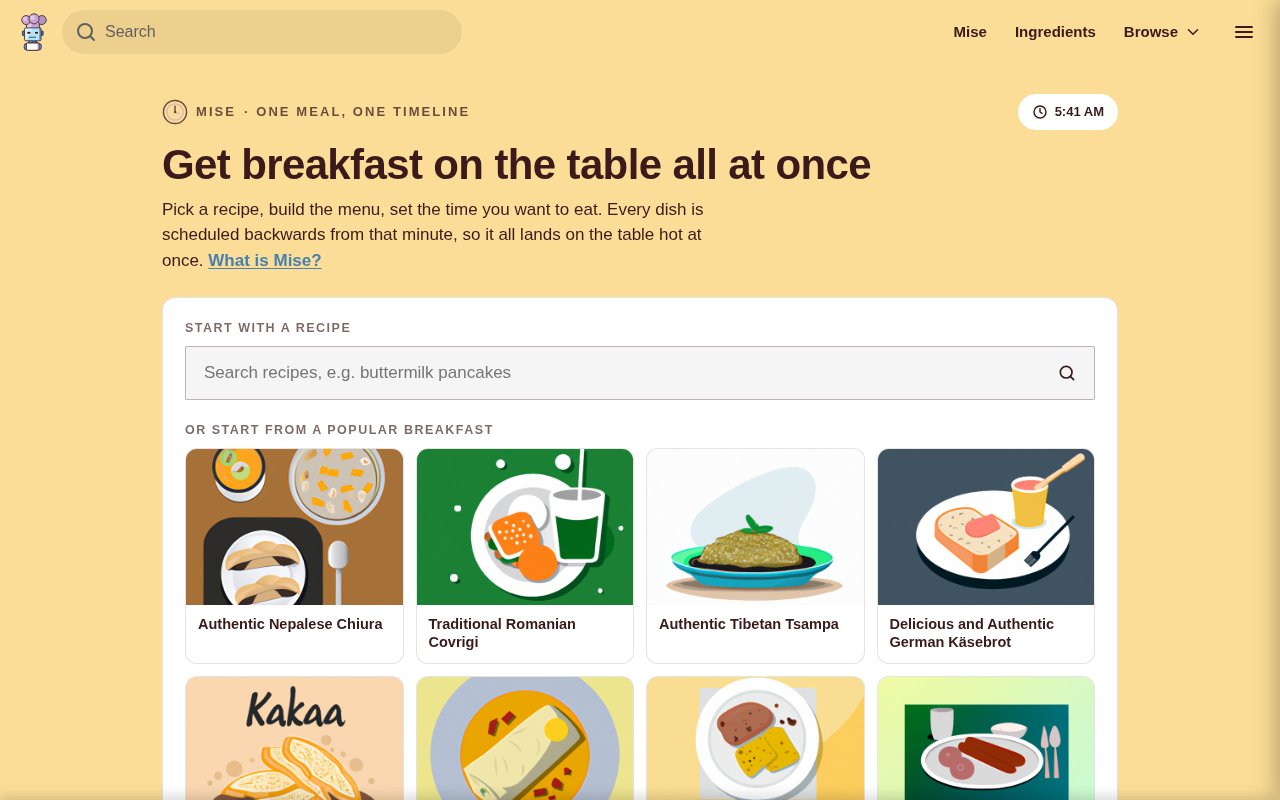
Robot Recipes Mise is a free browser meal planner that turns several separate recipes into one coordinated cooking schedule. A cook starts with a dish, adds the rest of the menu, chooses how many people are eating, and sets the time the meal should be served. Mise then works backward from that deadline so every dish has a start time and the whole meal is ready together. It addresses the part ordinary recipes leave out. Each recipe can explain one dish perfectly while giving no help with sharing an oven, avoiding overlapping prep, or keeping the first course warm while the last one finishes.
The planning flow starts with the recipe catalog on Robot Recipes. One dish anchors the meal, and the tool suggests compatible dishes to fill out the menu. A cook can remove those suggestions, search for different recipes, or add a custom dish that isn't in the catalog. Custom entries are useful for simple jobs such as making gravy, warming bread, cooking rice, or setting the table. They can be assigned hands-on and hands-free durations so they appear in the same schedule as full recipes. Mise also scales recipe quantities and the combined shopping list to the selected serving count.
Behind the plan, Mise reads each recipe's instructions and breaks the work into timed blocks. It distinguishes active steps such as chopping, searing, and plating from passive steps such as roasting, simmering, resting, chilling, and proving. The scheduler can run passive time alongside other work, while it nudges dishes earlier when two active steps would otherwise demand attention at once. The longest items are placed first, and anything that finishes early gets a keep-warm period. When a conflict can't be avoided, the plan identifies the two clashing steps instead of pretending one cook can perform both.
The result can be followed in several forms. A visual timeline gives each dish its own lane and separates hands-on work from unattended time. A minute-by-minute running order puts every action into the sequence it should happen. The shopping list merges ingredients across dishes and scales the totals, while a tool list shows the cookware and equipment the meal depends on. Cooking mode presents one instruction at a time in a high-contrast full-screen view, keeps the screen awake where the browser allows it, and sounds an alert when the next task is due. The planner also produces a printable sheet that can be saved as a PDF.
A saved plan is designed for practical kitchen use rather than public publishing. The link is unlisted, and anyone who receives it can open the same menu with its schedule adjusted against that person's own clock. That is handy when two people are coordinating the meal or when a host wants to send the running order ahead. The site also keeps the current plan on the local device for a day, which reduces the risk of losing the work after a refresh or an accidental tap of the back button.
Mise fits home cooks who are comfortable following recipes but find coordination harder than any individual technique. It is especially relevant for holiday meals, dinner parties, or any menu with several sides competing for one kitchen. A solo cook can use the schedule to avoid simultaneous hands-on tasks, while two people can share an unlisted plan link and work from the same menu. Because cooking mode no longer needs a connection after the page loads, it can stay open on a kitchen counter without relying on a stable network during the meal.
Its useful distinction is that it plans the meal rather than just collecting recipes. Standard meal planners often focus on what to eat across a week or on producing a grocery list. Mise focuses on the hour or two when several dishes actually have to come together. That narrow job makes the output concrete and immediately usable. The tradeoff is that the timing remains an estimate. Ovens, cookware, ingredient sizes, and personal pace vary, so the site tells cooks to treat the schedule as a plan rather than a guarantee. Its recipes and timing are generated rather than chef-authored, which makes normal food safety and allergy checks important.
Every part of Mise is free, with no account, app installation, email gate, or paid tier. The page says Robot Recipes funds the service through possible commissions on relevant Amazon links. Plans stay on the device unless the cook chooses to save one, in which case Mise creates an unlisted link rather than a public listing. A local plan is retained for a day to protect against an accidental refresh or back action. That light access model makes it easy to try for one dinner, though cooks who need guaranteed professional kitchen timing will still want to review and adjust the generated sequence themselves.
Key Features
- Backward meal scheduling
- Hands-on conflict detection
- Merged scaled shopping lists
- Step-by-step cooking mode
- Printable meal plans
- Unlisted plan sharing
Pros & Cons
What we like
- Coordinates several recipes around one serving time
- Works without an account or installed app
- Separates active work from unattended cooking
- Includes sharing, printing, and offline cooking mode
Room for improvement
- Generated timings still need a cook's judgment
- Recipe suggestions come from one catalog
- Custom dishes require manual duration estimates
- Saved plans use links rather than accounts
Frequently Asked Questions
What is Robot Recipes Mise?
Is Robot Recipes Mise free?
Can Mise include a dish that isn't on Robot Recipes?
Does Mise guarantee that every dish will finish on time?
Best For
Featured in
Alternatives to Robot Recipes Mise
View all
CalendHub
Smart scheduling and calendar management for teams
Kevin Gabeci Toolkits
Seven AI toolkits for writing books, making music, cutting video, and building agents.

Eased Into AI
Learn AI from zero. No jargon, no hype, just steps that work.

Fix It Gently
Calm, plain-English fixes for everyday tech problems.
Our take
Tool Index Editorial · Sep 2026· 3.5/5
Robot Recipes Mise takes several dishes, a serving count, and a meal time, then works backward into one cooking schedule. We found the separation of hands on and unattended steps especially useful because it can expose collisions that individual recipes ignore. It also produces a merged shopping list, a visual timeline, a running order, cooking mode, a printable sheet, and an unlisted share link.
Mise is free with no login or app. The schedule is still an estimate, since ovens, ingredient sizes, kitchen layout, and a cook's pace vary. Custom dishes need manual duration estimates, and suggested recipes come from the Robot Recipes catalog. It is a smart planning aid for a home dinner, not a guarantee that every dish will land perfectly.
Editorial opinion from the Tool Index team, written from the public product pages. Not a user review.
Reviews (0)
No reviews yet
Be the first to share your experience with Robot Recipes Mise
Sign in to write a reviewBadge builder
Add Robot Recipes Mise to your website
Choose a badge style and size, preview it here, then copy the generated HTML. Badge images are self-contained SVGs and do not require an external script.

<a href="https://toolindex.net/tools/robotrecipes?ref=badge" target="_blank" rel="noopener">
  <img src="https://toolindex.net/badge/robotrecipes/medium.svg" alt="Robot Recipes Mise - Listed on Tool Index" width="180" height="50" />
</a>How to use the badge
- 1. Pick the style, size, and theme that fit your layout.
- 2. Copy the generated HTML from the code block.
- 3. Paste it into your footer, homepage, or press page.
Standard badge available
The standard listing badge is available now. Score and circle badges are limited to tools currently ranked in the top 10 of a category.
Badge clicks return visitors to this profile with a referral tag so the source remains identifiable.
Related Tools

Confluence
Atlassian's long-running team wiki that anchors many enterprise knowledge stacks
Asana
Project management for teams that live in projects, tasks and dependencies
Kevin Gabeci Toolkits
Seven AI toolkits for writing books, making music, cutting video, and building agents.

Logseq
An open-source outliner notes app where every bullet is a first-class block
Work on Robot Recipes Mise? Request listing access or correction